
Every Zoi carries a smartphone from the start of the game. The phone is the central hub for managing purchases, social connections, career decisions, finances, and navigation. This article provides a detailed breakdown of every app and widget available on the phone, what each one does, and tips for getting the most out of them.
Accessing the Phone
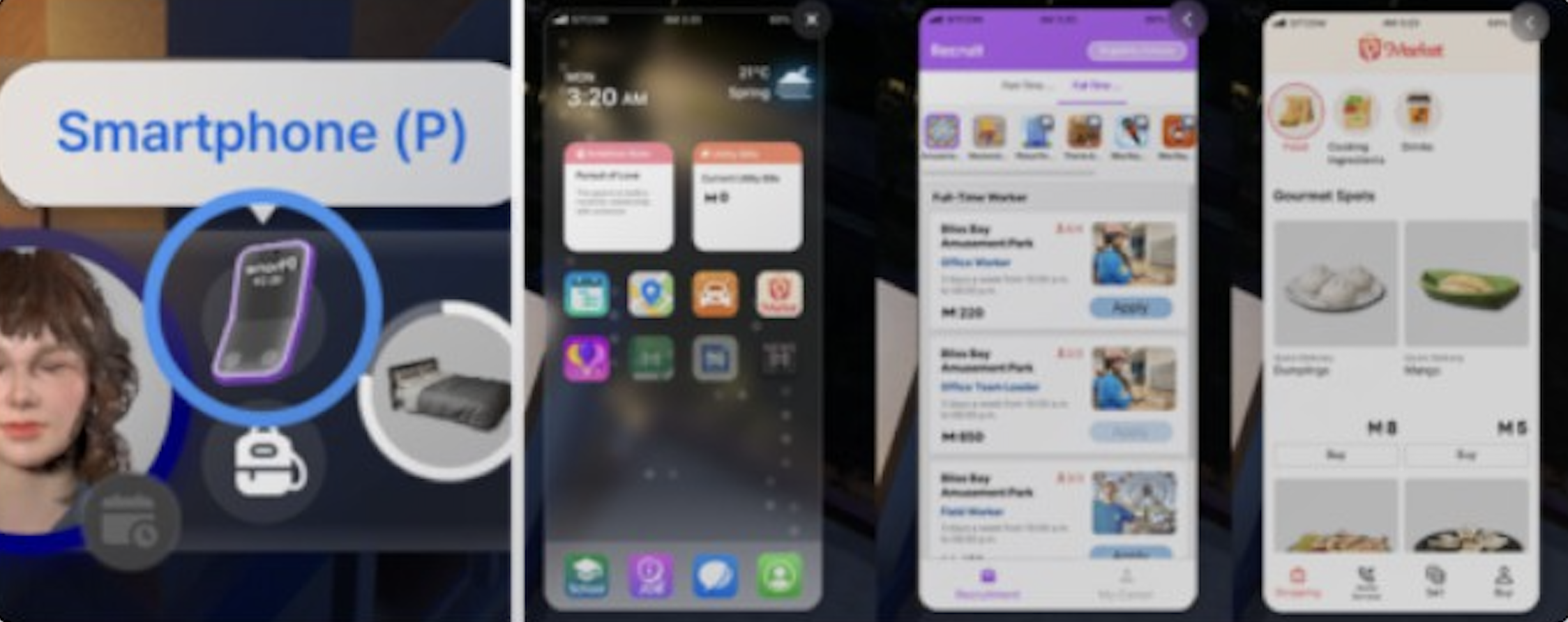
Open the smartphone by pressing P on the keyboard or by clicking the phone icon next to the character portrait in the bottom-left corner of the screen. The phone interface displays a home screen with widgets at the top and app icons arranged in a grid below.
Widgets
The top section of the phone's home screen contains four persistent widgets that display at-a-glance information without needing to open a full app.
Clock
Displays the current in-game time and day of the week. Useful for keeping track of work schedules, school hours, and event timing. The clock updates in real time as the game progresses.
Weather
Shows the current temperature, weather conditions (sunny, rainy, snowy, etc.), and the active season. Dowon experiences four distinct seasons with temperature swings, while Bliss Bay stays warm year-round. Your Zoi's clothing automatically adjusts to match the current temperature.
Ambition Note
Located in the top-left area, this widget shows a brief description of the Zoi's current ambition and the next step needed to fulfill it. Tapping the Ambition Note opens the full Ambition Menu, where you can view detailed task requirements, track progress, or switch to a different ambition. Progress is saved when switching, so you can return to a previous ambition without losing your work. Completing ambition levels rewards Meow Coins.
Utility Bills
Located in the top-right area, this widget shows any currently due utility bills (electricity, water, property tax). Bills arrive every Friday via a notification from the Tax Department. You can pay them directly from this widget. If bills go unpaid, electricity and water stop working in the household, and your Zoi becomes uncomfortable.
Communication Apps
Messages
The Messages app shows all text conversations with other Zois. Your Zoi receives messages from friends, coworkers, family members, and occasional promotional spam from the Pocket Market. When a message arrives, you can choose from several reply options.
Responses directly affect relationship scores. A friendly or supportive reply increases the bond with the sender, while a rude or dismissive reply lowers it. The available response options vary depending on your Zoi's traits and the nature of the incoming message. Currently, you cannot initiate text conversations or make phone calls to other Zois; you can only reply to messages you receive.
Contacts
The Contacts app lists every Zoi your character has met, including friends, family, romantic partners, and business associates. Each contact entry shows the four relationship bars (Friendship, Romance, Family, Business) and a portrait.
From the Contacts list, you can send gifts to other Zois using the "Give a Gift" button. Gift-giving requires at least a first-tier connection in any relationship type. Available gift options change based on your relationship level with the recipient. Gifts cost Meow and are delivered as a parcel to the recipient's home. Sending gifts increases relationship points and can trigger positive emotions in the recipient.
Shopping and Services
Pocket Market
The Pocket Market is the primary online shopping and services app. It has four tabs:
Shopping Tab lets you order items for home delivery. Products arrive in a box at your front door. The five sub-categories are:
Category | What It Includes |
|---|---|
Food and Beverage | Ready-to-eat meals (pancakes, sushi, steak, pizza, pasta, fried chicken) and drinks (specialty lattes, juices, pumpkin candies). Prices range from 3 Meow for a tomato to 80 Meow for a steak. |
Fresh | Raw cooking ingredients: Pumpkin, Tomato, Carrot, Potato, Sweet Potato, Corn, Mango, Banana. Also obtainable through gardening. |
Practical | Essentials like Explorer's Flashlight, Medicine, and Vitamins. |
Gift Ideas | Presents for other Zois: rose bouquets, carnations, floral vases, cat dolls, teddy bears, gift boxes, decorative items, and more. |
Luxury | High-end items: Gold Bar, Designer Bag, Diffuser, Small Gold Cat Figurine. |
Home Services Tab lets you hire workers who come to your home. After ordering, the worker arrives within one hour. You must go to the door and select "Greet Visitor" to let them in.
Service | Cost | Description |
|---|---|---|
Two-Hour Babysitting | 100 Meow | A babysitter cares for toddler Zois for 2 hours. |
24-Hour Babysitting | 500 Meow | Full-day toddler care. |
One-Time Repair Service | 100 Meow | A handyman repairs any broken furniture. Always succeeds, unlike manual repair attempts. |
One-Time Cleaning | 100 Meow | A cleaner tidies up the house once. |
24-Hour Cleaning | 500 Meow | A cleaner stays and maintains the house for a full day. |
Farm Helper / Crop Care | Varies | A worker tends to your garden and crops. |
Soul Guide / Exorcist | 3,000 Meow | Guides the souls of the dead. Used when ghost Zois are haunting the property. |
Sell Tab lets you list handmade items for sale online. You can sell paintings, bonsai, crafted items, and other creations. Sale prices depend on item quality, which is influenced by the Zoi's skill level in the relevant craft.
Bought Tab shows your order history, tracking previously purchased items and past deliveries.
Dream Car
The Dream Car app is the vehicle purchasing catalog. It features real car brand partnerships and lets you browse available models, customize the color during checkout, and buy a vehicle. The app also shows your currently owned cars. You can sell a vehicle through the app for a lump sum. Only one household member can purchase a car at a time.
Scheduling and Navigation
Schedule
The Schedule app displays your Zoi's weekly planner. Work shifts and school classes are automatically populated when your Zoi gets a job or enrolls. Beyond those fixed commitments, you can manually add, remove, and adjust scheduled items by clicking and dragging events on the calendar.
For each event you schedule, you can set the day, time, and duration. The Schedule supports both one-time events (like a holiday celebration) and recurring activities. One limitation: you can only schedule locations or places, not specific actions. The Zoi will travel to the scheduled location at the designated time but decides what to do there autonomously.
City Map
The City Map app opens a full map showing all locations, families, and points of interest in the current city. Clicking any location gives you the option to send your Zoi there via fast travel ("Go Here"). If your Zoi owns a car, a "Drive Here" option also appears.
Fast travel uses the public bus system in Bliss Bay or the subway in Dowon. The map also lets you swap to playing another household by clicking on their icon. Since the v0.4.0 update (Island Getaway), the City Map also allows travel between cities, including trips to Cahaya Island.
Social and Events
Events
The Events app handles planning for social events: Parties, Dates, and Weddings. To create an event, find an open timeslot on the calendar and fill in the details:
Setting | Description |
|---|---|
Name | A custom title for the event. |
Duration | Minimum 2 hours. Longer events allow more activities but drain guest energy. |
Location | Any accessible lot or property. |
Guest List | Invite specific Zois from the relationship panel. Only Zois with an existing connection can be invited. |
Dress Code | Set an outfit category (formal, casual, party, sportswear) that guests should wear. |
Activities | Choose which actions are encouraged or prohibited during the event. |
Dates are automatically scheduled one hour after the initial in-person interaction. Weddings are scheduled at 12 PM the following day.
Bubbly (Social Media)
Bubbly is inZOI's in-game social media platform, functioning like an Instagram-style feed. It is not a standalone app on the phone; instead, it is accessed through the smartphone action menu by clicking on your Zoi, selecting Smartphone, then "Post a Selfie on Social Media."
To unlock the ability to post on Bubbly, your Zoi's Challenger Value must reach at least 60 points. Challenger Value increases through creative and social activities like painting, singing, socializing, and surfing. The Adventurer trait provides a high baseline Challenger alignment.
Posting a selfie fulfills the "Post a Selfie on Social Media" urge, gives the Zoi a tranquil mood boost, and rewards Meow Coins. Other Zois also post on Bubbly, and you can read their updates and rumors through the platform.
Career and Education
Career
The Career app lets you browse and apply for jobs in the current city. It has two tabs: Recruitment (browse available positions and apply) and My Career (view your current job, promotion requirements, and progress).
Jobs are split into Full-Time and Part-Time positions. Available jobs are city-specific; for example, Idol Trainee is available in Dowon while Athlete is found in Bliss Bay. Applications are processed almost instantly, with a confirmation text sent to your Messages app. You can resign from the My Career tab. Switching to a new job automatically resigns you from the old one.
School
The School app manages education enrollment and progress. The University tab shows available degree programs. Currently, three degrees are offered: Business Administration, Computer Science, and Multimedia Arts. Enrollment is instant with no tuition fees or admission requirements.
After enrolling, classes are scheduled three days per week from 9 AM to 5 PM. Graduation requires attending university at least six times, which takes roughly 7 to 10 in-game days. Academic performance is tracked through the School tab.
Finance
Loan
The Loan app provides access to a loan shark service. You can borrow either 2,500 or 5,000 Meow at a 5% interest rate. The loan must be repaid; failure to repay on time results in penalties. This is a quick way to get emergency funds when your household is low on Meow, but the interest makes it more expensive than other income sources over time.
Payments
The Payments app handles utility bill transactions. It activates on Fridays when bills arrive. Currently, the Payments app only functions in the context of paying utility bills and cannot be opened independently for other financial management. Future updates may expand its functionality.
Apps Under Development
Three apps are visible on the phone but not yet functional as of early 2026:
App | Status | Expected Feature |
|---|---|---|
Diary | TBD | Will log significant life events, memories, and daily activities. The Event Memory and Diary system is planned for Q3 2026. |
Payments (Full Version) | Partially Implemented | Currently limited to utility bills. May expand to broader financial management. |
News | TBD | Will provide in-game news updates. No announced timeline. |
Features That Are Not Phone Apps
Several commonly confused features are part of the broader UI but are not accessed through the phone:
Feature | How to Access |
|---|---|
Camera icon in the top toolbar. Supports portrait/landscape, selfie mode, filters, and facial capture. | |
C icon shortcut. The creation-sharing platform for designs and builds. | |
Business Management | In-world interaction with business lots. Managed through the Business App that appears when you own a commercial property. |
Banking | Visit a physical bank in the city. Allows savings accounts and loans. |
Accessed via the lobby or web browser. The external fashion marketplace. | |
Accessed via the Zoi Card (bottom-right corner), not through the phone. |
Tips
Check Messages regularly. Ignoring messages from friends and family causes relationship scores to decay over time.
Use the Schedule app to block out personal time. Even though you can only schedule locations, sending your Zoi to a park or gym on a recurring basis keeps their needs balanced.
The Pocket Market's Sell tab is one of the most overlooked income sources. High-skill paintings and bonsai can sell for significant Meow.
Pin the City Map app as your first stop when exploring a new city. Unmarked locations only appear after you discover them in person.
Pay utility bills on Friday as soon as they arrive. Forgetting to pay causes discomfort and disrupts household activities.
If you need quick cash, the Loan app is faster than selling items, but keep the 5% interest in mind.
Related Articles
Smartphone
Shopping
Social Events
Careers
Meow and Economy
Relationships
Driving and Vehicles
Contact Management (March 2026)
The March 2026 update added contact management features to the phone. Zois can now add or delete phone numbers and contacts. They can also initiate friendly conversations with strangers by asking for their contact number, which adds the stranger to the phone's contact list if the interaction is successful.
This streamlines social networking by letting Zois build their relationships contact list through organic interactions rather than relying solely on the existing relationship system.