

Smart Zoi
Complete guide to Smart Zoi in inZOI, covering the NVIDIA ACE-powered AI behavior system, Mistral NeMo Minitron language model, inner thoughts, diary entries, Smart Schedule, the Zoi Pen, application range and queue limit settings, performance optimization, hardware requirements, troubleshooting, and tips for getting the most out of AI-driven NPC autonomy.
On This Page
Overview
Smart Zoi is an experimental AI feature that gives Zois independent decision-making. Instead of waiting for player direction or following simple scripts, a Smart Zoi thinks about what to do next based on its personality traits, recent experiences, relationships, and current needs. Developed in partnership with NVIDIA using their ACE (Avatar Cloud Engine) technology, inZOI was the first game to ship with AI-powered NPCs using what NVIDIA calls "Co-Playable Character" (CPC) AI tech.
A Co-Playable Character is an AI companion enabled by an on-device small language model built with the NVIDIA ACE SDK. Unlike traditional game AI that follows pre-scripted behavior trees, CPCs interpret their surroundings, form opinions, and make context-aware choices. In inZOI, this means that a Smart Zoi does not simply react to its lowest need meter. It considers the full picture of its life, including upcoming plans, recent conversations, personal values, and long-term goals, before choosing what to do next.
How Smart Zoi Differs From Standard Autonomy
Without Smart Zoi, every Zoi in the game runs on a Utility AI system. Utility AI is a basic decision-making framework built around a character's needs: hunger, fun, hygiene, social interaction, energy, and so on. If a Zoi's hunger meter drops lower than its hygiene meter, it will prioritize finding food over taking a bath. This approach keeps characters functional but predictable, and it has no awareness of context beyond the raw numbers.
Smart Zoi adds a layer of context-aware reasoning on top of Utility AI. Consider a Zoi who is hungry but has dinner reservations with their partner in ten minutes. Under standard Utility AI, the Zoi would eat immediately because hunger is the lowest meter, which would ruin its appetite for the dinner date. A Smart Zoi takes that reservation into account, decides to wait, and heads to the restaurant instead. This kind of forward-thinking behavior is what separates the two systems.
The comparison below summarizes the main differences between the two approaches.
Aspect | Standard Autonomy (Utility AI) | Smart Zoi (AI-Powered) |
|---|---|---|
Decision basis | Needs, traits, personality, and preferences scored per candidate action within about a 40 m radius | Need meters plus context, personality, memories, and upcoming plans |
Scheduling | Fixed daily routines with minor variation | Adaptive schedules generated each night based on the day's events |
Transparency | No insight into why a Zoi chose an action | Inner Thoughts explain reasoning in real time |
Player influence | Direct commands and queue management | Free-form text prompts via the Zoi Pen to shape motivations |
Reflective behavior | None | Diary entries at end of day that feed into the next day's schedule |
GPU requirement | None (CPU-based) | NVIDIA RTX 3060 or higher (GPU-accelerated SLM) |
Technical Foundation
Smart Zoi runs a Mistral NeMo Minitron small language model (SLM) with 0.5 billion parameters entirely on-device. No cloud connection is required for the AI processing. NVIDIA's distillation methods compress a larger model's knowledge into this compact footprint, producing high-quality outputs at low latency. The model uses approximately 1 GB of VRAM.
The SLM is optimized with NVIDIA TensorRT-LLM, which accelerates inference on GeForce RTX GPUs through techniques like kernel fusion, quantization, and tensor parallelism. This is what allows a language model to run inside a game in real time without noticeable frame rate drops on supported hardware. The model runs as part of the NVIDIA ACE (Avatar Cloud Engine) SDK, which KRAFTON integrated directly into the game engine.
The SLM processes information about the Zoi's current state, personality, emotions, skills, desired life, memories, and social context, then generates decisions about what the Zoi should do next. Every Zoi is composed of over 400 mental elements that feed into this process. These mental elements include personality traits like extroversion, ambition, cleanliness, and honesty, as well as social norms, personal values, learned preferences, and accumulated life experiences. The Zoi internally "asks questions" of the AI model, and the model's responses guide behavior and daily scheduling.
Gameplay Mechanics
Because the model runs entirely on the local GPU, Smart Zoi works offline after the initial game setup. There is no dependency on external servers for ongoing gameplay. The compact 0.5B parameter count was chosen specifically to balance quality against the need to share GPU resources with the game's rendering pipeline.
How to Enable Smart Zoi
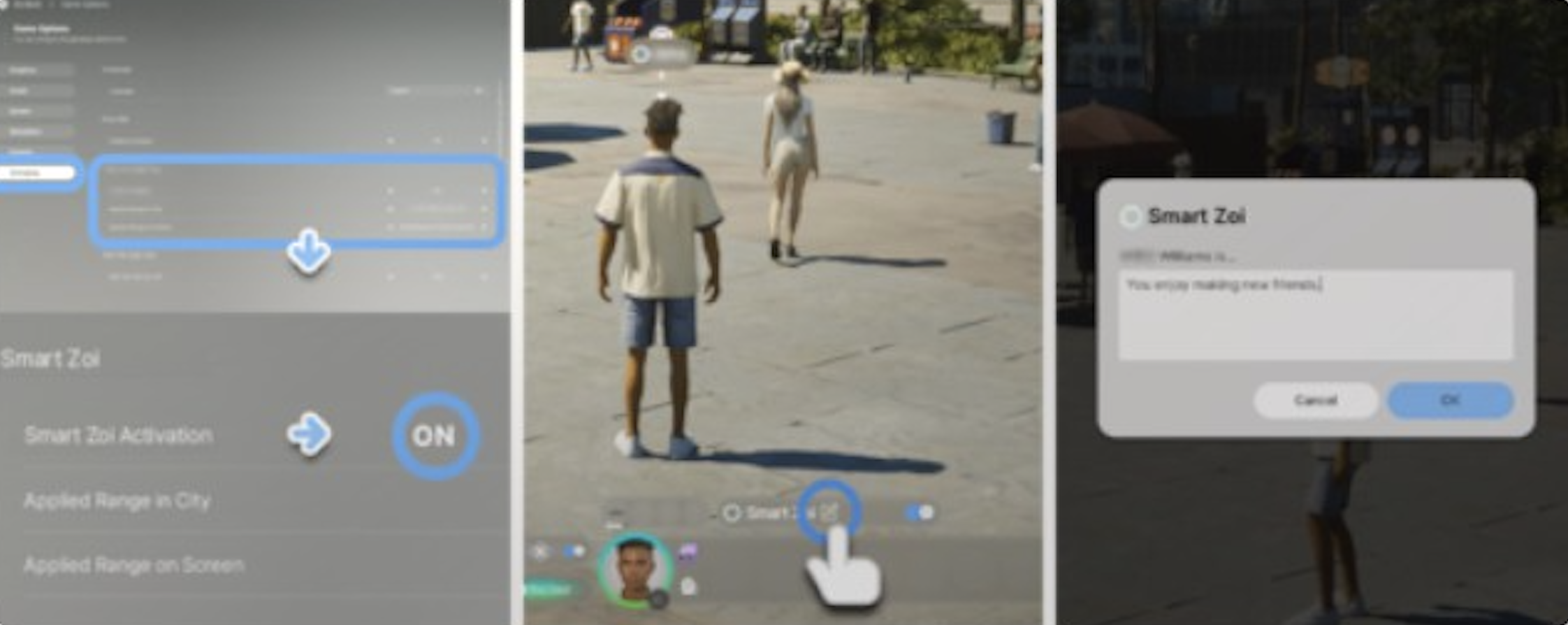
Open the Options Menu, navigate to the Gameplay tab, and find the Experimental section. Toggle Smart Zoi on. You can apply it to individual characters, entire families, or all city residents. There is also an option to limit the number of active Smart Zoi instances to help with performance.
When you first activate Smart Zoi, a pop-up prompt may appear recommending adjustments to your graphical settings. This system automatically lowers all graphics settings by one level (for example, High becomes Medium, Medium becomes Low) to free up GPU headroom for the language model. You can dismiss this prompt and manage graphics settings manually if you prefer.
During gameplay at speeds below 5x, prompts appear near character profile icons allowing you to toggle Smart Zoi on or off for individual Zois without opening the settings menu.
Application Range Settings
The Application Range settings control how widespread the Smart Zoi effect is within the game world. There are two separate scopes you can configure:
Setting | Description |
|---|---|
City scope | Determines which Zois in the city use Smart Zoi. Options include your active Zoi only, your Zoi's family only, or all Zois in the city. |
Screen scope | Limits the number of on-screen Zois that process Smart Zoi simultaneously. Reducing this value directly lowers GPU usage since fewer language model inferences run in parallel. |
Queue Limit | Controls how far ahead a Smart Zoi can plan actions in its task queue. A higher queue limit allows longer chains of planned behavior but requires more processing. A lower queue limit keeps actions more immediate and responsive. |
For the best balance of performance and immersion, many players set the city scope to their active Zoi's family and keep the screen limit at the default value. Expanding Smart Zoi to all city residents provides the most dynamic world but puts the heaviest load on the GPU.
Core Features
Inner Thoughts
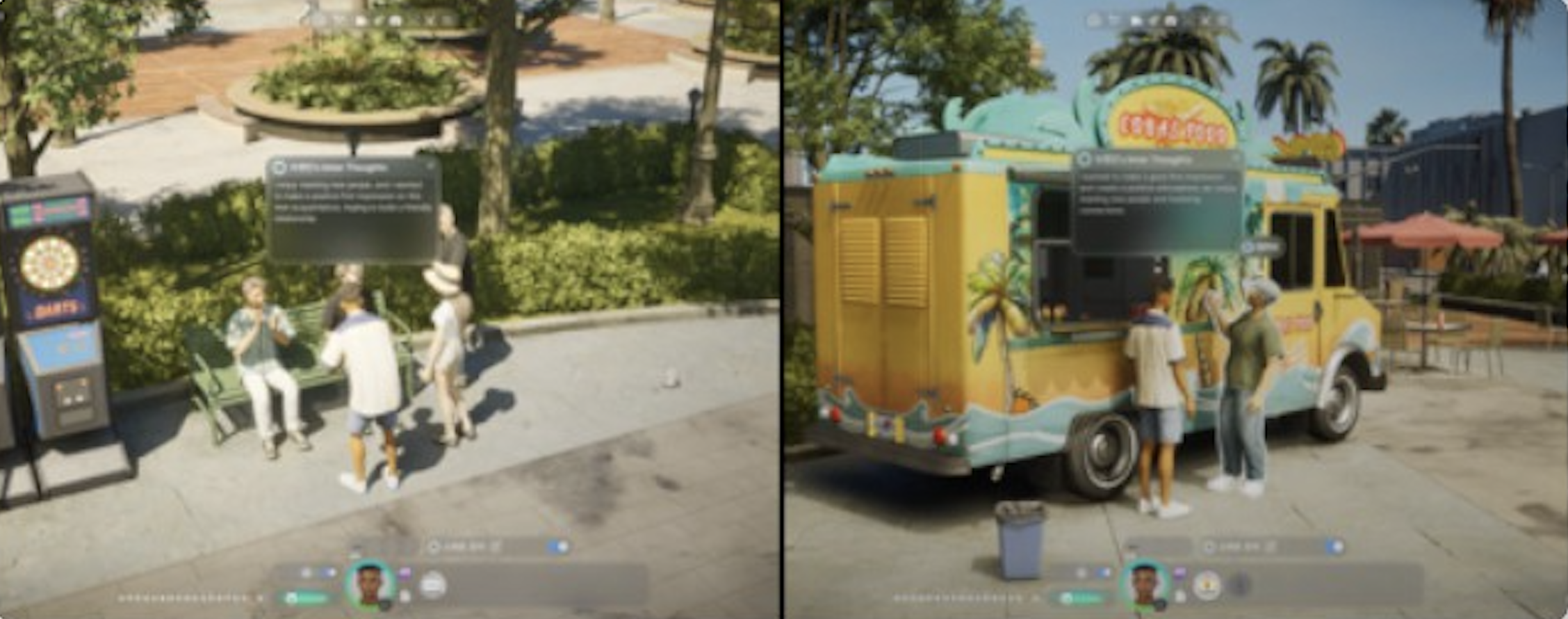
With Smart Zoi activated, Zois generate detailed inner monologues when performing tasks or actions. These thoughts provide a window into the Zoi's reasoning and personality. Inner Thoughts may reveal a Zoi's reflection on their life, their specific thoughts on music playing nearby, their understanding of a book they are reading, or deeper feelings during a conversation.
A compassionate Zoi might spontaneously notice a hungry NPC and decide to purchase food for them. A curious Zoi reading a science book might develop thoughts about pursuing a technology career. These inner thoughts are not just flavor text; they feed directly into the Diary and Schedule systems.
Inner Thoughts Display
When a Smart Zoi makes a decision, inZOI sometimes displays the reasoning behind the choice in a thought bubble. For example, a considerate Zoi helping a lost stranger might show: "Calmly offering directions to a lost person with clarity and empathy is well-suited to this considerate Zoi." This transparency lets players understand why their characters behave the way they do, even when the behavior is unexpected.
Inner Thoughts appear as floating text near the Zoi's portrait during gameplay. They update dynamically as the Zoi moves between activities. If a Zoi is listening to music at a cafe, for instance, the thought might reference the genre playing and whether the Zoi enjoys it based on their hobbies and preferences. If the Zoi is at work, the thought might reflect job satisfaction or frustration with a colleague.
Diary System
At the end of each day, when a Zoi is sufficiently tired and it is past 11 PM in-game, the Zoi writes a diary entry reflecting on their day. The diary combines input from Inner Thoughts and notable moments that occurred throughout the day. It provides a longer, more comprehensive analysis from the Zoi's perspective.
Discoveries and realizations can occur during the diary-writing process. A Zoi who had a particularly meaningful conversation might recognize a shift in their priorities. A Zoi who failed at a task repeatedly might express frustration and resolve to try a different approach. These diary insights are factored into the following day's schedule generation.
The diary is a bridge between daily experience and future planning. Each entry synthesizes the Zoi's Inner Thoughts into a coherent narrative. This points to the moments that mattered most. Players can read these entries at any time through the Zoi's profile panel, making the diary a useful tool for understanding how a character's personality is evolving over time.
Smart Schedule
After a reflective diary session, the Zoi analyzes their thoughts, feelings, and events to generate a new schedule for the following day. Unlike the default autonomy system where Zois follow relatively predictable routines, Smart Schedule creates adaptive daily plans that change based on what actually happened.
A Zoi who discovered a new hobby through Inner Thoughts might schedule time for it tomorrow. A Zoi who had a fight with a friend might avoid social activities for a day. Changes in values or preferences from recent events are reflected in the schedule. Over time, Smart Schedule produces increasingly personalized daily routines that feel unique to each Zoi.
How Schedule Generation Works
The schedule generation process considers the Zoi's career obligations, recurring social commitments, and personal goals alongside whatever the diary highlighted. If a Zoi wrote about wanting to spend more time outdoors after a particularly enjoyable walk in Dowon, the next day's schedule might include a longer block of park time. If a Zoi had an argument with a neighbor, it might avoid that neighbor's usual hangout spots.
Smart Schedule also interacts with the game's event system. If a festival or community event is happening the next day, a Smart Zoi aware of it might adjust plans accordingly, whereas a standard-autonomy Zoi would not factor upcoming events into its routine.
Zoi Pen
The Zoi Pen gives players a way to directly influence a Smart Zoi's thoughts and feelings through free-form text input. Think of it as planting an idea within the Zoi. The input influences their inner thoughts, diary reflections, and ultimately their decisions and schedule.
Input is currently limited to 100 words, with 20 words being the recommended length. Shorter, thematic prompts tend to produce better results than specific action commands. For example, writing "you feel suspicious that the world around you is a simulation" will cause the Zoi to examine their surroundings skeptically, question reality through book analysis, and develop existential thoughts over several days.
The Zoi Pen is most effective when you describe feelings, beliefs, or attitudes rather than direct instructions. Writing "go to the park" is a command that the Zoi may or may not follow. Writing "you feel restless indoors and crave fresh air" is a motivation that shapes behavior more naturally and produces richer Inner Thoughts. The AI model interprets the prompt as part of the Zoi's internal state, so framing input as emotions or convictions leads to more consistent, long-lasting behavioral shifts.
Example Zoi Pen prompts and their effects:
Prompt Theme | Resulting Behavior |
|---|---|
Color obsession (e.g., "you are fascinated by the color red") | Gravitates toward red items, alters outfits to include red, critiques others' fashion choices |
Age awareness (e.g., "you feel older than you are") | Seeks peaceful environments, prefers mature interactions, develops time-related anxieties |
Self-superiority (e.g., "you believe you are better than everyone") | Intensifies daily schedule, criticizes other characters, alters dietary habits |
Musical passion (e.g., "music is the most important thing in your life") | Practices instruments every morning, attends concerts, writes diary entries about musical experiences |
Nature lover (e.g., "you feel most alive when surrounded by trees and water") | Schedules outdoor time, visits parks and waterfront areas, develops calmer Inner Thoughts |
Social butterfly (e.g., "being alone makes you anxious") | Seeks out group activities, initiates conversations with strangers, avoids spending time at home alone |
Settings and Configuration
All Smart Zoi settings are found in the Options Menu under the Gameplay tab in the Experimental section. The table below lists every configurable option.
Setting | Options | Effect |
|---|---|---|
Smart Zoi Toggle | On / Off | Master switch that enables or disables the entire Smart Zoi system |
Application Range (City) | Determines which Zois in the city run the AI language model for decision-making | |
Application Range (Screen) | Numeric slider | Limits how many on-screen Zois process Smart Zoi simultaneously, reducing GPU load |
Queue Limit | Numeric slider | Sets how far ahead a Smart Zoi can plan actions in its task queue |
The per-Zoi toggle (accessible via the portrait icon during gameplay) lets you enable or disable Smart Zoi for a specific character without changing the global settings. This is useful for focusing the AI on your main character while letting household members run on standard autonomy.
System Requirements
Smart Zoi is GPU-accelerated exclusively on NVIDIA GeForce RTX GPUs. The feature is not currently available on AMD or Intel GPUs. KRAFTON has stated it will be made available to all players who meet system requirements in the future. Players with NVIDIA GeForce 10 Series (GTX 1000 series) or older cards will not see the Smart Zoi option in the settings menu at all.
Tier | Processor | RAM | GPU |
|---|---|---|---|
Minimum | Intel i5-10400 / AMD Ryzen 5 3600 | 12 GB | NVIDIA RTX 3060 (8 GB) |
Medium | Intel i7-11700 / AMD Ryzen 7 5800X3D | 16 GB | NVIDIA RTX 4060 (8 GB) |
Recommended | Intel i7-12700K / AMD Ryzen 7 7800X3D | 16 GB | NVIDIA RTX 5070 / 4070 Super (12 GB) |
High | Intel i7-14700K / AMD Ryzen 7 9800X3D | 32 GB | NVIDIA RTX 5070 Ti / 4080 Super (16 GB) |
The language model itself uses roughly 1 GB of VRAM. The remaining GPU headroom is needed for the game's rendering. On minimum-tier hardware, you may need to lower graphics settings to maintain acceptable frame rates with Smart Zoi active. The graphics auto-adjustment popup that appears when enabling Smart Zoi handles this automatically if accepted.
Performance Optimization
Smart Zoi adds GPU overhead because it runs a language model alongside the game's rendering pipeline. The following strategies help maintain smooth frame rates while keeping Smart Zoi active:
Narrow the City scope. Setting Application Range (City) to "My Zoi" or "My Family" instead of "All Zois" drastically reduces the number of inference calls the GPU handles per frame.
Lower the Screen limit. Reducing the on-screen Smart Zoi count means fewer models running in parallel. Start with the default and lower it if you notice stuttering.
Reduce graphics settings by one tier. Accepting the auto-adjustment popup when enabling Smart Zoi is the simplest approach. If you prefer manual control, lowering shadow quality, reflection quality, or draw distance frees up the most VRAM.
Avoid 5x speed. Smart Zoi features (Inner Thoughts, Diary, Smart Schedule) are disabled at 5x speed anyway. Running at 1x to 3x gives the AI model enough time to generate quality outputs.
Keep GPU drivers up to date. NVIDIA periodically releases Game Ready Drivers with specific ACE optimizations for inZOI. Check for driver updates if Smart Zoi feels sluggish.
Close background applications. Other GPU-intensive programs (video editors, streaming software, other games) compete for the same VRAM that the language model needs.
Troubleshooting
Because Smart Zoi is an experimental feature, players sometimes encounter issues. Below are the most commonly reported problems and their solutions.
Problem | Likely Cause | Solution |
|---|---|---|
"This Zoi doesn't have anything on their mind right now" appears constantly | Outdated GPU drivers or conflicting AI software | Update to the latest NVIDIA Game Ready Driver. Disable external AI tools like Ollama if they are running in the background. |
Smart Zoi option does not appear in settings | Unsupported GPU (non-RTX or GTX 10 series) | Smart Zoi requires an NVIDIA RTX GPU. Check the System Requirements section for compatible hardware. |
Zoi repeatedly queues impossible actions | Queue Limit set too high or conflicting player commands | Lower the Queue Limit in settings. Avoid issuing direct commands while Smart Zoi is actively planning. |
Inner Thoughts disappear too quickly during conversations | Known early access bug | Slow down game speed to 1x during important conversations. Check the Zoi's diary later for a summary of their thoughts. |
Diary entries not generating | Zoi goes to bed before 11 PM or game speed is 5x | Ensure the Zoi stays awake past 11 PM in-game. Run the game at 3x speed or slower during evening hours. |
Significant frame rate drops after enabling Smart Zoi | GPU overloaded with too many Smart Zoi instances | Narrow Application Range to your Zoi's family. Lower the screen limit. Accept the graphics auto-adjustment popup or manually reduce settings. |
Zoi loses all autonomy and stands idle | Rare bug where Smart Zoi conflicts with standard autonomy | Toggle Smart Zoi off and back on for the affected Zoi. If the issue persists, disable Smart Zoi, save, reload, and re-enable it. |
Smart Zoi may also fail to function when starting a new game. The issue only affects new games: loading a save file and re-enabling Smart Zoi restores normal behavior. The team lists this in the official known issues for August 2026.
Tips and Best Practices
Tip | Details |
|---|---|
Start with one Zoi. | When trying Smart Zoi for the first time, enable it for your main character only. Observe how Inner Thoughts, the Diary, and Smart Schedule interact before expanding to the full household or city. |
Read the diary regularly. | Diary entries are the richest source of insight into a Smart Zoi's evolving personality. Checking the diary each morning helps you understand why the Zoi scheduled certain activities. |
Use the Zoi Pen sparingly. | Frequent prompt changes can pull the Zoi in conflicting directions. Write a Zoi Pen prompt, then let several in-game days pass so the idea has time to develop through Inner Thoughts and diary reflections before writing another one. |
Frame Zoi Pen prompts as emotions, not commands. | "You feel drawn to cooking" works better than "cook dinner tonight." Emotional framing lets the AI produce richer, longer-lasting behavioral changes. |
Keep prompts short. | The recommended length is 20 words. Longer prompts (up to the 100-word limit) can work but tend to produce less focused results because the model tries to address every idea at once. |
Pair Smart Zoi with specific | traits. Characters with distinctive personality traits produce more varied and entertaining Inner Thoughts. A Zoi with the Ambitious trait and the Lazy trait, for example, generates internal conflict that plays out in interesting ways. |
Do not micromanage. | Smart Zoi is designed for players who enjoy watching emergent stories unfold. If you prefer precise control over every action, standard autonomy with manual commands is a better fit. |
Check for driver updates after major patches. | KRAFTON and NVIDIA coordinate on ACE optimizations. A new game patch sometimes requires an updated driver for the best Smart Zoi performance. |
Limitations
The Diary, Inner Thoughts, and Smart Schedule features are disabled at 5x speed or higher. The AI model needs real-time processing to generate meaningful output.
Smart Zoi is experimental and may produce unexpected or inconsistent behavior. It is not intended for precise micromanagement playstyles.
Running Smart Zoi on multiple Zois simultaneously increases GPU load. Use the instance limiter in settings to manage performance.
The feature requires an internet connection for initial setup but processes AI decisions entirely on-device afterward.
Smart Zoi is currently exclusive to NVIDIA GeForce RTX GPUs. AMD and Intel GPU users cannot enable the feature. KRAFTON has indicated plans to expand support in the future.
New schedule items generated by Smart Schedule may fail if a Zoi goes to bed very late, leaving insufficient time for the diary and schedule generation cycle to complete before the next day begins.
Inner Thoughts may occasionally feel repetitive for Zois with simple personality profiles. Adding more distinct traits and using the Zoi Pen to introduce complexity helps mitigate this.
The Zoi Pen's 100-word input limit means you cannot write detailed backstories as a single prompt. Instead, introduce ideas gradually over multiple in-game days for the best results.
Planned Improvements (July 2026)
In the July 24, 2026 developer update, director Hyungjun Kim said Smart Zoi improvements are being discussed with the responsible team. As the game's content expanded, bugs appeared where Smart Zoi failed to respond properly, and those failures are the starting point for the work. The team also invited players to suggest which functions Smart Zoi should handle next, and said details will be shared once the internal discussions wrap up.
v0.10.0 Smart Zoi Changes (September 3, 2026)
Smart Zoi decision-making was improved in v0.10.0 to draw on more context when choosing what to do. Current location, group activity, social event, the Zoi's job, and any business the Zoi owns all now feed into the choice.
An interaction picked by a Smart Zoi is marked with a dedicated symbol so it can be told apart from an ordinary autonomous action.
Names shown on speech bubbles are localised to the game language setting.
One outstanding issue is worth knowing before enabling the feature. The v0.10.1 hotfix on September 5, 2026 fixed a crash that occurred when Smart Zoi was enabled in a non-English environment, but that fix applies only to Windows. The v0.10.2 hotfix of September 9, 2026 then listed a fix for issues that occurred when activating Smart Zoi on non-English operating systems, including shifted building and object positions and vehicles sinking into roads, without a platform qualifier. v0.10.3 (September 10, 2026) also fixed premium Restaurant Business operations that did not function properly while Smart Zoi was enabled.