

Overview
inZOI's Creative Studio includes one of the most detailed body customization systems in the life simulation genre. Players can adjust nearly every aspect of their Zoi's physique using a combination of drag sculpting, dedicated sliders, and body presets. The system supports a wide range of body shapes, from slim to heavy, with fine control over individual body parts. With over 250 customization options across the entire character creation process, body type editing is a core part of building a unique Zoi.
Gender Identity and Body Frames
When starting a new Zoi, players choose from three gender identity options: male, female, or non-binary. This choice determines the base body frame, voice pitch range, and which clothing categories are available by default. However, body customization itself is not locked behind gender. A non-binary Zoi can use the full range of masculine and feminine body sliders, and all gender identities have access to the same body preset library.
Gender identity also affects certain details within the body editor. Male-presenting Zois have body hair sliders (see the Body Hair section below), while female-presenting Zois have additional bust customization options including spacing and height controls. Non-binary Zois receive all available slider options regardless of the chosen body frame.
Players can set their Zoi's dating preferences and gender identity independently, and gender does not restrict marriage options. Zois of any gender identity can marry any other Zoi.
Customization Methods
Body type customization uses two primary methods that work together: free-form drag sculpting and slider-based controls.
Drag Sculpting
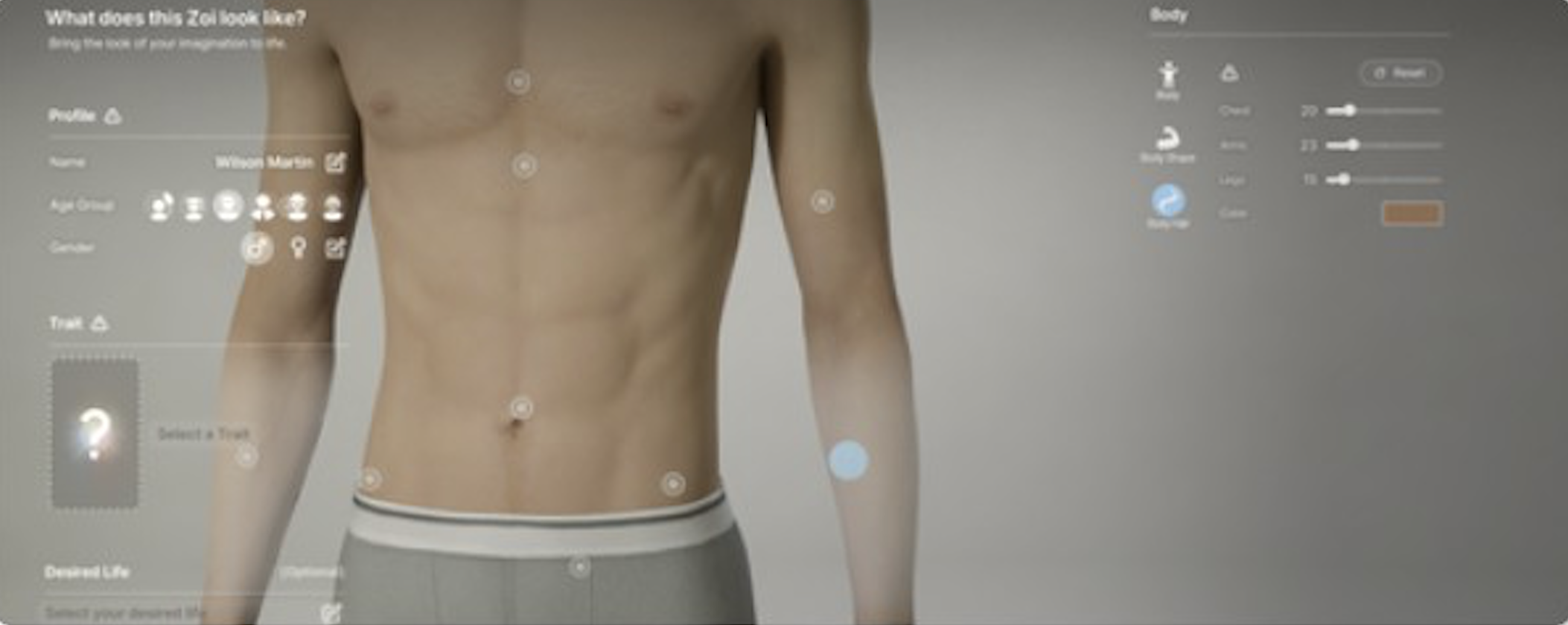
The most intuitive method is dragging directly on your Zoi's body model. Clicking on any body region highlights it, and dragging in different directions adjusts the shape, size, and proportions of that area. This works similarly to clay sculpting and gives precise control over how each body part looks from different angles.
When you click on a body part, dot-style sliders appear that let you fine-tune the adjustment. Each dot can be dragged to reshape the selected area. This system lets players make subtle changes that would be difficult to achieve with traditional numbered sliders alone.
Drag sculpting works in three dimensions. Pulling outward from the body increases size, while pushing inward reduces it. Rotating the camera while dragging lets you shape a body part from multiple angles in a single editing pass. The system responds in real time, so you can see the result of each adjustment instantly on the 3D model.
Primary Sliders
Two global sliders control the overall body shape before fine-tuning individual parts:
Slider | Effect | Impact on Other Sliders |
|---|---|---|
Body Weight | Adjusts overall body mass from thin to heavy | Changes all individual body part sliders proportionally |
Muscle Mass | Controls muscle definition from soft to toned | Independent; does not affect other sliders |
The body weight slider is a global modifier. Moving it affects the size of every body part at once, including the face. This is useful for establishing a general build before making targeted adjustments. The muscle mass slider operates independently and only changes how defined the muscles appear without altering the body's proportions.
Edit Modes
The body editor offers two modes for adjusting individual parts:
Mode | Behavior |
|---|---|
Symmetry Mode | Adjustments to one side of the body mirror to the other side automatically (e.g., both arms adjust together) |
Individual Edit Mode | Each body section can be edited independently without affecting any other part |
Symmetry mode is the default and is recommended for most body types. Individual edit mode is useful for creating asymmetric characters or making very precise adjustments to one side.
Both face and body share the same symmetry toggle. When symmetry is turned off, any change you make to one arm, leg, or shoulder only applies to that specific side. This can be used to create characters with intentional asymmetry, such as one arm slightly larger than the other. Symmetry can be toggled on and off at any time during the editing session without losing previous changes.
Adjustable Body Parts
Players can click on and adjust the following body regions using the dot slider system:
Body Part | Adjustments Available |
|---|---|
Neck | Thickness, length |
Shoulders | Width, slope, height |
Arms | Upper arm thickness, shape |
Forearms | Forearm thickness, shape |
Chest / Bust | Size, shape, spacing, height |
Waist | Width, definition |
Hips | Width, shape |
Buttocks | Size, shape, projection |
Thighs | Thickness, shape |
Legs (Lower) | Calf thickness, shape |
Hands and feet cannot be customized in the current version of the game. Facial features are edited through a separate system with its own set of detailed controls for eyes, nose, mouth, jawline, and skin texture.
Each body region typically offers between two and four adjustment points. For example, the chest area on a female-presenting Zoi has separate controls for overall size, vertical position (height), horizontal spacing (how far apart), and shape (natural curve versus rounded). Male-presenting Zois get chest thickness and pectoral definition controls instead. The waist region has width and muscle definition sliders that interact with the global muscle mass slider, meaning a high muscle mass value combined with a narrow waist can produce a visibly toned midsection.
Body Presets
For players who prefer not to manually sculpt every detail, the Creative Studio offers a selection of body presets covering a range of body types. Selecting a preset applies a predefined body shape that can then be further modified with sliders and drag editing. Body presets are separate from face and outfit presets, so choosing a body preset does not change your Zoi's facial features or clothing.
The default preset library includes thin, athletic, average, curvy, and heavy builds for each body frame. Each preset sets all individual body sliders to specific values, so applying a preset effectively resets your custom sculpting work. For this reason, most players select a preset first and then fine-tune from there. Presets can be previewed before applying, and there is no limit to how many times you can switch between presets during a single editing session.
Community Presets on Canvas
Beyond the built-in presets, players can browse and download thousands of community-made body presets through Canvas, inZOI's official content-sharing platform. When uploading a Zoi to Canvas, creators can choose to share the full character (face, body, and outfit together) or just the body preset on its own. Downloaded body presets appear in the preset menu alongside the defaults and can be further customized after applying them.
Canvas presets are especially popular for players who want realistic or stylized body types that go beyond what the default presets offer. Searching by tags like "curvy," "muscular," or "petite" helps narrow down the hundreds of available options.
Body Hair
Male-presenting Zois have access to body hair sliders that are not available for female-presenting characters. These sliders control hair density and distribution across three regions:
Feature | Description |
|---|---|
Chest | Adjusts chest hair from none to full coverage |
Arms | Controls arm hair visibility |
Legs | Controls leg hair visibility |
In addition to density sliders, players can change the color of body hair independently from head hair. A color picker with preset swatches and a full color wheel lets you match body hair to your Zoi's natural hair color or set it to something entirely different. The body hair color applies uniformly across all three regions; there is no option to set different colors for chest, arm, and leg hair individually.
Non-binary Zois receive the body hair options regardless of body frame, giving them the same chest, arm, and leg hair sliders as male-presenting characters. Female-presenting Zois do not currently have body hair sliders in the base game, though community mods have added this functionality.
Skin Tone and Skin Details
Skin tone is adjusted through a combination of preset swatches and a full color wheel. The color wheel offers continuous selection across a wide range of tones, while presets provide quick starting points for common skin tones. Adjusting the skin tone affects the entire body uniformly, including the face.
Additional skin details are found in the makeup and face detail sections of the Creative Studio. Players can add freckles, moles, scars, bandaids, and pimple patches to their Zoi's face. These are applied as overlays on top of the base skin tone. Skin texture options let you change how smooth or textured the skin surface appears, affecting how light reflects off the character model.
As of early 2026, community feedback has called for more body-specific skin details such as cellulite, stretch marks, and hyperpigmentation on areas like knees and elbows. Developer Hyungjun "Kjun" Kim discussed more realistic body skin options with optional blemish details during a February 27, 2026 Brainstorm with Kjun session, though these features have not yet been implemented in the base game.
Tattoos and Face Paint
Tattoos in inZOI are currently categorized under the "Face Paint" section of the character editor. The available options include neck tattoos and decorative face designs. Players can change the color of face paint designs but cannot adjust their size, placement, or orientation.
Placement is limited to the face and neck area at launch. Full-body tattoos covering arms, legs, chest, and back are planned for a future update. The developers have also teased AI-generated tattoo support that would let players describe a design and have it generated as a custom texture, though no release date has been confirmed for this feature.
Height
Height cannot be adjusted in inZOI. All Zois of the same gender presentation and age group are the same height. The developers have confirmed this is a deliberate limitation because the game uses pre-programmed animations. Allowing different heights would break interaction animations such as hugging, handshakes, and conversations where two Zois need to face each other at matching positions.
Age Groups and Body Appearance
inZOI features six playable life stages: Child, Teenager, Young Adult, Adult, Middle-Aged, and Senior (plus Newborn and Toddler, which are not directly customizable in the body editor). Each age group has a fixed height and default posture that cannot be overridden through body customization.
As Zois age, their physical appearance changes automatically. The transition from Adult to Middle-Aged introduces subtle changes like slightly different posture and the beginning of wrinkle formation. Seniors show more pronounced aging effects including altered posture, visible wrinkles, and the option for white or gray hair. These age-related changes are layered on top of the body shape you defined during character creation, so a muscular Young Adult will retain their body proportions as a Senior, but with the added visual effects of aging.
Body customization is fully available for all age groups that can be directly created in the Creative Studio (Child through Senior). However, the range of available presets and some slider extremes may vary between age groups. For instance, the muscle mass slider has a reduced maximum for Child and Teenager Zois compared to Young Adults.
February 2026 Realism Update
On February 13, 2026, Director Hyungjun Kim addressed community feedback about body representation. Players had noted that wider and heavier body types looked artificially smooth, with curves that did not reflect real body variation. The update changed how larger body types are rendered:
Reduced artificial smoothing on wider and bigger Zois
Added more natural skin textures and subtle body contours
Improved proportions for all body sizes to look more realistic
Preserved the existing range of body shapes while making them appear more natural
Before this update, the game had a tendency to make body shapes look flawless with perfectly smooth curves. The change introduced more organic variation, particularly visible on larger body types where skin folds, natural contours, and realistic proportions replaced the previous airbrushed appearance.
March 2026 Body Shape Adjustments
The March 2026 update (released March 26, 2026) continued the realism improvements started in February. The official patch notes state that "body shapes have been adjusted to appear more realistic." While the February update focused specifically on heavier body types, the March patch applied broader adjustments across all body sizes.
Additional character-creation changes in the March update include improved preset behavior (Zoi presets now exclusively change selected features when applied) and a randomizer that can be configured to only change specific features rather than randomizing the entire character. These quality-of-life changes make it easier to experiment with body types without losing work on other parts of the character.
Editing Body After Creation
Once a Zoi has been placed into a household and gameplay has begun, body shape cannot be changed through normal in-game means. Interacting with a mirror in the home opens the appearance editor, but this only allows changes to hairstyle, hair color, makeup, and skin details. Body shape, body frame, facial structure, name, age, and gender identity are locked after creation.
Players who want to modify a Zoi's body after creation need to use the full Creative Studio editor, which can be accessed from the main menu before loading a save. This returns the selected Zoi to the complete character editor with all body sliders and presets available. Any changes made here carry over when the save is reloaded.
Impact on Gameplay
Body type in inZOI is entirely cosmetic. A Zoi's physical build does not affect their skills, career performance, relationships, or interactions with other Zois. All body types have identical gameplay capabilities. This is a deliberate design decision to let players create Zois that look however they want without worrying about stat penalties or advantages tied to appearance.
Clothing items adapt to different body types automatically. Outfits stretch and adjust to fit the character's proportions, so players do not need to worry about finding size-specific clothing. The nine outfit categories (everyday, formal, school, sleepwear, party, sportswear, swimwear, summer, and winter) all support the full range of body types.
Known Limitations and Clipping Issues
While the clothing system adapts to different body sizes, animations do not fully account for all body shape variations. Characters with bodies that differ significantly from the default proportions may experience clipping, where limbs or fingers pass through objects, furniture, or other characters during certain animations. This is most noticeable during close-contact interactions like hugging or sitting in chairs.
The development team has acknowledged this as a known limitation. Creating animations that work correctly for every possible body configuration is a significant technical challenge, and the current system prioritizes a wide customization range over perfect animation fidelity for extreme body shapes. Periodic updates have improved clipping behavior for common body types, and the community modding scene has produced additional fixes for specific animation issues.
Other current limitations include the absence of hand and foot customization, no height adjustment, and the inability to set different body hair colors per region. These are among the most frequently requested features on the official inZOI forums.
Tips for Body Customization
Tip | Details |
|---|---|
Start with a preset, then refine. | Applying a body preset gives you a solid foundation. From there, use drag sculpting and sliders to make targeted adjustments rather than building from scratch. |
Set body weight first. | Since the body weight slider affects all individual body parts proportionally, adjust it before fine-tuning specific regions. Otherwise your per-region tweaks will shift when you change the global weight. |
Use symmetry mode for most edits. | Unless you specifically want asymmetry, keep symmetry mode enabled to save time and ensure a balanced look. |
Rotate the camera frequently. | A body shape that looks good from the front may look different from the side or back. Rotate the camera to check proportions from all angles before moving on. |
Preview with different outfits. | Some body proportions look different once clothing is applied. Switch between outfit categories in the editor to see how your body shape interacts with different clothing styles. |
Save presets of your work. | Upload partial or complete body configurations to Canvas so you can reuse them for future characters or share them with other players. |
Related Features
Feature | Description |
|---|---|
the full character creation system | |
AI-based face scanning technology | |
the overall character design workspace | |
sharing custom characters online | |
outfit categories and customization | |
age groups and aging mechanics | |
personality traits and preferences | |
managing Zoi families |