

Accessing the Phone
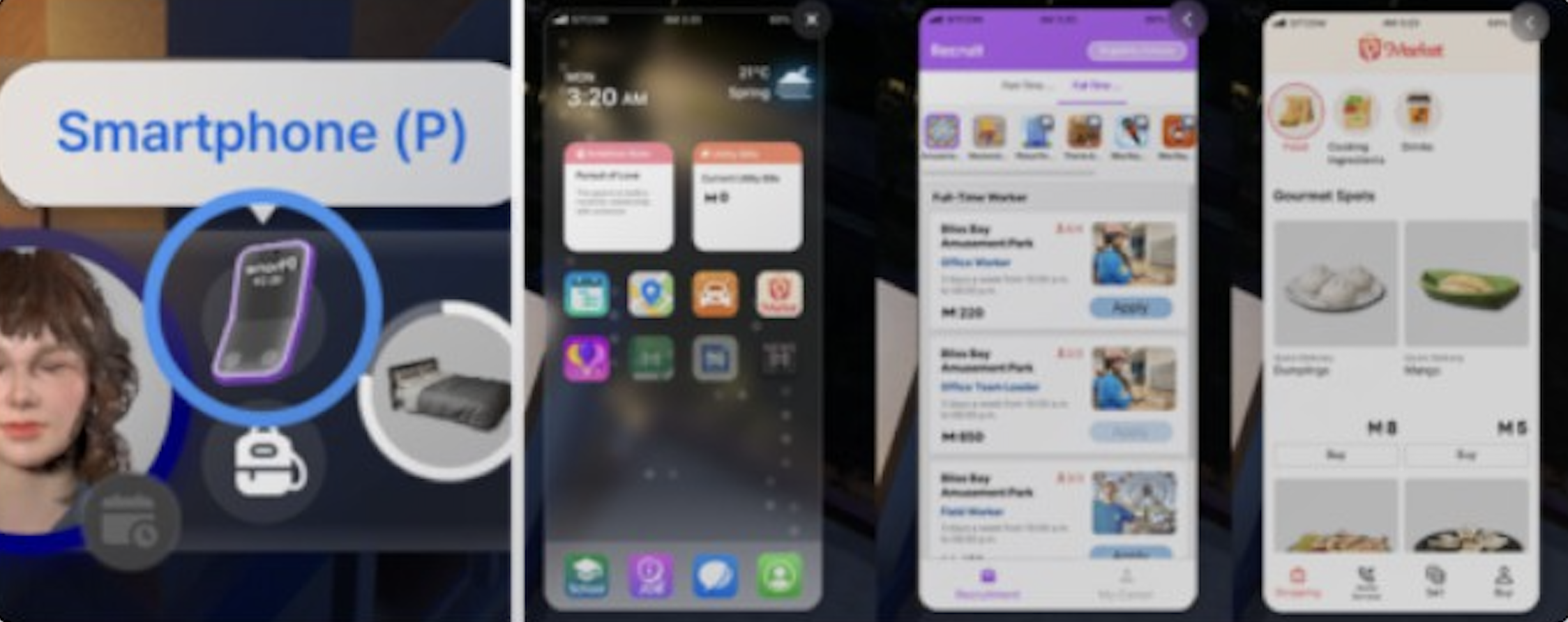
Every Zoi carries a smartphone from the start of the game. Open it by pressing P on the keyboard (see controls) or by clicking the phone icon next to the character portrait in the bottom-left UI. The phone is the central hub for managing purchases, social connections, career decisions, finances, and city navigation.
In the top-left corner of the phone screen, a small widget displays the Zoi's current Ambition objectives. The top-right corner shows outstanding Utility Bills when they are due. These quick-glance indicators let you track priorities without opening individual apps.
Complete App List
The smartphone comes preloaded with a set of apps that cover shopping, social life, career management, and city navigation. The table below lists every app available on the phone. For a deeper look at individual apps, see the dedicated Phone Apps article.
App | Purpose |
|---|---|
Buy food, ingredients, drinks, practical items, gifts, and luxury goods. Also hire services such as babysitters, repair technicians, cleaners, farm helpers, and soul guides. Sell your own belongings for Meow. | |
Messages | View text conversations with other Zois. Reply to incoming messages from friends, family, and coworkers. Responses affect relationship scores. Also used to receive delivery confirmations and Tax Department payment notices. |
Contacts | Browse all Zois your character has met. Send gifts, initiate phone calls (v0.7+), and manage saved phone numbers. Includes options to add, delete, and block contacts. |
Schedule | View and edit the Zoi's weekly calendar. Fixed blocks from jobs and school appear automatically. Open slots can be filled with planned activities or social events. |
City Map | Check points of interest, community lots, residential lots, and landmarks. Select a destination to travel via public transportation or drive there if the Zoi owns a vehicle. |
Dream Car | Browse and purchase vehicles including cars, motorcycles, scooters, mopeds, and bicycles. Purchased vehicles appear parked outside the Zoi's home. |
Events | Plan and manage Social Events such as parties, dates, weddings, and casual hangouts. Set the time, location, and guest list. Invitations go out to selected contacts. |
School | View available schools and manage student progress. Shows which school a younger Zoi attends, their academic standing, and university graduation progress. |
Career | Browse and apply for jobs. Each listing shows the career name, starting salary, work hours, and required skills. Zois can also resign or check promotion requirements. |
Loan | Access loan shark loans for quick cash. Two amounts available: 2,500 or 5,000 Meow at 5% interest. Missing payments triggers debt collector visits. |
InZOI's in-game social media platform. Post selfies, share updates, leave comments on other Zois' posts, and spread or deny rumors. Activity on Bubbly affects social reputation and karma. | |
Payments | Shortcut for paying Utility Bills when they arrive on Fridays. At other times, the app cannot be opened. The same payment flow is also accessible through the Tax Department message in the Messages app. |
Diary | Under development. Planned to log significant life events, memories, and daily activities once fully implemented. |
News | Under development. Will eventually deliver in-world news stories and city updates. |
Messages and Contacts
The Messages app shows all text conversations with other Zois. Your Zoi receives messages from friends, coworkers, family members, and occasional spam from the Pocket Market. Replies affect relationship scores. Choosing a friendly response increases the bond, while rude or dismissive replies lower it. Different response options appear depending on your Zoi's traits and the nature of the incoming message.
The Contacts tab lists every Zoi your character has met. You can select a contact to send them a gift, which arrives at their location. Gift-giving increases relationship points and can trigger positive emotions in the recipient.
Phone Calls (V0.7.0)
The v0.7.0 update (March 26, 2026) introduced a full phone calling system. Zois can now place and receive voice calls through their smartphone, adding a new layer to social interactions beyond text messaging. For complete details on calling mechanics, see the dedicated Phone Calls article.
Making and Receiving Calls
To call another Zoi, open the Contacts app and select a contact who has a saved phone number. Choose the "Call" option to initiate the conversation. The other Zoi will answer if they are available. Calls function similarly to in-person conversations: you can discuss topics, build relationships, and share information, all without needing to be physically present.
Incoming calls trigger a notification on screen. You can choose to answer or ignore the call. Ignoring calls from the same Zoi repeatedly may affect your relationship with them.
Getting Phone Numbers
Phone numbers are not automatically available. To add a Zoi to your contacts, you must first meet them in person and use the "Ask for Phone Number" interaction. The success of this request depends on your current relationship level with the other Zoi. Strangers are less likely to share their number than acquaintances or friends.
Contact Management
The Contacts app received a major overhaul in v0.7.0. The following actions are now available:
Action | Description |
|---|---|
Add contacts | After asking for a phone number in person, the contact is saved to your phone. |
Delete contacts | Remove a Zoi's number from your contact list. If you change your mind later, you can ask the Zoi for their number again in person. |
Block contacts | Block a Zoi's number to prevent them from calling or texting you. Blocked Zois cannot reach you through the phone. |
Unblock contacts | A blocked Zoi can ask you to unblock them during an in-person encounter. You choose whether to accept or refuse the request. |
NPC Zois also use the contact system. They can ask for your number, call you, and even request to be unblocked if you have blocked them. This makes social dynamics feel more reciprocal, as the phone system works both ways.
Bubbly Social Media
Bubbly is inZOI's built-in social media platform, functioning like a simplified version of Instagram within the game world. Through Bubbly, Zois can post selfies, share status updates, and leave comments on other characters' posts. To post a selfie, click on your Zoi and select the "Post a Selfie on Social Media" interaction from the smartphone dropdown menu.
Activity on Bubbly ties into the karma system. Depending on your Zoi's karma level, additional options become available, such as posting positive or negative things about other Zois. Spreading rumors through Bubbly can damage another Zoi's social reputation, while posting supportive content builds goodwill. Other Zois in the city may react to posts, which can shift relationship dynamics in unexpected ways.
Notifications
The smartphone delivers various notifications throughout gameplay. These pop up on screen to alert the player about important events without needing to open the phone manually. Common notification types include:
Incoming calls and messages: A banner appears when another Zoi calls or sends a text, giving you the option to respond immediately.
Delivery confirmations: After ordering from the Pocket Market, a notification confirms when items have arrived at the front door.
Bill reminders: When Utility Bills are due on Fridays, the phone notifies you. The bill amount appears in the top-right corner of the phone screen.
Event reminders: Upcoming Social Events trigger a reminder before they start, giving you time to prepare or travel to the location.
Career updates: Notifications appear when your Zoi is eligible for a promotion, when a new job posting matches their skills, or when work hours are about to begin.
Social media activity: When another Zoi comments on your Bubbly post or interacts with your social media content, a notification appears.
Pocket Market
The Pocket Market is the primary shopping app. It has several purchasing categories:
Feature | Description |
|---|---|
Food and beverage | prepared meals (pancakes, sushi, steak, pizza, pasta, baked goods), drinks (specialty lattes, juices), and snacks (pumpkin candies, fresh fruits). |
Fresh ingredients | raw cooking ingredients: pumpkins, tomatoes, carrots, potatoes, sweet potatoes, corn, mangos, bananas. Used for home cooking. |
Practical items | flashlights, medicine, vitamins, and other useful items. |
Gift ideas | rose bouquets, carnations, vases, plush toys, furniture gifts, globes, and surprise boxes. |
Luxury items | gold bars, designer bags, diffusers, and decorative figurines. |
All purchases from the Shopping tab are delivered directly to the Zoi's front door. A delivery notification appears when the items arrive.
Pocket Market Services
The Pocket Market also offers hire-able services under a separate tab:
Service | Description |
|---|---|
Babysitter | available in 2-hour and 24-hour options. The babysitter watches over children and toddlers, handling their needs while you focus on other household members. |
Repair technician | fixes broken appliances, plumbing, and furniture. Cheaper than replacing damaged items outright. |
Cleaning service | two tiers available. The cleaner tackles floors, surfaces, and general cleanliness. |
Farm Helper | 4 hours of automated gardening care. The helper waters and fertilizes all plants on the property. |
Soul Guide | a spiritual guidance service that affects karma and emotional state. |
Dream Car
Browse and purchase vehicles: cars, motorcycles, scooters, mopeds, and bicycles. The Buy tab shows all available vehicles with prices. Purchased vehicles appear parked outside the Zoi's home. See the transportation article for driving mechanics and vehicle restrictions.
Schedule
View and adjust the Zoi's weekly schedule. Fixed time blocks from jobs and school are shown in the calendar. Open time slots can be filled with planned activities, Social Events, or personal tasks. The schedule helps keep track of when the Zoi is free versus committed.
City Map
Check points of interest, community lots, residential lots, and landmarks around the city. Select a location to get travel options: "Go Here" for public transportation or "Drive Here" if the Zoi owns a vehicle. The map also shows the current location of all household members.
Events
Plan and manage Social Events from this app. Options include parties, dates, weddings, and casual hangouts. Select a time, location, and guest list to set up the event. Invitations go out to selected contacts, and the event appears on the schedule.
School
View available schools and manage student progress. For younger Zois, this shows which school they attend and their academic standing. University students can check their major, class schedule, and graduation progress here.
Career
Browse and apply for jobs. Each listing shows the career name, starting salary, work hours, and required skills. Available positions vary by city. Zois can also resign from their current position through this app and check promotion requirements for their current role.
Loan
Access loan shark loans for quick cash. Two amounts are available: 2,500 or 5,000 Meow at 5% interest. Loans from this app are separate from bank loans (which are tied to home purchases). Missing loan shark payments triggers visits from debt collectors who can seize household items.
Payments
This app only activates when Utility Bills arrive, which happens every Friday. At other times, the Payments app cannot be opened. When a bill arrives, open Messages, select the Tax Department conversation, and use the Submit Payment button. The Payments app provides an alternative shortcut to the same payment flow.
Diary and News
Both of these apps are under development. The developers have confirmed a diary system is planned that will log significant life events, memories, and daily activities. The News app will eventually deliver in-world news stories. The December 2025 v0.5.0 update introduced the Memory System, which is a step toward the full diary feature.
Smartphone Animations
The v0.7.0 update also added contextual animations for smartphone usage. Zois now have dedicated animations for using their phone while lying on a sofa or sitting on a toilet, making everyday interactions feel more natural. These animations play automatically when a Zoi checks their phone in those positions.
Tips
Press P to quickly toggle the phone open or closed at any time during gameplay.
Check Messages regularly to avoid missing time-sensitive invitations or bill payment deadlines.
Use the Pocket Market to order ingredients for cooking instead of traveling to a store, saving valuable in-game time.
Keep an eye on the Ambition widget in the top-left corner of the phone for a quick reminder of your current objectives.
When building new relationships, always ask for phone numbers early so you can maintain contact through calls and texts even when your Zois are apart.
If a Zoi keeps calling and you want space, use the Block feature in Contacts rather than repeatedly ignoring calls, which lowers your relationship score.