

Family
Complete guide to the family system in inZOI, covering household creation, management, finances, roles, parenthood (pregnancy, adoption, medical birth), life stages, splitting and merging households, baby care, birthday parties, business inheritance, and tips for managing multi-generational families.
On This Page
Overview
A family in inZOI is a household: a group of up to 8 Zois living under the same roof. Families can be built from scratch in Edit City, formed through marriage, or expanded through pregnancy and new member creation. Since v0.2.0, families can also grow through adoption and medical birth, giving same-sex couples and single Zois equal access to parenthood. Managing household composition, roles, and finances is a constant part of gameplay, especially once families grow beyond a couple.
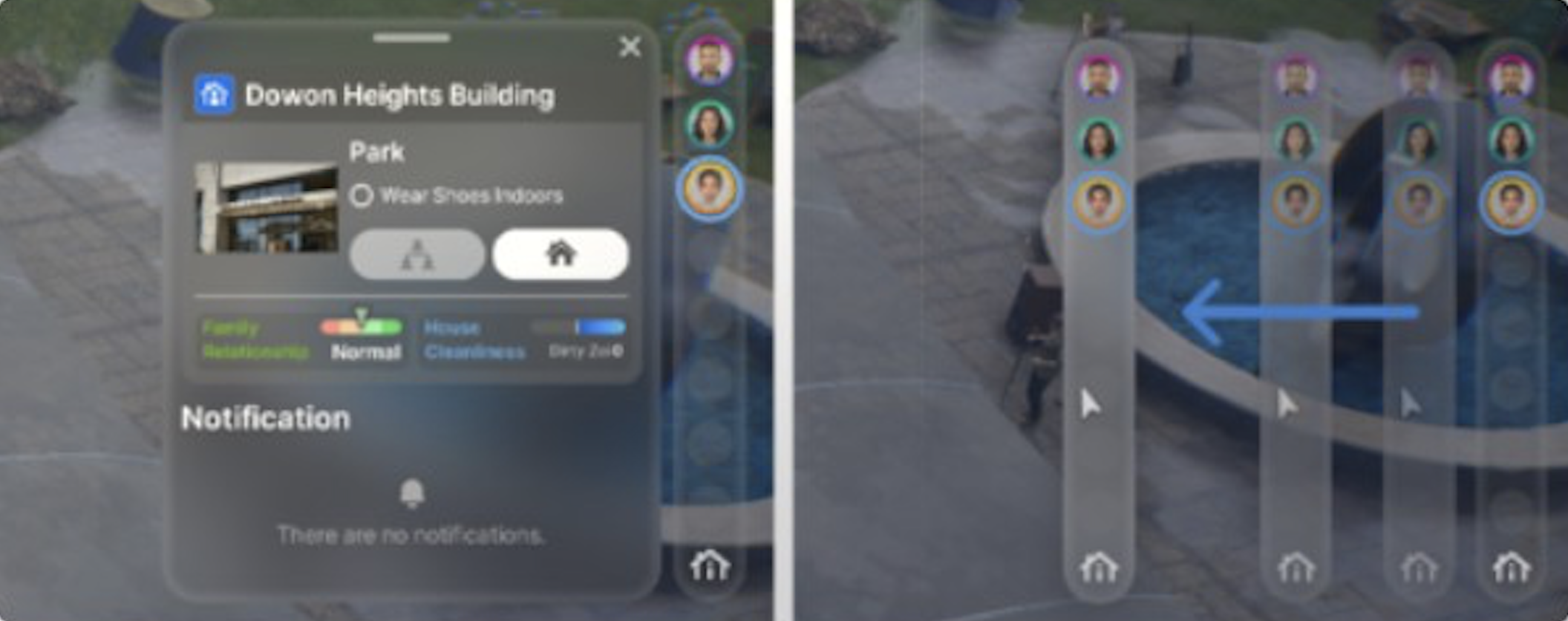
The 8-member cap is a hard limit. When a household reaches maximum capacity, new pregnancies automatically fail. Someone in the family would have to die or move out before a new Zoi can join through birth. The same restriction applies to adoption and medical birth.
Creating a New Family
The most straightforward way to start a family is through Edit City:
Open the Edit City screen (accessible via the map, press [M], or during initial game setup).
Click on any empty house or lot.
Click "Select Family."
Choose a pre-made household from the available presets, or click "Create New Family" to design Zois from scratch using character creation.
When creating a new family, the game enters the character creation screen. Design each family member individually, then assign their relationships to each other before finalizing the household. You can set family bonds (parent, child) and romantic partnerships during this step, which means a new family can start with pre-established connections rather than building everything from scratch through gameplay.
Adding Members to an Existing Family
There are several ways to add a new Zoi to an existing household.
Through Edit City
Open the Smartphone (press [P]).
Go to City Map [M].
Select the household you want to modify.
Choose "Add Family Member."
Design the new Zoi in the character creation screen.
Click the Relationships button to define their connection to existing household members.
Through Marriage
When two Zois get married, the game prompts them to move in together. After the wedding ceremony, a pop-up menu appears asking which household the couple should live in. The spouse who moves automatically joins the other's family. This is currently the only way to naturally move a Zoi into another household through gameplay without using the Manage Family screen. Unmarried Zois cannot ask each other to move in, even with maximum relationship scores.
Through Pregnancy, Adoption, or Medical Birth
Families can expand biologically through pregnancy, which adds a newborn after 3 in-game days. Adoption and medical birth (both added in v0.2.0) provide alternative paths for any Zoi to become a parent, including same-sex couples and single Zois. See the "Alternative Paths to Parenthood" section below for details.
Available Roles
Role | Description |
|---|---|
Roommate | No familial bond. Simply a housemate who shares the space. |
Partner / Husband / Wife | Romantic partner. Sets the Romance relationship to a committed level. |
Father / Mother | Parental role. Establishes a parent-child Family bond. |
Son / Daughter | Child role. Establishes the corresponding parent bond in reverse. |
Roles assigned to existing household members during the Add Family Member process cannot be changed retroactively through this menu. To alter relationships for Zois already in the household, you need to develop them through gameplay interactions or use cheat codes.
Role Limitations
The current role system has limitations. You cannot directly assign grandparent, sibling, aunt, uncle, or cousin relationships when adding a new member. The only available family roles are parent and child. Sibling relationships form automatically when two Zois share the same parents. Grandparent bonds form when a child's parent also has a parent in the household. Extended family connections require multi-generational gameplay rather than manual assignment.
Alternative Paths to Parenthood
Since the v0.2.0 update (June 2025), inZOI offers three distinct ways to have children. These options ensure that all Zois, regardless of gender or marital status, have a path to parenthood.
Method | Requirements | Details |
|---|---|---|
Natural Pregnancy | Married male-female couple | Use the "Suggest Having a Baby" interaction under Romance. Pregnancy lasts 3 in-game days across early, middle, and late stages. The baby inherits physical traits from both parents. |
Any Zoi (single, married, or partnered) | Select "Adopt a Child" under General Actions. Choose the child's age: Newborn, Toddler, or Child. Available to all Zois regardless of gender or relationship status. | |
Medical Birth | Any two Zois (requires consent from partner) | Costs 1,000 Meow. Works for all gender combinations, including same-sex couples. The resulting child inherits genetic traits from both parents. The Zoi who initiates the medical birth must obtain consent from the partner Zoi. |
Known issue with medical birth: When a Zoi chooses medical birth with a partner they are not married to, the baby may only recognize the Zoi who applied for the procedure as family. Unmarried medical birth partners may need to establish the second parental bond manually through the Manage Family screen.
The Manage Family Screen
The Manage Family screen is the central hub for household management, accessed through Smartphone > City Map > Manage Zois > Manage Family. It provides several options for reorganizing households:
Option | What It Does |
|---|---|
Move Zois Between Families | Select up to two families and transfer specific Zois between them. Decide how Meow is split. |
Create a Temporary Family | Parks Zois in a holding household during complex reorganizations. Dissolve the temporary family once finished. |
Add Family Member | Create a new Zoi and add them directly to the selected household using character creation. |
Remove Zoi | Remove a Zoi from the household entirely. The Zoi is deleted from the game. |
Important restriction: Babies and toddlers cannot be transferred between households through the Manage Family screen. They must remain with their current family until they age into the Child life stage. This prevents exploits around child care and ensures newborns stay with their parents.
Splitting and Merging Households
The household splitting and merging system allows complete reorganization of who lives where. These actions can be performed at any point during gameplay, and changes are fully reversible through the same management system.
Moving Zois Between Families
Open Smartphone > City Map > Manage Zois > Manage Family.
Select "Move Zois Between Families."
Choose up to two families from the list.
Select specific Zois to transfer between the families.
Decide how much Meow (household funds) each family keeps after the split.
Surnames are not affected by family changes. A Zoi who moves from the Kim household to the Park household keeps their original surname. The game does not rename Zois to match their new family. Identity, appearance, skills, and traits are all preserved during transfers.
Using Temporary Families
The "Create a Temporary Family" option acts as an intermediary holding area. This is especially useful when moving Zois from multiple different households into a single new family. Rather than trying to juggle direct transfers between three or more families, you can park Zois in the temporary family first, then move them all to their final destination at once. Name the temporary family, distribute assets and members as needed, then dissolve it when the reorganization is complete.
Creating Roommate Arrangements
Because the "Ask to Move In" option only appears after marriage, roommate households must be created manually through the Manage Family screen. Use "Move Zois Between Families" to place unmarried Zois together in the same household. Once moved, they will share the home as roommates with no familial bond. This is the only way to have unmarried Zois living together outside of Edit City.
Moving Houses and Relocating
Families can change their residence within a city through the Edit City screen. Select the family, choose a new empty lot or available home, and confirm the move. The household's furniture and belongings transfer with them.
Moving Between Cities
Starting with v0.3.0 (August 2025), families can relocate between Bliss Bay and Dowon. Before this update, once a family moved into one city, they could not transfer to the other. The Move Cities feature allows full family relocation across the two available cities, carrying over all members, assets, and relationships.
Household Finances
All Meow earned by household members goes into a shared pool. Whether Zois earn money through careers, selling items at the Pocket Market, or running a business, the income is pooled into a single household fund. When Zois move between families, the Meow split is manual. The game presents a slider letting you decide exactly how much money each family gets. There is no automatic even split, so pay attention to the slider before confirming a transfer.
Note: Leaving a newly split-off family with no assets may prevent them from purchasing a home if they do not already own one. Always ensure departing Zois receive enough Meow to cover basic expenses.
Bills
Utility bills are charged every Friday and paid automatically from the household's shared Meow pool. Bill amounts scale with the size and value of the property, including the number of rooms, furniture quality, and utility usage. If the household cannot afford to pay bills, the consequences escalate:
First missed bill: A warning notification appears.
Continued non-payment: Utilities may be restricted, affecting the household's comfort and functionality.
Severe delinquency: The household faces eviction risk.
Welfare System
inZOI includes a safety net for struggling households. When a family's Meow balance drops below 1,000 Meow, the welfare system activates and provides a 2,000 Meow payment. This prevents families from becoming completely destitute and ensures basic needs can be met. The payment is automatic and does not require any player action.
Insurance
The insurance system (added in v0.3.0) allows households to purchase coverage against unexpected expenses. Insurance helps cover costs from broken appliances, property damage, and certain emergencies. Policies are purchased through the Smartphone and deducted from the household's Meow pool on a recurring basis. For larger households with expensive furniture, the recurring cost is small compared to potential replacement costs.
Life Stages and Aging Within the Family
Zois progress through nine life stages over the course of approximately 100 in-game days. Understanding these durations helps with family planning, since each stage brings different interactions, responsibilities, and limitations.
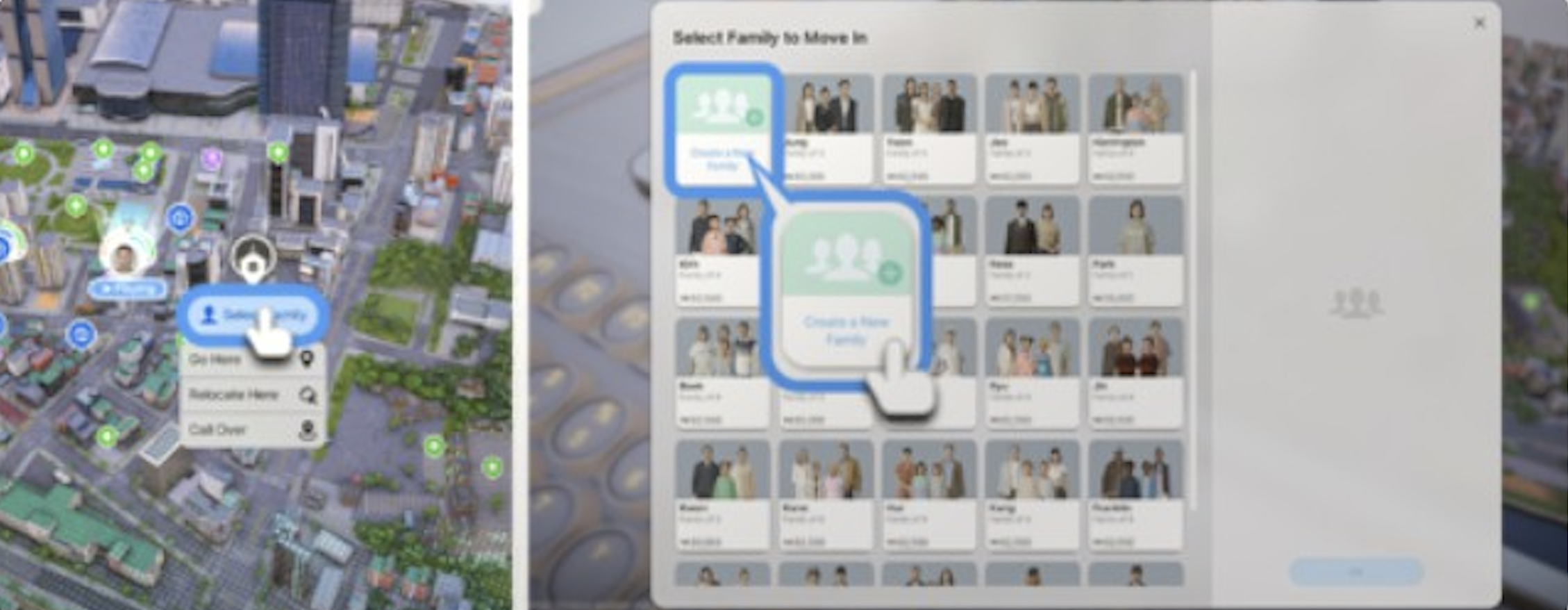
Image | Life Stage | Duration (In-Game Days) | Family Notes |
|---|---|---|---|
| Newborn | 1 day | Cannot be transferred between households. Limited interactions; requires constant parental care. |
| Toddler | 2 days | Cannot be transferred between households. Can use new baby bath and toys (v0.7.0). |
| Child | 7 days | First stage eligible for household transfer. Attends school; parents can check homework. |
| Adolescent | 5 days | Can receive feedback from parents (v0.7.0). New parenting urges and conflict scenarios. |
| Teenager | 4 days | Can date other teenagers. Does not have Child Protection Agency safety net. |
| Young Adult | 10 days | Fully independent. Can marry, have children, and start careers. |
| Adult | 20 days | Peak earning years. Can run businesses and mentor younger family members. |
| Middle-Aged | 16 days | Can trigger business inheritance planning. |
| Senior | Up to 35 days | High probability of natural death before maximum. Business inheritance transfers to next generation. |








Each in-game day lasts 96 real-world minutes by default, though this can be adjusted in the settings. Players can also disable aging entirely through Options > Simulation, with separate toggles for your own Zois and other Zois in the city.
Calendar, Birthdays, and Family Events
The v0.7.0 update (March 2026) introduced a 28-day month calendar system that tracks birthdays, holidays, and pregnancy due dates. This gives families a structured way to plan celebrations and anticipate major life events.
Birthday Parties
Zois older than babies can have birthday parties thrown for them. Birthday parties serve as the trigger for aging up: a Zoi advances to their next life stage after blowing out candles on a birthday cake during the party. If no party is held, the Zoi still ages up on their birthday after spending the day alone, but they miss out on the social benefits and mood boosts.
To throw a birthday party:
Open the Smartphone (press [P]) and tap the Events app.
Find an open time slot on the Zoi's schedule (minimum 2-hour block).
Select Make Event and choose Party as the event type.
Name the party, set its duration, and choose a location.
Invite up to 10 guests, set the dress code, and choose recommended or prohibited activities.
During the party, an activity list appears with optional tasks: greeting guests, lighting candles on the birthday cake, opening gifts, and smashing a pinata. Completing these activities enhances the celebration experience, though they are not mandatory. Guests who attend gain relationship boosts with the birthday Zoi.
Seasonal Festivals
The calendar also tracks four seasonal holidays throughout the year. These festivals provide family gathering opportunities with unique seasonal activities. Festivals are displayed on the calendar alongside birthdays, giving players advance notice to plan family celebrations.
Baby Care and Customization
The v0.7.0 update significantly improved baby-related gameplay. Baby Zois can now be customized in the Edit Appearance menu, giving parents the ability to pick outfits and adjust their infant's look. Six new baby outfits were added, along with new infant toys and an inflatable baby bath object for building.
Newborns arrive without teeth and develop them as they grow, adding a small visual progression detail. A new interaction allows Zois to quickly clean up after baby Zois, reducing the time spent on infant hygiene tasks. Baby needs have also been rebalanced so that family members die less frequently from low needs, reducing the chance of accidental infant deaths.
The Toddler stage lasts 2 in-game days and introduces more interactive parenting. Toddlers can use the dedicated baby bath and play with the new toy objects. Parents (and older siblings) can teach toddlers basic life skills through guided activities. Once a toddler ages into the Child stage (lasting 7 days), they become eligible for household transfers and begin attending school.
Family Tree Viewer
The family tree viewer displays all familial connections for a household. This shows parent-child bonds, marriages, and sibling relationships in a visual diagram. It tracks lineage across generations, letting players see how their family has grown over time.
To access the family tree, click the Home icon in the Family List on the right side of the screen, then select Edit Family. Alternatively, in the main game, click the house icon ("Home Information") at the bottom of the family portrait panel, then select the "Create Family" button to open the family information screen where the tree is visible.
v0.5.0 improvements (December 2025): The family tree viewer received significant updates including clearer visual layout, improved navigation for large families, and better display of extended family connections across multiple generations.
Automatic Household Behaviors
Several quality-of-life features automate routine household tasks:
Behavior | Description |
|---|---|
Automatic lights | When all members of a family go to sleep, all lights in their property automatically turn off. Lights turn back on when any family member wakes up. This was added in v0.7.0. |
Family-exclusive parking | Residential properties now have designated parking spaces for household vehicles. Family members' cars are parked in these reserved spots rather than mixed with public parking. |
Minimap family tracking | The v0.7.0 minimap displays player Zois, family members, and property icons, making it easy to locate household members across the city. |
Cooking for the Family
Most cooking recipes in inZOI prepare a single serving. To feed an entire family, Zois need to reach cooking level 3 to unlock group meal recipes. Dishes labeled "big enough to share with others" (such as steak, pizza, and chicken) produce enough food for the whole household. Without group meals, a parent would need to cook individual servings for each family member.
Tip: Zois have a habit of autonomously washing dishes as soon as they finish eating, which sometimes causes them to throw out remaining portions of a shared meal. Keep an eye on family meals to make sure the food is not discarded before everyone has eaten.
Memory and Milestone Tracking
The v0.7.0 update introduced a memory system that records significant life events for each Zoi. Milestones include a Zoi's first steps as a toddler, graduating from school, getting married, and having their first child. These memories are logged in the Zoi's personal timeline and can be reviewed at any time.
Positive and negative family interactions also generate memory entries. For example, a memorable family dinner, a heated argument, or a child's birthday party all get recorded. These memories can unlock additional gameplay opportunities and influence a Zoi's mood when recalled.
Family Interactions
Family-specific interactions expand as the household grows. The system focuses on parent-child dynamics and household coordination.
Parenting Interactions
Interaction | Who Can Do It | Details |
|---|---|---|
Check homework | Parents | Review and help with a child's school assignments. |
Help with school tasks | Parents | Sit with the child and assist with specific homework problems. |
Provide emotional support | Parents, older siblings | Comfort a child who is upset or has negative emotions. |
Ask to cook a meal | Children | Children can request a parent to prepare food. |
Ask to do laundry | Children | Children can request a nearby adult to wash their clothes. |
Scold / Discipline | Parents | Address negative behavior in children. Added in v0.5.0. |
Praise / Encourage | Parents | Positive reinforcement for good behavior or achievements. Added in v0.5.0. |
Teach life skills | Parents | Teach toddlers and children basic skills through guided activities. Expanded in v0.5.0. |
Ask for feedback | Adolescents, Teenagers | Adolescent and teenager Zois can ask parents for feedback. Added in v0.7.0. |
Adults in the same household can coordinate chores through cleanliness and home management interactions. The v0.5.0 update added new parenting urges for toddlers and children that create dynamic family scenarios, including discipline moments and parent-child conflicts that arise organically during gameplay.
Romance and Spousal Interactions
Married and partnered Zois have access to couple-specific interactions that keep the romantic bond active within the household:
Interaction | Description |
|---|---|
Ask spouse on a date | Married Zois can invite their partner on a date (added in v0.7.0). Date outcomes vary based on personality traits and relationship status. |
Kiss Passionately | A new romance interaction added in v0.7.0 for deeper romantic expression. |
Suggest Having a Baby | The standard pregnancy initiation interaction under the Romance menu. |
Relationship log entries | Zois gain special buffs and log entries based on their characteristics during romantic interactions (v0.7.0). |
NPC Families and Autonomous Behavior
NPC Zois in inZOI are characters that move through the city but do not appear in the family overview and do not live on playable lots. You can befriend and date NPCs, but the only way to add an NPC to your household naturally is through marriage. Once married, the NPC transitions from a non-playable character to a fully controllable member of your family.
Autonomous relationship building between NPCs is limited in the current version. When two Zois interact on their own, conversations tend to last only a few seconds before they move on, and without player intervention there is very little chance of forming meaningful bonds. NPCs can still initiate some interactions with the player's Zoi, including sending text messages and starting conversations. The v0.7.0 update introduced phone number exchange, allowing Zois to request and share contact information; this improves the path to building NPC relationships over time.
Family and Pregnancy
Pregnancy adds a new Zoi to the household after 3 in-game days. The process is divided into early, middle, and late stages. During pregnancy, the expecting Zoi gains special interactions such as announcing the pregnancy, feeling fetal movement, and experiencing food cravings. Appearance editing is disabled for the duration of the pregnancy.
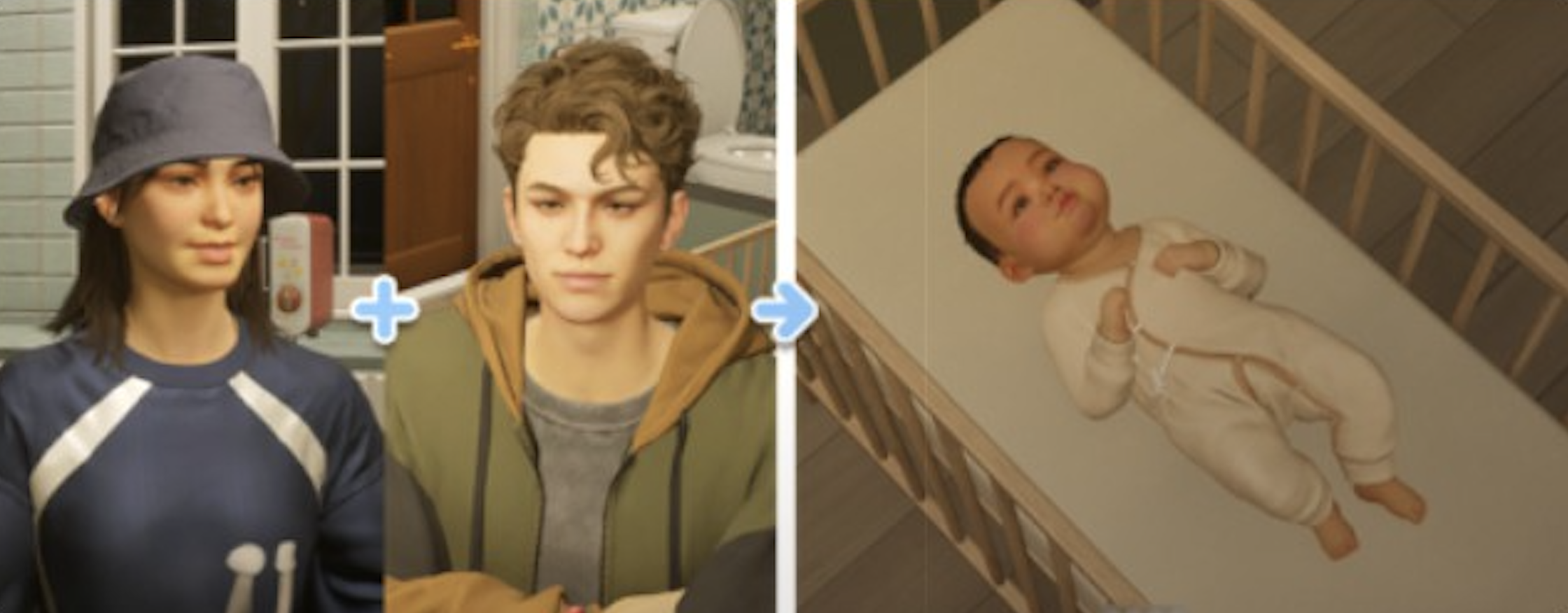
Babies inherit physical characteristics from their parents, including hair color, eye color, and facial structure, along with potentially inheriting traits and skill tendencies. The newborn starts in a crib and ages to Toddler after 1 day. As of v0.7.0, the calendar displays pregnancy due dates, helping families prepare for the arrival.
At household capacity (8 members), pregnancy attempts will not succeed. The same applies to adoption and medical birth.
Children and Protection
Children in inZOI cannot die from neglect. If a child's needs become critically low, the Child Protection Agency intervenes and takes the child away instead. This system covers Newborns, Toddlers, Children, and Adolescents. Teenagers do not have this protection and can die like any adult Zoi. The v0.7.0 update adjusted baby needs so that family members die less frequently from low needs overall, reducing accidental deaths across the household.
Business Inheritance
Starting with v0.5.0 (December 2025), family businesses can be inherited by other household members. When a Zoi who owns a business dies or becomes a Senior, the business ownership can transfer to another adult family member. This allows multi-generational business dynasties and prevents business progress from being lost when the founding Zoi ages out. The inheriting Zoi takes over the business at its current level and retains all existing employees, inventory, and reputation.
Premade Families
inZOI ships with premade families across both cities for players who want to jump into gameplay without creating Zois from scratch.
City | Number of Premade Families | Notes |
|---|---|---|
51 families | Larger selection with diverse household compositions: singles, couples, full families, and roommate arrangements. | |
33 families | Slightly smaller selection. Includes families tied to city-specific lore and locations. |
Premade families come with pre-built relationships, starting Meow balances, assigned homes, and personality traits. They serve as a ready-to-play option and as a reference for how the family system works. Players can modify premade families through the Manage Family screen just like any custom household.
Custody and Separation
The game does not have formal custody mechanics. When parents separate (by moving one parent to a different household through Manage Family), children can be placed with either parent, and there are no court proceedings or custody disputes. The player has full control over which parent the children stay with. Remember that babies and toddlers cannot be transferred, so separating parents of very young children requires waiting until the child reaches the Child life stage.
Family-Related Ambitions and Desired Lives
Several ambitions and desired lives focus on family development:
Name | Type | Requirements |
|---|---|---|
Ambition | Build and maintain strong family relationships. Requires high relationship scores between family members. | |
Ambition | Successfully raise children through all life stages. Tracks parenting milestones and child skill development. | |
Desired Life | A Zoi whose life revolves around their family. Grants mood boosts from family interactions and penalties from family conflict. |
Cheat Codes
Cheat | Effect |
|---|---|
getBabyWith [Zoi ID] | Triggers an immediate pregnancy with the specified Zoi, bypassing relationship requirements and the normal try-for-baby interaction. The pregnancy still lasts the standard 3 in-game days. |
setRelationshipFull | Maximizes the relationship score between two Zois. Useful for instantly creating strong family bonds. |
removePregnancy | Cancels an ongoing pregnancy. |
Patch History
Version | Date | Changes |
|---|---|---|
v0.2.0 | June 2025 | Added adoption and medical birth systems. Same-sex couples and single Zois can now become parents. |
v0.3.0 | August 2025 | Added insurance system for household financial protection. |
v0.4.0 | October 2025 | Added new family interaction types. Improved household management UI. |
v0.5.0 | December 2025 | Added business inheritance, expanded parenting interactions (scold, praise, teach life skills), improved family tree viewer, added Move Cities feature for family relocation. |
v0.6.0 | February 2026 | Bug fixes and stability improvements for family systems. |
v0.7.0 | March 2026 | Added 28-day calendar with birthday tracking, birthday parties as social events, baby customization in Edit Appearance, baby outfit options, inflatable baby bath, infant toys, automatic household lighting, family minimap tracking, memory and milestone system, phone number exchange, spousal date interactions, adolescent feedback interactions, and rebalanced baby needs. |
Beyond the shipped patches, the June 2026 preview cycle addressed family play directly: issues with family members riding together in a vehicle were identified and fixed in the development build, functional high chairs were shown, and new child traits, inheritance systems, and acquired traits are in preparation. The developers also said family systems and storytelling will keep being refined across updates rather than completed in a single patch.
Tips
Plan your household size before expanding. The 8-member cap means you need to leave room for pregnancies, adoption, and new additions. A family of 7 can only have one more member join through any method.
Use the Create a Temporary Family option for complex household reorganizations. It is much easier than trying to juggle transfers between multiple active families. Park Zois in the temporary household, then distribute them to their final homes.
Set the Meow split carefully when moving Zois between families. The default is not an even split, so check the slider before confirming. Leaving a new family with zero Meow can prevent them from buying a home.
The welfare system kicks in at 1,000 Meow, providing 2,000 Meow. If your family is struggling, letting the balance drop to trigger it is a valid survival strategy rather than selling furniture.
Focus on the Parenting Expert ambition if you enjoy the family gameplay loop. It tracks milestones that happen naturally through raising children across all life stages.
Remember that babies and toddlers cannot be transferred between households. Wait until they age up to Child (7 in-game days) before reorganizing families.
Pay bills on time. They are due every Friday. Keep a buffer in the household Meow pool to avoid escalating consequences from missed payments.
Consider insurance for larger households with expensive furniture and appliances. The recurring cost is small compared to replacement costs from accidents.
Unlock group meal recipes at cooking level 3 to feed the whole family at once. Without these, you will need to cook individual portions for each Zoi.
Use the calendar to plan birthday parties in advance. Birthday dates are tracked automatically since v0.7.0, so you can schedule celebrations and invite guests ahead of time.
Medical birth costs 1,000 Meow and works for any two Zois regardless of gender. It is the best option for same-sex couples who want children with inherited genetics from both parents.
Check the minimap to track family members around the city. The v0.7.0 minimap shows where each household member is located, making it easy to find and direct them.
Marriage is the only natural way to move a Zoi into your household. For roommate arrangements, use the Manage Family screen to manually transfer unmarried Zois into the same home.