

This article is incomplete
Some sections are missing or need additional details. Help improve it by contributing.
Overview
The minimap is a navigation overlay added in the March 2026 update (v0.7.0) that gives players a persistent, at-a-glance view of their surroundings without opening the full city map. It was one of the most requested features from the community since inZOI's early access launch. The minimap displays player Zois, family members, and property icons, all filterable so players can control exactly what information appears on screen.
Before the minimap, navigating the cities of Dowon, Bliss Bay, and Cahaya required opening the full map screen. This paused the flow of gameplay and made it harder to keep track of multiple Zois or find nearby points of interest on the fly. The minimap solves this by providing constant spatial awareness in a compact, movable display that stays on screen during normal gameplay.
How the Minimap Works
The minimap appears as a small circular or rectangular overlay showing a top-down view of the immediate area around the active Zoi. It updates in real time as the Zoi moves through the world, rotating and scrolling to keep the player oriented. Key locations, other Zois, and property markers appear as icons on the minimap surface.
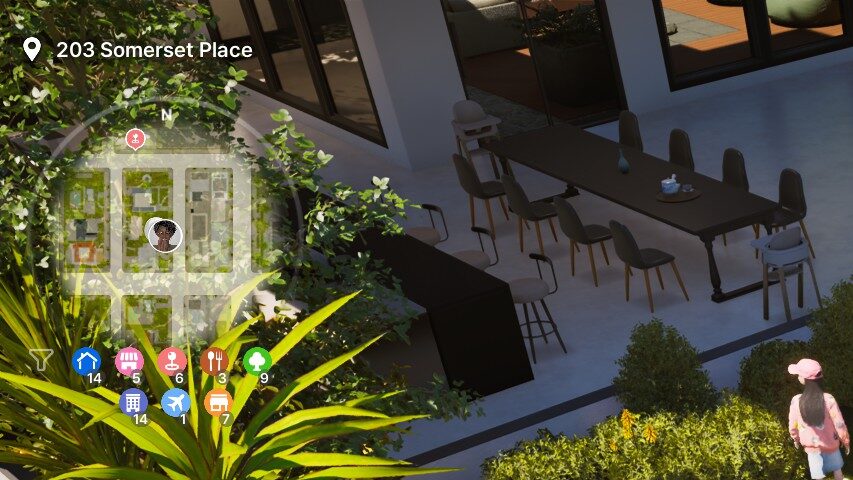
The minimap can be placed anywhere on the screen. Players are free to drag it to whichever corner or edge suits their playstyle. This flexibility is particularly useful for streamers and content creators who need specific screen layouts for their broadcasts. The ability to reposition the minimap means it never has to obstruct important UI elements like the needs panel, smartphone interface, or career task list.
What the Minimap Displays
The minimap shows several categories of information:
Icon Type | Description |
|---|---|
Player Zois | The currently active Zoi and any other Zois in the player's household are displayed as distinct icons on the minimap, making it easy to track their locations across the city. |
Family Members | Family members who are not currently being controlled still appear on the minimap, so players can see where everyone in the household is at a given moment. |
Property Icons | Owned properties, businesses, and important community lots are marked with icons. This includes homes, shops, restaurants, movie theaters, and other key locations. |
Points of Interest | Notable venues and landmarks in the city are displayed, helping players find destinations without opening the full map. |
Vehicles | Vehicles in the vicinity are also indicated on the minimap, which is useful for locating parked cars or tracking vehicle movement. |
Customizable Filters
One of the minimap's strongest features is its filter system. Players can select which types of property icons and markers appear on the minimap, letting them keep the display clean and focused on relevant information. For instance, a player focused on managing their business might filter out residential properties and only show commercial venues, while someone trying to locate a specific Zoi might turn off property markers entirely.
The filter system supports toggling visibility for:
Residential properties: homes and apartments owned by the player's household
Commercial properties: businesses, shops, restaurants, and other commercial lots
Community lots: public venues like parks, movie theaters, and community centers
Zoi markers: player Zois and family members
Vehicle markers: cars and other vehicles in the area
By combining these filters, players can create a minimap display tailored to their current activity. The settings persist between sessions, so you only need to configure them once.
Enabling and Disabling the Minimap
The minimap can be toggled on or off entirely through the game settings. To access the toggle:
Open the pause menu and navigate to Game Options.
Select the Screen tab.
Find the minimap toggle and switch it on or off.
When disabled, the minimap is completely hidden from the screen, freeing up space for an unobstructed view of the game world. This is useful during cinematic moments, screenshots, or for players who prefer a cleaner HUD. The minimap can be re-enabled at any time through the same settings menu.
Navigation While Driving
The minimap is especially useful while driving. Before its introduction, players had no convenient way to check their route while behind the wheel without pausing to open the full city map. With the minimap active, drivers can glance at their destination marker and surrounding streets in real time, making it much easier to navigate the cities of Dowon, Bliss Bay, and Cahaya without stopping.
The minimap shows the general direction of your destination and nearby road layouts, though it does not provide turn-by-turn GPS directions. Players still need to use their spatial awareness to navigate intersections and find the best route. For longer trips, combining the minimap with the full city map gives the best results: plan the overall route on the full map, then use the minimap to stay oriented during the drive.
That gap is closing: the late-May 2026 preview videos showed a GPS-style display on the minimap that highlights the fastest route to a destination, planned for an upcoming update. Community response to the GPS and minimap previews was strongly positive, with map rotation, zoom controls, custom waypoints, and underground-level support among the most requested follow-ups. Until that work ships, the live build keeps the marker-based display described above.
Uses for Content Creators
The minimap's repositionable design was built with content creators in mind. Streamers on Twitch and YouTube often need specific screen layouts that leave room for webcam overlays, chat panels, and donation tickers. Because the minimap can be dragged anywhere on the screen, creators can position it in a spot that does not conflict with their broadcast layout.
The filter system is also valuable for recordings and streams. Creators can strip the minimap down to only the most relevant icons, reducing visual clutter and keeping the audience focused on the gameplay rather than a busy HUD overlay. Alternatively, for community content focused on city exploration, the minimap can show all icons to give viewers a sense of the surrounding area.
Minimap vs. Full City Map
The minimap complements rather than replaces the full city map. Here is how they compare:
Feature | Minimap | Full City Map |
|---|---|---|
Access | Always on screen (when enabled) | Opens in a separate overlay, pausing context |
Coverage | Immediate surroundings only | Entire city |
Interaction | View only; no clicking or selecting | Click to set destinations, view lot details |
Customization | Filters and screen position | Zoom and pan |
Driving use | Real-time navigation aid | Route planning before trips |
Performance impact | Minimal | None (separate screen) |
For day-to-day gameplay, the minimap handles most navigation needs. The full city map remains the best tool for long-distance planning, finding specific lots, and getting an overview of the entire city layout.
Tips for Using the Minimap
Position it in a corner: The bottom-right or top-right corner tends to be the least obstructive placement for most players.
Use filters aggressively: The minimap is most useful when it shows only what you need. Turn off icons you are not actively looking for to keep the display readable.
Check it while driving: A quick glance at the minimap while behind the wheel saves time compared to opening the full map.
Combine with the city map: Use the full map to plan your route, then rely on the minimap to stay oriented as you travel.
Track your household: Keep family member icons enabled to see where your other Zois are at all times, even while controlling a different household member.
Disable for screenshots: Turn the minimap off in settings when capturing screenshots or recording cinematic footage for a cleaner look.
GPS Navigation (v0.9.0)
The v0.9.0 update (June 19, 2026) added GPS-style navigation to the mini map. When moving to a set destination, the mini map can act as GPS navigation rather than just an overview. Both the mini map and the full map now display the Zoi's current facing direction.
The mini map can also be set to rotate based on the Zoi's facing direction, so the map turns as the Zoi turns. This is toggled under Game Option > Controls > UI Settings, and is separate from the fixed-orientation default.
v0.10.0 Minimap Changes (September 3, 2026)
The control guide and the minimap can be closed and reopened directly from the screen, without going through the options menu.
A marker removed from the minimap also disappears from the city, so the two views no longer disagree.
Related Features
March 2026 Update: the anniversary patch that introduced the minimap
Driving and Vehicles: navigating cities by car with the minimap's help
Dowon, Bliss Bay, Cahaya: the three cities shown on the minimap
Business: locating commercial properties via property icons
Smartphone: another UI tool for managing your Zoi's daily life
Needs: the needs panel that the minimap can be positioned around