

Overview
inZOI runs on Unreal Engine 5 with advanced rendering features including Lumen global illumination, Nanite virtualized geometry, and Virtual Shadow Maps. The game is available on Windows PC and macOS, with a PlayStation 5 version planned for the first half of 2027. The actual download size is approximately 30 GB as of early 2026, though listed storage requirements are higher to account for save data, mods, and future updates. The size grows with each content update.
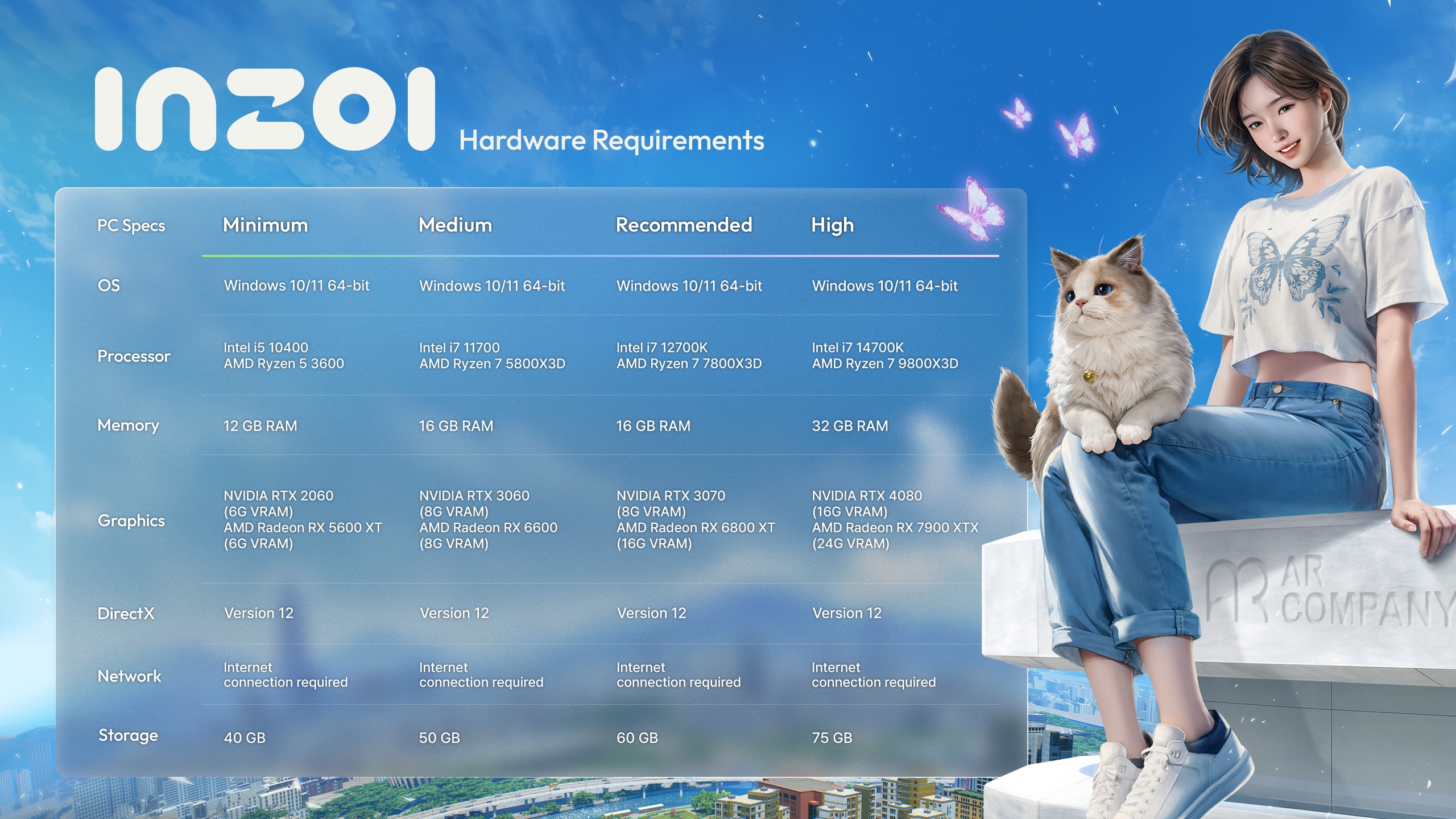
Windows PC Requirements
inZOI offers four specification tiers on Windows, each providing a different balance of visual quality and performance:
Component | Minimum | Medium | Recommended | High |
|---|---|---|---|---|
OS | Windows 10/11 (64-bit) | Windows 10/11 (64-bit) | Windows 10/11 (64-bit) | Windows 11 (64-bit) |
CPU | Intel i5-10400 / AMD Ryzen 5 3600 | Intel i7-11700 / AMD Ryzen 7 5800X3D | Intel i7-12700K / AMD Ryzen 7 7800X3D | Intel i7-14700K / AMD Ryzen 7 9800X3D |
GPU | RTX 2060 / RX 5600 XT | RTX 3060 / RX 6600 | RTX 3070 / RX 6800 XT | RTX 4080 / RX 7900 XTX |
VRAM | 6 GB | 8 GB | 8 GB / 16 GB | 16 GB+ |
RAM | 12 GB | 16 GB | 16 GB | 32 GB |
DirectX | Version 12 | Version 12 | Version 12 | Version 12 |
Storage | 40 GB | 50 GB | 60 GB | 75 GB |
The VRAM requirements vary by tier because inZOI's Nanite geometry and Lumen lighting systems store large amounts of data on the GPU. At 4K resolution with maximum quality settings and ray tracing enabled, the game can use 10 to 12 GB of VRAM. Players with 6 GB cards should stick to 1080p and lower quality presets.
macOS Requirements
The macOS version launched on August 20, 2025, optimized for Apple Silicon processors. The game uses Metal for rendering and Core ML for AI features.
Component | Minimum | Recommended |
|---|---|---|
OS | macOS Sequoia 15.0 | macOS Sequoia 15.0 |
Processor | Apple M1 | Apple M3 |
RAM | 16 GB | 16 GB |
Storage | 36 GB | 45 GB |
Apple M3 and M4 chips support hardware-accelerated ray tracing and HDR output. MetalFX Upscaling is available on all supported Apple Silicon processors for improved performance.
Smart Zoi AI Requirements
The Smart Zoi AI system uses a Small Language Model (SLM) that runs entirely on-device. It has its own separate hardware requirements and is only available on NVIDIA GPUs. AMD GPUs cannot run Smart Zoi. On macOS, Smart Zoi uses Apple's Core ML framework and is available on all supported Apple Silicon processors.
Tier | GPU | VRAM | RAM |
|---|---|---|---|
Minimum | NVIDIA RTX 3060 | 8 GB | 12 GB |
Medium | NVIDIA RTX 4060 | 8 GB | 16 GB |
Recommended | NVIDIA RTX 5070 / RTX 4070 Super | 12 GB | 16 GB |
High | NVIDIA RTX 5070 Ti / RTX 4080 Super | 16 GB | 32 GB |
Smart Zoi adds approximately 1 GB of additional VRAM usage on top of the base game's graphics requirements. When many Zois have Smart Zoi enabled simultaneously, performance can decrease, particularly after 11 PM in-game when Zois enter their diary-writing and sleep routines.
Graphics Technology
inZOI leverages several modern rendering technologies for its photorealistic visual style:
Technology | Description |
|---|---|
Lumen | Unreal Engine 5's global illumination and reflection system, providing real-time dynamic lighting. |
Nanite | Virtualized geometry system that renders highly detailed meshes without traditional LOD management. |
NVIDIA DLSS | Deep Learning Super Sampling for frame generation and upscaling on NVIDIA GPUs. Improves performance at higher resolutions. |
AMD FSR 3 | FidelityFX Super Resolution for upscaling on AMD GPUs. |
Intel XeSS | Xe Super Sampling for upscaling on Intel Arc GPUs. |
Frame Generation | Interpolates additional frames between rendered frames for smoother motion. Available with compatible NVIDIA and AMD GPUs. |
Ray Tracing | Denoised Lumen output for enhanced global illumination, reflections, and shadows. Optional; significant performance cost. |
MetalFX Upscaling | Apple's upscaling technology for macOS performance optimization. |
HDR | High Dynamic Range output support on compatible displays. |
VRAM Usage
VRAM consumption scales significantly with resolution and quality settings:
1080p Low/Medium: 4 to 6 GB. Playable on 6 GB cards like the RTX 2060.
1080p High/Ultra: 6 to 8 GB. Recommended 8 GB cards.
1440p with upscaling: 8 to 10 GB depending on quality preset and upscaler used.
4K Maximum with ray tracing: 10 to 12 GB. Requires high-end cards with 16 GB+ VRAM for stable performance.
The game is heavily GPU-bound, meaning the graphics card is the primary bottleneck for frame rates. Enabling DLSS, FSR, or XeSS upscaling is strongly recommended at any resolution to maintain smooth performance.
Performance Tips
Upscaling (DLSS, FSR, or XeSS) is strongly recommended for smooth performance at any resolution. It provides a substantial frame rate boost with minimal visual quality loss.
Ray tracing is optional and has a significant performance cost. Disable it on lower-end hardware for a major frame rate improvement.
Reducing the simulation distance in settings can improve frame rates in densely populated areas.
SSD storage is recommended for faster load times, though not strictly required.
Disabling Nanite (if available in settings) can help on systems with limited VRAM, at the cost of reduced geometric detail at distance.
Close background applications to free system RAM. At 12 GB system RAM (Minimum tier), the game may compete with the operating system for memory.
Monitor GPU temperature during extended sessions. inZOI's UE5 rendering can push GPUs to their thermal limits.
Supported Languages
inZOI supports 15 languages with full interface and audio localization (Dutch and Turkish added in v0.8.0 on April 29, 2026 with experimental AI translation): English, Korean, French, Italian, German, Spanish, Russian, Japanese, Simplified Chinese, Traditional Chinese, Portuguese (Brazil), Portuguese (Portugal), Polish, Dutch, and Turkish.
v0.9.0 Hardware Support
The v0.9.0 update (June 19, 2026) added support for Intel Iris Xe Graphics with the latest driver, widening the range of integrated GPUs the game runs on. Players on Intel Iris Xe hardware should update to the latest graphics driver for the best results.
The PlayStation 5 version remains targeted for the first half of 2027 as a full release, and there is no announced Xbox version. See PlayStation 5 Version for the console timeline.