

NPCs
Complete guide to NPCs (non-player characters) in inZOI: NPC generation sources (Original, New, player-created), premade families by city, population management and city stability settings, NPC needs system and autonomy, trait-driven behavior, the Smart Zoi AI system (NVIDIA ACE), Zoi Pen, Inner Thoughts, Diary, Smart Schedule, aging and story progression, switching households, meta-characters (Bora, Psycat, Henri, Nyx), NPC interactions and relationships, community lot behavior, assigning NPCs to public spaces, crime and karma, and v0.7.0 improvements.
On This Page
NPCs (non-player characters) are the AI-controlled Zois that populate the cities of inZOI. They live their own lives, go to work, visit community lots, form relationships, and contribute to the living world that surrounds your active household. NPCs come from three sources: premade characters created by the developers, randomly generated Zois that fill the population dynamically, and player-created families added through the Manage Families feature.
Every Zoi in the game, whether player-controlled or autonomous, shares the same underlying simulation. NPCs have the same eight needs, the same emotional responses, and the same life stage progression as any Zoi in your household. The difference is simply who makes the decisions: you or the AI.
NPC Sources
The Zois that populate each city come from three distinct sources:
Source | Description |
|---|---|
Original Zois | Pre-made characters created by inZOI Studio (KRAFTON) with fixed attributes. These appear as premade families in each city. Most start as "Not in the City" and must be manually placed by the player. |
New Zois | Randomly generated by the game system to fill cities. Always unique per playthrough. Cities auto-populate over time; one player reported their population growing from 90 to 260+ Zois over 4 in-game weeks. |
Player-Created Zois | Families created via Create-a-Zoi or downloaded from Canvas (the community sharing platform with 470,000+ creations). Added to the city through the Manage Families feature (Map > Manage Families). Downloaded Canvas Zois appear as presets during character creation rather than spawning directly in the world. To add a Canvas Zoi as an NPC, create them as a new family first, then place them in the city through Manage Families. |
New Zois (the randomly generated townies) cannot be edited in Create-a-Zoi and have no allocated home. They appear on streets and in public facilities to keep the world feeling populated. The game also spawns extra Zois at businesses and community lots regardless of the actual population count, so even a small city never feels completely empty.
Meta-Characters
inZOI features several meta-characters who exist outside the normal simulation. These characters belong to the fictional AR Company and serve narrative and tutorial roles:
Character | Role |
|---|---|
Bora | New intern at AR Company. Effectively is the player's avatar and narrator in tutorials and promotional material. |
A Ragdoll cat who is the player character's main supervisor at AR Company. Central figure in the game's framing narrative. | |
Henri | Human Resource Manager at AR Company. is an in-game guide. |
Cupid | AR Company colleague. May have feelings for Psycat according to promotional lore. |
Nyx | A black cat who manages Zois in the afterlife. Appears when a Zoi dies to guide their soul. See Karma for details on the afterlife system. |
Two additional characters, Zeno (the CEO) and Nemace, were present in earlier versions but have been removed from the current Early Access build.
Premade Families by City
Each city comes with pre-made families that reflect its cultural theme. Most premade families start as "Not in the City" and can be placed by the player through the Manage Families interface.
Dowon
The Korean-inspired metropolis has approximately 30 premade families. Family names reflect Korean culture: Baek, Choi, Hur, Hwang, Jin, Joo, Jung, Kang, Kim, Kwon, Lee, Park, Ryu, Song, Sun, Yang, Yoon, and others. Dowon premade families tend to have diverse occupations matching the city's urban theme.
Bliss Bay
Bliss Bay has approximately 48 premade families with Western-themed names: Abbott, Armstrong, Brown, Carpenter, Chapman, Clark, Collins, Cooper, Ford, and many more. This is the largest premade family pool of the three cities.
Cahaya
Cahaya was added in the v0.3.0 Island Getaway update. It has fewer premade families than the original two cities, with names reflecting Southeast Asian heritage.
Population Management
Players can control city population through the Manage City settings, accessible via Game Options > Manage Zois > Manage City tab. Two key sliders affect NPC density:
Setting | Description |
|---|---|
Maximum Population | Controls the upper limit of Zois in the city. Higher values create busier streets and community lots but may affect performance. |
Maximum Vehicle Count | Limits the number of cars and vehicles on roads. |
Even at low population settings, extra Zois still randomly appear at public facilities and businesses to prevent locations from feeling completely empty. Players can also add or remove families manually through the Manage Families interface.
City Stability Settings
Nineteen city stability parameters can be adjusted across 9 levels (Highest to Lowest) to fine-tune the simulation. These settings affect all NPCs citywide:
Parameter | Effect |
|---|---|
Friendships | How quickly NPC friendships develop |
Romantic Relationships | Pace of NPC romance progression |
Speed of professional relationship building | |
Strength and development of family bonds | |
Civic Consciousness | How politely NPCs behave in public |
Positive Emotion Control | Intensity and frequency of positive emotions |
Negative Emotion Control | Intensity and frequency of negative emotions |
City Sanitation | Cleanliness of public spaces |
Fire Prevention Rate | Frequency of fire incidents |
City Safety | Crime rates and overall safety |
Health Level | General health of the NPC population |
Dream Occurrence Rate | How often NPCs dream during sleep |
These parameters allow players to shape the overall feel of their city. Setting Friendships to the highest level, for example, means NPCs will bond more quickly with one another, while lowering City Safety increases the chance of criminal activity across the population.
NPC Needs System
NPCs share the same eight needs as player-controlled Zois. These needs decline over time and must be fulfilled through appropriate actions. The needs are divided into physical and mental categories:
Category | Need | How NPCs Fulfill It |
|---|---|---|
Physical | Hunger | Cooking at home, grabbing snacks from the fridge, eating at restaurants or food vendors |
Physical | Sleep | Sleeping in beds, napping on sofas; extreme fatigue can be fatal |
Physical | Hygiene | Showering or bathing; poor hygiene repels other Zois and isolates the NPC |
Physical | Bathroom | Using a nearby toilet after eating |
Mental | Fun | Engaging in hobbies and relaxing activities; what each Zoi finds fun depends on their preferences |
Mental | Social | Conversations, paired activities, and social events |
Mental | Energy | Resting and eating; a hungry Zoi loses energy faster |
Mental | Recognition | Completing work or school tasks, discussing achievements, receiving compliments |
Needs are interconnected. A Zoi who is starving loses energy more rapidly, and a Zoi with zero social contact risks having their Recognition need bottom out. If the Recognition need stays at a critical level for a prolonged period, the Zoi may run away from home permanently, vacating their spot in the family. This mechanic applies to both NPCs and player-controlled Zois.
As of v0.7.0, NPC autonomy interrupts ongoing actions when any need falls below 30% (checked every 30 in-game minutes). This prevents NPCs from starving or collapsing because they were stuck in a long activity chain.
NPC Behavior and Daily Routines
NPCs follow autonomous behavior patterns driven by their needs, traits, and schedules. When not controlled by the player, NPCs:
Go to work at their scheduled times
Address physical needs (hunger, sleep, hygiene, bathroom) as they decline
Visit community lots like playgrounds, convenience stores, carnivals, and internet cafes
Initiate brief conversations with nearby Zois
Follow personality-driven urges influenced by their traits and values
React to other Zois' actions (for example, getting annoyed if someone changes the TV channel they were watching)
The Schedule feature lets players set timetables that direct a Zoi to specific locations at specific times. However, only locations can be assigned, not specific actions. NPCs will decide what to do upon arrival based on their needs and personality.
NPC behavior on community lots can be inconsistent in the current Early Access build. Characters sometimes get stuck, repeat actions, or appear at locations without engaging in meaningful activities. The developers have acknowledged these issues as part of their "Fundamentals First" improvement initiative.
Trait-Driven Autonomy
Every Zoi has over 400 mental parameters that shape their personality, emotions, and decision-making. The most visible of these is the trait assigned during Create-a-Zoi. There are 18 traits organized into 9 opposing pairs, drawn from the Enneagram personality framework. A Zoi's trait affects which autonomous interactions they choose, how quickly their needs decay, what urges they experience, and how they relate to other Zois.
For example, a Zoi with the Considerate trait may autonomously buy food for a hungry stranger, while a Zoi with the Appreciative trait might cheer on a street performer and gradually attract a crowd. An Adventurous Zoi tends to seek out new locations and activities, and a Studious Zoi gravitates toward reading and learning interactions.
Ambitions and Urges
As of v0.7.0, traits and characteristics directly determine which autonomy interactions an NPC will perform. When an NPC acts on a trait-driven urge, a speech box appears above their head explaining the reason for the action. This makes it much easier to understand why an NPC chose a particular behavior.
Ambitions further layer on top of traits to influence urges. When an ambition is active, it shapes the spontaneous desires that drive autonomous behavior, creating emergent patterns where a Zoi's personality and aspirations visibly guide their daily life.
NPC conversations also vary based on the participants' traits, emotions, and existing relationship. Two Zois with the same trait may bond faster, while opposing traits can lead to friction or conflict.
NPC Relationships and Social Interactions
NPCs participate in the same relationship system as player-controlled Zois. There are four relationship types, each tracked by an independent progress bar with six tiers:
Type | How It Develops | Notes |
|---|---|---|
Friendship | Friendly conversation, playing together, sharing meals, attending social events | Easiest to build; available from the first meeting between any two Zois |
Flirtation, dates, physical affection, romantic gestures | Requires both Zois to be Young Adult or older; a minimum of roughly 20% friendship is needed before romantic interactions appear | |
Marriage, having children, aging together | Decays much more slowly than other types; reflects blood ties or legal bonds | |
Working together, professional conversations | Develops through shared workplace interactions |
A single Zoi can have all four bars active with the same person. Strong friendships and a loving partner improve a Zoi's emotions, help needs recover faster, and boost work performance. Conversely, a Zoi with no social connections risks their Recognition need bottoming out.
If a Zoi stops contacting a friend for an extended period, the friendship bar slowly drops. Romance decays at a similar rate. Regular contact through visits, phone calls, texts, or social events prevents decay. Frequently failing friendship interactions can eventually turn a Zoi into a Foe, making them nearly hostile.
Interacting with NPCs
Players can interact with NPCs through several methods:
Method | Description |
|---|---|
Direct interaction | Click on an NPC while controlling your Zoi to see available social actions. The menu varies based on relationship level, traits, and life stage. |
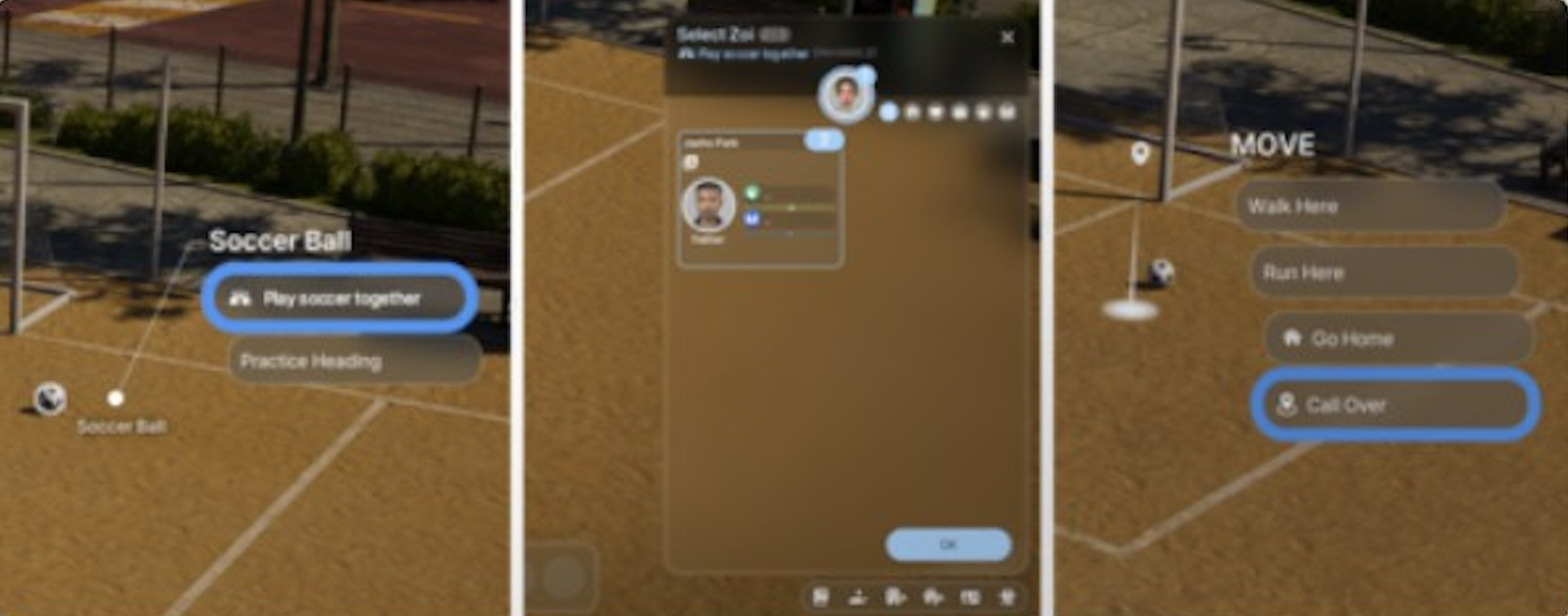
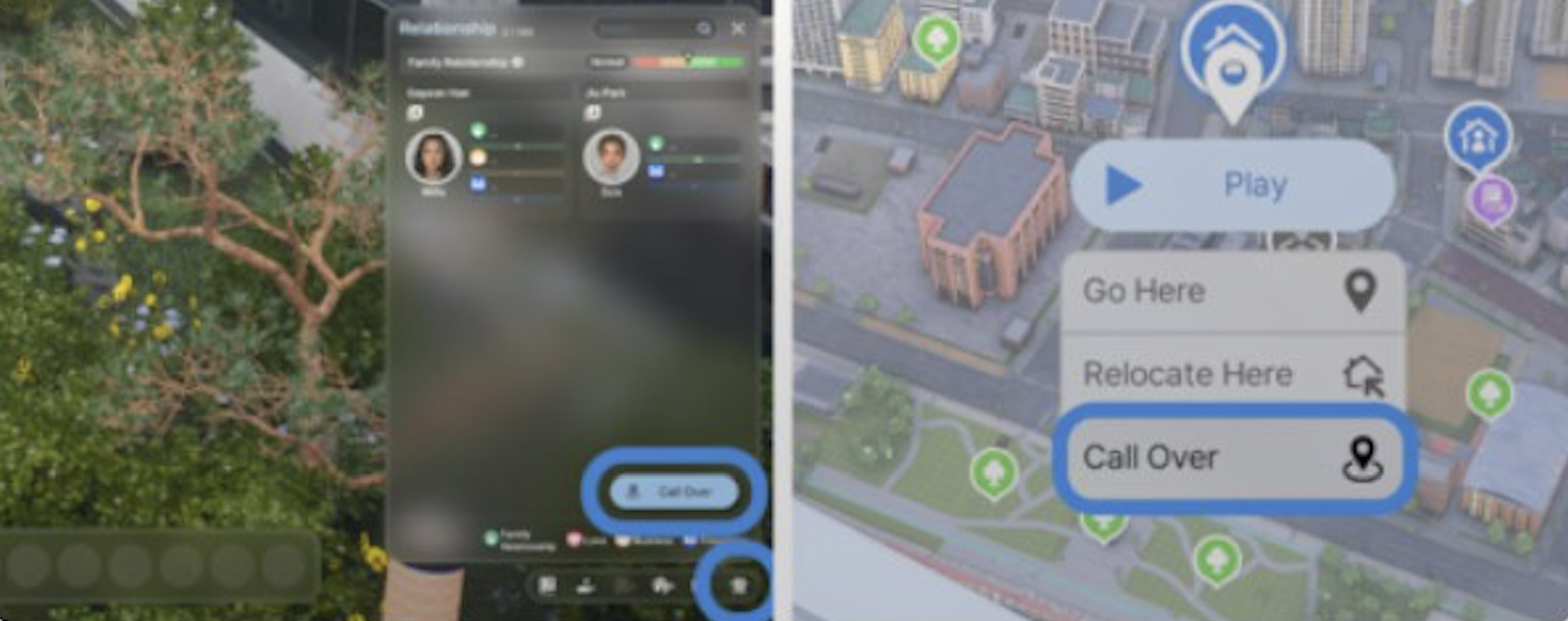
Call Over | Click on the ground near your Zoi and select "Call Over" to open the relationship panel and invite a specific NPC to your current location. This does not use the phone; it is accessed through the Relationship tab in the bottom-right corner of the screen. |
Host parties, dinners, or other events through the social event system to gather multiple NPCs at your lot. | |
Chance encounters | Visit community lots where NPCs congregate to meet new Zois organically. |
NPCs may decline a Call Over request if they are busy with another activity or if the relationship level is too low. A notification will indicate whether the NPC accepted or refused.
Moving NPCs Into Your Household
There is currently no direct "Ask to Move In" social interaction in the Early Access build. The primary way to bring an NPC into your household is through marriage: after your Zoi marries an NPC, a prompt appears asking whether to merge households, and the NPC becomes fully controllable. Players can also use the Manage Families feature to merge or split households manually.
Community Lot Behavior
NPCs visit community lots and public spaces throughout the city as part of their daily routines. Their behavior at these locations includes shopping, socializing, using public facilities, and attending events. Each city has a range of community lots such as parks, playgrounds, convenience stores, gyms, internet cafes, libraries, and carnivals.
The game spawns additional NPCs at community lots beyond the ones who live in the city. These "visitor" Zois are randomly generated and appear at businesses and public facilities to keep locations feeling populated, even in cities with low population settings.
Assigning NPCs to Public Spaces
Players can manually assign up to 8 NPCs to any public space or community lot. This is done through the Build Mode interface:
Enter Build Mode on a public property.
Click the rightmost button in the top-center toolbar to open the NPC assignment panel.
Choose from existing Zois or create new ones to fill the available slots.
Assign specific roles to each NPC based on the lot type.
This feature lets players curate who appears at their favorite locations rather than relying entirely on random spawns. Assigned NPCs will regularly visit and interact at the designated lot.
Known Community Lot Issues
Several community lot issues have been reported during Early Access:
NPCs entering homes even when doors are locked to "Family Only"
Community lots appearing empty despite population settings being high
NPCs spawning at locations without engaging in meaningful activities
Vendors and stall operators sometimes failing to appear at their assigned posts
These issues are being addressed through ongoing updates as part of the Fundamentals First initiative.
Smart Zoi AI
Smart Zoi is an advanced AI system that uses NVIDIA ACE (Avatar Cloud Engine) technology with small language models to create more lifelike NPC behavior. It is available only to players with NVIDIA GPUs (minimum RTX 3060 with 8GB VRAM). The underlying model is a 0.5 billion parameter Mistral NeMo Minitron, optimized by NVIDIA for low-latency inference on consumer GPUs.
Enabling Smart Zoi
Smart Zoi is activated through the Gameplay tab of the Options menu under the "(Experimental)" section. Players can choose the scope of the feature:
Mode | Description |
|---|---|
Your Zoi only | Only your active character uses Smart Zoi behavior. |
Your Zoi's family | All members of the active household benefit from the AI. |
All Zois in the city | Every Zoi in the simulation runs Smart Zoi logic, including NPCs. This has the largest performance impact. |
Smart Zoi Features
Smart Zoi adds several AI-driven features that significantly deepen NPC behavior:
Feature | Description |
|---|---|
Zoi Pen | A text input tool (100 words max, 20 recommended) that lets players "plant ideas" to influence a Zoi's behavior thematically. The input should contain thematic or abstract elements rather than direct action commands. It takes a moment for the idea to influence the Zoi's decisions. Currently supports English only. |
Inner Thoughts | AI-generated internal monologues that reveal a Zoi's decision-making process in real time. These can reflect on their life, their thoughts about music playing, their understanding of a book they are reading, or deeper feelings during conversation. |
Diary System | After 11 PM when a Zoi is sufficiently tired, they write a reflective diary entry combining Inner Thoughts with events from the day. Discoveries and realizations can occur during diary writing, influencing the next day's schedule. |
Smart Schedule | After writing a diary, the Zoi analyzes their thoughts, feelings, and experiences to autonomously generate a schedule for the following day. This creates a feedback loop where daily events shape future plans. |
Context-Aware Decisions | Personality-driven choices: a compassionate Zoi buys food for homeless; a hungry Zoi with dinner reservations waits rather than eating immediately. Over time, these choices compound into emergent personality growth. |
Smart Zoi Limitations
Diary, Inner Thoughts, and Smart Schedule features are disabled at 5x speed or higher.
The Zoi Pen currently supports English input only.
Performance impact scales with the number of Zois running the feature; applying it to the entire city is demanding on hardware.
Smart Zoi was rolled back to its October version after the v0.5.2 hotfix due to stability issues.
In v0.6.0, action selection was further optimized. The system remains experimental and continues to receive improvements with each update.
NPC Crime and Karma
NPCs can engage in crime under certain conditions. Criminal interactions unlock when a Zoi experiences economic hardship (assets of 2,000 Meow or less), social isolation, relationship conflict, or has the Rulebreaker trait or Malicious characteristic. Only Young Adult and older Zois can commit crimes. NPCs who turn to crime may scam, steal, attempt voice phishing, impersonate charity workers, or hold fake seminars.
Criminal actions lower a Zoi's karma. As karma decreases, other Zois start avoiding the NPC and spreading rumors. Severely low karma damages relationships, harms career prospects, and affects the Zoi's afterlife destination when they die. If the City Safety stability setting is high, criminal NPCs are more likely to be caught and sent to jail.
Aging and Life Stages
NPCs progress through 9 life stages, the same as player-controlled Zois:
Life Stage | Notes |
|---|---|
Newborn | Only through pregnancy. Very limited interactions. |
Toddler | Only through aging up from Newborn. Learning basic skills. |
Child | Can attend school, do chores, fish, and mine. |
Transitional stage between childhood and teenage years. | |
Teenager | Can attend school, use smartphones. Cannot romance. |
Young Adult | Full access to all interactions, careers, romance, and crime. |
Adult | Peak career and family stage. |
Middle-Aged | Continued active life with some physical decline. |
Senior | Final life stage. Death is inevitable at this stage. |
Players can control aging through Options > Simulation. Aging can be disabled entirely, or set separately for "My Zois" (your active household) and "Other Zois" (all NPCs). Day length can also be adjusted to slow or speed the simulation. Seasons change every 7 in-game days, and the passage of seasons drives the aging cycle.
When an NPC dies, they become a Soul (ghost) managed by the meta-character Nyx. The type of afterlife depends on the Zoi's lifetime karma. A Zoi with good karma may reincarnate favorably, while a Zoi with severely low karma faces an unfavorable afterlife.
Story Progression
All households in the same save file are simulated simultaneously. Unplayed NPC families continue going to work, having their needs deplete, and living autonomously. However, unplayed households currently have limited story progression: NPCs do not autonomously get married, have babies, advance in their careers, or build significant new relationships without player intervention. This is a heavily requested feature on the community wishlist.
The 2026 roadmap includes plans for autonomous marriage and divorce actions, multiple breakup outcomes, cheating controls, and "unique Zois with their own events, stories, and personalities" to make NPC lives feel more dynamic.
Controlling NPCs and Switching Households
Players can switch between active households at any time:
Action | How |
|---|---|
Switch active family | Press M (map), select another family's house, and press Play. |
Switch between Zois in a family | Press Space Bar to cycle through family members. |
NPCs cannot be directly controlled unless they join your household. The primary way to convert an NPC to a playable character is through marriage: after your Zoi marries an NPC, the NPC joins your household and becomes fully controllable. Players can also merge and split households through the Manage Families feature.
NPC Jobs and Careers
NPCs hold jobs just like player-controlled Zois. Two career types exist: Active/On-Site careers (where the workplace interior is visible and tasks are interactive) and Rabbit Hole careers (where the Zoi disappears into a building and receives periodic notifications). Each city has unique career options tied to its theme:
City | Unique Careers |
|---|---|
Idol Trainee, Entertainment Planning, Pro Gamer, Firefighter, Reporter, University Professor | |
Amusement Park Employee, Football Player, University Professor, Gangster | |
Surf Shop, Convenience Store, farming-related occupations |
If a job position appears occupied by an NPC, players can still apply. The system may replace the current NPC employee. When autonomy is active, NPCs with jobs will try to fulfill their job tasks at work, though this does not guarantee success as the AI balances needs against work obligations.
The 2026 roadmap plans to add multiple jobs, interviews, remote work, freelance careers, beauty careers, police expansion, and part-time jobs for teenagers.
V0.7.0 NPC Improvements (March 2026)
The v0.7.0 anniversary update (released March 26, 2026) introduced roughly 60 major features, many of which directly improved NPC behavior:
Improvement | Details |
|---|---|
Trait-Based Autonomy | Traits and characteristics now directly determine which autonomy interactions NPCs perform. A speech box shows the reason behind each action. |
Zois can now start multitasking if a nearby interaction catches their interest. They can eat certain foods while walking and hold conversations while carrying items. | |
Need Interruption | Every 30 in-game minutes, ongoing interactions are interrupted if any need falls below 30%, preventing NPCs from neglecting critical needs. |
Context-Aware Reactions | NPCs now respond more naturally to other Zois' actions. For example, changing a TV channel while an NPC is watching triggers visible frustration. |
Improved Conversations | NPC dialogue varies based on traits, emotions, and relationships, so conversations feel less repetitive and more personality-driven. |
Correct Tool Usage | NPCs now select the correct cleaning tool for their environment (no more sweeping carpet or vacuuming grass). |
Post-Shower Outfit Change | After showering or bathing at home, NPCs change into a gown before switching back to their previous outfit. |
Faster Group Interactions | Group interactions take less time to find participants, making social gatherings flow more smoothly. |
Memory and News Feed | Enhanced systems that help players understand the reasons behind NPC behavior. Memory optimization is not yet fully complete. |
Upcoming NPC Improvements
The 2026 roadmap and recent developer updates outline several planned improvements to NPC behavior beyond what shipped in v0.7.0:
Feature | Details |
|---|---|
Full memory system | NPCs will remember significant and traumatic events, affecting their future behavior and interactions. The foundation was added in the March 2026 update, but the system is not yet fully optimized. |
Autonomous life events | NPCs will autonomously get married, divorce, have children, and advance in careers without player intervention. |
Unique story Zois | Special NPCs with their own events, stories, and personalities that create recurring narrative threads in the city. |
Improved seating behavior | Better decision-making for where and when to sit. |
Anti-loitering rules | NPCs will stop lingering aimlessly at locations. |
Group conversation dynamics | More natural multi-Zoi conversations. |
Cheating and breakup controls | Multiple breakup outcomes, cheating mechanics, and related emotional reactions. |
An expanded system where NPC behavior affects how the community perceives and treats them. |
Tips
Use Manage Families (Map > Manage Families) to add, remove, or rearrange NPC families in your city.
Adjust population settings in Manage City to balance world liveliness with game performance.
Disable aging for "Other Zois" if you want NPC neighbors to remain the same life stage permanently.
Build relationships with NPCs before opening a business so you have employees ready to hire.
Use the Call Over feature from the Relationship tab (not the phone) to invite specific NPCs to your lot for interactions or events.
Switch households (M > select house > Play) to experience the game from different perspectives without starting a new save.
Browse premade families in Manage Families. Many interesting characters start as "Not in the City" and need to be placed manually.
Assign your favorite custom Zois to public spaces through Build Mode so they appear regularly at community lots instead of random townies.
If an NPC keeps declining your Call Over request, check whether they are at work or engaged in another task. Try again later in the evening when they are free.
Enable Smart Zoi for your household only if you want deeper AI behavior without the performance cost of running it citywide.
Use the Zoi Pen to plant thematic ideas ("loves music," "adventurous spirit") rather than specific commands for best results with Smart Zoi.
Keep an eye on the Recognition need of neglected household members. If it stays critical for too long, the Zoi will permanently leave.
Set City Safety to a higher level in the stability settings if you want fewer NPC criminals roaming the streets.
After the v0.7.0 update, watch for the speech box above NPCs' heads to learn why they chose a particular action. This helps you understand the trait-driven autonomy system.