

Overview
Marriage is a major relationship milestone in inZOI that unlocks several family-building features, including pregnancy and shared household management. Only Zois who have reached a high romance level can propose and marry. The wedding system includes ceremony planning, venue selection, guest invitations, a scripted 8-step ceremony, and commemorative photos. Same-sex weddings are fully supported. Zois can form romantic relationships and marry regardless of gender.
Marriage also converts the romance relationship between the two Zois into a family relationship, resets the bond level, and introduces the jealousy system. After the wedding, the couple must live together in a single household, and their finances merge. This article covers every aspect of the marriage pipeline, from building the initial romance through the ceremony itself and into married life.
Romance Progression
Before a Zoi can propose, the couple must progress through the game's romance levels. inZOI tracks four independent relationship types (Friendship, Romance, Family, and Business), each with its own six-tier progression. The Romance track is the one that governs marriage eligibility.
Romance Levels
The six Romance (Love) tiers, from worst to best:
Tier | Level Name | Description |
|---|---|---|
1 (Negative) | Terrible | A deeply hostile or broken romantic connection. Reaching this level between spouses enables divorce. |
2 (Negative) | Uncomfortable | The Zois feel uneasy around each other romantically. Romantic interactions will have a very low success rate. |
3 (Neutral) | Ambivalent | No strong romantic feelings in either direction. This is the default starting point for two Zois who have just met. |
4 (Positive) | Mutual Crush | Both Zois are aware of a romantic spark. Unlocks the Confess Love dialogue option to advance the relationship. |
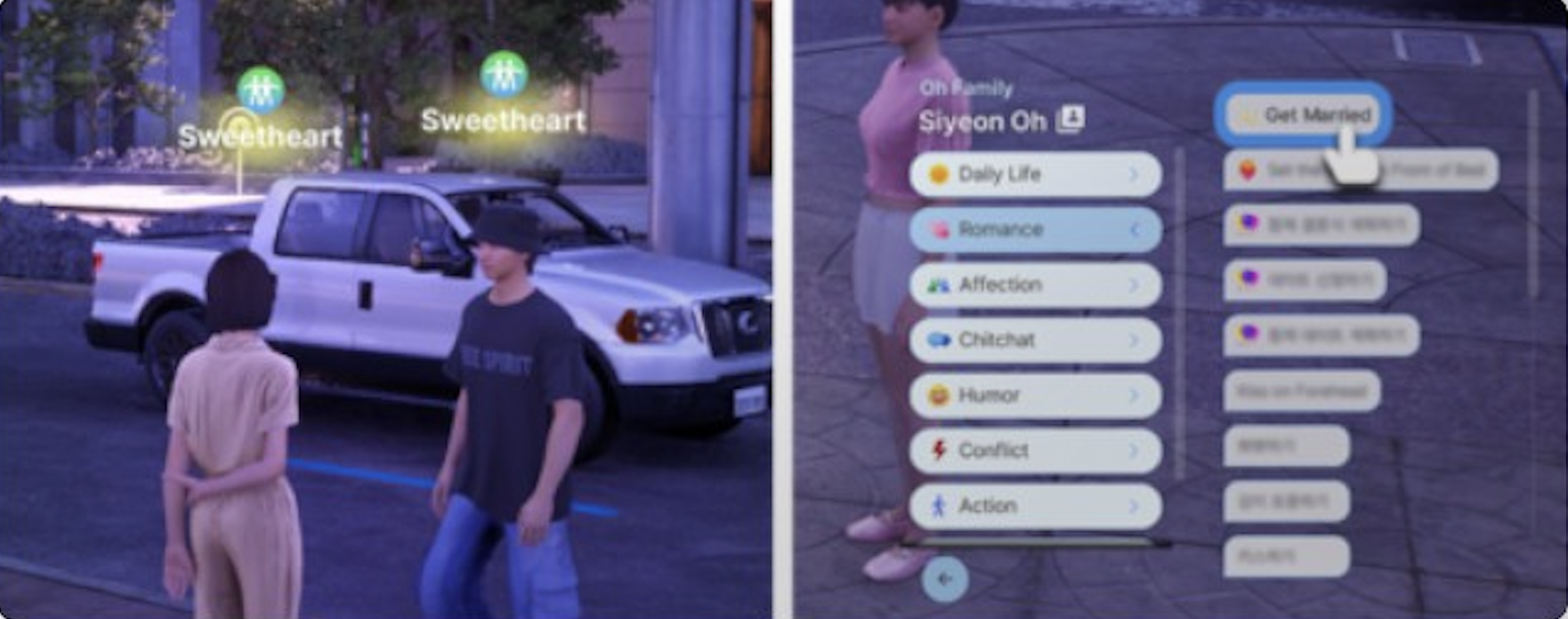
5 (Positive) | Sweetheart | An official romantic couple. Unlocks the proposal option (Ask Them to Marry You) and the Set the Mood interaction. |
6 (Positive) | True Love | The highest romance level. Proposals at this tier have the best acceptance odds. Reached by selecting "Be together as true loves" at the dialogue checkpoint. |
Building Romance Step by Step
Build Friendship First. Start with positive social interactions under the Humor, Affection, and Chitchat categories. Once the Friendship bar reaches roughly half full, Romance-category actions become available.
Use Romance Interactions. Select options from the Romance tab during conversations. Kisses, hugs, flirting, and dates all raise the romance meter. Going on dates is particularly effective because multiple romance interactions can be chained in a single outing.
Pass the Mutual Crush Checkpoint. When the romance bar fills enough, a "Select Relationship" dialogue prompt appears. Choose "Confess Love" to advance from Mutual Crush to Sweetheart. If the confession fails, keep building the meter and try again.
Advance to True Love. Continue using romance interactions until another checkpoint appears. Select "Be together as true loves" to reach the maximum romance tier. This is not required for a proposal, but it significantly increases the acceptance odds.
The speed at which relationships develop can be adjusted globally through the City Map's Manage City settings, which lets you increase or decrease interaction success rates for all Zois in the city.
Requirements
Requirement | Details |
|---|---|
Minimum Age | Young Adult or older |
Romance Level | Must reach Sweetheart or True Love (True Love yields the highest acceptance rate) |
Friendship Level | A strong Friendship track alongside Romance increases acceptance odds. Building both simultaneously is recommended. |
Household Limit | Combined household must not exceed 8 Zois after the merge |
Romantic Preference | Both Zois must have compatible romantic preferences set during character creation. Same-sex marriage is fully supported. |
Mood | Both Zois should be in a positive emotional state at the time of the proposal for the best success rate. |
Proposal
To propose, the proposing Zoi must have reached Sweetheart or True Love status with the target Zoi. The proposal option ("Ask Them to Marry You") appears under the Romance interaction menu, marked with a diamond ring icon. Acceptance depends on the relationship quality between the two Zois. A strong Friendship track alongside the Romance track increases the chances of acceptance. Proposals are more likely to succeed when the Zois are committed as True Loves.
If the proposal is accepted, the two Zois become engaged. Engaged Zois display a ring icon next to their relationship status in the Smartphone contacts. There is no time limit on an engagement; the couple can remain engaged indefinitely while building their social circle or planning the ceremony.
Failed Proposals
A failed proposal does not end the relationship. The Zoi who was rejected may receive a temporary Embarrassed mood modifier, but the romance level stays intact. Players can try again after improving the relationship further or waiting for both Zois to be in better moods.
Canceling an Engagement
Engaged Zois can call off the engagement at any time through the interactions menu. Canceling an engagement does not reset the romance level, but both Zois may receive a temporary Sad modifier. The couple can get re-engaged later without penalty.
Wedding Planning
After engagement, there are two paths:
Immediate marriage: Select "Get Married" to skip the ceremony entirely and become officially married right away. This is instant and requires no planning.
Plan a wedding: Use the Events App or select "Plan Wedding Together" in conversation to organize a full ceremony. This allows complete customization of the venue, guest list, roles, and dress code.
Planning Through the Events App
Press P to open the Smartphone and open the Events app.
Find an available timeslot and click "Make Event."
Select "Wedding" as the event type.
Set the event name and duration. Longer durations give more time for all 8 scripted actions to complete naturally.
Choose a venue location from any owned residential lot, community lot, or dedicated wedding venue.
Assign roles: Officiant, Wedding Party Members, and Guests.
Set a dress code (can be customized individually per attendee).
Configure up to 7 recommended and prohibited actions per guest.
Confirm the event. The wedding will appear on the Calendar and the couple will receive a reminder notification.
Planning Through Conversation
Invite the fiance to your home and select "Plan Wedding Together" in dialogue. This auto-schedules the wedding for noon the following day with a default guest list. This method is simpler but offers less customization than the Events App. The initiating Zoi's friends are automatically assigned to the officiant, wedding party, and guest slots.
Planning Tips
If the fiance lives in a different city district, use the "Call Over" phone interaction to invite them to your home before selecting "Plan Wedding Together."
Set the wedding duration to at least 3 to 4 in-game hours to allow all scripted actions to play out without rushing.
Always review auto-assigned roles before confirming. The game fills slots with the initiating Zoi's friends, which may not match the player's preference.
Decorate the venue in advance by entering Build Mode through Edit City and then Edit Property on the chosen lot.
Wedding Roles
Three roles are assigned during wedding planning:
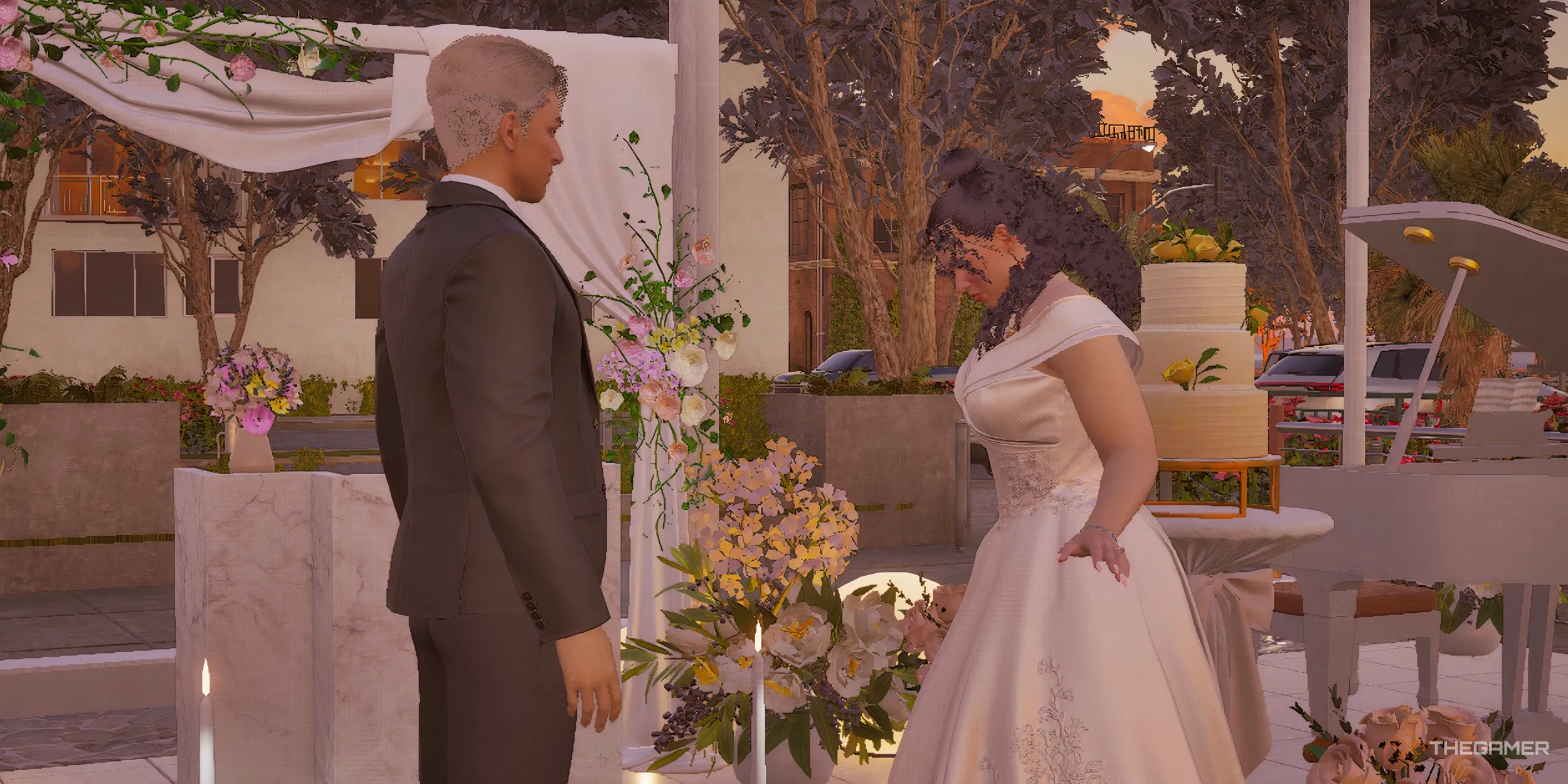
Role | Description |
|---|---|
Officiant | Conducts the ceremony and delivers the opening speech. Any invited Zoi can serve as officiant. If no officiant is assigned manually, the game auto-fills the slot with one of the initiating Zoi's friends. |
Wedding Party Members | Stand alongside the couple during the ceremony. Three members from the wedding party deliver speeches during step 4 of the ceremony. These are typically the couple's closest friends or family members. |
Guests | Attend the ceremony and perform Immediate Actions (clapping, cheering, crying, heckling). Guests can react emotionally to the scripted moments throughout the ceremony. |
The initiating Zoi may auto-fill the officiant and guest slots with their friends. Always review and adjust the assignments before confirming.
As of the v0.7.0 update, wedding event participants are automatically granted door permissions at the venue, so guests will no longer get stuck outside locked areas.
The Ceremony
The wedding ceremony follows scripted actions that should be performed in order. Players can either press play for automatic progression or manually trigger each action from the top-left menu. The ceremony is divided into core scripted steps and optional Immediate Actions that guests and the couple can perform alongside them.
Scripted Actions
Step | Action | Description |
|---|---|---|
1 | Thank Guests for Attending | The couple acknowledges the gathered guests. |
2 | Prepare the Officiant Speech | The officiant prepares and delivers the opening speech about the couple. |
3 | Walk Together Down the Aisle | The couple walks down the aisle together to the ceremony location. |
4 | Give a Speech | Three Zois from the Wedding Party deliver speeches about the couple. |
5 | Exchange Rings | The couple exchanges wedding rings, sealing the vows. |
6 | Celebrate the Marriage | Guests react with cheering, applause, and emotional responses. |
7 | Exit Together Down the Aisle | The newlyweds walk back down the aisle as a married couple. |
8 | Dance Happily | The couple shares a celebratory dance. |
9 (v0.7.0+) | Give Kiss Performance | Added in the March 2026 update. The couple performs a kiss for the audience. This is a new scripted action that plays after the celebratory dance. |
Optional Actions
Additional actions may occur during the ceremony. The couple can exchange or read letters to each other before the ring exchange. A guest may catch the bouquet when it is thrown. Guests have access to Immediate Actions (clapping, heckling, crying) that they can perform alongside the scripted steps. Some guests may cry from emotion, and as evening approaches, tired guests may rest on nearby couches.
Important: Skipping or rearranging the scripted actions may cause Zois to freeze. If this happens, use the Emergency Rescue cheat. Always follow the actions in order for the smoothest experience. It is strongly recommended to let the scripted steps play in sequence rather than triggering them manually out of order.
Venue Options
Venue | Location | Notes |
|---|---|---|
Outdoor Wedding Venue | Pre-decorated with an archway and seating. The outdoor kitchen is decorative only. A reliable default choice for players who do not want to decorate from scratch. | |
Wedding Studio | Added in v0.4.0. A purpose-built wedding venue on the island with professional decorations. Ideal for tropical-themed ceremonies. | |
Home / Residential Lot | Any city | The most reliable option. Full control over furniture and functionality. No script conflicts with other venue types. Allows the couple to decorate freely in Build Mode. |
Community Lot | Any city | Any editable community lot can be used, but may cause script conflicts with lot-specific functions. Test the venue beforehand if possible. |
For the most dependable experience, use your home lot or one of the two dedicated wedding venues (Dowon outdoor or Cahaya studio). Community lots with other assigned functions (restaurants, gyms) may interfere with the wedding script.
Decorating the Venue
Wedding decorations are available in Build Mode under the Social Event Furniture category, in the Wedding Items subcategory. To place them before the ceremony, enter Edit City from the City Map and select Edit Property on the venue lot.
Image | Item | Cost (Meow) | Notes |
|---|---|---|---|
| Floral Wedding Cake | 100 | Never depletes regardless of guest count. The most cost-effective food source for the ceremony. |
| Romantic Wedding Arch | 270 | Decorated arch for the altar area. Creates a focus for the ceremony. |
| Wedding Arch | 245 | A simpler arch variant for a more understated look. |
| Wedding Aisle | 120 | Decorative aisle runner for the processional walk. Place two for a longer aisle. |
| Wedding Canopy | 562 | A large overhead canopy structure. The most expensive decoration piece. |
| Wedding Podium | 312 | A podium for the officiant and speeches. |
| Wedding Table | 148 | A decorated reception table for the wedding feast. |
| Wedding Heart Lighting Decoration | 864 | Heart-shaped lighting display. The most expensive single decoration item. |
| Outdoor Wedding Lights | 245 | String lights that add ambient evening atmosphere. |








Place comfort items (toilets, couches) at the venue since long ceremonies can leave guests with low needs. Vending machines (chip machines, ramen machines) serve as reliable food sources when kitchen equipment is unavailable. The Floral Wedding Cake at 100 Meow is the best value since it never runs out.
Wedding Outfits
A dress code is set during planning and can be customized individually per attendee. To change the couple's outfits, enter Create a Zoi mode before the ceremony. Multiple wedding dress options with color variants are available in the clothing system. Custom outfits can be crafted with adjustable sleeves, hems, neckline, and fit using the clothing customization system.
Players can also upload custom textures or generate unique fabric patterns using the AI image generator within the clothing editor. This allows for fully personalized wedding attire that goes beyond the preset options. Community-created wedding outfits are available through the Workshop for players who want curated designs.
Post-Wedding Changes
Marriage triggers several gameplay changes that affect relationships, housing, and finances:

Change | Effect |
|---|---|
Household Merge | A window appears immediately after the ceremony. Choose which house to live in. Divide or combine Meow between households using a slider. The couple must reside in the same household after marriage. |
Relationship Conversion | The Romance relationship type converts to Family. The bond level resets to the neutral tier (Distant) within the Family track and must be rebuilt through positive family interactions. This is intentional, not a bug. |
Pregnancy Unlock | Married couples can try for a baby. See Pregnancy. The "Try for a Baby" option appears in the Romance menu after the Family relationship is rebuilt to a positive level. |
Financial Sharing | Both spouses contribute to and draw from the household Meow balance. All income earned by either spouse goes into the shared pool. |
Relationship Status | Displayed as "Spouse" in the relationship panel. The ring icon appears next to the spouse's name in the Smartphone contacts. |
Jealousy System | Romantic interactions with other Zois may trigger a confrontation from the spouse. See the Jealousy and Infidelity section below. |
Family Tree | Marriage is recorded in the Family Tree system. The tree updates to show the spousal connection. |
Dating After Marriage | As of v0.7.0, married Zois can ask each other on dates. This was added so couples can continue building their family relationship through dedicated romantic outings. |
There is no limit on the number of marriages and divorces per lifespan. Surnames do not automatically change upon marriage in the current Early Access build.
Understanding the Relationship Reset
A common source of confusion is that the romance bar "disappears" after marriage. This is working as intended. When two Zois marry, their Romance relationship converts to a Family relationship. The bar visible in the relationship panel is now the Family bar, which starts near the neutral level. Players must continue positive interactions (conversations, shared meals, dates, family activities) to raise the Family bond from Distant through Affectionate, Close, and ultimately to Loving. Once the Family relationship reaches a positive tier, the "Try for a Baby" option becomes available.
Photo Booth
A Photo Booth is available at wedding venues. It works like Photo Mode: click on a Zoi to change their expression and pose, adjust the time-of-day slider for different lighting, and customize the composition. Photos save automatically. Players can switch between Portrait and Landscape modes, apply filters, and adjust the field of view and depth of field settings.
For long ceremonies, the natural lighting shifts from daytime to evening, creating atmospheric photo opportunities. Scheduling the wedding for late afternoon allows the ceremony to transition into golden hour, which produces the most visually striking photos. The time-of-day slider in the Photo Booth can also be adjusted manually for consistent lighting regardless of the actual in-game time.
Jealousy and Infidelity
The jealousy system only activates after marriage. Single or dating Zois are described as "open-minded about romance" and will not get jealous if their partner flirts with someone else. Once married, however, a Zoi who witnesses their spouse performing romantic interactions with another Zoi in the same area will react automatically.
How Jealousy Works
Stage | Details |
|---|---|
Trigger | A married Zoi performs a romantic interaction (kissing, flirting, confessing love) with a third Zoi while the spouse is present in the same area. |
Detection | The spouse detects the infidelity visually. If the cheating happens in a different area where the spouse is not present, the spouse will receive a text message on their Smartphone asking questions, and the relationship will still deteriorate. |
Confrontation | The jealous spouse may use aggressive interactions such as Provoke, or resort to physically slapping the unfaithful partner. |
Mood Effects | Both the cheater and the betrayed spouse may receive Embarrassed and Annoyed mood modifiers. Negative body language persists for a time. |
Relationship Impact | The Family relationship between the spouses drops. Repeated infidelity can push the relationship toward Dysfunctional or Estranged, eventually enabling divorce. |
Recovery | The negative effects are temporary. A jealous Zoi will recover after time passes, and the relationship can be repaired through positive interactions. The game currently has limited long-term memory for infidelity events. |
Zois can maintain multiple romantic relationships simultaneously before marriage without any jealousy consequences. The system only activates once a Zoi has a spouse.
Same-Sex Marriage
inZOI fully supports same-sex marriage. Zois can form love relationships and marry regardless of gender, as long as both Zois have compatible romantic preferences set during character creation. The entire wedding pipeline (proposal, planning, ceremony, household merge, pregnancy options) works identically for same-sex couples and opposite-sex couples. All wedding ceremony actions, including the ring exchange, aisle walk, speeches, and the v0.7.0 Kiss Performance, are available for both configurations.
Divorce
Married Zois can file for divorce through social interactions. The option to divorce appears under the Conflict category in the social interaction menu. To access it, click on the spouse and open the Conflict menu. The couple will have a conversation, and the marriage ends immediately.
Divorce Requirements
Divorce does not require the relationship to reach a specific negative tier first. Players can initiate a divorce at any time through the Conflict menu. However, the divorcing spouse may initially reject the request. Persistent attempts will eventually succeed regardless of the current relationship level.
Divorce Consequences
The household splits. Shared Meow is divided, and each Zoi retains their personal inventory and career status.
Both Zois receive a Terrible relationship status with each other and a Sad +5 mood modifier that lasts approximately two in-game days.
The Zois are free to pursue new romantic relationships and can remarry other Zois (or even remarry each other).
Children of divorced parents may experience negative emotions from the separation, receiving their own Sad modifier.
The divorce is recorded in the Family Tree.
The 2026 Roadmap mentions plans for divorce lawsuits and custody disputes as future additions through the expanded Trial and Justice system. In the current build, custody is informal: children remain with whichever household they are placed in during the split.
Known Issues
Issue | Workaround |
|---|---|
Pre-mature marriage certificate | Game may issue a marriage certificate before the scheduled ceremony. The celebration still occurs normally. |
Event not on calendar | Plan from home or use "Plan Wedding Together" in conversation instead of the Events App. |
Fiance in different city | Invite the fiance to your home first using Call Over. |
Non-functional venue kitchen | The Dowon outdoor venue kitchen is decorative. Use wedding cake, vending machines, or Build Mode food items. |
Frozen Zois | Use Emergency Rescue cheat. Always follow the 8 scripted steps in order. Do not skip or rearrange them. |
Ghost guests | Deceased Zois may appear at weddings. No fix currently available. |
Romance options gone after marriage | This is intentional. The Romance bar converts to a Family bar. Rebuild the Family relationship through positive interactions to unlock Try for a Baby. |
Business sold upon marriage | Fixed in v0.7.0. Previously, business properties could be forcibly sold during the household merge. Update to the latest version to avoid this. |
Marriage with NPC Zois abnormal | Fixed in v0.7.0. Marriage with non-player-controlled Zois now proceeds normally. |
Tips
Build both romance and friendship simultaneously before proposing for the best acceptance odds. A high Friendship level alongside True Love makes rejection almost impossible.
Make sure your household has room (under 8 Zois) before the wedding, since the spouse will join your household.
Use your home or a dedicated wedding venue (Dowon or Cahaya) for the most reliable experience. Custom community lot venues can cause script conflicts.
Follow the scripted actions in order. Skipping or rearranging steps is the most common cause of frozen Zois during the ceremony.
Decorate the venue in advance via Edit City then Edit Property. Place the Floral Wedding Cake (100 Meow) since it never depletes regardless of guest count.
Add comfort items (toilets, couches, vending machines) to the venue. Long ceremonies can leave guests with low needs.
Style outfits beforehand in Create a Zoi mode to match the dress code.
Double-check the guest list and role assignments. The initiating Zoi auto-fills slots with their own friends.
Save before the wedding in case of bugs or unexpected freezes.
For the best photos, schedule the wedding for late afternoon so the ceremony transitions into golden hour lighting.
After marriage, keep performing positive interactions to rebuild the Family relationship. The Try for a Baby option only appears once the Family bond reaches a positive tier.
Married Zois who catch their spouse being romantic with someone else will react with a slap, so manage multiple relationships carefully.
Set the wedding duration to at least 3 to 4 in-game hours. Shorter durations may cut the ceremony short before all scripted actions complete.
As of v0.7.0, married couples can go on dates with each other. Use this to rebuild the Family relationship faster after the wedding.