

Restaurant Business
Complete guide to running a restaurant business in inZOI, covering setup, registration, kitchen equipment, cooking skill requirements, menu management, stocking items, hiring employees, customer satisfaction, business value, revenue, operating fees, and profit optimization tips.
On This Page
Overview
The Restaurant is one of nine business types available in inZOI, introduced in the v0.5.0 update (December 2025) alongside the small business management system. Players can purchase a commercial property lot, equip it with a kitchen and dining area, hire staff, and serve cooked meals to customers in exchange for Meow revenue. Of all the food-related business presets, the Restaurant places the heaviest emphasis on the Cooking skill, since the quality and variety of menu items depends directly on the owner's proficiency.
Restaurants follow the same core business loop as every other commercial venture: register through the Business App, configure your settings, furnish the lot in Build Mode, stock inventory, open for business, and serve customers during operating hours. What sets the Restaurant apart is its reliance on cooked dishes rather than baked goods or beverages, making the owner's Cooking skill the single most important factor for long-term success.
Registration and Business App
Before your Zoi can open a restaurant, you need to register the business. Open the Smartphone by pressing P and select the Business App icon. From there, fill out the business registration form, which assigns your Zoi as the owner and unlocks the remaining configuration tabs.
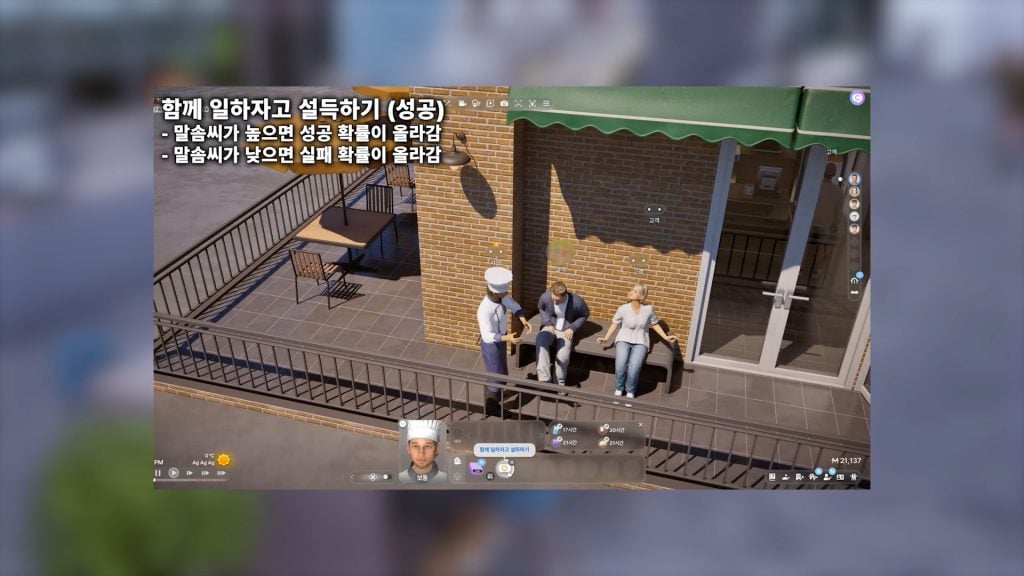
Once registered, the Business App becomes your central management hub. It contains several tabs that control how the restaurant operates:
Business Hours: Set which days of the week your restaurant is open and the start and end times for each operating day. Shorter hours reduce employee wages but also limit how many customers you can serve.
Recipe Tab: Choose which cooked dishes appear on your restaurant's menu. Only recipes that your owner Zoi has already learned through the Cooking skill are available here. As you unlock higher-level recipes, you can add them to the lineup.
Business Type: Select the Restaurant preset, which automatically configures a management environment suited to food service. The preset provides sensible defaults for customer interactions and product display.
Player Settings: Configure customer activities and target customers. The most critical setting is enabling "Order" under customer activity. Without this toggle, visiting Zois will browse your restaurant but will never actually purchase anything.
Setting up the Lot
After registration, you enter Build Mode to furnish and arrange the restaurant property. The physical layout of your space directly affects customer satisfaction, employee efficiency, and overall revenue. A well-designed restaurant needs both a functional back-of-house kitchen and an inviting front-of-house dining area.
Required Fixtures
Every restaurant needs at least two essential fixtures to function:
Kiosk: The point-of-sale terminal where customers place and pay for orders. Search for "kiosk" in Build Mode and place it near the entrance or counter area. Without a kiosk, customers cannot order food.
Market Stand: The display where finished dishes are placed for sale. Access the Social Event category in Edit Property, select Business, and add a market stand. Your Zoi (or employees) will place completed meals on the stand, and customers will order from the available selection.
Kitchen Equipment
Beyond the required fixtures, a restaurant kitchen should include the following equipment. Higher-quality appliances reduce the risk of cooking failures, burnt food, and kitchen fires:
Equipment | Purpose |
|---|---|
Stove | Primary cooking appliance for most recipes |
Oven | Required for baked dishes and certain advanced recipes |
Refrigerator | Stores ingredients and provides the Stock Market Items interaction |
Prep Counter | Work surface for food preparation |
BBQ Grill (outdoor) | Required for grilling recipes such as steak (Cooking level 5) |
The dining area should feature tables, chairs, and decorative items. Ambient furniture and decor raise the perceived quality of the space, which in turn boosts customer satisfaction scores.
Cooking Skill and Menu
The restaurant's menu is tied directly to the owner Zoi's Cooking skill. At lower skill levels, only basic breakfast items and simple meals are available. As the skill progresses toward level 5, more complex and profitable dishes unlock, including group-size servings of Fried Chicken and Steak. The Cooking skill can reach level 10, though recipes currently only unlock up to level 5 in Early Access, suggesting that future updates will add more advanced dishes.
There are several ways to raise the Cooking skill:
Active cooking: Every dish you prepare earns skill experience. Cooking a variety of different recipes levels the skill faster than repeating the same dish.
Watching cooking shows: Your Zoi can watch the cooking channel on TV under the Entertainment section, which provides passive skill gains without spending Meow on ingredients.
Practice: Even failed attempts (burnt food) still contribute a small amount of experience, though they waste ingredients and time.
Food quality scales with skill level. A level 5 chef's steak provides significantly more hunger satisfaction than a level 0 Zoi's pancakes. In a restaurant context, higher-quality food commands better prices, generates stronger customer reviews, and brings in repeat visitors. Players can customize which learned recipes appear on the menu through the Recipe Tab in the Business App. Offering a diverse selection attracts a wider range of customers, while specializing in a few high-level dishes can build a reputation for quality.
Stocking and Daily Operations
Before opening for the day, you need to stock the restaurant's inventory. Walk to the refrigerator and select the "Stock Market Items" interaction. This triggers a cooking session where your Zoi prepares dishes from the active menu and places finished plates on the market stand. Using the "Fill Cooking" option automates the process so that multiple servings are prepared in sequence.
A practical strategy is to stock inventory outside of business operating hours. Pre-cooking meals before you officially open means that customers are greeted with a full display of food the moment they walk in, rather than waiting for dishes to be prepared on the fly. This reduces wait times, improves customer satisfaction, and lets your Zoi focus on other management tasks during peak hours.
Group meals are especially important for restaurant profitability. Group-size dishes sell for roughly ten times their crafting cost, making them far more efficient than individual portions. Once your Cooking skill reaches level 5 and you unlock Fried Chicken and Steak (group), prioritize stocking these whenever possible.
Hiring and Managing Employees
Restaurants can hire NPC employees to assist with cooking and serving customers. Hiring is done through the Business App, but there is an important limitation: you can only hire Zois who are already acquaintances or members of your household. You cannot hire strangers. This means you should build relationships with skilled Zois before opening a restaurant so you have a pool of candidates ready to go.
As your business level increases, the maximum number of employees you can hire also increases. Employee salaries are calculated based on the business level, salary rank, and working hours. Wages are paid out automatically after business hours end each day. Employees can negotiate their salaries through conversations, so keeping them happy helps prevent wage demands from spiraling.
In practice, restaurant employees sometimes slack off and chat with customers instead of preparing food. Your owner Zoi is typically far more productive than hired staff, so many players handle cooking personally and assign employees to service roles like greeting and serving. Understaffing leads to long wait times and poor reviews, while overstaffing eats into profit margins, so finding the right balance is essential.
Customer Satisfaction
Customer satisfaction is the primary driver of business growth. It is measured across multiple factors, and the game provides real-time feedback through customer thought bubbles that appear while they dine. At the end of each business day, a summary of customer reviews gives more detailed information about what went well and what needs improvement.
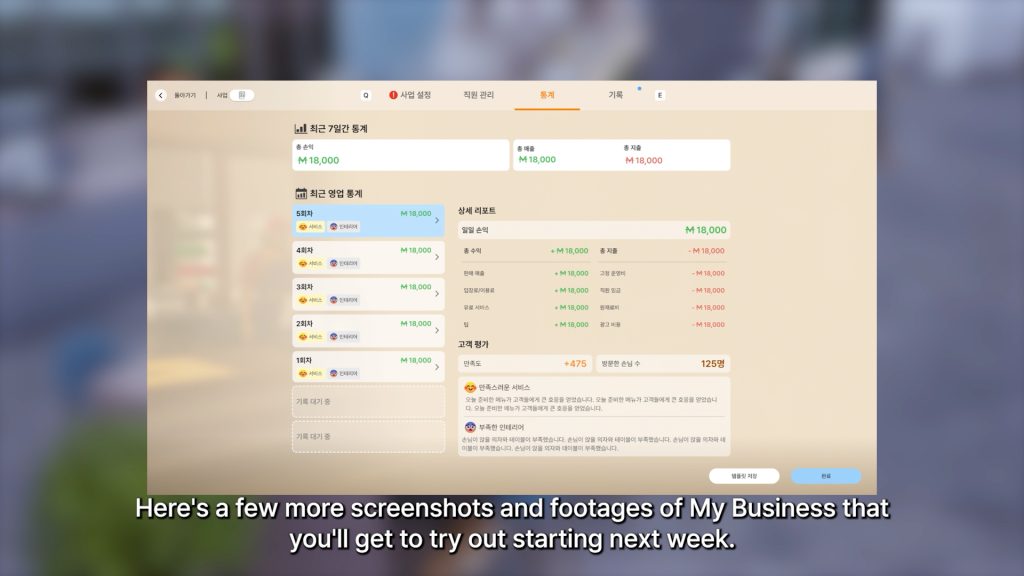
The key factors that influence customer satisfaction in a restaurant include:
Factor | Details |
|---|---|
Food Quality | Determined by the owner's Cooking skill level. Higher skill produces tastier, more satisfying meals. |
Service Speed | How quickly orders are taken and meals are delivered. Adequate staffing and pre-stocked inventory help. |
Ambiance | Decor quality, cleanliness, and the overall atmosphere of the dining area. Better furniture raises scores. |
Pricing | Competitive pricing attracts more customers. Setting prices too high discourages visits, while prices too low cut into margins. |
Employee Responsiveness | How attentive staff members are to customer needs. Well-managed employees greet and serve customers promptly. |
Relationship with Owner | Customers who have a personal relationship with the business owner tend to give higher satisfaction ratings. |
You can actively seek feedback by selecting the "Search for Tips to Improve Customer Satisfaction" option on a computer, or by asking customers directly for feedback using the self-interaction menu. Both methods provide actionable suggestions for raising your scores.
Business Value and Leveling
Like all businesses in inZOI, restaurants have a value and level system that improves with consistent management and positive customer reviews. The value of your restaurant increases as customer satisfaction climbs and as you serve more customers each day. Higher business value attracts even more foot traffic, creating a positive feedback loop.
As your business levels up, you unlock additional management options, including the ability to hire more employees and access improved equipment. Businesses left unattended for multiple days lose reputation quickly, reducing both customer count and revenue. Consistent daily operation is important for maintaining and growing your restaurant's standing.
Revenue and Operating Costs
Revenue comes from customers ordering and paying for meals during operating hours. The amount earned per day depends on the number of customers served, the prices on your menu, and the quality of the food. A well-run restaurant at a moderate business level can earn several thousand Meow per day, though profits vary widely depending on setup.
Operating costs include:
Daily operating fee: A fixed fee charged each time you open for business. This fee increases as your business grows in value.
Employee wages: Paid out after each business day based on hours worked and salary rank.
Ingredient costs: Every dish you cook to stock the market stand requires Meow to purchase ingredients from the refrigerator. Crafting costs add up quickly, especially when stocking group meals.
In the early days, it is common for operating fees and wages to exceed revenue, making the restaurant unprofitable until customer volume picks up and your Cooking skill produces higher-value dishes. Patience is key. As your star rating increases and you begin stocking premium group meals, daily profits should overtake costs. Some experienced players report net earnings of 4,500 to over 13,000 Meow per day once the business matures.
Comparison with Other Food Businesses
inZOI offers three food-related business presets: the Cafe, the Bakery, and the Restaurant. While all three involve preparing and selling food or beverages, they differ in their skill requirements and product focus.
Business Type | Primary Skill | Product Focus |
|---|---|---|
Cooking / Barista | Coffee, beverages, and light snacks | |
Bread, pastries, cakes, and desserts | ||
Restaurant | Full cooked meals and group dishes |
Restaurants tend to have higher ingredient costs than cafes because cooked meals require more expensive inputs. However, the potential revenue per item is also higher, especially for group meals. Cafes can supplement meal sales with entrance fees and hourly charges, which restaurants do not typically use. Bar businesses occupy a separate niche focused on drinks and nightlife.
Other Business Types
The Restaurant is one of nine business type presets available in the v0.5.0 business system:
Cafe
Bakery
Restaurant (this article)
Bar
Florist Shop
Confectionery
Gym
School
Open Lot
Service Flow Overhaul (v0.10.0)
A developer letter on August 14, 2026 announced a rework of how restaurants serve customers, targeted at the September 2026 update. It is not in the live build, so the operating details elsewhere on this page still apply for now.
The described flow moves away from customers being handled individually. Groups arrive and dine together, take available seats, and place orders with a waiter. The chef prepares the requested dishes with cooking times streamlined against the standard cooking system so that group orders do not stall, and the waiter serves each table. Customers eat, pay the bill, and leave. An interaction permission system decides who can use each object, which is intended to stop employees from sitting in customer seats. Restaurants standing unused around the cities are to be renovated so they can use the same functionality.
v0.10.0 Business Management Changes (September 3, 2026)
The title of a business owner can be edited.
Zois with no prior relationship with the owner can be hired.
Hire candidates are listed in descending order of their required skill level.
Work schedule and role presets can be applied to employees after hiring.
Part-time employees are each assigned half of the business's operating hours.
If required furniture is missing when operation begins, the owner is notified. Luxury restaurants cannot open at all until every required piece is placed.
The recipe selection screen groups recipes by category.
The owner can ask a customer to leave the building, which bars that Zoi from entering for a period of time.
The dining loop itself also went live in this update: a group is seated, orders, is served by a waiter, pays, and leaves. That flow can be operated at a restaurant business the Zoi owns.
September 2026 Hotfixes and Planned Changes
Version or letter | Change |
|---|---|
v0.10.2 (September 9, 2026) | Fixed Dowon's Sodam Restaurant not operating properly when continuing an existing save |
v0.10.3 (September 10, 2026) | Fixed premium Restaurant Business operations not functioning properly when Smart Zoi was enabled |
v0.10.4 (September 16, 2026) | Fixed the designated uniform not being worn after buying a premium restaurant previously run by an NPC Zoi, serving failures at premium restaurants, a false Placement Required message in Business Property Build Mode, and a false Preparation Incomplete warning in the Business app |
September 9, 2026 developer reply | A separate set of restaurant-mode options is being added to the business settings interface, drink and baking or pastry recipes are to be temporarily disabled while the dining flow is improved, and break-time settings and business events are under consideration |
September 4 and 18, 2026 letters | Presets for restaurant interactions and a Build Mode editor for lot behaviour, so customers keep to customer seats while staff use staff chairs and tools, are planned for October 2026 |
Tips
Level up your Cooking skill before opening the restaurant. A higher skill means better food from day one, which translates to stronger opening reviews and faster business growth.
Start with a modest menu and expand as your Cooking skill grows. Overextending early leads to inconsistent food quality that frustrates customers.
Stock your market stand fully before opening hours. Pre-cooking meals outside of business hours means customers see a full display immediately and do not have to wait.
Prioritize group meals once you unlock them at Cooking level 5. Fried Chicken and Steak sell for roughly ten times their crafting cost, making them the most profitable items on your menu.
Build relationships with skilled Zois in your neighborhood before opening. Since you can only hire acquaintances, having a roster of candidates ready makes staffing much easier.
Handle cooking yourself whenever possible. Your owner Zoi is more productive than hired employees, who sometimes get distracted chatting with guests instead of preparing food.
Invest in decor and ambiance. Customers rate the overall dining experience, not just the food quality. Higher-quality furniture directly improves satisfaction scores.
Check customer feedback daily, either through end-of-day reviews or by asking customers directly. Adjust your menu, pricing, and layout based on what they tell you.
Keep the restaurant open consistently. Businesses left unattended for multiple days lose reputation, customer count, and revenue.
Watch your operating costs carefully in the early days. It is normal for the restaurant to lose money at first. Focus on leveling up your Cooking skill and building customer volume rather than trying to turn a profit immediately.
See Also
Business
Cooking
Cafe Business
Bakery Business
Bar Business
Meow
Careers
Smartphone
Build Mode