

Overview
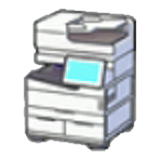
The 3D Printer is a crafting feature in Pokemon Pokopia that allows players to duplicate furniture and decorative items by photographing them. It is located inside rebuilt Pokemon Centers, on the left side of the interior. The 3D Printer lets you create copies of items even if you have not learned their crafting recipe, making it a powerful shortcut for expanding your furniture collection.
How to Unlock
The 3D Printer becomes available once you rebuild your first Pokemon Center. The unlock chain is:
Build your first Leaf Den (basic habitat).
Place at least 3 pieces of furniture inside the Leaf Den.
Talk to Charmander, then bring it to Professor Tangrowth to receive the Ditto Flag.
Place the Ditto Flag, then speak with Professor Tangrowth again.
This unlocks the Pokemon Center Rebuilding Request once your Environment Level reaches 3.
Purchase the Pokemon Center Rebuilding Kit for 1,000 Life Coins from the PC Shop.
Build the Pokemon Center in any of the five areas.
Once built, the Pokemon Center interior contains three features: a healing machine (restores PP once per day for free), the 3D Printer (on the left side), and space for Trading Pokemon to operate.
How to Use
Step | Description |
|---|---|
Take a Reference Photo | Press Minus (-) to open the camera. Press Y to switch into Object Mode. Point the camera at the item you want to copy. When a label appears with the item's name, take the photo. It is saved under the "Reference Photos" section of your album. |
Visit the 3D Printer | Go to any rebuilt Pokemon Center and interact with the 3D Printer on the left side of the room. |
Select the item | Choose from your photographed items. The printer shows the Pokemetal cost for each copy. |
Print copies | Confirm to create as many copies as you want, spending Pokemetal for each one. |
Object Mode and Item Recognition
The camera has two modes. When you first open it with the Minus (-) button, you are in standard photo mode, which takes scenic pictures but does not register items for the 3D Printer. To take a valid reference photo, press the Y button to switch into Object Mode. In Object Mode, the camera scans whatever you are pointing at and attempts to identify it. When the item is correctly in focus and recognized, its name appears on screen as a label above the object. Only then should you take the photo.
If the item name does not appear, try moving closer, adjusting the camera angle, or making sure nothing is blocking the object. Items that cannot be identified in Object Mode cannot be printed. You can store up to 20 reference photos in your album at once. Previously used photos are marked with a green checkmark so you can keep track of what you have already printed. If you reach the 20-photo limit, delete older reference photos to make room for new ones.
Pokemetal Cost
The Pokemetal cost varies by item. Small single-block furniture items cost as little as 2 Pokemetal, while larger or rarer items can cost up to 5 Rare Pokemetal per copy. Multiple copies can be made in one session as long as you have sufficient Pokemetal. Because Pokemetal is relatively expensive to gather, it is worth stockpiling before large printing sessions.
What Can Be Printed
Category | Details |
|---|---|
Furniture and decorative items | Any placeable object you have a Reference Photo of. |
Items you don't have the recipe for | If you photograph it, you can print it without needing the crafting recipe. |
Dream Island items | Rare furniture found on Dream Islands can be photographed and printed. |
Items from other players' worlds | Visit a friend's island, photograph their rare furniture, then print copies at home. This is one of the 3D Printer's most powerful applications. |
items: Furniture found on Cloud Islands can be photographed and printed in your main world. |
What Cannot Be Printed
The 3D Printer only works on furniture and decorative objects. It cannot print:
Category | Reason |
|---|---|
Building kits | (Leaf Den Kit, Pokemon Center Rebuilding Kit, etc.) |
Raw materials | |
Food items | (cooked meals, berries, ingredients) |
Seeds and plants | -- |
Quest items | -- |
If the camera in Object Mode cannot identify and label an object, it cannot be printed. Move closer or adjust the angle if the label does not appear.
Detailed Restrictions
The 3D Printer is limited to furniture, decorative items, and certain placeable objects. Beyond the categories listed above, the following items are also confirmed to be non-printable:
Restriction | Details |
|---|---|
Town Map | and other key progression items that are designed to remain unique in your inventory |
Building Kit structures | (Leaf Den Kit, Pokemon Center Rebuilding Kit, Legendary Bird Kits, and all other pre-designed building kits purchased from the PC Shop) |
Unique tools | that are intended to remain one-of-a-kind throughout your playthrough |
As a general rule, if the camera in Object Mode cannot identify and label an object, it falls into a restricted category and cannot be duplicated. The 3D Printer is designed to copy decorative and habitat-related items, not game progression tools or structural kits.
Daily Photo Limit
Object Mode photography has a daily limit on new reference photos. After taking your allotment for the day, you must wait until the next daily reset (5:00 AM) to photograph more items. Using the clock trick to skip ahead uses the next day's allowance as well. Once photos are saved in your album, you can print unlimited copies from them at any time (Pokemetal permitting).
Where to Find Pokemetal
Pokemetal is refined from Pokemetal Fragments. The main sources are:
Source | Details |
|---|---|
Primary farming source. Contains Pokemetal Fragments, Crystal Fragments, and Wastepaper. Visit once per day. | |
Pokemetal Fragments can be found in underground mines. | |
Pokemetal Fragments also appear in Skylands mines. | |
General exploration | Pokemetal Fragments can occasionally be picked up while exploring. |
Pokemon Center bartering | Pokemetal can be purchased for 2,000 barter points via the Trading system. |
Bring food for Dream Island trips, as you need powered-up Rock Smash to break ore deposits. You cannot access home storage while on a Dream Island, so clear inventory space before visiting.
Sharing Items with Friends
The 3D Printer is especially useful in multiplayer. When visiting a friend's world, you can photograph any item they have placed, even if it is something you have never seen before. Back in your own world, use that photo at the 3D Printer to create your own copy. This makes the 3D Printer one of the best ways to share rare furniture designs across friend groups.
Painting and Customization
The painting system (unlocked by recruiting Smearguru in Bleak Beach) allows recoloring furniture. When you photograph a painted item, the Reference Photo captures the item as it currently looks. Whether 3D-printed copies retain the custom paint job has not been fully confirmed, so it is recommended to test with a low-cost item before committing Pokemetal to painted furniture.
Tips
Stock up on Pokemetal Fragments by visiting Sky Dream Islands regularly. The Dragonite Doll is the key.
When visiting friends, take photos of everything interesting. You can decide what to print later.
In Object Mode (Y), make sure the camera fully identifies the item before taking the photo. If the label does not appear, move closer or adjust the angle.
The 3D Printer is available as soon as you rebuild a Pokemon Center in any area. Prioritize rebuilding one early.
Save your daily photo allowance for rare or hard-to-craft items.