

Blinding Flash
Guide to the Blinding Flash utility skill in Crimson Desert, covering controls, combat crowd control, the Blade Flash finisher upgrade with auto-dash flurry mechanics, boss weak points, burning vines, lighting lanterns, cooking food with focused light, midair scouting, light-reflection puzzles, powered cable detection, and POI scanning.
On This Page
Overview
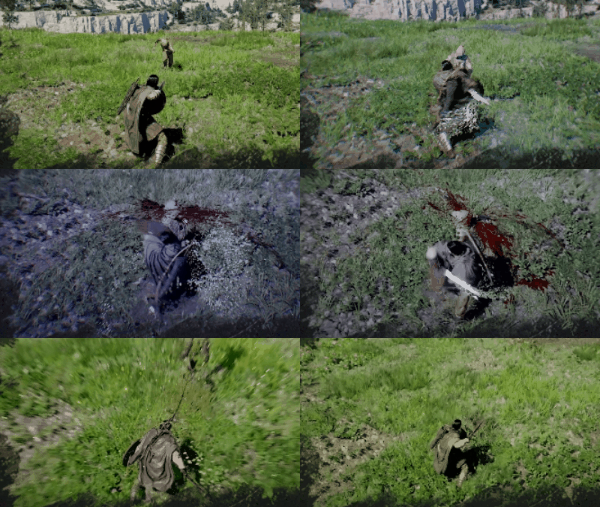
Blinding Flash is a utility skill in Crimson Desert that serves triple duty as a combat crowd-control tool, a puzzle-solving mechanic, and an exploration aid. It is available to all three playable characters (Kliff, Damiane, and Oongka) and belongs to the Stamina (Blue) branch of the skill tree. When activated, the character raises their sword and reflects concentrated sunlight to temporarily blind nearby enemies, reveal hidden passages, burn thorny vines, and solve light-reflection puzzles throughout the world of Pywel.

The skill is automatically granted the first time Kliff enters the Abyss during the Prologue, immediately following the encounter at Greymane Camp. A short in-game tutorial walks the player through the basic activation and Focus Light inputs at that point. However, this tutorial passes quickly and is easy to forget by the time Blinding Flash is needed again later in the story.
Blinding Flash is one of the most versatile skills in Crimson Desert. Unlike most abilities that serve a single purpose, Blinding Flash functions as a combat crowd-control tool, a puzzle-solving mechanic, and an exploration aid all in one. Kliff raises his sword and reflects concentrated sunlight to temporarily blind enemies, burn through obstructions, charge ancient devices, reveal hidden points of interest, and even cook raw meat on the ground.
Blinding Flash is a free skill with no cooldown and no Stamina cost, making it available for use at any time. It is unlocked automatically during the Prologue when Kliff first enters the Abyss following the encounter at Greymane Camp. Other playable characters such as Damiane and Oongka have it available from the moment you gain control of them.
This guide covers every use case for Blinding Flash: from blinding groups of enemies and executing the Finisher combo in combat, to solving light-reflection puzzles and burning away thorny vines blocking your path, to scanning for points of interest while mounted or in midair.
Skill Details
Detail | Info |
|---|---|
Character | |
Skill Tree | Stamina (Blue) |
Utility | |
Spirit Cost | No cost (free to use) |
Cooldown | None |
Cast Time | Approximately 0.8 seconds |
Blind Duration | Approximately 1 second |
How to Unlock | Auto-unlock |
Input | L1 + R1 |
How to Use Blinding Flash
Activating Blinding Flash requires pressing both inputs at the same time. The game will not recognize the input if the buttons are pressed one after the other. Once in the Blinding Flash stance, the character holds their sword aloft. This reflects light outward. From this stance, you can blind enemies in your immediate vicinity, focus concentrated light on a specific target, or scan for points of interest.
Controller (PlayStation / Xbox)
Press L1 + R1 (PlayStation) or LB + RB (Xbox) simultaneously to enter the Blinding Flash stance.
Release R1 / RB while continuing to hold L1 / LB. Once Focus Light is active, R1 / RB can stay released; holding L1 / LB alone is enough to sustain the concentrated beam.
While holding L1 / LB, aim the crosshair at your target (a light source, vine, or enemy).
Keep the crosshair on the target and wait for the audio or visual cue confirming the effect has triggered.
Keyboard and Mouse
Press Ctrl + Left Click at the same time to enter the Blinding Flash stance.
Release Left Click, then press and hold Ctrl again to start focusing concentrated light. Once Focus Light is active, Left Click can stay released; holding Ctrl alone maintains the beam.
Aim the crosshair at your target and hold until the effect triggers.
The activation keybind can be remapped in the Controls settings. On PC, some players find it more comfortable to bind Blinding Flash to Mouse 4 or Mouse 5.
A common stumbling point for new players is the two-step input. Blinding Flash will not activate if the buttons are pressed one after the other; both inputs must be hit simultaneously to enter the stance. On controller this tends to feel natural, but the simultaneous Ctrl + Left Click on keyboard can be awkward during fast-paced combat. Players with a PlayStation DualSense Edge or Xbox Elite Controller can map one of the rear paddle buttons to Blinding Flash for a single-press activation, which makes the skill much easier to use under pressure.
Combat Uses
In combat, entering the Blinding Flash stance provides brief crowd control by blinding and dazing all nearby enemies. This temporarily interrupts their actions and immobilizes them for a short duration. The crowd-control effect is particularly valuable when fighting groups of enemies, since it gives you a window to reposition, consume a recovery item, or switch to an offensive follow-up. Because the base skill has no Spirit cost, you can use it freely whenever you need breathing room.
Blinded enemies display a distinctive apparition-like visual effect over their bodies, making it easy to confirm at a glance which targets have been affected. Because the blind lasts only about one second, any follow-up attack or Blinding Flash Finisher input needs to happen right away.
Blinding Flash Finisher
After unlocking the Blinding Flash Finisher upgrade, you can press R2 / RT / Right Click while enemies are still blinded to execute a devastating follow-up combo. The character pulls their sword to the side to reflect light, then holds heavy attacks to perform approximately 6 rapid heavy strikes in an incredibly short window. During this finisher sequence, time slows down significantly, preventing enemies from retaliating while the barrage plays out. The final slash of the finisher unleashes a shockwave that knocks back any remaining enemies in range.
What makes the Blinding Flash Finisher especially potent is how it interacts with damage scaling. Because all six hits land as heavy attacks, the finisher's total output scales directly with your damage per hit rather than your attack speed. The more damage each individual swing deals, the more value you get from those six compressed strikes. This means the finisher benefits enormously from weapon upgrades, damage buffs, and Force Palm combos that boost per-hit damage. It is arguably the best early game DPS option available and one of the most efficient ways to burst down tough enemies before you have access to a full spread of combat abilities.
Recommended Early Unlock
Because of its raw damage output and low barrier to entry, the Blinding Flash Finisher is widely recommended as the first combat ability to unlock after learning the fundamentals. It remains effective well into the late game, especially against bosses where windows to deal free damage are limited. The stun from the base Blinding Flash creates a reliable opening, and the Finisher converts that opening into the highest burst damage available at any point in the early skill tree.
Blade Flash Activation and Controls
Unlocking the finisher requires Blinding Flash Lv.1 plus 1 Abyss Artifact. Once unlocked, activating the upgraded form (called Blade Flash) follows a specific sequence. Hold L1 + R1 on PlayStation or LB + RB on Xbox to enter the Blinding Flash stance. While in the stance, use the left stick to aim concentrated light toward enemies to blind them. Once targets are blinded, press R2 (PlayStation) or RT (Xbox) repeatedly to launch into the flurry of strikes.
Flurry Mechanics and Auto-Dash
When the flurry begins, the world slows down around Kliff. This slowdown is not cosmetic; it genuinely prevents enemies from moving or attacking during the flurry, meaning Kliff takes no damage while slashing. Each press of R2/RT delivers another strike, and Kliff automatically dashes from one enemy to the next as long as he has Spirit remaining. You do not need to aim or manually close the distance between targets. The auto-dash chains seamlessly from one enemy to another across the entire group.
The flurry concludes with a massive final slash that sends out a shockwave, knocking back any enemies that survived the onslaught. This closing hit covers a wide area and is both a finishing blow and a crowd-control tool for anything still standing.
Spirit Economy During Blade Flash
One of the reasons Blade Flash is so effective is its Spirit economy. Every successful attack during the flurry restores a portion of Kliff's Spirit, and landing kills restores even more. Because you are hitting multiple enemies in rapid succession, the Spirit spent on the ability is almost entirely refunded by the time the flurry ends. Against groups of three or more enemies, you will frequently finish the Blade Flash sequence with more Spirit than you started with, making it functionally free in most mob encounters.
Comparison to Ninja Gaiden's Ultimate Technique
Players familiar with the Ninja Gaiden series will recognize the Blade Flash mechanic immediately. The combination of charging up, auto-dashing between targets, and delivering a devastating chain of strikes while the world slows down closely mirrors Ninja Gaiden's Ultimate Technique. Pearl Abyss has not explicitly cited Ninja Gaiden as an influence, but the mechanical similarity is unmistakable. Both techniques reward patience during the charge phase with an extremely powerful, nearly invincible attack sequence that wipes groups of enemies in one activation.
Destroying Shielded Arcane Enemies
In the northern reaches of Pywel and around ancient ruins, players may encounter floating arcane mages protected by energy shields. These enemies are fast and difficult to hit with conventional melee attacks, since their shields deflect most physical strikes. However, Focused Light (the charged beam variant of Blinding Flash) bypasses their shields entirely and destroys them quickly. When exploring these areas, keeping Blinding Flash ready is the most reliable way to deal with shielded arcane enemies before they become a nuisance.
Revealing Boss Weak Points
Blinding Flash has a specialized combat application against certain bosses. During the fight with Tenebrum, a flying specter encountered later in the story, aiming the Blinding Flash beam at the boss exposes a hidden weak point marked by a square indicator on its body. You can then strike the revealed weak point for increased damage. This mechanic means Blinding Flash is worth considering in boss encounters, not just against regular enemies.
Exploration and Utility Uses
Point of Interest Locator
When you activate Blinding Flash while standing at an elevated vantage point, the skill highlights notable points of interest across the surrounding landscape regardless of whether you have explored that area of the map. Highlighted locations often include Abyss Nexuses (fast travel points), and the marked areas frequently contain Abyss Artifacts or other collectibles. This makes Blinding Flash a useful scouting tool whenever you arrive in a new region.
You can also channel Blinding Flash while mounted. Activating the skill on horseback marks nearby locations with a glowing blue light, similar to the orange glow that the Lantern produces. This is handy when riding through unfamiliar territory, since you can scan for points of interest without ever dismounting.
Aerial Scouting Technique
Blinding Flash can also be activated while airborne, which opens up an advanced scouting technique. Jump from a high cliff or elevated ledge, then trigger Blinding Flash at the peak of your jump. Scanning from midair gives you a completely unobstructed view of the terrain below, revealing points of interest across a much wider area than scanning from the ground ever could. Once you have identified your next destination from up high, you can drop directly toward it rather than hiking across the landscape on foot. This jump-and-scan approach is especially useful when entering unfamiliar regions, because a single midair pulse can mark out Abyss Nexuses, collectible clusters, and quest objectives all at once.
Revealing NPC Pocket Contents
Blinding Flash has a second scouting application beyond point-of-interest detection: it also reveals the items in NPC pockets. While in the Blinding Flash stance, the item each nearby NPC is carrying appears as a glowing silhouette at their hip. The exact shape of the silhouette tells you what item type it is, which makes Blinding Flash a valuable pre-scout tool for pickpocketing.
The shape to watch for is a cube. Cube silhouettes always correspond to Abyss Artifact pickups. An NPC showing a cube in their pocket is a guaranteed artifact pickpocket, and the stolen artifact notification appears on the left side of the screen rather than the usual right-side loot feed.
Blinding Flash's detection stance normally slows your character to a walk, which makes scouting a full room tedious. You can bypass this slowdown with a small ledge trick. Activate Blinding Flash on a raised lip or step, then walk off the edge: as soon as you leave the ground, the slow-motion stance cancels and you drop into fast mode while the pocket X-ray effect is still active. This lets you move through crowded interiors like the Scholastone Institute eating quarters at normal running speed while still seeing every NPC's pocket silhouette.
Remember that the steal prompt only appears if you are wearing a criminal mask. Blinding Flash will still reveal the pocket contents without a mask equipped, but you will not be able to follow through on the pickpocket.
Revealing Sanctum Secret Puzzles
After cleansing a sanctum, use Blinding Flash while looking at the sanctum dial to reveal the hidden puzzle. The focused light beam causes hidden markings on the dial to glow, exposing the correct configuration needed to solve the sanctum secret puzzle. Without Blinding Flash (or another light source), the markings remain invisible and the puzzle cannot be solved. This is one of the most commonly missed uses of the ability, since many players leave the sanctum immediately after cleansing without checking for additional secrets.
Identifying Gold Bar Carriers
When using Blinding Flash to reveal NPC pocket contents for pickpocketing, pay attention to stacked icon silhouettes that appear at an NPC's hip. A stacked cube icon specifically indicates that the NPC is carrying a gold bar. Gold bars are among the most valuable pickpocketing targets in the game, so scanning crowds with Blinding Flash (or your lantern, which has the same pocket-revealing effect) before committing to a theft helps you prioritize the highest-value marks.
Burning Vines
Throughout Pywel, thorny red vines block pathways, hide collectibles, and seal entrances to areas like the Spire of Insight. To burn them away, enter the Blinding Flash stance and aim the concentrated light beam at the vines. After a moment, they will catch fire and disappear, clearing the path. You can also burn vines with fire arrows, but Blinding Flash has no ammunition cost and works anywhere sunlight is available.
Lighting Lanterns and Other Burnable Objects
Beyond vines, the focused light beam can ignite most burnable objects in the environment. Stone lanterns, wooden barriers, and dry brush all catch fire when exposed to the concentrated beam for a few seconds. Several sanctum puzzles require lighting lanterns in a specific sequence, and Blinding Flash works as a free alternative to fire arrows for completing those objectives. As long as sunlight is available, you can ignite as many objects as needed without spending ammunition.
Cooking Food with Focused Light
The concentrated light beam generates enough heat to cook raw food on the spot, producing basic grilled items without a bonfire or Field Pot. This is one of the more unusual applications of Blinding Flash. Even Pearl Abyss's own marketing lead, who logged over 400 hours during development, was surprised when the community discovered this trick.
To cook food using focused light:
Open your inventory and discard the raw food item (meat, fruit, or vegetables) so it physically lands on the ground in the game world.
Activate Blinding Flash (L1 + R1 / LB + RB / Ctrl + Left Click), then hold the block input to channel focused light.
Aim the light beam at the food on the ground and keep it focused for a few seconds.
The item will transform into its grilled version once enough heat has been applied.
You can produce Grilled Meat, Grilled Fruit, and Grilled Vegetables this way. All three restore health, making them useful emergency healing options when you are far from a cooking station. If you have a large supply of raw ingredients, drop multiple items at once and sweep the beam across them for quick batch grilling. The process is nearly instant per item.
Light-grilled food is weaker than proper Field Pot recipes prepared at bonfires. The healing and stat bonuses are lower. Still, field cooking is handy when you are low on health during exploration and do not want to backtrack to a camp.
Limitation: Blinding Flash requires ambient sunlight to function. The ability does not produce a usable beam indoors or at nighttime, so plan field cooking for daytime outdoor areas.
Light-Reflection Puzzles
Light-reflection puzzles appear throughout ancient ruins and Abyss areas in Crimson Desert. These puzzles require you to direct concentrated light at a glowing device or crystal until it activates. The basic process works as follows:
Stand in front of the light source or crystal and enter the Blinding Flash stance (L1 + R1 / LB + RB / Ctrl + Left Click).
Release the second button (R1 / RB / Left Click), then press and hold the first button (L1 / LB / Ctrl) to focus concentrated light.
Aim the crosshair directly at the glowing element. The reticle needs to sit precisely on the light source, not on the surrounding wall or door.
Hold your aim for roughly three to five seconds. After a brief delay with no visible feedback, the device will begin to glow blue and the light will shift from orange to purple and back to orange, indicating the puzzle is solved.
While Focus Light is active, it leaves a visible light trail behind your crosshair movements. This trail helps you see where you have already aimed, which is particularly useful in puzzles that require directing light across multiple points in sequence. If the trail disappears, the Focus Light channel has been interrupted and you need to re-enter the Blinding Flash stance before trying again.
A common mistake is repositioning or releasing the button during the initial delay, since the game provides no immediate visual feedback for the first few seconds. Stay steady and keep aiming at the target until the color shift begins.
Detecting Powered Cables
Beyond activating Abyss Devices, entering the Blinding Flash stance near a cable network in Abyss environments reveals the power state of each cable. Powered cables glow visibly while unpowered ones stay dark. This makes it much simpler to trace which circuits are active and which still need a power source, saving significant time in larger puzzle rooms where multiple devices feed into a central mechanism.
Beyond combat and puzzles, Blinding Flash is a powerful exploration tool. When activated, it highlights nearby points of interest with a glowing blue light, marking locations that often contain Abyss Artifacts, Abyss Nexuses (fast travel points), collectibles, or quest objectives.
Scanning for Points of Interest
Enter the Blinding Flash stance while standing in any open area. Nearby points of interest will be highlighted with a blue glow, similar to the orange glow produced by the lantern.
The scan works while standing on the ground, while mounted on your horse, and even while in midair.
Highlighted locations frequently contain Abyss Nexuses (used for fast travel), sealed Abyss Artifacts, or other collectibles worth investigating.
Midair Scanning
For the widest possible scan radius, activate Blinding Flash while airborne. Jump off a high cliff or elevated vantage point and enter the stance at the peak of your jump. Scanning from midair provides a completely unobstructed view of the terrain below, revealing points of interest across a much wider area than scanning from the ground. After the scan, you can drop directly toward your next objective.
This jump-and-scan approach is especially useful when entering unfamiliar regions. A single midair pulse can mark out Abyss Nexuses, collectible clusters, and quest objectives all at once, saving you from running around aimlessly.
Mounted Scanning
You can activate Blinding Flash while riding your horse without dismounting. This makes it efficient to sweep across large stretches of open terrain. Ride through a region at full speed, periodically entering the Blinding Flash stance to check for nearby points of interest. When you spot a blue glint in the distance, ride toward it to investigate. This is one of the fastest ways to discover undiscovered Abyss Nexuses and hidden treasures across the world map.
Skill Progression
Blinding Flash has one upgrade that branches from it as you invest more Abyss Artifacts.
Skill | Effect | How to Unlock | |
|---|---|---|---|
Rush in and deliver a rapid flurry of strikes while enemies are blinded. The final slash unleashes a shockwave that knocks back survivors. | Spend 1 Abyss Artifact, or observe the skill in action during gameplay ("Watch and Learn" mechanic) | R2 / RT / Right Click while enemies are blinded |
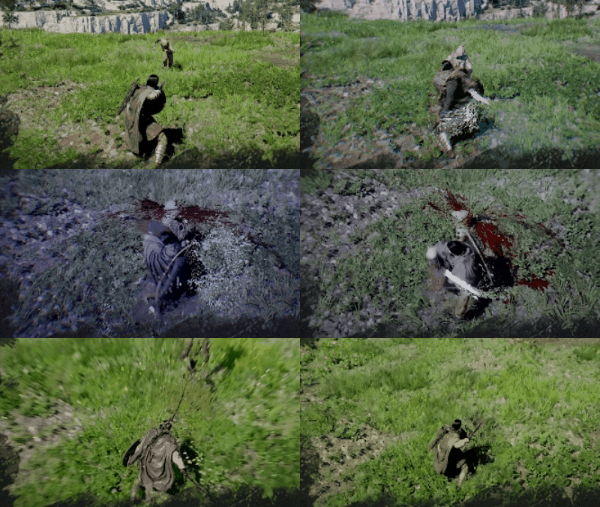
The Blinding Flash Finisher costs 5 Spirit per use. If you decide to respec this skill later, it will cost 1 Faded Abyss Artifact.
Mounted Usage Fix (Patch 1.02.00)
Before Patch 1.02.00, Blinding Flash had a long-standing issue where the ability would not remain active while the character was moving on a mount. The weapon would automatically sheathe after a brief moment, breaking the sustained beam and forcing players to dismount whenever they wanted to scan for hidden points of interest from horseback.
The patch resolved this issue. Blinding Flash can now be held indefinitely while moving on a mount, including while sprinting on horseback, climbing walls, and moving on foot. The character no longer auto-sheathes the weapon during these actions. This is a major quality-of-life improvement for exploration because the sustained beam is the primary tool for spotting Abyss Nexus points, Abyss Cores, and treasure walls from a distance. Players who previously dismounted every few minutes to scan the environment can now ride continuously while keeping the beam up.
Focus Light Mode
Focus Light is the secondary input you press while Blinding Flash is already drawn. It switches the skill from its basic blind-flash pulse into a sustained, tightly focused beam that is used for the most important puzzle-solving and field-utility tricks in the game. Two of the highest-value uses for Focus Light come up all the time during exploration but are easy to miss if you only use Blinding Flash as a combat opener.
Reading Sanctum Refracting Gem Puzzles
The first major Focus Light use is reading the refracting gem that sits on top of every sanctum generator. After you liberate a sanctum, the generator may still have a small floating antenna above the central gem. To trigger the Cleansing phase that awards the sanctum's Core reward, draw Blinding Flash, aim at the refracting gem, and press Focus Light. The button is LB on a controller or Control on PC. The beam lights up a ring of nodes around the generator that flash a Morse-code-style rhythm. Copy the rhythm by tapping and holding matching positions. Taps are instant presses (do not hold them down), holds end on a faint audio cue, and getting the input wrong resets the puzzle. Success lowers the antenna and drops a fragment that you hook with your Axiom Grapple and seal. See the Sanctum Secret Puzzles article for the full walkthrough, including the reward (for example the Core of Temperance from the Sanctum of Temperance). The cores feed Kuku Pot recipes.
Cooking Raw Meat on the Ground
The second Focus Light use is a field cooking trick that is invaluable when you arrive at a boss fight without prepared food in your inventory. Open your inventory, discard raw meat onto the ground so it lands as a physical item in the world, then draw Blinding Flash and enter blade mode. Aim the focused beam at the meat and hold it on the item. The beam's concentrated heat cooks the meat instantly, turning it into Grilled Meat that you can pick back up and eat for a much stronger heal than the raw version. There is no bonfire or Field Pot setup involved. Community reports suggest the same trick also works on other raw ingredients such as fruit and vegetables, though raw meat is the most reliable and the most useful in emergency boss-fight scenarios. If you find yourself at the entrance of a boss arena with nothing cooked, drop whatever raw ingredients you have and grill them on the spot before engaging.
In both use cases, Focus Light is the same exact button press (LB on controller, Control on PC) fired after Blinding Flash is already drawn. Learning the sustained-beam input early pays off throughout the entire game because these two tricks alone add a full sanctum progression path and an emergency field cooking option that most new players miss.
Tips
Blinding Flash is one of the first skills you unlock (during the Prologue for Kliff), and investing in the Finisher upgrade early gives you a powerful crowd-clearing option for the rest of the game.
The Blinding Flash Finisher performs approximately six heavy attacks in rapid succession. Because each hit scales with your damage per hit, upgrading your weapon or stacking damage buffs before using the Finisher dramatically increases its total output. Prioritize raw damage over attack speed when building around this ability.
Spirit regenerates while in Focus mode, so pair Blinding Flash Finisher with Focus for sustained use in drawn-out fights.
The base Blinding Flash has no Spirit cost, so use it liberally whenever you are surrounded. Even without the Finisher, the brief stun buys time to heal or reposition.
When exploring a new area, head to the highest point you can find and activate Blinding Flash to reveal nearby points of interest, fast travel locations, and collectible spots.
During light-reflection puzzles, do not panic if nothing happens for the first few seconds. Keep your aim steady on the glowing crystal, and the activation will follow after a short delay.
On PC, consider rebinding Blinding Flash to Mouse 4 or Mouse 5 if pressing Ctrl + Left Click feels awkward during combat.
For the widest scouting range, jump off a high cliff and activate Blinding Flash at the peak of your jump. Scanning from midair reveals points of interest across a much larger area than standing on the ground, and you can drop directly toward your next objective afterward.
If you are running low on healing items in the field, drop raw meat, fruit, or vegetables on the ground and use focused light to grill them on the spot. The grilled versions heal less than Field Pot meals, but they cost nothing to produce and work in a pinch.
Remember that Blinding Flash requires ambient sunlight. It will not work indoors or during nighttime, so stock up on grilled food and burn any troublesome vines while the sun is out before heading into caves or dungeons.
For maximum scanning range, jump past the Abyss layer boundary (the shimmering barrier visible above certain regions) and activate Blinding Flash at peak height. This surveys an enormous area at once, marking multiple objectives before you drop down to the nearest one.
Use it constantly. Blinding Flash costs nothing and has no cooldown. Get into the habit of activating it whenever you enter a new area, especially in dungeons, ruins, and unfamiliar terrain.
Always try Focus Light on glowing objects. If you see anything glowing faintly in the environment (crystals, devices, unlit torches, peculiar markings), aim your Focus Light beam at it. Many hidden interactions are only triggered by concentrated light.
Check for vines before backtracking. Thorny vines often hide shortcuts and treasure rooms. If a path appears blocked by vines, burn them away with Focus Light before assuming you need to find an alternate route.
Scan before committing to a direction. When you reach a fork in the road or an open area with multiple paths, use Blinding Flash to scan for points of interest. This helps you prioritize which direction to explore first.
Combine with elevation. The higher you are when scanning, the more terrain you can survey. Climb to rooftops, hilltops, or cliff edges before activating Blinding Flash for the most effective POI scan.
Keep your sword equipped. Blinding Flash requires the sword to be your active weapon. If you switch to the bow or another weapon, you will not be able to activate the skill. Switch back to the sword before attempting to use it.
The Finisher pays for itself. At only 5 Spirit and 1 Abyss Artifact to unlock, the Blinding Flash Finisher is one of the most efficient damage investments in the early game. Unlock it as soon as you have a spare artifact.
Practice the timing. The window between the blind landing and the Finisher activation is narrow. Practice on weaker enemies until the timing feels natural before relying on it in boss fights.
Skill Summary
Property | Details |
|---|---|
Skill Name | Blinding Flash |
Type | Utility / Combat |
Stamina Cost | None |
Spirit Cost | None (base skill); 5 Spirit (Finisher) |
Cooldown | None |
Unlock | Prologue (Abyss tutorial) |
Available Characters | |
Requirements | Sword must be equipped |
Controls
Blinding Flash uses a two-phase activation sequence. The first input enters the Blinding Flash stance, and the second input triggers the Focus Light beam for puzzle-solving and exploration scanning. You must press both inputs at the exact same time to enter the stance; pressing them sequentially will not work.
Activation (Enter Stance)
Platform | Input | Notes |
|---|---|---|
PC (Keyboard + Mouse) | Ctrl + Left Mouse Button (simultaneously) | Both keys must be pressed at the same instant. Pressing Ctrl first and then clicking will not trigger the stance. |
PlayStation | L1 + R1 (simultaneously) | Tap both shoulder buttons together. Release both after Kliff raises his sword. |
Xbox | LB + RB (simultaneously) | Same as PlayStation. Tap both bumpers together. |
Focus Light (Sustained Beam)
After entering the Blinding Flash stance, you can channel a sustained beam of concentrated light by performing a second input sequence. This is required for charging Abyss Devices, burning vines, lighting torches, and scanning for points of interest.
Platform | Input | Notes |
|---|---|---|
PC | Release Ctrl, then press and hold Ctrl again | Keep Left Mouse Button held throughout, or release it after Kliff raises his sword. Then re-press and hold Ctrl to project the beam. |
PlayStation | Release R1, then press and hold L1 | After entering the stance, let go of R1 and hold L1 to maintain the focused beam. |
Xbox | Release RB, then press and hold LB | Same as PlayStation with Xbox button equivalents. |
Aim the crosshair at your target while holding the Focus Light input. The beam follows wherever you look, so you can sweep it across an area or hold it steady on a single point.
Combat Applications
In combat, Blinding Flash is an effective crowd-control tool. The initial flash temporarily blinds all enemies in front of Kliff, causing them to stagger, pause, or clutch their heads. This interrupts enemy attacks and creates an opening for follow-up damage. Because the skill has no cooldown or Stamina cost, you can use it repeatedly throughout a fight whenever you need breathing room.
Blinding Enemies
The flash affects all enemies in a cone in front of Kliff, making it especially useful against groups.
Blinded enemies are briefly immobilized and cannot attack, block, or dodge for the duration of the stagger.
Some bosses are also susceptible to the blind effect, though the stagger window may be shorter.
Use Blinding Flash proactively before engaging a group, or reactively to interrupt an incoming attack you cannot dodge.
Blinding Flash Finisher
The Blinding Flash Finisher is an unlockable follow-up attack that turns Blinding Flash into a high-damage combo starter. After blinding enemies, hold the heavy attack input to launch Kliff into a rapid multi-hit flurry that automatically dashes between nearby targets.
Property | Details |
|---|---|
Unlock Method | Spend 1 Abyss Artifact in the Sword skill tree (Skills menu) |
Prerequisite | Blinding Flash must be at Level 1 |
Spirit Cost | 5 Spirit per activation |
Activation Input | Hold RMB (PC) / R2 (PlayStation) / RT (Xbox) immediately after the blind |
Damage Output | Roughly equivalent to three Light Attacks plus one Heavy Attack, delivered within about three seconds |
Final Hit Effect | Sends weaker enemies airborne, allowing juggle follow-ups |
Finisher Combo Tips
Position yourself close to enemies (but not so close that you risk getting hit before the flash goes off).
Activate Blinding Flash with the standard input (Ctrl + LMB / L1 + R1 / LB + RB).
Watch for enemy stagger animations confirming the blind effect landed.
Immediately hold the heavy attack input (RMB / R2 / RT) while the blind window is active.
Kliff dashes forward and delivers a rapid series of strikes. Do not press any additional inputs during the combo.
Timing is critical. The most common mistake is pressing the heavy attack input too early or too late. If you press it before the blind effect registers, the finisher will not activate. If you wait too long, the blind wears off.
Chain into other skills. After the finisher's final hit sends enemies airborne, follow up with Forward Slash, a Heavy Attack, or other skills for additional damage.
Pair with defensive skills. Use Focused Insight (instant parry) or Evasive Roll to protect yourself while positioning for the Blinding Flash opener.
Effective against groups. The finisher automatically targets multiple enemies if they are close together, dealing damage to each one in the combo chain.
Defeating Flying Enemies
Blinding Flash has a unique interaction with airborne enemies. Instead of simply blinding them, the reflected light can directly damage or kill flying creatures. When you encounter Harpies or other flying enemies, enter the Blinding Flash stance and aim the Focus Light beam at them. Sustaining the beam on a flying target deals continuous damage, and weaker flying enemies can be killed outright with a few seconds of focused light. This is often more efficient than trying to shoot them down with a bow.
Puzzle-Solving Uses
Outside of combat, Blinding Flash is the primary tool for solving light-based environmental puzzles throughout the world of Pywel. These puzzles appear in Sanctums, ancient ruins, Abyss areas, and scattered across the open world. All of them require the Focus Light beam rather than the initial flash.
Light-Reflection Puzzles
Light-reflection puzzles are the most common puzzle type involving Blinding Flash. They require you to direct the Focus Light beam at a glowing crystal or Abyss Device until it fully charges and activates.
Stand in front of the crystal or device. It will have a faint glow (usually orange) indicating it is ready to receive light.
Enter the Blinding Flash stance (Ctrl + LMB / L1 + R1 / LB + RB).
Activate Focus Light (release and re-press the block input) and aim the crosshair directly at the device.
Hold the beam steady on the target. The device will begin to glow blue as it charges.
The crystal's color shifts from orange to purple as it charges. Continue holding the beam.
After roughly three to five seconds (varies by puzzle), the device completes its activation cycle and the color shifts back. You will hear a distinct audio cue confirming the puzzle is solved.
Some puzzles require you to charge multiple devices in sequence. Each device must be fully activated before moving to the next.
In the Sanctum of Temperance, you must time your Focus Light to match rotating gems on a circular mechanism. Focus the light only when a gem passes through the activation point at the top of the circle.
If the beam breaks contact with the crystal before it finishes charging, some devices reset their progress. Keep your aim steady.
Burning Vines and Thorns
Thorny vines block access to many areas throughout Crimson Desert, including treasure caches, puzzle rooms like the Spire of Insight, and shortcut paths. Blinding Flash is the fastest and most reliable way to clear them.
Make sure your sword is equipped (Blinding Flash requires the sword).
Enter the Blinding Flash stance facing the vine cluster.
Activate Focus Light and aim the concentrated beam directly at the vines.
Hold the beam for a few seconds until the vines catch fire.
Release and wait for the fire to burn through completely. The path will be clear within a few seconds.
The alternative method for destroying vines is to use fire arrows: equip wooden arrows, dip the arrow tip into a nearby fire source (torch, campfire, or brazier), and shoot the vines. However, this method requires both arrows and a fire source, which are not always nearby. Blinding Flash works anywhere on the map without needing any resources, making it the preferred method.
Lighting Torches and Braziers
Unlit torches and braziers scattered throughout dungeons and the open world can be ignited with the Focus Light beam. Aim the beam at the torch head and hold it for one to two seconds. The torch will catch fire and illuminate the area. This is useful in dark caves and ruins where visibility is limited, and some puzzle sequences require specific torches to be lit to open doors or reveal hidden paths.
Cooking Meat
One of the more unusual uses of Blinding Flash is cooking raw meat without a bonfire or campfire. To cook meat with Blinding Flash:
Open your inventory and select the raw meat you want to cook.
Choose "Discard" to drop the meat on the ground in front of you.
Enter the Blinding Flash stance and activate Focus Light.
Aim the beam at the dropped meat on the ground.
Hold the beam until the meat cooks. The visual appearance changes when done.
This trick is situational but useful when you are far from any campfire and need to heal. Cooked meat restores more health than raw meat, so it is worth the extra effort when no other cooking method is available.
Frequently Asked Questions
Question | Answer |
|---|---|
Does Blinding Flash work at night? | Yes. Despite being described as reflecting sunlight, Blinding Flash works at any time of day, including nighttime and indoors. |
Can I use Blinding Flash without the sword? | No. The sword must be your active equipped weapon. Switch back to the sword if you have another weapon selected. |
Does Blinding Flash work on all bosses? | Most bosses can be blinded, but the stagger duration is shorter than on regular enemies. Some late-game bosses may resist the effect entirely. |
Can I use Focus Light while moving? | You can slowly walk while channeling Focus Light, but running or sprinting will break the stance. Keep movement minimal for best results. |
How do I know if a puzzle device is fully charged? | The device's color shifts from orange to purple and back to orange when complete. You will also hear a distinct audio cue (a metallic ringing sound). |
Is there a range limit on Focus Light? | Yes. The beam has an effective range of roughly 20 to 30 meters. Beyond that, it will not charge devices or ignite objects. Move closer if nothing is happening. |
Related Articles
Skill page: Blinding Flash
Finisher skill: Blinding Flash Finisher
Exploration: Fast Travel Guide
Exploration: Abyss Nexus
Collectibles: Abyss Artifacts
Puzzles: Sanctum of Temperance
Combat: Combat Guide
Skills: Skill Tree Guide
Character: Kliff
Weapon: Swords
See Also
Skills
The Abyss
Controls
Cooking
Combat Tips
Skill Tree Guide
Boss Strategies
Force Palm
Patch 1.03.00 Fix
As of Patch 1.03.00 (April 9, 2026), Pearl Abyss fixed an issue where Blinding Flash would deactivate while the player was moving on a mount.
Patch 1.04.00 Update
Patch 1.04.00 expanded where Blinding Flash can be used and how it picks its target. The skill is now usable in zones that previously blocked weapon draws, so players can blind cultists and other crowd-control targets in towns, sanctuaries, and other safe areas where the sword could not be drawn before. During combat the flash also defaults to the enemy you are currently facing, instead of always firing in the previous facing direction, which makes the skill far more reliable for interrupting an attacker mid-combo. The patch also fixed an old bug where Blinding Flash would deactivate while the player was moving on a mount; the effect now persists across mounted movement. See Patch 1.04.00 for the full skill change list.