

Overview
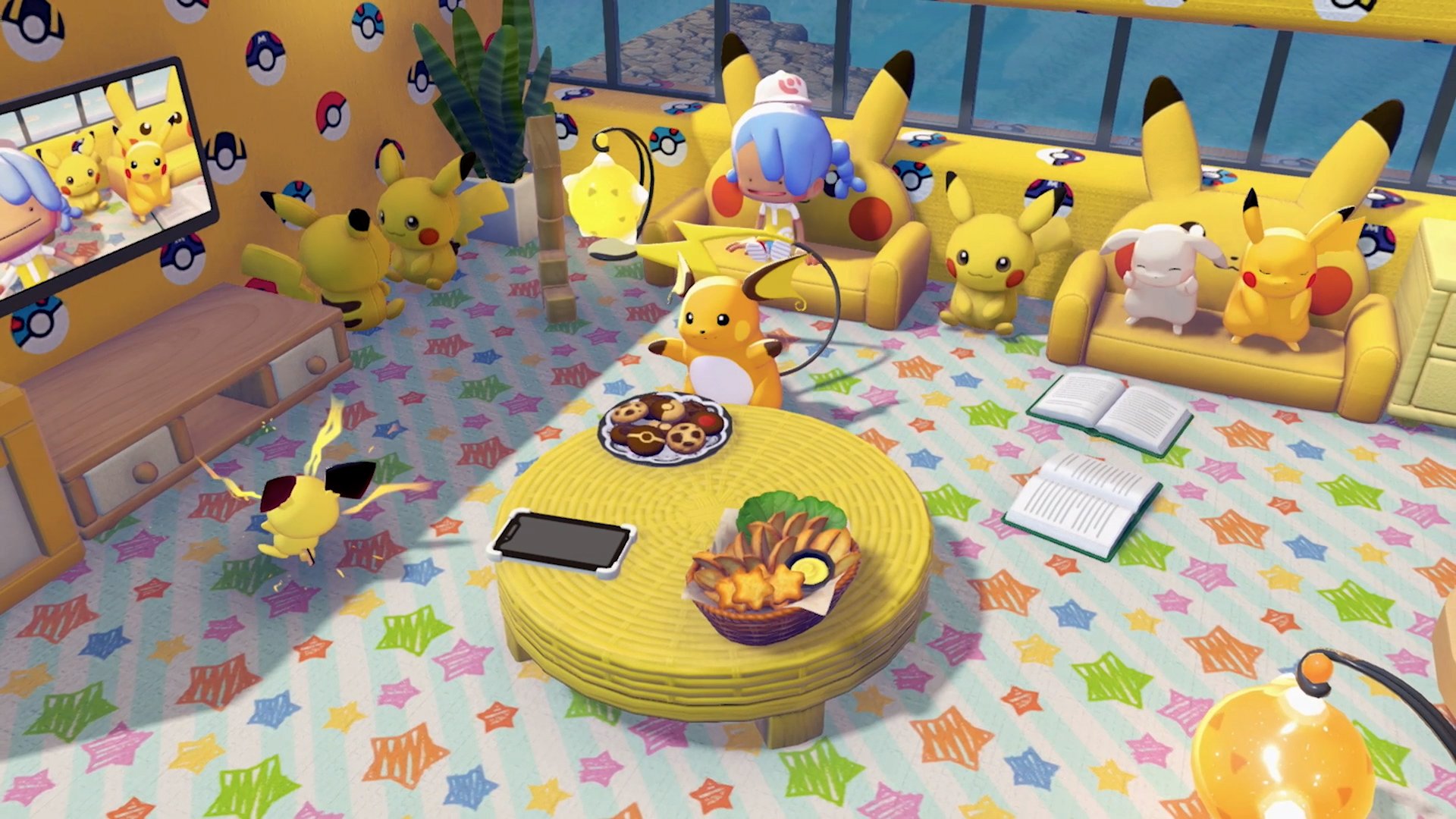
Decorating in Pokemon Pokopia is the system of placing, arranging, and customizing furniture, blocks, and decorative objects both inside and outside of structures. While building focuses on constructing walls, houses, and infrastructure, decorating is about filling those spaces with furniture that makes Pokemon comfortable, expressing your creative vision through color and design, and raising Environment Level through higher comfort scores. The decorating system includes furniture placement, the Smearguru Paint system for recoloring items, block crafting for custom surfaces, and a comfort level mechanic that ties Pokemon happiness directly to how well you furnish their homes.
Furniture Placement
Furniture can be placed indoors (inside houses and structures) or outdoors (in the open world). To place furniture:
Open your inventory (X) and select the furniture item you want to place.
Hold the item and aim at the location where you want to put it.
Use the D-Pad to adjust the item's position: Up/Down for height, Left/Right to rotate.
Press A to confirm placement. Press B to cancel.
For precise placement, use Mouse Mode (see Controls and Settings). Mouse Mode lets you point and click with a Joy-Con placed flat on a table surface, giving far more accurate positioning than stick controls. This is especially valuable for aligning furniture inside tight rooms or placing items at a distance.
Hold ZL to strafe while placing items. Strafing lets you move side-to-side without the camera rotating, making it much easier to line up furniture against walls and in corners.
Furniture Categories
Furniture is organized into several categories in the crafting menu:
Category | Examples | Effect |
|---|---|---|
Furniture | Beds, chairs, tables, sofas, drawers | Interactive; Pokemon actively use these items. Required for valid housing (3+ pieces inside walls). |
Decorations | Fences, lampposts, signs, ornamental items, mirrors | Aesthetic; contribute to visual appeal and can affect Environment Level |
Outdoor Items | Campfires, trash cans, birdhouses, planters | Designed for exterior use; many are components of habitat recipes |
Utility Items | Workbenches, Storage Boxes, Smelting Furnaces, cooking stations | Functional gameplay equipment |
Obtaining Furniture
Furniture comes from multiple entries:
Source | Description |
|---|---|
Crafting | Build furniture at a Workbench using gathered and processed materials. Most basic furniture (Log Table, Log Chair, Straw Bed) requires only Small Logs or Leaves. |
Purchase furniture from the Pokemon Center PC terminal. New items unlock as you raise Environment Level and progress through the story. | |
Lost Relics | Dig up Lost Relics from treasure blocks and bring them to Professor Tangrowth for appraisal. Appraised relics become unique furniture items. |
Found inside rebuilt Pokemon Centers, the 3D Printer (Copy Machine) lets you duplicate any item by taking a reference photo of it and paying Pokemetal. Useful for copying rare furniture without re-finding it. | |
Pokemon trades | Pokemon with the Trade specialty run shops that sell rotating furniture stock. |
Dream Islands | Abandoned structures on Dream Islands contain unique furniture and recipe scrolls not available elsewhere. |
Interior Decoration
A structure becomes a valid house when it has at least four walls, a doorway, and three or more pieces of furniture inside. Once designated as a house, Pokemon can be invited to move in. Interior decoration directly affects the occupant Pokemon's comfort level, which in turn contributes to the area's Environment Level.
Natural habitats (like Tall Grass or Flower Beds) provide limited space for furniture. Custom-built houses offer vastly more floor space for decorations, allowing you to tailor the interior precisely to each Pokemon's preferences.
Comfort Level System
Every Pokemon that moves into a house has a comfort level measuring their satisfaction with their living conditions. Comfort is rated on six tiers:
Tier | Rating | Description |
|---|---|---|
5 | Awesome | Highest rating; Pokemon gives random gifts and uses your character name |
4 | Great | Very satisfied; may have one minor preference unmet |
3 | Nice | Some preferences met; room for improvement |
2 | Average | Default starting point for newly moved-in Pokemon |
1 | No Home | Pokemon lacks housing or was displaced |
How to Raise Comfort
Comfort level is raised through several methods:
Method | Details |
|---|---|
Furniture matching | Each Pokemon has preferences for specific furniture types (Relaxation, Decoration, Toys). Check the far-right tab of the Pokemon's Pokedex entry to see their preferred furniture styles, food flavors, weather, and environmental conditions. Place at least three furniture items the Pokemon likes. |
Feeding preferred food | Gift cooked food matching the Pokemon's favorite flavor (Sweet, Sour, Spicy, Bitter, or Dry). Placing food directly in their habitat also works. |
Completingrequests | When a Pokemon has a thought bubble above its head, it is making a request. Completing these provides the largest comfort boosts. Requests may ask for specific furniture, food, materials, or construction projects. |
Bed sizing | Give larger Pokemon appropriately sized beds. A small bed assigned to a large Pokemon like Snorlax reduces comfort instead of helping. |
Direct inquiry | Ask a Pokemon "How's your comfort level?" and they tell you exactly what they need. Missing items are highlighted in orange text. |
Climate matching | Place Pokemon in environments matching their climate preferences. Water and Grass types prefer high humidity areas; Fire types prefer dry environments. Create distinct climate zones rather than flooding your entire island with water. |
The game calculates your island's overall Environment Level by adding up the comfort scores of every resident. Reaching Environment Level milestones unlocks new shop items, crafting blueprints, building kits, and attracts rarer species to your islands.
When a Pokemon reaches "Awesome" comfort, it begins addressing you by your character name instead of "Ditto" and occasionally gifts you random materials, recipes, or rare items.
The Paint System
The Paint system lets you recolor furniture, blocks, and buildings. It is unlocked by recruiting Smearguru, a variant form of Smeargle covered in colorful paint splotches.
Unlocking Smearguru
Reach Great Trainer Rank and open the checkpoint gate at Bleak Beach.
Find Smearguru in a private hut past the gate.
Smearguru asks for a crushed Leppa Berry. To make one, give a Leppa Berry to a Pokemon with the Crush specialty (like Onix or Pawmo) and ask them to crush it.
Deliver the crushed berry to Smearguru.
Build a Tantalizing Restaurant Habitat (Seat x1, Table x1, Menu Board x1, Plated Food x1) to recruit Smearguru to your island.
Smearguru teaches you the Paint Balloon recipe and unlocks the Paint system.
Creating Dyes and Paint Balloons
To paint items, you first need to create colored dyes, then craft Paint Balloons from them.
Making dyes: Give any crushable item (berries, flowers, mushrooms, or other colored materials) to a Pokemon with the Crush specialty. Different materials produce different colored dyes. For example, crushing Leppa Berries produces red dye. Experiment with different materials to discover all available colors.
Crush-specialty Pokemon include:
Pokemon | Region |
|---|---|
Crafting Paint Balloons: After Smearguru gives you the Paint Balloon recipe, craft balloons at any Workbench using the dyes you have created. Paint Balloons come in the same color as the dye used. They are consumed on use, so craft extras before starting a large painting project.
How to Paint Items
There are two ways to apply paint:
Paint Balloons: Select a Paint Balloon from your inventory, stand near the item you want to paint, and use the balloon on it. The item changes to the balloon's color.
Smearguru as a follower: Ask Smearguru to follow you. Walk to the item or building you want to paint, and Smearguru can help paint it directly. Smearguru can recolor furniture into different colors and patterns, and even paint individual segments of an item separately for multi-toned designs.
Customizable Items
Not all items can be painted. Customizable items are marked with a paintbrush icon in the top-right corner of their crafting menu entry. Items without this icon cannot be recolored. Customizable items include many furniture pieces, building blocks, fences, and structural elements.
Block Crafting for Decoration
Blocks are not just building materials; they also serve as decorative surfaces for walls, floors, and pathways. Craft decorative blocks at a Workbench to create custom looks for your structures:
Block Type | Material | Description |
|---|---|---|
Wooden Wall | Pleasant woodsy aroma; line up to build walls | |
Wooden Flooring | Hard planks that support heavy Pokemon | |
Wooden Pillar (Lower / Middle / Upper) | Sturdy trunk-like columns; three height variants for multi-story builds | |
Arched Tiling | Beautiful arching pattern when placed together; ideal for archways and entries | |
Stone Tiling | Stone | Road-category block for pathways and plazas |
Hay Pile | Straw bales that can function as rustic walls or flooring |
Additional block styles unlock as you progress through the game's regions and discover new recipes from sparkling ripples, golden Poke Balls, and the PC Shop. Mixing different block types (wooden walls with stone flooring, for example) creates varied architectural styles.
Exterior Decoration
Outdoor decoration serves both aesthetic and functional purposes. Well-decorated exteriors contribute to Environment Level and can include habitat components that attract new Pokemon. Consider these design elements for outdoor spaces:
Element | Description |
|---|---|
Pathways and roads | Stone Tiling and Wooden Flooring create navigable paths between buildings and habitats. |
Fences and gates | Enclose areas and define property boundaries. Fences double as valid walls for housing. |
Lighting | Streetlights, lanterns, and garden lights illuminate areas at night and are required for some habitats (like Illuminated Tall Grass). Lighting fixtures require electricity from Generate-specialty Pokemon or power infrastructure. |
Gardens | Plant decorative seeds (Wildflower Seeds, Beautiful-Flower Seeds, Hedge Seeds) to create colorful outdoor gardens. |
Water features | Use Water Gun to create ponds and streams. Place Water Basins and fountains for permanent water decoration. |
Signs and landmarks | Craft signs, statues, and markers to label areas and add character to your island. |
Tips
Tip | Details |
|---|---|
Check Pokedex entries first | Before decorating a Pokemon's house, open their Pokedex entry and check the far-right tab for preferred furniture, flavors, and climate. Matching preferences provides the biggest comfort boosts. |
Three furniture minimum | A house needs at least three furniture pieces inside to qualify as a valid home. Aim for more to maximize comfort. |
Ask Pokemon directly | The fastest way to learn what a Pokemon wants is to ask them. Missing items appear in orange text in their dialogue. |
Use Mouse Mode for interiors | Placing furniture inside tight rooms with stick controls is frustrating. Mouse Mode gives you precision pointing for exact alignment. |
Strafe with ZL | Hold ZL while placing items to move side-to-side without the camera swinging. Essential for wall-aligned furniture. |
Create climate zones | Water types want humidity, Fire types want dryness. Do not flood your entire island; instead, create distinct wet and dry zones matched to residents. |
Crush different items for dye variety | Leppa Berries make red, but experiment with Chesto Berries, flowers, mushrooms, and other colored items to unlock the full range of Paint Balloon colors. |
Paint Balloons are consumed on use | Craft a batch before starting a big painting project. Running out mid-project means another trip to the Crush Pokemon. |
Lost Relics are unique furniture | Appraised relics from Professor Tangrowth become one-of-a-kind furniture pieces. Use the 3D Printer to duplicate them if you want multiples. |
Mix block types for style | Wooden walls with Stone Tiling floors, Arched Tiling entryways with Hay Pile accents. Combining different materials creates visually distinct buildings. |