

Save System
Complete guide to the inZOI save system. Covers manual saving, auto-save configuration, loading and deleting saves, save file locations on Windows and macOS, save file format, managing multiple households, Steam Cloud, backing up saves, cross-platform transfers, save corruption fixes, crash recovery, and patch history.
On This Page
inZOI uses a save system that supports both manual saves and configurable auto-saves. Players can maintain multiple save files for different households and cities, allowing them to experiment with different playstyles without losing progress. Each save file stores the complete game state, including Zoi attributes, Relationships, Skills progress, lot configurations, and world state. The save system is designed to be straightforward and accessible, with no requirement to reach specific checkpoints before saving. Players can save at almost any time during an active session.
Saving Your Game
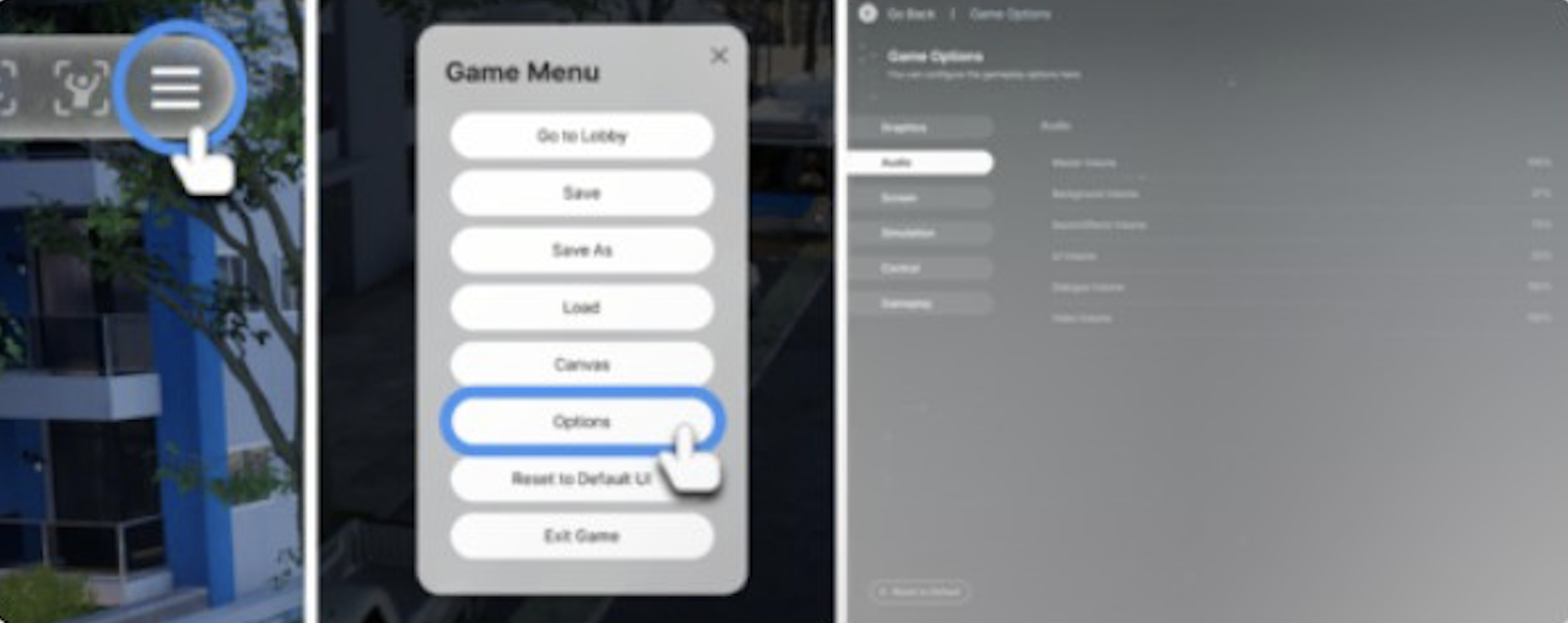
Manual saves can be triggered at almost any time through the game menu. Press Esc or select the menu icon on the far right of the top bar, then choose a save option. The save option may be greyed out during certain events, cutscenes, or timed actions; you must wait for the action to complete before saving.
Save Type | Description |
|---|---|
Save | Overwrites the current save file. Quick and simple, but no prompt for a name. |
Save As | Creates a new custom-named save file. Useful for marking milestones (weddings, before risky decisions, etc.). The current save file is preserved and not overwritten. |
Auto-Save | Automatic saves at a configurable interval. Uses a 3-slot rotation system. |
Auto-Save
The auto-save system uses 3 rolling slots (AutoSave_1, AutoSave_2, AutoSave_3). The game cycles through these slots in order, overwriting the oldest auto-save each cycle. This means you always have up to three recent auto-save recovery points, covering a wider window of time than a single auto-save slot would provide.
Auto-save settings are found under Esc > Options > Gameplay > Save:
Setting | Options |
|---|---|
Auto-save toggle | On (default) or Off |
Auto-save interval | 5, 10, 15 (default), or 30 minutes |
Auto-save works during regular gameplay, Create a Zoi mode, and Build Mode. Setting the interval to 5 minutes is recommended for players who experience frequent crashes, at the cost of slightly more frequent brief pauses. In rare cases, auto-save can trigger brief freezes or error popups in Build Mode, particularly on lots with many custom presets. If you encounter repeated crashes during auto-save while building, consider saving manually and temporarily disabling auto-save until you finish the build.
Loading Saves
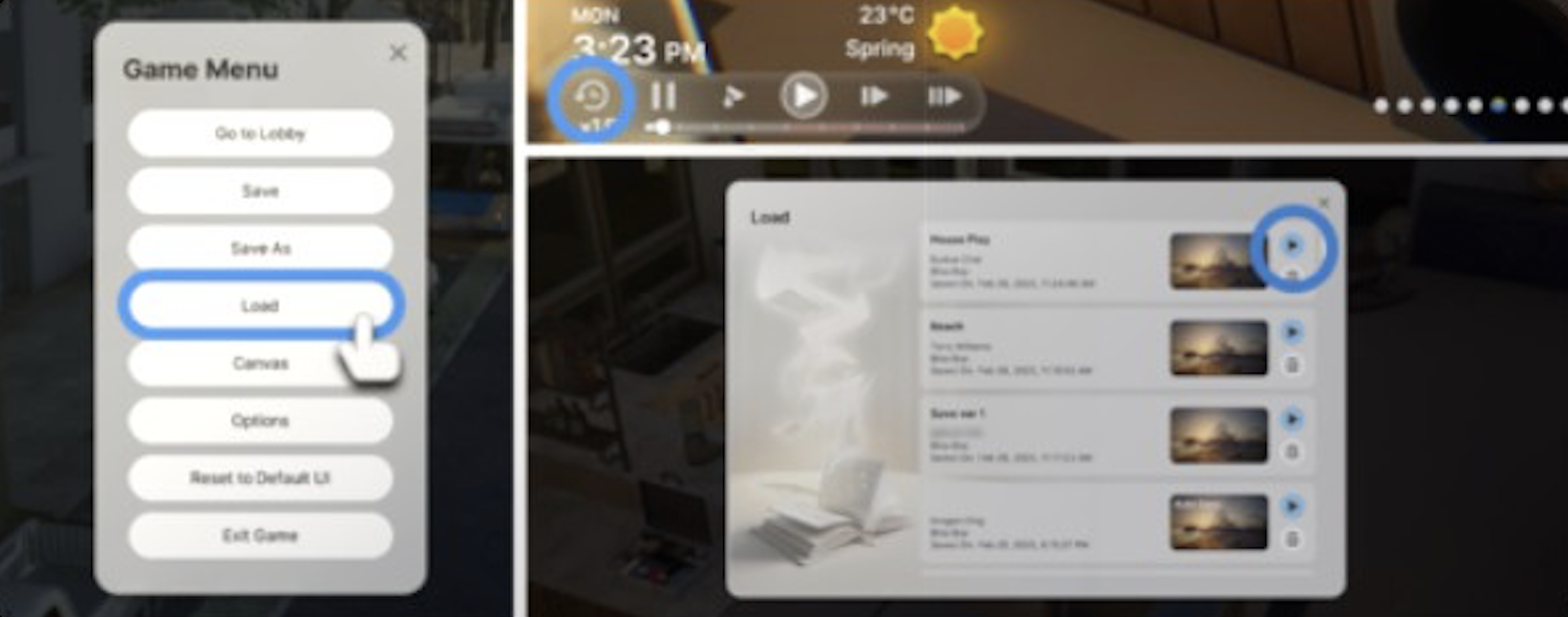
To load a save file, press Esc to open the game menu and select Load. This opens a list of all your save files, including manual saves and auto-saves. Select the save you want and confirm to load it. The game will return to the main loading screen and restore the world state from that save.
As of v0.7.0, a search function has been added to the load menu. This makes it significantly easier to locate specific saves when you have accumulated many save files over time. Simply type part of the save name into the search bar to filter the list.
Each save entry in the load menu displays a thumbnail preview image, the save name, the date and time the save was created, and the family associated with that save. Auto-saves are labeled with their slot number (for example, AutoSave_1) so they can be distinguished from manual saves.
Deleting Saves
To delete a save file, open the game menu and select Load to view the list of all save files. Select the save you want to remove, then press the trash can icon. The game will ask for confirmation before permanently deleting the save data. Deleted saves cannot be recovered through the game interface, so make sure you have a backup if you think you might need the save later.
You can also delete save files manually by navigating to the SaveGames folder on your computer and removing the corresponding save folder. See the file locations section below for exact paths.
Save File Locations
Windows
Content | Path |
|---|---|
Save files | C:\Users\{Username}\Documents\inZOI\SaveGames |
Config files | C:\Users\{Username}\AppData\Local\Blue Client\Saved\Config\Windows |
Photos | C:\Users\{Username}\Documents\inZOI\Photos |
Mod tracking | C:\Users\{Username}\Documents\inZOI\ModSave |
Character Studio presets | C:\Users\{Username}\AppData\Local\inZOI_Character_Studio |
Quick access: paste %USERPROFILE%\Documents\inZOI\SaveGames into File Explorer's address bar. The AppData folder is hidden by default; enable "Show hidden items" in File Explorer's View settings to access it. "Blue Client" is inZOI's internal development name.
macOS
Version | Path |
|---|---|
Steam version | ~/Documents/inZOI/SaveGames |
Mac App Store version | ~/Library/Containers/com.krafton.inzoi/Data/Documents/inZOI/SaveGames |
Access via Finder > Documents > inZOI > SaveGames, or press Cmd+Shift+G and paste the path. The Steam and Mac App Store versions are independent products with separate save locations. If you have both installed, saves from one version will not appear in the other.
Save File Format
Each save consists of several files within a save folder:
File | Purpose |
|---|---|
.b1 | Primary save data (binary format) |
.b2 | Secondary save data |
.thumbnail | Preview image shown in the load menu |
Portraits/ subfolder | PNG files for each character in the save |
All three core files (.b1,.b2,.thumbnail) must be created simultaneously for a valid save. The portrait PNGs are functionally important, not just cosmetic; they help the game validate saves and link character data. If portrait files are missing or mismatched, the save may fail to load or report corruption. The internal structure of.b1 and.b2 files has not been publicly documented by the developers.
Individual save files are approximately 6 MB in size for local saves. Photos are stored separately (in the Photos folder), which keeps save file sizes small compared to similar life simulation games.
Multiple Save Files
Save files are per-world, not per-household. Each save contains an entire city with all its households, NPCs, and world state. If you want to play in multiple cities, each requires its own save file. Saves are named after the initial Zoi's surname by default, but "Save As" allows custom naming.
There does not appear to be a hard limit on the number of custom-named saves; storage is constrained only by available disk space.
Managing Multiple Households in One Save
Although each save file is tied to a family name, the save actually contains the entire city. You can populate a single city with multiple custom families using the Edit City mode. To switch households within a save:
Click the hand icon in the city view to enter Edit City mode.
Select the household you want to play.
Press "Play Household" to switch control to that family.
Inactive households continue to simulate in the background while you play the active household. This means other families in the city will go about their daily routines, go to work, build relationships, and age even when you are not directly controlling them.
One limitation is that you cannot maintain a unified catalog of created families across different city saves. If you create a family in one city save, that family is bound to that save. However, individual Zois can be saved as templates in the Character Studio and placed into any city.
Steam Cloud
Steam Cloud is supported and enabled by default. Save files are automatically synced when using the same Steam account across devices. Cloud saves can be disabled in Steam's per-game properties (right-click game > Properties > General > uncheck Steam Cloud).
Known Steam Cloud issues:
Issue | Details |
|---|---|
Mac/Windows compatibility | Saves created on Mac may trigger a compatibility warning when loaded on Windows after certain updates, due to version number mismatches between platforms. |
Sync corruption | Steam Cloud sync can occasionally cause save corruption when.b1 and.b2 files are synced at different timestamps. Some players recommend disabling Steam Cloud and saving locally to avoid this issue entirely. |
Sync conflicts on restore | If you manually restore a save backup while Steam Cloud is enabled, the cloud version may conflict with your local files. The game may prompt you to choose between the local and cloud version. Always pick the version you intend to keep. |
If you experience repeated save corruption and suspect Steam Cloud is involved, disable cloud saving in Steam's per-game properties and rely on local saves with manual backups instead.
Backing up Save Files
The official inZOI Help Center recommends this backup procedure:
Close the game completely before backing up.
Navigate to the SaveGames folder (see file locations above).
Copy the desired save folder(s) to a safe location (USB drive, external hard drive, or cloud storage).
To restore, copy the backed-up folder(s) back to the SaveGames directory.
If using Steam Cloud, be prepared to handle sync conflicts when restoring manually.
For maximum safety, consider copying the entire inZOI folder (not just SaveGames) so that photos, mod data, and configuration files are also preserved. Regular backups are especially important because save corruption, while uncommon, can result in permanent data loss if no backup exists.
Transferring Saves Between Platforms
Saves can be transferred between Windows and macOS via manual file copy:
Close the game on the source computer.
Copy the save folder from the source SaveGames directory.
Transfer via USB drive or cloud storage.
Paste into the destination SaveGames directory (see macOS paths above).
Launch the game; the save should appear in the load menu.
Cross-platform transfers may trigger compatibility warnings after certain updates. If using the same Steam account on both platforms, Steam Cloud will sync saves automatically; manual transfer is only needed when Steam Cloud is disabled or not functioning correctly.
The Steam and Mac App Store versions of inZOI are independent products. Automatic transfer via Steam Cloud works only between machines using the same Steam account on the Steam version. If you are transferring from Steam on Windows to the Mac App Store version (or vice versa), you must use the manual file copy method and paste into the correct directory for that version.
Save Corruption
Save corruption can occur in several situations. Below are the known causes and their fixes:
Cause | Fix |
|---|---|
Windows username with special characters | Usernames containing spaces, ampersands (&), or non-English characters cause path resolution failures. Create a new Windows admin account with a simple alphanumeric name, log into Steam under it, and copy portrait PNGs from old saves. |
Crash during save | If the game crashes mid-save, the save file may become corrupted. The 3-slot auto-save rotation provides fallback recovery points. |
Windows Defender Controlled Folder Access | Ransomware protection can block the game from writing to the Documents folder. Disable Controlled Folder Access in Windows Security, or whitelist the game executable. |
Steam Cloud sync mismatch | Mismatched timestamps on.b1,.b2, and.thumbnail files during cloud sync. Disable Steam Cloud to prevent this. |
Third-party antivirus software | Bitdefender, Norton, and other antivirus programs may block inZOI from writing save files. Set inZOI to "Allowed" in Bitdefender, whitelist inZOI in Norton, or add an exception for the game in your antivirus settings. |
Insufficient disk space | The game cannot write new save data if the drive is nearly full. Free up disk space and try saving again. |
The corruption error message reads: "Save Data Corrupted. Corrupted save data cannot be played or recovered. (ErrorCode: FileNotFound)."
Running the game as administrator (right-click > Properties > Compatibility > Run as administrator) can help in cases where Windows permissions are preventing the game from accessing the save folder.
Recovering Corrupted Saves
If your save files are reporting corruption, try these recovery methods in order:
Method 1: Load an Older Auto-Save
Because inZOI uses a 3-slot auto-save rotation, you may have two older auto-saves that are still intact. Open the Load menu and try loading AutoSave_2 or AutoSave_3 instead of AutoSave_1. You will lose progress since that auto-save was created, but the world state should be intact.
Method 2: Verify Integrity of Game Files
If the game itself is crashing when loading any save, the game installation may be damaged. On Steam, right-click inZOI in your library, go to Properties > Installed Files, and select "Verify integrity of game files." Steam will check for missing or corrupted game files and replace them. This does not affect your save data.
Method 3: Portrait Recovery Technique
Community members have discovered that corrupted saves can sometimes be recovered by restoring character portrait PNG files. This works because inZOI uses portrait files to validate save data linkages. To attempt this:
Create a new Windows admin account with a simple alphanumeric username (no spaces, no special characters).
Log into Steam and inZOI under the new account.
Start a new game and create a test save to confirm saving works.
Navigate to the old account's SaveGames folder and locate the corrupted save's Portraits subfolder.
Copy the portrait PNG files from the corrupted save into the corresponding Portraits folder in the new account's SaveGames directory.
Restart the game. Previously inaccessible saves may now appear in the Load menu.
Method 4: Restore From Backup
If you have been backing up your SaveGames folder regularly, copy the backup save folder back into the SaveGames directory. Close the game before restoring, and if Steam Cloud is enabled, choose the local version when prompted about sync conflicts.
Crash Recovery
If the game crashes unexpectedly, any progress since the last save (manual or auto-save) is lost. The 3-slot auto-save rotation provides a safety net: if the most recent auto-save was corrupted by the crash, you can load one of the two older auto-save slots.
If the game crashes repeatedly when loading a specific save, the save itself may be corrupted. See the Recovering Corrupted Saves section above for potential fixes.
If the game crashes on launch or before you can reach the Load menu, try verifying the integrity of game files through Steam. You can also check for graphics driver updates, disable hardware-accelerated GPU scheduling in Windows Display settings, or update your Visual C++ Redistributable packages.
Community recommendation: set auto-save to every 5 minutes and manually save after significant events (weddings, life milestones, completing a build).
Common Troubleshooting
Save Option Greyed Out
The Save button in the game menu may be unavailable during certain situations: active cutscenes, timed actions, loading screens, or tutorial sequences. Wait for the current action to complete and try again. If the Save button remains greyed out during normal gameplay, try pausing and unpausing or switching to a different game mode and back.
Saves Not Appearing After Restart
If saves created via "Save As" disappear after restarting the game, real-time antivirus protection is likely blocking the game from writing to the Documents folder. Check your antivirus protection history for blocked operations and either whitelist the inZOI save folder or disable Controlled Folder Access. Disabling cloud saving in Steam has also resolved this issue for some players.
Game Stuck on Loading Screen
If the game hangs indefinitely when loading a save, the save may be partially corrupted. Try loading one of the three auto-save slots instead. If all saves cause the same issue, verify game file integrity through Steam and check that your Windows username does not contain special characters.
Cannot Save Photos, Presets, or Textures
If you cannot save in-game photos, AI-generated textures, or Build Mode presets, the root cause is usually the same as general save failures: antivirus software blocking file writes to the Documents folder. Apply the same fixes described in the Save Corruption section.
Save-Related Patch History
Patch | Change |
|---|---|
v0.1.4 (April 4, 2025) | Added error popups for JSON object creation errors during save file loading. |
v0.1.5 (April 15, 2025) | Fixed Esc key failing to exit Map Mode, which caused corrupted save files. Improved lifespan system to prevent repeated deaths at the same age when loading saves. |
v0.6.0 (February 12, 2026) | Fixed an issue where some character Zoi presets could not be saved in certain save files. |
v0.6.1 (February 2026) | Fixed Hanok preset saving issues and stability improvements. |
v0.7.0 (March 26, 2026) | Added search function to the load menu for easier save file management. Fixed furniture getting rained on in roofed spaces when resuming from a save file. Fixed doors and windows being removed when reverting to the last saved property. Fixed issues with initially saved presets not applying correctly. Property size standardization with automatic notifications on save load. |
All major updates (v0.2 through v0.7) maintain backward compatibility with existing save files. Property sizes were standardized in v0.7.0, and the game will notify you if a property needs to be refreshed when loading an older save.
Tips
Tip | Details |
|---|---|
Save before risky decisions | Use "Save As" to create a named checkpoint before important life events, career changes, or risky actions. This lets you reload if things go wrong. |
Set auto-save to 5 minutes | If your system is prone to crashes, the 5-minute interval provides the best safety net at the cost of slightly more frequent brief pauses. |
Back up regularly | Copy your SaveGames folder to an external location periodically. Save corruption, while uncommon, can result in complete data loss. |
Avoid special characters in Windows username | If you encounter repeated save failures, check whether your Windows username contains spaces, &, or non-English characters. Creating a new Windows admin account with a simple name is the most reliable fix. |
Disable Steam Cloud if experiencing corruption | Local-only saves avoid the sync-related corruption issues that some players have reported. |
Photos are separate | In-game photos are saved to the Photos folder, not inside save files. Deleting a save does not delete your photos, and vice versa. |
Use the search function | As of v0.7.0, the Load menu includes a search bar. Use it to quickly find specific saves when your save list grows large. |
Name your saves descriptively | Use "Save As" with descriptive names like "BeforeWedding" or "NewBusinessStarted" so you can easily identify important checkpoints later. |
Check antivirus settings first | Most save-related problems reported by the community trace back to antivirus software blocking file writes. If saving fails, check your antivirus protection history before trying other fixes. |