
Loading...
Loading...
Cleanliness
March 27, 2026 at 04:29 AM
Major expansion: added cooperative cleaning section, expanded dirt accumulation with City Sanitation detail, hygiene sustain strategies, Smart Zoi autonomous cleaning, v0.7.0 patch history, and 15 community-sourced tips
Cleanliness in inZOI affects both Zoi mood and household relationships. Dirty furniture, floors, and rugs accumulate grime over time, causing visual dirt and gameplay penalties. The Hygiene need depletes faster when the home is dirty, and wearing dirty clothing makes the Zoi Uncomfortable. Keeping the home clean requires manual effort, the right tools, or hired help.
Cleanliness is closely tied to several other game systems. The Housework skill levels up through cleaning activities and unlocks better tools at higher levels. The Neat Freak ambition tracks cleaning milestones across three levels. Traits such as Perfectionist and Slacker directly alter how Zois interact with cleaning. Players who want to skip the cleaning loop entirely can use cheats to freeze or instantly restore property cleanliness.
Effect | Details |
|---|---|
Mood penalty | Dirty surroundings negatively affect Zoi mood, making them more likely to develop negative emotions. |
Faster Hygiene drain | The Hygiene need depletes more quickly in a dirty environment. |
Uncomfortable status | Wearing dirty clothes or living in a dirty home gives the Uncomfortable emotion. This escalates to Displeased if it accumulates, which further lowers Housework skill growth. |
Relationship strain | Poor home cleanliness strains family relationships. Household members react negatively to living in filth. |
Social isolation | Low Hygiene makes nearby Zois uncomfortable and can effectively isolate the household from social interactions. |
Housework skill slowdown | The Uncomfortable and Displeased emotions hinder Housework skill growth. Address mood issues before cleaning sessions. |
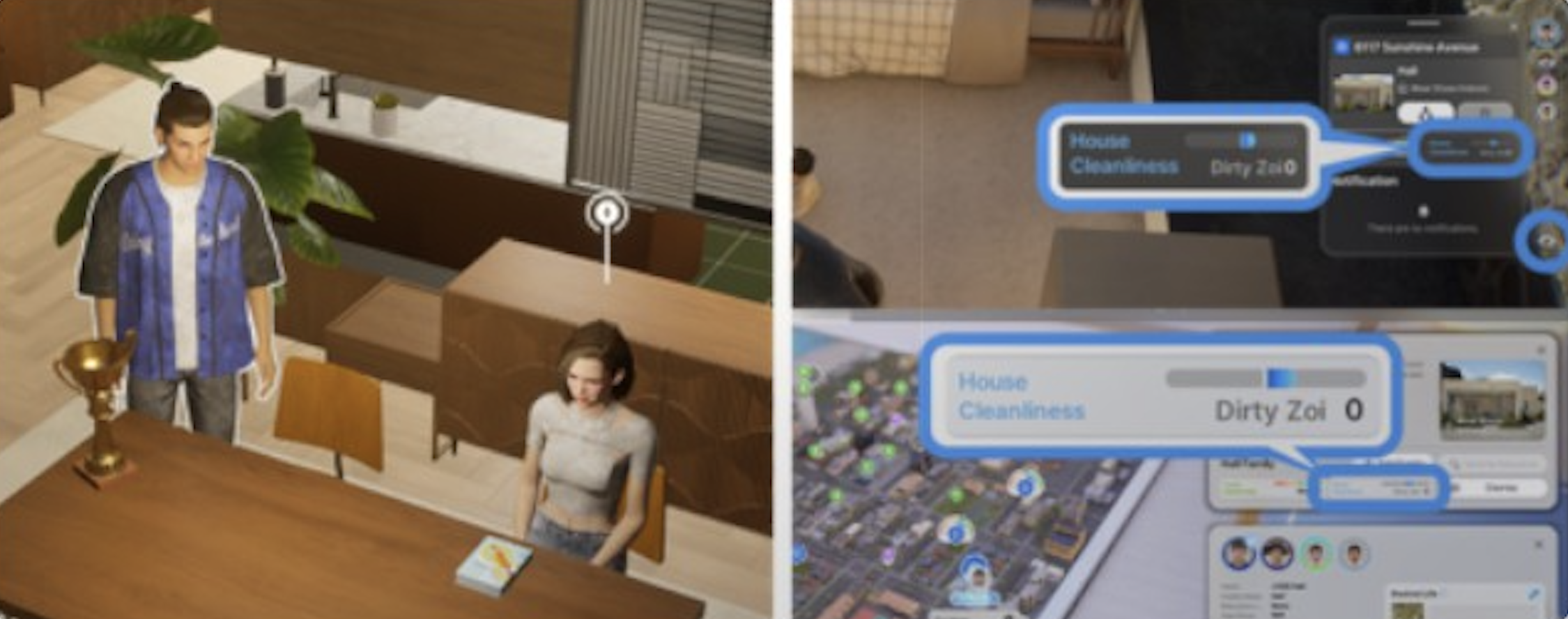
The Home Information Screen displays the property's overall cleanliness meter and a count of dirty Zois in the household. Access it through the household management interface. The cleanliness meter provides a quick overview of how dirty the home is without needing to visually inspect every room. Checking this screen periodically helps catch dirt buildup before it reaches levels that trigger mood penalties.
Dirty furniture, floors, and rugs develop a marbled, dusty appearance. The grime is visible and gets progressively worse the longer cleaning is neglected. Dirty clothing on Zois shows visible dark grime, while clean clothes display full color and brightness. These visual cues make it possible to gauge cleanliness at a glance, though the Home Information Screen gives a more precise reading.
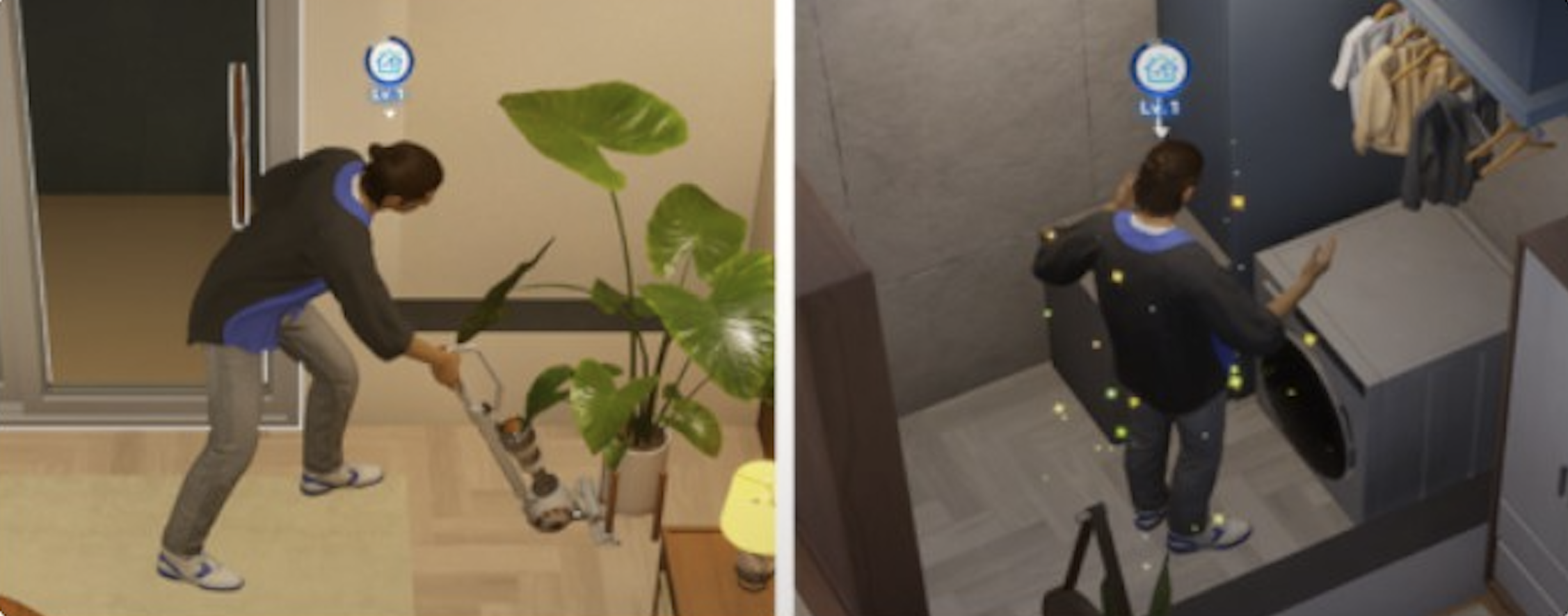
Four cleaning tools are available, purchased through Build Mode or the Pocket Market on the smartphone. All cleaning tools are found in the Bathroom furniture category in Build Mode. You can also search for them by name using the search bar.
Tool | Cost | Uses per Session | Notes |
|---|---|---|---|
Mop | 15 Mew | 3 | Basic indoor floor cleaning tool. |
Broom | 18 Mew | 3 | Works both indoors and outdoors. The only tool for exterior cleaning. |
Cordless Vacuum | 35 Mew | 5 | More efficient than mop or broom. Recharges after use. |
Premium Vacuum | 450 Mew | 5 | The most efficient cleaning tool. Requires Housework Level 3 to use. Covers a larger area per action. |
Cleaning tools do not permanently break or need repair. The "uses per session" count resets (tools recharge) between cleaning sessions. The difference between the mop, broom, and vacuum is primarily efficiency: the cordless and premium vacuums cover more ground per action and complete the animation faster than the mop or broom.
Cleaning floor sections is more efficient than cleaning individual furniture pieces. When you direct a Zoi to clean a floor section, nearby furniture on that section also gets cleaned. Bathroom fixtures (sinks, toilets, showers) are also cleaned automatically when you mop the bathroom floor; there is no separate scrubbing interaction for individual fixtures.
For larger cleaning jobs, use the multi-action commands:
Command | Effect |
|---|---|
Clean 3 | The Zoi autonomously cleans 3 dirty spots in sequence. |
Clean 5 | The Zoi autonomously cleans 5 dirty spots in sequence. |
Clear Everything | Instantly clears everything from a selected table. Added in v0.2.0. Useful for dining table cleanup after meals. |
To issue a multi-action command, click on your Zoi and select the Clean icon rather than clicking on individual dirty spots. The Zoi will then walk through the house, cleaning multiple rooms or areas automatically. If your house is large and requires more than five spots, you will need to issue the command again after the first round finishes.
Multiple household members can clean at the same time. Switch to a different Zoi by pressing the Space key and direct them to clean while the previous Zoi is still working. This effectively doubles or triples cleaning throughput for larger homes. Only family members in the household can participate; neighbors or other NPCs visiting the house will not help with cleaning.
Cooperative cleaning is especially useful after hosting events or parties, where the entire home can become dirty in a short time. Assigning each household member a different floor or area of the house avoids overlap and covers the property faster.
Dirt accumulates automatically over time regardless of usage frequency. At launch, the decay rate was extremely aggressive; players reported houses getting completely dirty within less than 12 hours of in-game time. Patch v0.1.7 (April 2025) significantly slowed the rate at which lots become dirty. The developers acknowledged "the previous setting caused pollution to occur too frequently, disrupting the natural flow of gameplay."
The City Sanitation setting (under City Management > City Stability) affects the rate at which Zois and furniture become dirty. The slider has nine levels from Lowest to Highest. According to the in-game description, a higher setting increases the rate at which things become clean. In practice, community testing has produced mixed results: some players report a noticeable difference when moving the slider to its extremes, while others see little change.
To adjust the City Sanitation level, open City Management from the main menu, navigate to City Stability, and scroll down to the City Sanitation slider. Changes take effect gradually over the course of a few in-game days rather than immediately. The developers have indicated they are considering adding an option to disable lot cleanliness changes entirely in a future update, which would let players opt out of the cleaning loop altogether.
Separate from regular dirt, furniture physically deteriorates over time. Sofas and beds develop visible tears, tables and counters show scuffs, and cabinets get worn-out finishes. Electronics like computers, TVs, washing machines, and stoves can break down entirely. Objects used more regularly deteriorate faster.
Action | Details |
|---|---|
Refurbish | Requires Housework Level 2. Costs Meow. Restores furniture to original condition. Works on counters, cabinets, beds, and couches. Some chairs and tables cannot be refurbished and must be replaced. |
Repair | Fix broken electronics (computers, TVs, stoves, washing machines) by selecting the item and choosing "Repair." Grants Housework skill XP. Alternatively, hire a Repair service for 100 Meow. |
Warning: Broken electronics left unrepaired can cause fires. A fire can destroy furniture and potentially kill Zois in the household. Address broken appliances promptly to avoid catastrophic damage. If a fire does start, Zois in the vicinity will panic and attempt to flee; firefighters can be called to extinguish the blaze.
Two cleaning services are available through the Pocket Market app on the smartphone:
Service | Cost | Duration | Notes |
|---|---|---|---|
Spick-And-Span | 100 Mew | ~1 hour | Basic cleaning service. Handles general cleaning and dirty dishes. |
Good-As-New | 500 Mew | ~2 hours | Premium service. More thorough cleaning. |
Important: When a cleaner arrives at the property, you must click on them and select the option to invite them in. Cleaners will not enter the house on their own. Forgetting this step means the cleaner stands outside and eventually leaves without doing any work. After you invite them in, they will begin cleaning autonomously.
These are one-time services with no recurring subscription option. Each time you need cleaning help, you must open the Pocket Market, purchase the service again, and invite the arriving cleaner inside. For households that struggle with upkeep, the Spick-And-Span service at 100 Mew is a cost-effective option that handles the basics.
Dirty clothes are handled through the laundry system. inZOI has nine outfit categories: Everyday, Formal, School, Sleepwear, Party, Sportswear, Swimwear, Summer, and Winter. Each category currently supports only one outfit slot.
Detail | Description |
|---|---|
Equipment | A washing machine is required. Place one via Build Mode in the Bathroom furniture category. |
How to wash | Click the washing machine and select "Wash Laundry." The process completes in seconds. |
Natural Detergent | A second option, "Wash with Natural Detergent," is available to Zois with the Coexistence value. Choosing this option satisfies the Coexistence value. |
Age restriction | Only Adults and Teenagers can do laundry independently. Children must use "Ask to Do Laundry" to request a nearby adult or teenager. When the older Zoi operates the machine, it cleans both their clothes and the child's. The laundry area needs space for two Zois to stand together near the machine. |
Automation | Laundry can be set as a preference in the Zoi Card interface, which makes the Zoi prioritize doing laundry autonomously when dirty clothes accumulate. |
No dryer | The game has no clothes dryer. There is no loading/unloading cycle, folding animation, or visible laundry progression stages. |
If your Zoi's clothes remain dirty after using the washing machine, this may be a known bug where the laundry interaction completes but the clothes do not visually update. Saving and reloading the game typically resolves the issue. Make sure the Zoi is wearing the dirty outfit when interacting with the machine.
Hygiene is one of four physical needs (alongside Hunger, Sleep, and Bathroom). Low Hygiene does not kill a Zoi, but it makes nearby Zois uncomfortable and can effectively isolate the household from social interactions.
Action | Hygiene Restored |
|---|---|
Shower or bath | Best method. Fills the gauge substantially. |
Washing hands at a sink | Fills approximately half the hygiene bar. Takes only a few seconds. |
Brushing teeth | Minor hygiene boost. |
Washing face at a faucet | Minor hygiene boost. |
Fabric freshener / disinfecting bedding | Minor relief from the Uncomfortable emotion. |
An important community discovery is that washing hands, brushing teeth, and freshening bedding can sustain the Hygiene gauge for extended periods without a full shower. Some players have reported going weeks of in-game time without showering by relying on frequent hand washing and perfuming their bed. While a shower or bath is the most effective single action, the smaller hygiene actions can be chained together to maintain adequate levels throughout the day.
The Perfectionist trait causes the Hygiene gauge to decrease more quickly, meaning those Zois need more frequent grooming. Zois with this trait will autonomously seek out hygiene interactions more often, but may need manual direction during busy schedules.
When Zois shower or bathe, they wear a towel for modesty. This is an intentional design choice by the developers, who opted for towels over pixelation to maintain the game's visual style.
Cleaning contributes to the Housework skill. Higher levels make cleaning faster and more thorough. The skill can be raised through cleaning with any tool, doing laundry, repairing broken electronics, refurbishing furniture, crafting custom furniture at a Furniture Workbench, and performing cleaning tasks at active jobs (Deli, Burger Shop).
Level | Unlock |
|---|---|
Level 2 | Ability to Refurbish deteriorated furniture. |
Level 3 | Premium Cordless Vacuum Cleaner (450 Meow). The most efficient cleaning tool. |
Level 7 | Prestige Front Load Washing Machine. Superior to the basic washing machine. |
Level 10 | Maximum level. Required for the Neat Freak ambition (Level 3). |
The Uncomfortable emotion slows Housework skill growth, and when it escalates to Displeased, it further hinders growth. Address mood issues (hunger, sleep, hygiene) before attempting dedicated cleaning sessions. The most efficient way to level the skill early on is to buy a Cordless Vacuum and use Clean 5 commands repeatedly, since each cleaning action grants XP regardless of the tool used, and the vacuum covers more ground per action.
The Neat Freak ambition (under Stay Healthy) tracks cleaning milestones across three levels:
Level | Requirements |
|---|---|
Level 1 | Buy a cleaning tool 1 time, clean 3 times |
Level 2 | Clean 10 times, buy a washing machine 1 time |
Level 3 | Do laundry 20 times, achieve Housework Level 10 |
Trait / Characteristic | Effect |
|---|---|
Perfectionist | Prioritizes orderliness and routine. Hygiene gauge decreases more quickly, requiring more frequent grooming. |
Slacker (v0.4.0) | Zois with this characteristic have a chance to refrain from cleaning up empty plates or books. |
Players can also set cleaning as a preference under Zoi Card > Preferences (yellow heart on cleaning and laundry). With Autonomy enabled, the Zoi will clean automatically whenever the opportunity arises. This is one of the most effective ways to maintain a clean home without constant manual input.
When Autonomy is turned on, Zois with a cleaning preference will seek out dirty spots and clean them without manual direction. The priority level of autonomous cleaning depends on the Zoi's current needs, ongoing tasks, and whether cleaning is set as a high preference.
With Smart Zoi enabled, writing personality descriptions like "you are a clean freak" or "you love keeping the house spotless" in the Smart Zoi prompt demonstrably increases autonomous cleaning behavior, even without changing formal preferences. Community testing has confirmed that Smart Zoi personality prompts influence cleaning frequency. However, a known quirk with Smart Zoi is that Zois may sometimes prioritize cleaning excessively, such as cleaning the street outside the house or repeatedly looking in the mirror, which the developers have acknowledged as a tuning issue.
Toddlers generate significant mess: diapers, bottles, trash, and papers knocked from bookcases. A major bug in earlier versions caused Zois to not autonomously clean up toddler-generated messes, leaving houses full of debris. This was fixed in v0.4.4 (November 2025). Toddlers also trigger frequent "Clean Up" requests in the Zoi queue.
Dirty diapers and empty bottles can only be deleted one at a time; there is currently no option to select and delete them in stacks. This has been a frequent community request. v0.7.0 (March 2026) added a new interaction that allows Zois to quickly clean up after baby Zois, reducing the tedium of individually clearing each piece of toddler-related mess.
Outdoor areas (lawns and exterior spaces) also accumulate dirt and contribute to the overall lot cleanliness rating. The broom is the tool intended for outdoor use, though a known quirk causes Zois and hired cleaners to occasionally vacuum or mop the lawn instead. This behavior has been present since launch and the community views it as a design quirk that may be refined in future updates.
If you notice a hired cleaner or autonomous Zoi vacuuming the garden, they are still effectively cleaning the outdoor area. The visual mismatch between the tool and the terrain is cosmetic rather than functional. The broom remains the correct tool to buy specifically for outdoor cleaning if you are directing Zois manually.
To use cleaning cheats, open the cheat console with Ctrl + Shift + C after enabling cheats through Psycat's Advice. Cheats are officially supported by the developers and will not harm save files.
Cheat | Effect |
|---|---|
FreezeCleanliness true | Stops the property from getting dirty. Furniture and floors stay clean indefinitely. |
FreezeCleanliness false | Re-enables normal dirt accumulation. Use this to return to standard gameplay. |
instantClean | Immediately cleans all furniture and surfaces on the entire property. |
The FreezeCleanliness cheat is particularly useful for players who want to focus on other aspects of gameplay (building, relationships, careers) without the constant upkeep requirement. Using instantClean before important events or visitors can save time when you need a quick reset.
Version | Date | Changes |
|---|---|---|
v0.1.7 | April 2025 | Significantly slowed the rate at which lots become dirty. Developers acknowledged the previous setting was too aggressive. |
v0.2.0 | June 2025 | Added "Clear Everything" table interaction for instant table cleanup. |
v0.4.0 | October 2025 | Added Slacker characteristic. Added cleaning bookshelves and wardrobes interactions. Added rummaging through outdoor trash bins. |
v0.4.4 | November 2025 | Fixed bug where Zois would not clean toddler-generated messes (diapers, bottles, trash, papers). |
v0.5.0 | December 2025 | Added "Display" interaction so Zois stop autonomously throwing away collectibles and decorative items. |
v0.7.0 | March 2026 | Added quick cleanup interaction for baby Zoi messes. Anniversary update with broader quality-of-life improvements. |
Buy a Cordless Vacuum (35 Meow) as soon as possible. It cleans 5 spots per session versus 3 for the mop/broom. Upgrade to the Premium Vacuum at Housework Level 3.
Clean floor sections rather than individual furniture. It covers more area per action, and bathroom fixtures are cleaned automatically when you mop the floor.
Use Clean 3 or Clean 5 multi-actions to automate cleaning runs without manual direction for each spot.
Set cleaning as a preference on one adult Zoi (Zoi Card > Preferences > yellow heart on cleaning and laundry) so dirty areas get handled automatically with Autonomy enabled.
Buy a broom early for outdoor cleaning. It is the only tool designed for exterior use.
Level Housework to 3 as soon as possible to unlock the Premium Vacuum. It is expensive (450 Meow) but covers more area and is significantly more efficient.
Repair broken appliances yourself instead of hiring a technician (100 Meow). It saves money and grants Housework XP.
Feed your Zoi and let them rest before cleaning sessions. The Uncomfortable emotion slows Housework skill growth.
Watch the Home Information Screen periodically. It gives a snapshot of how dirty the house is before the visual grime becomes obvious.
If money is tight, the Spick-And-Span service at 100 Meow is affordable and handles the basics. Remember to click the cleaner to invite them inside.
For households with multiple Zois, switch characters (Space key) and direct each person to clean different areas simultaneously. This cuts cleaning time dramatically.
When hosting parties or events, plan for a post-event cleaning session. Have Clean 5 queued on multiple household members to recover quickly.
Washing hands at a sink restores roughly half the Hygiene bar and takes only a few seconds. Use it as a quick top-up between showers.
Writing "you are a clean freak" in the Smart Zoi prompt increases autonomous cleaning behavior without needing to change formal preferences.
Adjust the City Sanitation slider under City Management > City Stability if you want to slow down or speed up dirt accumulation across the entire city.
