

Overview
Cloud Islands are persistent online worlds in Pokemon Pokopia where up to 4 players can build, craft, explore, and play together. Unlike Dream Islands (which are single-player resource-gathering runs), Cloud Islands are permanent. They stay online even when the owner logs off, and anyone with the address code can visit and contribute at any time. This guide covers everything you need to know to create, manage, and get the most out of your Cloud Island.
Requirements
Environment Level 2 in the main game (roughly 30 minutes of playtime in Withered Wasteland).
An active Nintendo Switch Online membership.
A stable internet connection.
Each player needs their own Nintendo Switch 2 console and a copy of the game. Split-screen is not supported.
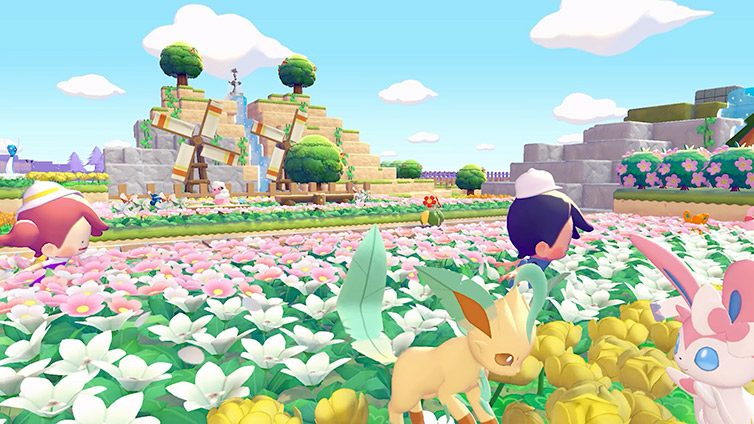
Creating a Cloud Island
You can only have one Cloud Island at a time. To create a new one, you must delete your existing island first. Here is the step-by-step process:
Go to any Pokemon Center and interact with the PC.
Select "Link Play," then "Play on a Cloud Island," then "Create a New Cloud Island."
Name your island.
Choose the generation method: randomly generated terrain, or enter a 9-digit Magic Number to replicate a specific island layout.
Configure your sharing preferences, Virtual Mode setting, and optional Link Code.
Confirm creation. The system generates an 8-digit address code for sharing.
Address Codes, Magic Numbers, and Link Codes
Cloud Islands use three different number systems. Understanding the differences is important for managing who can access your island and how.
Code Type | Length | Purpose |
|---|---|---|
Address Code | 8 characters | The unique identifier for your Cloud Island. Share this so others can visit. |
9 digits | A terrain seed that determines the island layout. The same Magic Number always generates the same base terrain. Placed buildings and items are NOT preserved. | |
Link Code | Optional | An additional authentication code the owner can require for entry. Can be changed at any time. |
To find your codes, navigate to Link Play at a Pokemon Center PC, click Check Settings at the bottom of the menu, then click Cloud Island Settings and scroll down. Your Address Code, Magic Number, and Link Code (if enabled) are all listed there.
Players share Magic Numbers online to let others recreate interesting island layouts. If you note your Magic Number before deleting an island, you can recreate the same base terrain later, though all placed buildings and items will be lost.
Visiting a Cloud Island
To visit another player's Cloud Island, go to any Pokemon Center PC and follow these steps:
Select "Link Play," then "Play on a Cloud Island."
Choose one of three options:
Option | Description |
|---|---|
Visit Previously Explored Islands | Access your history of Cloud Islands you have visited before. |
Search for New Islands | Enter an 8-digit address code to visit another player's island. |
Create a New Island | Generate a random island or use a Magic Number. |
If the island has a Link Code enabled, you will be prompted to enter it after providing the address code. To leave a Cloud Island, open the Pokedex menu (+ button) and press the minus button to select "Go Back Home."
Multiplayer Roles
Up to 4 players can be on a single Cloud Island at the same time. There is no limit to how many different players can visit across separate sessions, so a popular island code can see hundreds of visitors. The host does not need to be online for others to join.
Role | Description |
|---|---|
Owner | The player who created the island. Can adjust all settings (Link Code, sharing, Virtual Mode) and kick any player. |
Host | When no players are present, the next player to arrive becomes the host. The host can kick visitors but not the owner. The owner is the default host when present. |
Visitor | Standard players with normal building and interaction capabilities but no administrative powers. |
Permission Settings
The owner controls what visitors can do through the settings menu. Permissions can be changed at any time, even during an active session.
Setting | What It Does |
|---|---|
Share with Others | Decides whether other players can play on the island at all. |
Enable Virtual Mode | When on, visitors can only explore and take photos. They cannot place or remove blocks, craft, or interact with objects. |
Set Link Code | Requires visitors to enter a code before joining. The code is randomly generated when enabled. |
Display Link Code | Controls whether the Link Code is visible to players currently on the island. |
Change Link Code | Lets the owner reset the Link Code to a new random value. |
Allow Link Code Saving | Controls whether visitors can save the Link Code for easy future access. |
For maximum security, enable a Link Code and disable Link Code Saving. Only share the code with trusted friends. For a public show island, enable Virtual Mode so visitors can tour your builds without changing anything.
What Transfers (and What Does Not)
Cloud Islands have their own separate inventory, Environment Level, and shop. Some things transfer between Cloud Islands and the main game, and some do not.
Transfers to Main Game | Does NOT Transfer |
|---|---|
Recipes learned on Cloud Islands (permanent) | Items in your Cloud Island bag |
Habitats discovered (permanent) | Crafted or purchased items |
Life Coins (shared currency) | Trainer Rank progress |
Ditto moves already learned in main game | Pokemon discovered on Cloud Islands do not register in main Pokedex |
Key takeaway: recipes are the single most important thing to buy on a Cloud Island, because they are the only purchase category that permanently transfers back to the main game. Items, materials, and crafted goods stay on the Cloud Island.
The Cloud Island Shop
Cloud Islands have their own shop accessible from the PC. The shop catalogue differs from the main game shop and is tied to the Cloud Island's own Environment Level, which is independent from your main game progression. Life Coins are the currency and are shared between the main game and Cloud Islands, so spending on one affects your balance on the other.
Prioritize buying recipes from the Cloud Island shop before anything else. Once purchased, they unlock permanently in your main game. Also keep an eye out for Pokemetal when it appears as a Daily Item or Environment Level reward, since it is used for the 3D Printer.
The 3D Printer
The 3D Printer lets you duplicate items you photograph on other players' Cloud Islands. It sits on the left side of the Pokemon Center in your main world. Here is how it works:
While visiting a Cloud Island, open the camera (press the Minus button).
Switch to copy mode by pressing Y. The game displays the name of the item you are pointing at.
Photograph the item to save it to your reference photo album.
Return to your main world's Pokemon Center and interact with the 3D Printer.
Select the photo and pay the Pokemetal cost. Standard furniture costs regular Pokemetal (minimum 2 per item). Rarer items like Berry Trees and Lost Relics cost Rare Pokemetal.
Collect your duplicate item.
The 3D Printer is especially valuable for copying Berry Trees. Getting all Berry varieties through normal gameplay requires trading with friends, but the 3D Printer lets you photograph and replicate any Berry Tree you find on someone else's island.
Virtual Mode
Virtual Mode is a view-only exploration feature. It requires Environment Level 3 and purchasing Mysterious Goggles from the PC Shop. When enabled on a Cloud Island, visitors enter a virtual copy of the island where their actions do not affect the real world.
Virtual Mode is useful for touring impressive builds without the risk of accidental changes. You can still take photos in Virtual Mode for the 3D Printer, which makes it the safest way to browse popular islands for items to copy.
Building on Cloud Islands
Cloud Islands start completely blank with no facilities, giving you a creative sandbox. There are two approaches to construction:
Method | Description |
|---|---|
Custom Block Construction | Place individual blocks to build walls, floors, and structures from scratch. Requires four walls, a door, and at least 3 unique pieces of furniture for a Pokemon to move in. Minimum enclosed space is 2x2 blocks; maximum is around 10x9. |
Pre-Made Construction Kits | Purchase blueprints for pre-designed structures from the shop. Kits range from small dens (15 minutes to build) to full houses (ready the next day). Themes include leaf, sand, stone, city, and specialty designs like Poke Ball houses, log cabins, and windmills. |
Cloud Islands contain all biomes from the main game in a single location, so every material is accessible. You can also scavenge windows, furniture, and decorations from abandoned buildings and the S.S. Anne if present on the island layout. Work with the existing terrain (caves, cliffs, water features) instead of levelling everything flat for more interesting builds.
Multiplayer Activities
Beyond building, Cloud Islands support several group activities:
Collaborative crafting: Share materials and work on large projects together.
Mini-games: Play Jump Rope and Hide-and-Sneak with friends (requires the associated Pokemon on the Cloud Island).
Group photography: Decorate scenes, pose your Pokemon, and change expressions for group photos.
Resource sharing: Pool materials and Life Coins to level up the island faster.
Backup System
Cloud Island backups must be saved manually. There is no automatic backup. If you delete your Cloud Island without a backup, it is gone permanently.
Rule | Details |
|---|---|
Backup limit | One backup per Cloud Island at a time. |
Restore limit | Backups can only be restored once per day. |
Notes | You can attach custom notes to backup data for identification. |
Overwriting | Saving a new backup deletes the previous one (confirmation required). |
To save a backup: press the R Button to open the Cloud Island Backup menu, then select Save. To restore: open the same menu and select Restore. Always back up before inviting unknown players or making major changes to your island.
Developer Island
The Pokemon Company has shared official Developer Island codes for the community. These are show islands built by the development team, designed to inspire players and demonstrate advanced building techniques. Check official Pokemon social media channels for the latest codes. You need the Mysterious Goggles to visit them in Virtual Mode.
Cloud Islands vs. Dream Islands
Players often confuse Cloud Islands with Dream Islands. They serve very different purposes:
Feature | ||
|---|---|---|
Type | Online multiplayer, persistent | Single-player, daily resource runs |
Players | Up to 4 simultaneously | Solo only |
Persistence | Permanent (until owner deletes) | Temporary (one visit per day) |
Full building and crafting | No building; gather resources only | |
Inventory | Separate from main game | Resources transfer back to main game |
Online Requirement | Nintendo Switch Online + internet | No online requirement |
Special Resource | None exclusive | Stardust (crafted into Star Pieces for multiplayer gifting) |
Tips
Buy recipes from the Cloud Island shop first. They are the only purchases that permanently transfer to your main game.
Back up before inviting strangers. One bad visitor can destroy hours of building. Save a backup, then enable a Link Code.
Note your Magic Number before deleting. You can recreate the same terrain layout later, though all buildings will be lost.
Use Link Codes for private islands. If you only want trusted friends to visit, always keep a Link Code enabled.
Use Virtual Mode for public show islands. Visitors can explore and photograph your builds without risk of damage.
Photograph Berry Trees on other islands. The 3D Printer lets you replicate any Berry Tree you find, which is the fastest way to complete your Berry collection.
Life Coins are shared. Spending coins on a Cloud Island reduces your main game balance. Budget carefully.
Level up the Cloud Island shop. The shop catalogue expands with the island's Environment Level, which is independent from your main game. Raising it unlocks more recipes and items.
Grab Pokemetal whenever it appears. It shows up as a Daily Item or Environment Level reward and is essential for the 3D Printer.
Build for your Pokemon. Custom block houses need four walls, a door, and at least 3 unique pieces of furniture for a Pokemon to move in. Keep this in mind when designing rooms.