
Loading...
Loading...
Magnet Rise
March 30, 2026 at 02:23 AM
converted 2 bullet list(s) to table(s)
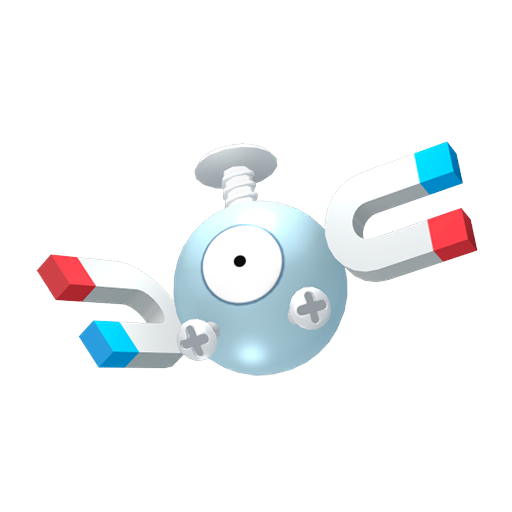
Magnet Rise is the fourteenth and final Ditto transformation move in Pokemon Pokopia. It transforms Ditto into Magnemite, granting free vertical flight and advanced building capabilities. Magnet Rise is exclusively a post-game unlock, available only after completing the main story and the Team Initiation Challenge.
Complete all 8 stages of the Team Initiation Challenge across all four story regions.
Watch the credits roll. When you return to the game, the mysterious tower is gone.
A hole has opened in the ground where the tower stood. Drop down to find Magnemite.
Magnemite will request a Factory Storage Habitat. Build it using the following items:
Item | Quantity |
|---|---|
Streetlight | 1 |
Metal Drum | 1 |
Jumbled Cord | 1 |
Control Unit | 1 |
Once Magnemite moves into the habitat, it will teach you Magnet Rise.
Magnet Rise has a unique control scheme compared to every other move in the game. It functions as a dedicated build mode:
Button | Action |
|---|---|
R or B | Float upward |
L | Float downward |
Left Stick | Move horizontally in any direction |
Y | Zap (break blocks instantly, including Black Rocks) |
Hold Y | Grab terrain blocks without destroying them |
A | Spit out / place items from inventory |
D-Pad Up | Adjust item placement quantity |
Right Stick Click | Toggle between Spit Out and Replace modes |
Magnet Rise is far more than a flight move. It provides a comprehensive building toolkit:
Capability | Details |
|---|---|
Free Flight | Move in any direction with full omnidirectional control. No PP drain while hovering. |
Instant Block Breaking | The Zap action (Y) destroys terrain blocks instantly, including Black Rocks that cannot be broken by Rock Smash or Rollout. |
Auto-Collection | Materials drop directly into your inventory without needing to pick them up manually. |
Large-Scale Placement | Place blocks in 3x3x1 scale measurements, making construction much faster than placing one block at a time. |
Object Moving | Pick up large boulders, trees, and other objects without destroying them, then relocate them anywhere. |
Magnet Rise offers two distinct placement modes that can be toggled by clicking the Right Stick. Understanding when to use each mode is key to efficient construction.
Spit Out is the default placement mode. When active, pressing A deploys blocks or items from your inventory into the world. Terrain blocks are placed at a 3x3x1 scale, meaning each press lays down a slab of nine blocks at once. This makes building walls, floors, and large terrain features drastically faster than placing blocks individually. You can rotate the placement orientation between horizontal and vertical using the D-Pad, which lets you build upward columns or flat platforms with equal ease.
Use D-Pad Up to adjust how many items you spit out per press. For furniture and crafted objects, items are placed one at a time rather than in a 3x3 grid.
Replace Mode swaps the block you are targeting with the block currently selected in your inventory, all at the same 3x3x1 scale. This is extremely useful for renovating buildings or changing terrain types without the two-step process of breaking first and then placing. For example, you can convert a dirt path into a stone road in a single pass, or swap out wooden walls for brick without tearing down the structure.
Toggle between Spit Out and Replace by clicking the Right Stick. The current mode is shown on the HUD near the bottom of the screen.
The Y button serves double duty depending on whether it is tapped or held.
Tapping Y fires a Zap that instantly destroys the targeted block. All materials that would normally drop are sent straight into your inventory without falling on the ground. Zap is powerful enough to break Black Rocks, which ordinarily require a fully powered-up Rock Smash to destroy. Because Zap is instant and costs less PP than Rock Smash or Cut, it is the most efficient way to clear terrain in the game.
When used on a complete object such as furniture or a placed decoration, Zap collects the entire item intact and places it in your bag rather than breaking it into raw materials.
Holding Y lets you grab terrain blocks, boulders, trees, and other large objects without destroying them. The grabbed object can then be relocated anywhere by flying to the desired spot and releasing it. This is the only way to reposition large environmental objects like mature trees and massive boulders while keeping them whole.
Grab also lets you collect certain items that are otherwise unobtainable. Stone debris, broken streetlights, ruined furniture fragments, and various plant stages (seedlings, wilted plants) can only be picked up through the Grab mechanic. Serebii's item database lists over 100 items exclusive to Magnet Rise collection.
Like all Ditto transformations, Magnet Rise drains PP while active. However, simply hovering in place costs no PP. PP is consumed when you perform actions: Zapping blocks, spitting out items, or grabbing objects. On a per-action basis, Magnet Rise uses less PP than Rock Smash or Cut for the same block-breaking result, making it the most PP-efficient demolition tool.
For extended building sessions, stock up on PP-restoring items beforehand. Leppa Salad and Carrots are effective choices. You can also place a cooking station near your build site so you can craft food without leaving the area.
Magnet Rise shares some capabilities with earlier transformations but surpasses each of them in scope. The table below highlights the key differences.
Feature | Magnet Rise | Other Transformation |
|---|---|---|
Block Breaking | Instant Zap; breaks any block including Black Rocks | Rock Smash: slow, multi-hit; cannot break Black Rocks without power-up |
Block Placement | 3x3x1 slab; vertical and horizontal rotation | Standard: one block at a time from ground level |
Block Replacement | Replace Mode swaps blocks in 3x3x1 areas | Not available on any other transformation |
Movement | Free omnidirectional flight | Jump: single vertical hop; Glide: horizontal only; Surf: water only |
Object Relocation | Grab and move trees, boulders, debris intact | Strength: push only, cannot lift or fly with objects |
Material Collection | Auto-collected into inventory on Zap | Manual pickup required after breaking |
PP Efficiency | Lower PP cost per block destroyed | Rock Smash and Cut use more PP per block |
Because of these advantages, many players recommend saving large construction projects until after unlocking Magnet Rise in the post-game. Building Palette Town structures for Legendary Pokemon and complex Eeveelution habitats, in particular, benefit enormously from Magnet Rise's speed and flexibility.
Magnet Rise is the backbone of advanced building in Pokopia. Below are practical strategies for getting the most out of it.
Material | Details |
|---|---|
Level ground before building | Fly to a bird's-eye view of your build area and use Zap to flatten uneven terrain. The 3x3x1 Spit Out mode can then lay down a uniform foundation quickly. See How to Level Ground for step-by-step instructions. |
Use Replace Mode for renovations | If you want to change the material of an existing wall or floor, switch to Replace Mode instead of tearing it down and rebuilding. This preserves the structure's shape while updating its appearance. |
Rotate placement for vertical builds | When constructing towers or multi-story buildings, rotate your slab orientation to vertical using the D-Pad. This lets you build upward in 3-block increments rather than stacking single blocks. |
Collect materials in bulk | Before starting a big project, fly over resource-rich areas and Zap blocks rapidly. Materials auto-collect into your inventory, so you can stockpile hundreds of blocks in minutes without stopping to pick anything up. |
Relocate trees and boulders for landscaping | Use Hold Y (Grab) to pick up large environmental objects and fly them to a new position. This is the only way to move mature trees without destroying them, making it essential for landscape design. |
Build roofs from above | One of the most frustrating tasks before Magnet Rise is placing roof blocks. With flight, you can hover directly above a building and place roof pieces looking straight down, which is far easier than trying to reach them from the ground. |
The Factory Storage Habitat is a special dwelling requested by Magnemite before it will teach you Magnet Rise. Unlike most habitats, the Factory Storage type only requires four specific items to construct:
Item | Quantity | Where to Find |
|---|---|---|
Streetlight (any type) | 1 | Craft one, or use a Mushroom Lamp as a quick substitute |
Metal Drum | 1 | Found near the hole where Magnemite appears |
Jumbled Cord | 1 | Found near the hole where Magnemite appears |
Control Unit | 1 | Located in the northeast island of Sparkling Skylands among ruined office buildings |
The Metal Drum and Jumbled Cord are both located at the quest site, so you only need to travel for the Streetlight and Control Unit. If you have already crafted a Mushroom Lamp or any streetlight variant during the story, that will work for the Streetlight requirement. The Control Unit is the trickiest item to find; fly to the northeast corner of Sparkling Skylands and search the ruined buildings there.
Once all four items are placed, Magnemite moves in and teaches Magnet Rise immediately. The Factory Storage Habitat also counts toward your habitat total for Pokedex completion.
Magnet Rise is the recommended way to build large structures. The ability to fly while placing and absorbing blocks makes construction projects that previously took hours achievable in minutes.
Use the Replace mode (Right Stick Click) to swap one block type for another without first removing the old block. This is perfect for renovating buildings.
Magnet Rise works in every region, not just the post-game area. Go back to earlier towns and use it to finalize your designs.
The official game tip suggests using the Default option for Run/Jump Controls when using Magnet Rise for the most intuitive hovering experience.
