

Overview
The camper van is the central element of Outbound. It functions simultaneously as the player's vehicle, home, workshop, and farm. The game describes itself as a cozy camper-van exploration-crafting game, and every system in the game connects back to the van in some way. Players begin with an empty shell and gradually expand it into a fully furnished, multi-level mobile base using the modular building system. The van's design draws visual inspiration from classic VW camper vans, reimagined in the game's colorful, near-future setting.
Because the van is the player's only permanent structure, it must accommodate everything: workstations for crafting, gardens for growing crops and mushrooms, storage for hoarding resources, energy generators for power, and decorations for personality. Where the player parks the van becomes their campsite, and when they want to move on, the entire home travels with them.
Choosing Your Van
When you start a new game you name your vehicle, set its colors and license plate, and choose its body. Three vans are available from the start, with a fourth unlocked through the School Bus Adventures DLC. Each balances three things: building space (how much you can attach), carrying weight (how much you can haul before it bogs down), and handling. The vans are not built for speed, so for many players handling matters least, but the choice shapes how the whole run feels.
Van | Building Space | Carrying Weight | Handling | Best For |
|---|---|---|---|---|
Classic | Slightly above average | Average | Slightly below average | The balanced all-rounder and the safest pick if you are unsure |
Pathmaker | Below average | Slightly above average | Above average | The nimble option: smaller inside, but the best to drive |
Big One | Nearly maxed | Above average | Below average | The most building and hauling room, at the cost of handling |
School Bus | Nearly maxed | Nearly maxed | Below average | The roomiest of all, added by the School Bus Adventures DLC |
You are not locked into your first choice of color. Paint stations dotted around each biome let you recolor the van at any time, as long as you have paint on hand.
Layout
The van has several distinct zones that players interact with. The front cabin contains the steering wheel and driver's seat, accessed through the front door. Sitting in the driver's seat switches the game into driving mode. The back of the van opens via a rear hatch, which reveals the Crafting Table where basic items are assembled. This rear access point also connects to the van's storage module, allowing players to quickly deposit or retrieve items.
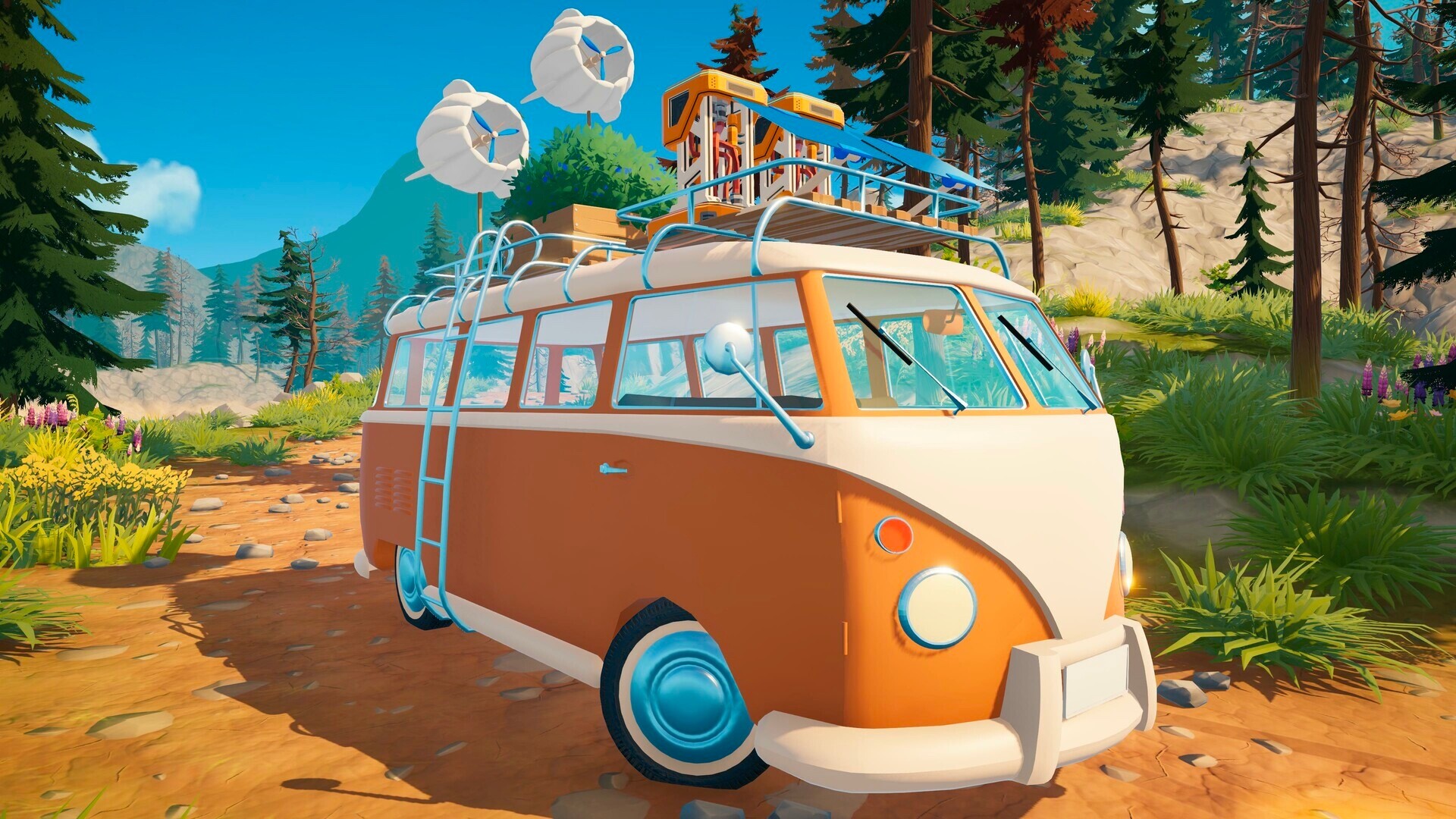
The interior is an open space where players place modules on a grid. Walls, floors, furniture, and machines can all be positioned freely within this area. The roof and exterior walls provide additional building surfaces, and players can build upward to create taller, multi-level configurations. Promotional screenshots from Square Glade Games show fully expanded vans with parties happening on elaborate rooftop decks.
Pop-Up Second Floor
One of the van's key features is its pop-up second floor, sometimes called camper mode. When activated, the roof section expands upward, creating a full additional level of usable space. This second floor can hold machines, storage containers, garden beds, and other modules that would not fit in the base interior alone.
The pop-up floor is particularly useful for greenhouse setups and workstation layouts that benefit from vertical separation. Players who invest in expanding their van's rooftop area gain significant extra room for production modules without sacrificing interior living space.
Modular Building
The van uses a grid-based modular building system that lets players attach walls, floors, furniture, workstations, and decorations both inside and on top of the vehicle. Players start with a bare shell and progressively unlock new building components through the technology tree. The building interface is intuitive, with modules snapping into grid positions for clean placement.
Buildable elements range from functional items like stoves, workbenches, and storage crates to agricultural additions like garden beds and greenhouses. Players can also attach solar panels and wind turbines to the van's exterior for renewable power generation. The modular approach means no two vans look the same, and players can reorganize their layout at any time.
Customization
Beyond functional modules, the van supports extensive cosmetic customization. Players can apply paint jobs to change the van's exterior color and add decorative elements to personalize their mobile home.
Feature | Description |
|---|---|
Paint Jobs | Change the van's exterior color and finish |
Fairy Lights | String lights that illuminate the van at night, creating a cozy atmosphere |
Curtains | Gingham curtains and other fabric decorations for the interior |
Candles | Placed inside or on the roof for ambient lighting |
License Plate | A customizable number plate that adds personal identity to the van |
Odometer | Tracks total distance traveled throughout the playthrough |
Lighting options are among the first decorative unlocks in the demo. Night scenes with a fully lit van, complete with string lights and interior candles, are one of the game's signature visual moments.
Fold-Away Mechanic
The signature feature of the camper van is how it handles travel. When the player enters driving mode, all built modules automatically fold into compact boxes attached to the van's frame. The van transforms from a sprawling home into a road-ready vehicle in seconds. When the player parks at a new location, the boxes unfold back into their full configuration without the player needing to manually rebuild anything.
This mechanic is central to the game's identity. Nothing needs to be dismantled or stored before moving. The entire home, including gardens, workstations, storage, and decorations, collapses and expands automatically. Players can drive to a completely new biome, park, and immediately have their full base available. The visual effect of the van unfolding into a multi-level home is one of Outbound's most distinctive moments.
Weight and Driving Performance
Every module attached to the van contributes to its total weight, and the van's weight directly affects driving performance. A heavily loaded van accelerates more slowly, handles less responsively, and consumes more battery power while driving. Players must balance the desire to carry every useful module against the practical cost of reduced mobility.
A small skill tree allows players to upgrade driving performance, energy capacity, and navigation abilities over time. Early in the game, the van feels noticeably slow; some demo players described it as barely faster than walking. Upgrading power systems and unlocking performance components gradually improves speed and handling.
Electric Motor and Battery
The camper van runs on an electric motor powered by a shared battery that also supplies energy to all onboard machines and systems. The starting power source is the Bio Burner, a biofuel generator mounted at the back of the van. Feeding it biodegradable resources like Fibre or Lumber adds energy to the battery. As players progress, they can supplement or replace the Bio Burner with solar panels, wind turbines, and water generators for fully sustainable power.
The driving system tracks both charge consumption and motor temperature, creating a balance between speed and efficiency. Solar arrays unfold from the van's exterior and generate power during daylight hours, though they only charge while the van is parked. The energy system page covers power generation and management in detail.
Power Sources
Source | Fuel | Notes |
|---|---|---|
Fibre, Lumber, Light Lumber | Starting generator; burns biodegradable materials to charge the battery | |
Sunlight | Unfold from the exterior; only generate power while parked during the day | |
Wind Turbines | Wind | Renewable source; effectiveness may vary with weather conditions |
Water Generators | Water flow | Alternative renewable option available later in the technology tree |
Storage
The van provides several layers of item storage. A storage module at the back of the van allows players to quickly offload items from their backpack, sort inventory, and even eat directly from the food supply. The interior can hold additional storage crates placed via the building system.
As players progress through the technology tree, they unlock larger storage containers for the van's interior and rooftop racks for exterior storage. Rooftop racks are especially useful for bulky resources that would otherwise take up valuable interior grid space. For a complete breakdown of storage options and backpack management, see the Storage and Inventory page.
Vehicle Types
While the camper van is the primary vehicle in Outbound, the game supports different vehicle types with their own characteristics, advantages, and disadvantages. The most notable alternative is the school bus, available through the School Bus Adventures DLC. This DLC is included with the Standard Physical Edition of the game and offers a larger vehicle with its own building layout and gameplay feel.
Each vehicle type handles differently and provides a distinct base-building experience. The camper van offers a compact, nimble platform well-suited for solo players and small groups, while alternative vehicles may trade maneuverability for additional interior space.
Driving
The van can be driven in both first-person and third-person perspectives. First-person driving puts the player behind the windshield for a more immersive view of the road ahead. Third-person mode pulls the camera back, giving a wider view of the van and its surroundings, which can be helpful for navigating tight trails or spotting nearby resources.
The van's driving model intentionally leans toward a relaxed, low-speed experience rather than a racing feel. Demo players noted that the van is large and somewhat unwieldy, consistent with the game's cozy tone. It does not roll over easily; the physics engine keeps it upright even on steep slopes, though it may slide sideways. Over time, upgrading power systems and unlocking better components through the technology tree improves acceleration and top speed. A compass helps with navigation across the open world. For more details, see the Driving page.
Multiplayer
In co-op, all players share the same van. Up to four players can ride together, with one player in the driver's seat at a time while others move freely inside the van. Passengers can work at stations, tend gardens, organize storage, or simply ride on the roof and enjoy the scenery.
Changes that one player makes to the van, such as placing new modules, rearranging furniture, or adding decorations, appear in real time for everyone. The host creates a session using an invitation code that other players use to join. Because the van is the shared hub, cooperative play naturally encourages task division: one player drives while others craft, farm, or cook during the trip.
Tips
Keep the Bio Burner stocked with Fibre or Lumber before long drives to avoid running out of battery mid-trip.
Use the pop-up second floor for garden beds and production machines, and keep the interior clear for storage and living space.
Rooftop racks free up interior grid slots. Move bulk resources to the roof as soon as racks are unlocked.
The van does not roll over easily, but it can slide on steep slopes. Park on flat ground when possible.
In multiplayer, have passengers craft or farm while the driver is on the road to maximize productivity.
Invest in driving and energy upgrades early to improve the van's sluggish starting speed.
Vehicle Research Station and Van Upgrades
The Vehicle Research Station is a built workstation that unlocks the entire van-upgrade tree. Once placed on an empty countertop inside the van, it lets the player research and craft three families of upgrades: motor tiers for steeper climbs, battery capacity tiers for longer trips between recharges, and a cooling system that lets the engine run in hot biomes. There is also a related Outdoor Building expansion that opens up a building zone next to the parked van so workstations and decorations can be placed outside the cabin.
Players unlock the Vehicle Research Station blueprint from one of the locked terminals attached to a Signal Tower, and the blueprint pool is randomized per playthrough. The terminal at the Community Tree Point of Interest in the northwestern part of the starting region is one common spawn, but the same blueprint can appear at other Signal Tower terminals depending on the run. Marked ? Points of Interest on the map are the highest-value places to check for major upgrades.
Once the station is built, the in-station menu pulls resources directly from the van's storage modules, so the player does not need to keep the upgrade materials in their backpack. Each upgrade has a research step followed by a build step, and higher tiers require materials that are only found in later biomes, so the full tree is meant to be unlocked across a complete playthrough rather than in the starting area.
Motor Upgrades
Three motor tiers extend the van's climbing ability into successively steeper terrain. Motor Upgrade I is unlocked early using basic refined parts and is enough for the rolling hills of the starting biome. Motor Upgrade II uses mid-tier metalwork and Electronics and is generally the threshold for confidently driving through coastal terrain. Motor Upgrade III is a late-game investment that uses rare ores and unlocks the steepest slopes the world contains, including canyon climbs that are otherwise impassable.
Battery Capacity Upgrades
The three Battery Capacity tiers extend how long the van can drive and run workstations between recharges. Battery Capacity I is a starter upgrade that uses common refined metal and Bolts. Battery Capacity II steps up to Battery Components and Sheet Metal. Battery Capacity III uses Power Cells, a late-game part, and gives the longest battery range in the game. Because the battery is shared between the motor and onboard workstations, every upgrade also lets more equipment run simultaneously without browning out the van's systems.
Cooling System Upgrade
The Cooling System Upgrade is a single tier that keeps the motor from overheating in hot biomes. Without it the engine temperature climbs quickly when driving through arid regions and forces the player to stop and let the van cool down. The upgrade uses Hardened Metal, Electronics, and Water, and is generally researched alongside or just before Motor Upgrade III so the van can both climb and cool through canyon terrain.
Outdoor Building Expansion
The Outdoor Building expansion adds a building zone next to the parked van, letting the player set up exterior crafting and farming stations that would not fit inside the cabin. There are two tiers: a starter Outdoor Building that opens the zone, and an Outdoor Building Space upgrade that enlarges it. Both use construction-grade materials like Scrap Metal, Fibre, and Everwood Plank. The Outdoor Building is especially useful for setting up large farms and workstation chains that would otherwise crowd the van's interior grid.
Progression Strategy
Research the Vehicle Research Station as soon as you find a Signal Tower terminal that offers it. Without it, the van is stuck at its starting climb, range, and heat tolerance.
Motor Upgrade I and Battery Capacity I are both cheap and dramatically expand where you can drive. Prioritize both before pushing into the second biome.
Cooling System Upgrade only matters when you start exploring the arid biome, so it can be deferred until you are about to leave the temperate zone.
Save Adamant Metal and Rose Minerals for Motor Upgrade III. They are rare enough that you do not want to spend them on lower-tier crafts.
Outdoor Building pairs well with the Sawmill and Solar Panels so larger workstations can run outside the cabin without taking up grid slots.
See Also
Building System
Modular Building
Energy System
Storage and Inventory
Driving
Multiplayer and Co-Op
School Bus Adventures DLC
Technology Tree