
Loading...
Controls
March 21, 2026 at 11:33 AM
Accuracy fix: Clarify that normal attacks do not consume stamina
Crimson Desert features a combo-focused control scheme inspired by action games like Devil May Cry and fighting games. The combat system rewards multi-hit combos, timed parries, and dodge cancels, drawing from both character action games and wrestling-style grapple mechanics. Pearl Abyss recommends playing with a controller for the best experience, though full keyboard and mouse support is available with rebindable keys on PC.
The game supports hot-swapping between controller and keyboard/mouse at any time. DualSense (PS5) controllers require a wired USB connection, while Xbox controllers work wirelessly. Controller button layouts are fixed and cannot be remapped, but PC keyboard bindings can be customized through the settings menu.
The following table lists the default PlayStation 5 controller bindings. These cannot be remapped.
Input | Action |
|---|---|
Left Stick | Move character |
Right Stick | Move camera |
R1 | Weak Attack |
R2 | Strong Attack |
L1 | Guard / Aim Lantern |
L2 | Aim / Shoot Ranged Weapon |
Square | Jump |
X (Cross) | Run (double tap to Sprint) |
Circle | Roll (double tap for Evasion) |
Triangle | Kick / Unarmed Attack |
D-Pad Up | Summon Horse / Quick Slot 1 |
D-Pad Left | Sheathe Weapon / Quick Slot 2 |
D-Pad Right | Eat Food / Quick Slot 3 |
D-Pad Down | Hard Lock |
L3 (Left Stick Click) | Crouch / Slide |
R3 (Right Stick Click) | |
Touchpad | Change Camera |
Options | Menu / Map |
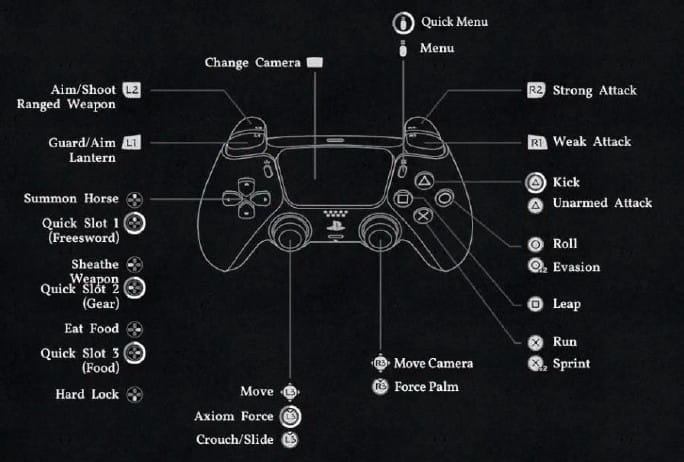
The following table lists the default Xbox controller bindings. These cannot be remapped.
Input | Action |
|---|---|
Left Stick | Move character |
Right Stick | Move camera |
RB | Weak Attack |
RT | Strong Attack |
LB | Guard / Aim Lantern |
LT | Aim / Shoot Ranged Weapon |
X | Jump / Leap |
A | Run (double tap for Sprint) |
B | Roll (double tap for Evasion) |
Y | Kick / Unarmed Attack |
D-Pad Up | Summon Horse / Quick Slot 1 |
D-Pad Left | Sheathe Weapon / Quick Slot 2 |
D-Pad Right | Eat Food / Quick Slot 3 |
D-Pad Down | Hard Lock |
LS (Left Stick Click) | Crouch / Slide |
RS (Right Stick Click) | |
View Button | Change Camera |
Menu Button | Quick Menu / Menu |
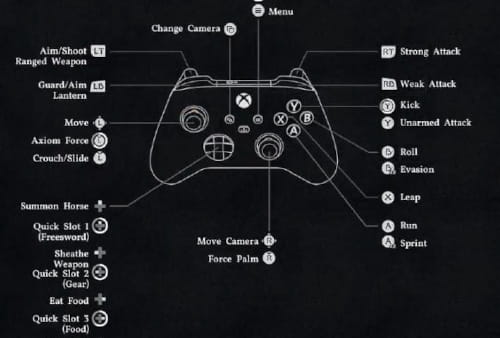
The following table lists the default PC keyboard and mouse bindings. Most of these can be remapped through the in-game settings menu, though some binds (movement, jump, crouch, menu shortcuts) may be locked.
Input | Action |
|---|---|
W, A, S, D | Movement |
Mouse | Camera control |
Left Mouse Button | Weak Attack |
Right Mouse Button | Strong Attack |
F | Kick / Unarmed Attack |
Alt | Roll / Evade |
Ctrl | Guard / Aim Lantern |
Shift | Run (double tap for Sprint) |
Space | Jump / Leap |
C | Crouch / Slide |
Caps Lock | Hard Lock |
Tab | |
H | Summon Horse |
R | Sheathe Weapon |
Z | Switch Weapons |
B | Use Equipment |
F1 | Quick Slot 1 |
F2 | Quick Slot 2 |
F3 | Quick Slot 3 |
Mouse Scroll | Zoom In/Out / Force Palm |
M | Map |
Esc | Menu |
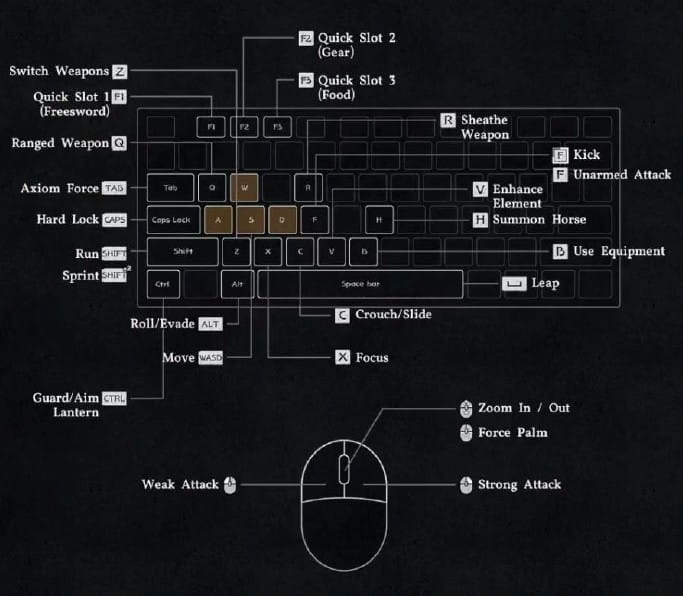
Beyond basic attacks, Crimson Desert's combat system includes a variety of advanced techniques. Timing is critical for parries, perfect dodges, and combos. A successful parry opens a brief window for a powerful riposte, while a perfectly timed dodge restores stamina instead of consuming it. Slow-motion aiming (Precision Focus) is triggered separately during sideways dives or aerial launches for enhanced ranged accuracy.
Action | PlayStation 5 | Xbox | PC |
|---|---|---|---|
L1 (precise timing) | LB (precise timing) | Ctrl (precise timing) | |
Perfect Dodge | Circle (precise timing) | B (precise timing) | Alt (precise timing) |
Downswing | R1 + R2 | RB + RT | LMB + RMB |
Stun Flash | L1 + R1 | LB + RB | Ctrl + LMB |
Hold L1 + R1, then R1 | Hold LB + RB, then RB | Hold Ctrl + LMB, then LMB | |
Riposte | R1 after successful Parry | RB after successful Parry | LMB after successful Parry |
Sprint Attack | R1 or R2 while Sprinting | RB or RT while Sprinting | LMB or RMB while Sprinting |
Aerial Attack | R1 or R2 mid-air | RB or RT mid-air | LMB or RMB mid-air |
The combat in Crimson Desert is not a Soulslike. It plays closer to a character action game with combos built around chaining weak and strong attacks together. The combo system rewards experimentation and punishes button mashing.
Weak and Strong Attacks: R1/RB delivers fast weak attacks for building combos, while R2/RT unleashes slower but more powerful strong attacks. Mixing both creates unique combo strings.
Parrying: Press L1/LB at the exact moment an enemy attack lands to parry the blow. A successful parry staggers the enemy and opens a riposte window.
Riposte: After a successful parry, press R1/RB immediately to deliver a devastating counter-attack that deals bonus damage.
Dodging and Evasion: Press Circle/B to roll away from attacks. Double tap Circle/B for a faster evasion. Precise dodge timing triggers a slow-motion window for counter-attacking.
Guard: Hold L1/LB to block incoming attacks. Blocking consumes stamina (though normal light attacks do not), and a full stamina depletion while guarding breaks your defense, leaving you vulnerable.
Kick: Press Triangle/Y to deliver an unarmed kick. Kicks can break through an enemy's guard and stagger them. Hold the button for an extended kick.
Grapple Moves: At close range, certain button combinations initiate wrestling-style grapple attacks like suplexes, chokeslams, and neckbreakers. These deal heavy damage and ignore enemy armor.
The Force Palm is a supernatural ability activated by clicking R3/RS (or Mouse Scroll on PC). It creates a powerful shockwave that can push back enemies, interact with objects in the environment, and provide mid-air propulsion during traversal.
Combat Use: Force Palm staggers nearby enemies and can interrupt their attacks. It is especially useful for creating breathing room when surrounded.
Traversal Use: When used mid-air, Force Palm propels Kliff forward, extending jump distance and reaching otherwise inaccessible areas.
Environmental Interaction: Force Palm can manipulate certain objects in the world, moving obstacles and revealing hidden paths.
Axiom Force: Activated with Tab on PC, Axiom Force is a separate ability tied to the Axiom Bracelet. It enhances combat and enables special environmental interactions.
Crimson Desert features ranged combat using bows and other ranged weapons. Aiming is done with L2/LT on controller or the dedicated aim key on PC.
Aim: Hold L2/LT (controller) to enter aiming mode. On PC, the aim key defaults to the right mouse button context or a dedicated ranged key.
Shoot: While aiming, press R1/RB to fire. Releasing the aim button also fires on controller.
Precision Focus: Precision Focus slows time while aiming, allowing for precise headshots and weak point targeting.
Lantern: The lantern can be aimed with L1/LB to illuminate dark areas and reveal hidden secrets. It serves as both a light source and a tool for discovering concealed items.
Exploration and traversal in Crimson Desert goes well beyond walking and running. Kliff can climb walls, glide through the air, use a grappling hook to swing across gaps, and ride mounts across the open world of Pywel.
Action | PlayStation 5 | Xbox | PC |
|---|---|---|---|
Jump / Leap | Square | X | Space |
Climb | Square near a wall + Left Stick | X near a wall + Left Stick | Space near a wall + W |
Wall Climb | Hold Square + Left Stick toward surface | Hold X + Left Stick toward surface | Hold Space + W toward surface |
Glide | Square mid-air (hold) | X mid-air (hold) | Space mid-air (hold) |
Context-sensitive at grapple points | Context-sensitive at grapple points | Context-sensitive at grapple points | |
Force Palm (mid-air) | R3 mid-air | RS mid-air | Mouse Scroll mid-air |
Slide | L3 while Sprinting | LS while Sprinting | C while Sprinting |
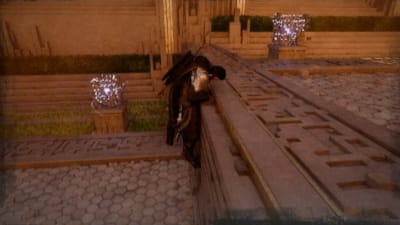
Paragliding: Press and hold Jump while airborne to deploy a glider. Steering is handled with the movement stick or WASD. Gliding consumes stamina (though normal light attacks do not) gradually.
Grappling Hook: At designated grapple points, a context-sensitive prompt appears. Use it to swing across chasms, scale vertical surfaces quickly, and reach elevated platforms.
Swimming: Kliff can swim across bodies of water. Movement controls remain the same while swimming, with Jump used to dive and surface.
Sliding: Press Crouch while sprinting to initiate a slide. Sliding down slopes builds momentum and covers ground quickly. It can also be used to pass under low obstacles.
Summoning and riding mounts is essential for crossing the vast open world. Press D-Pad Up (controller) or H (PC) to call your horse, then approach it and press Triangle/Y/F to mount.
Action | PlayStation 5 | Xbox | PC |
|---|---|---|---|
Call Horse | D-Pad Up | D-Pad Up | H |
Mount / Dismount | Triangle near horse | Y near horse | F near horse |
Accelerate | X (Cross) | A | Shift |
Steer | Left Stick | Left Stick | W, A, S, D |
Stealth is a viable approach in many situations. Crouching reduces your detection range and allows you to move through enemy camps unnoticed.
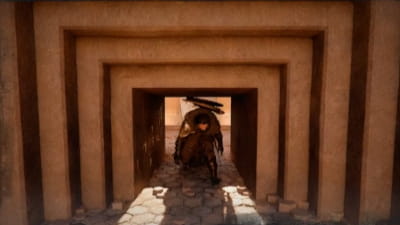
Crouch: Press L3/LS (controller) or C (PC) to crouch. While crouched, enemies have a harder time detecting you.
Stealth Takedowns: Approach an unaware enemy from behind while crouched to perform a silent takedown that eliminates them instantly.
Distraction: Throw objects to create noise and lure enemies away from their patrol routes.
Vegetation Cover: Use bushes and foliage as camouflage, especially when hunting wildlife. Animals and enemies lose sight of you inside dense vegetation.
Most advanced physical actions in Crimson Desert consumes stamina (though normal light attacks do not). Sprinting, dodging, blocking, climbing, swimming, and special combat skills all draw from the same stamina bar. Managing stamina is crucial in combat, as running out mid-fight leaves you unable to dodge or block.
Sprinting: Consumes stamina while held. Double-tap Run for a full sprint that drains stamina faster.
Guarding: Blocking attacks drains stamina per hit. If your stamina depletes while guarding, your defense breaks and you become staggered.
Climbing: Stamina drains while climbing walls. If it runs out mid-climb, Kliff falls.
Recovery: Stamina regenerates automatically when not performing stamina-consuming actions. Standing still recovers it fastest.
Crimson Desert offers several options to customize and simplify the controls to suit different playstyles and accessibility needs.
PC Key Rebinding: Most keyboard and mouse bindings can be remapped through the settings menu. Controller bindings are fixed.
Toggle Sprint: An option to change sprint from hold-to-run to a toggle, so you do not need to hold the button down while moving.
Auto Lock-On: Automatically locks onto the nearest enemy target when entering combat, removing the need to manually lock on.
Simplified Combo Mode: Reduces multi-button simultaneous inputs to sequential single presses. This makes combo execution much easier at the cost of slightly lower damage output.
Crimson Desert does not allow players to skip cutscenes entirely. However, a fast-forward feature is available during all story cinematics.
Action | How to Activate | Details |
|---|---|---|
Fast-forward | Press and hold the button shown in the bottom-right corner | Plays the cutscene at approximately 1.5x speed. You must continue holding the button for the duration. |
Pause | Press the pause/menu button during any cutscene | Pauses the cutscene. Useful for stepping away without missing dialogue. |
The fast-forward prompt appears automatically in the bottom-right corner of the screen whenever a cutscene begins. Since full skipping is not available, the 1.5x speed option is the only way to move through cinematics more quickly. The fast-forward feature works on both controller and keyboard input.
Pearl Abyss strongly recommends using a controller for the best combat experience. The combo system was designed around gamepad inputs.
If playing on keyboard and mouse, consider rebinding Dodge from Alt to a side mouse button for faster access during combat.
Practice parry timing on weaker enemies before taking on bosses. The parry window is tight but rewarding.
Use the Hard Lock (D-Pad Down / Caps Lock) during boss battles to keep the camera focused on a single target.
Force Palm is not just for combat. Use it during exploration to reach hidden areas and solve environmental puzzles.
Keep an eye on your stamina bar during fights. Running out of stamina while blocking results in a guard break that leaves you wide open.
The Simplified Combo Mode in accessibility settings is a great option for players who find the multi-button inputs difficult. The damage reduction is minor.
When exploring, alternate between sprinting and walking to manage stamina. Sprint in safe areas, conserve stamina near enemy camps.


