
Loading...
Loading...
Controls and Gameplay
May 3, 2026 at 11:58 AM
Added 1 image (2026-05-03)
Outbound supports keyboard-and-mouse and full controller input. The game is played entirely in first person while on foot and offers a choice between first-person and third-person camera angles while driving. All interactions with the camper van are physical: the player opens the front door to reach the steering wheel, lifts the rear hatch to access the Crafting Table, and walks through the interior to use installed workstations. Controller support was added during the beta phase (v0.7.6, October 2025), and the Steam store page lists full controller support.
On foot, the camera is locked to first person. The developers confirmed that third-person on-foot gameplay is not available for the 1.0 release due to the additional character animation and game-design work it would require. Players who experience motion sickness with first-person games should be aware of this limitation.
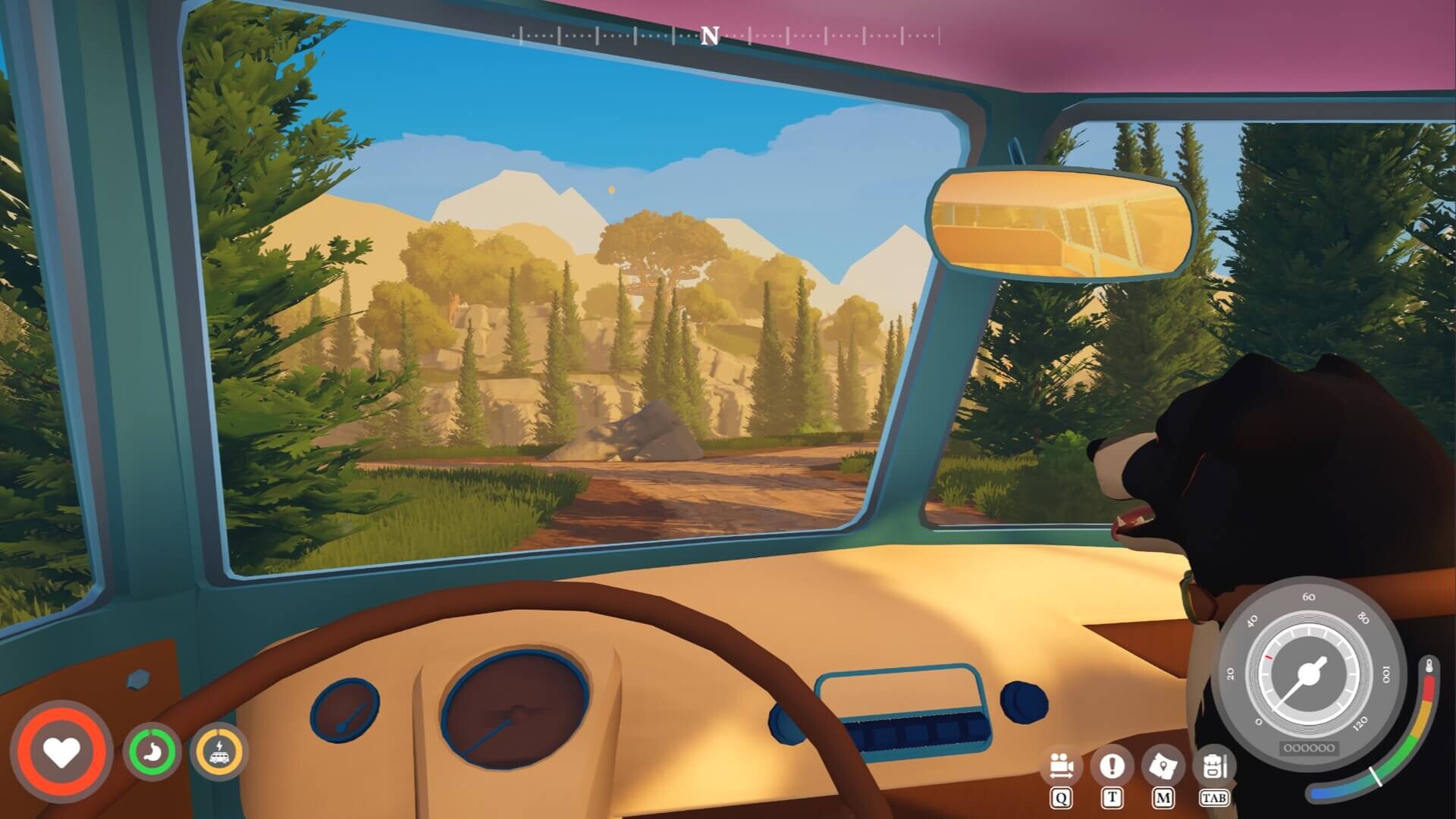
While driving, players can switch between a first-person cockpit view and a third-person exterior view. The option to select a default driving camera was introduced in v0.5.12 (April 2025) and is set when creating a new save file. Third-person driving provides better visibility of the road and surrounding terrain, while first-person cockpit view offers a more immersive experience on scenic routes.
While on foot, the player walks, sprints, gathers resources, uses tools, and commands the dog companion. Nearby interactable objects are highlighted with a prompt, simplifying resource collection. A compass was added during alpha testing based on player feedback to help with navigation. The table below lists the default keyboard-and-mouse bindings observed in the demo.
Action | Default Key / Input |
|---|---|
Move | W / A / S / D |
Look | Mouse movement |
Sprint | Left Shift (hold) |
Jump | Space |
Interact / Pick up | E |
Use tool / Primary action | Left Mouse Button |
Secondary action | Right Mouse Button |
Open inventory | Tab |
Open journal | J |
Toggle compass | C |
Command dog | F |
Scroll hotbar | Scroll Wheel / 1-9 |
Keybindings shown are based on the February 2026 demo. The full release may allow remapping.
Sprinting is tied to the energy system. As the in-game day progresses and the character's energy depletes, sprint speed decreases. Once the character becomes too tired (around sunset), sprinting is disabled entirely and the player moves at a walking pace until they sleep in the van to recover.
To start driving, the player walks to the front of the camper van, opens the driver-side door with the interact key, and selects the steering wheel. The van is electric, powered by renewable energy sources (solar, wind, water). Handling is affected by terrain type and the total weight of installed modules. A heavily built van with many workstations and building components handles differently from a stripped-down, lightweight setup.
Action | Keyboard | Notes |
|---|---|---|
Accelerate | W | Speed depends on van weight and terrain |
Brake / Reverse | S | Hold to reverse after stopping |
Steer left | A | |
Steer right | D | |
Horn | H | Honks the van horn |
Switch camera | V | Toggles between first-person cockpit and third-person exterior |
Exit vehicle | E | Returns to on-foot mode |
In the early game the van feels sluggish because the default powertrain is weak and the battery capacity is limited. Upgrading the energy system and keeping the overall build weight low improves acceleration and top speed.
One of Outbound's defining features is that all van interactions are physical rather than menu-driven. Instead of pressing a button to open a global crafting screen, the player walks up to the relevant part of the van and interacts with it directly.
Driver's door: Open the front door and select the steering wheel to enter driving mode.
Rear hatch: Lift the back hatch to access the Crafting Table mounted at the rear of the van.
Interior walkthrough: Walk inside the van to interact with installed workstations such as the sawmill, food processor, or recycling machine.
Storage compartments: Open drawers or containers inside the van to access shared storage that any co-op player can use.
Passenger seat: In multiplayer, other players can sit in the passenger seat while the host drives.
Entering building mode switches to a grid-based placement interface where the player can add, rearrange, and remove modules on the van. The modular building system uses interchangeable components that snap to a grid, allowing both interior and exterior customization.
Action | Default Input |
|---|---|
Enter / Exit building mode | B |
Select module from catalog | Left Mouse Button |
Place module | Left Mouse Button (confirm) |
Rotate module | R / Scroll Wheel |
Remove module | X |
Cancel placement | Right Mouse Button / Esc |
A ghost outline previews the module's position before placement is confirmed. Modules can be freely rearranged within the van's building boundaries at any time. Players must consider both interior space and exterior aerodynamics, because the van's weight and shape affect driving performance and fuel efficiency.
The crafting system is accessed by walking up to a workstation and pressing the interact key. Each workstation type has its own recipe list. The player scrolls through available recipes, selects one, and the workstation processes the required materials. Key workstations include:
Crafting Table: Located at the rear of the van (accessed by lifting the back hatch). Used for basic recipes, tools, and building components.
Sawmill: Converts raw logs into planks and processed wood products.
Food Processor: Prepares ingredients for cooking recipes.
Recycling Machine: Breaks down bottles, cans, and scrap into vouchers that can be spent at signal towers to unlock new blueprints.
New recipes are unlocked by discovering schematics in the world, downloading them from locked computers at signal towers using vouchers, or progressing through the technology tree.
Outbound includes several mini-games tied to specific activities. Each mini-game has its own control scheme that appears on screen when the activity begins.
Fishing was added as a Kickstarter stretch goal. The player casts a line with the primary action button, waits for a bite, and then follows on-screen prompts to reel in the catch. Timing and input rhythm determine whether the fish is caught or escapes.
Vehicle maintenance was introduced in v0.7.6 (beta). The van's tires lose pressure over time, and the player must inflate them using an on-screen mini-game. The mini-game involves matching a pressure gauge indicator to keep inflation within the target range.
Cooking lets players prepare meals that restore energy and provide temporary buffs. The cooking mini-game involves selecting ingredients and following recipe steps at the appropriate workstation. Prepared meals can be stored in the van's inventory for later consumption.
Patch v0.5.13 (April 2025) introduced a dedicated difficulty setting for mini-games with three options:
Setting | Effect |
|---|---|
On | Mini-games play at their intended difficulty with full timing requirements |
Easier | Timing windows are more forgiving and failure penalties are reduced |
Off | Mini-games are skipped entirely; the result is awarded automatically |
This setting can be changed at any time from the pause menu. It applies to all mini-games including fishing, tire inflation, and cooking activities.
Fall damage was adjusted in v0.5.13 alongside the mini-game difficulty update. The calculation was reworked to be less punishing for short drops. In keeping with Outbound's cozy design philosophy, falling from typical building heights causes minor energy loss rather than serious harm. Players who prefer a completely stress-free experience can further reduce fall damage through the game's settings.
Full controller support was added in v0.7.6 (October 2025) during the beta phase. The game works with Xbox, PlayStation, and generic USB/Bluetooth gamepads. Controller prompts replace keyboard hints automatically when a gamepad is detected. The Steam store page lists Outbound with full controller support, meaning the entire game (including menus, building mode, and mini-games) can be played without a keyboard or mouse.
Outbound also launched a console demo on PlayStation 5, Xbox Series X|S, Nintendo Switch, and Switch 2 in April 2026, confirming that the controller experience is a first-class input method on all platforms.
Action | Typical Gamepad Button |
|---|---|
Move | Left Stick |
Look / Camera | Right Stick |
Sprint | Left Stick press (L3) |
Jump | A / Cross |
Interact | X / Square |
Open inventory | D-Pad Up or Select |
Accelerate (driving) | Right Trigger (RT / R2) |
Brake (driving) | Left Trigger (LT / L2) |
Steer (driving) | Left Stick |
Gamepad mappings shown are standard conventions for the genre. The game may allow button remapping in its settings menu.
Outbound supports 17 languages for interface text, full audio, and subtitles:
Language | Language | Language |
|---|---|---|
English | Korean | Spanish |
Dutch | Polish | Latin American Spanish |
French | Brazilian Portuguese | Traditional Chinese |
German | Russian | Turkish |
Indonesian | Simplified Chinese | Ukrainian |
Italian | Japanese |
Use third-person camera while driving to spot roadside resources and avoid obstacles more easily.
Set mini-game difficulty to Easier or Off if you want a fully relaxed experience with no timing challenges.
Keep the van's weight low in the early game for faster travel. You can add heavier modules once you upgrade the energy system.
In co-op, one player can drive while others craft or manage inventory inside the van simultaneously.
Check tire pressure regularly after the beta update (v0.7.6+) to keep handling responsive.
