
Loading...
Loading...
Blinding Flash
March 24, 2026 at 08:59 AM
Add wikilinks to table cells (7 new links)
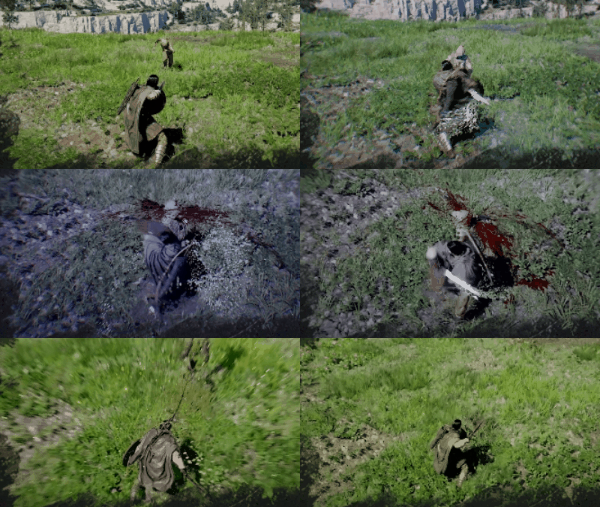
Blinding Flash is a utility skill in Crimson Desert that serves triple duty as a combat crowd-control tool, a puzzle-solving mechanic, and an exploration aid. It is available to all three playable characters (Kliff, Damiane, and Oongka) and belongs to the Stamina (Blue) branch of the skill tree. When activated, the character raises their sword and reflects concentrated sunlight to temporarily blind nearby enemies, reveal hidden passages, burn thorny vines, and solve light-reflection puzzles throughout the world of Pywel.

Detail | Info |
|---|---|
Character | |
Skill Tree | Stamina (Blue) |
Category | Utility |
Spirit Cost | No cost (free to use) |
How to Unlock | Kliff: Unlocked during the Prologue quest "Unknown Space". Damiane: Unlocked by default. |
L1 + R1 (PlayStation) / LB + RB (Xbox) / Ctrl + Left Click (PC) |
Activating Blinding Flash requires pressing both inputs at the same time. The game will not recognize the input if the buttons are pressed one after the other. Once in the Blinding Flash stance, the character holds their sword aloft, reflecting light outward. From this stance, you can blind enemies in your immediate vicinity, focus concentrated light on a specific target, or scan for points of interest.
Press L1 + R1 (PlayStation) or LB + RB (Xbox) simultaneously to enter the Blinding Flash stance.
Release R1 / RB while continuing to hold L1 / LB.
While holding L1 / LB, aim the crosshair at your target (a light source, vine, or enemy).
Keep the crosshair on the target and wait for the audio or visual cue confirming the effect has triggered.
Press Ctrl + Left Click at the same time to enter the Blinding Flash stance.
Release Left Click, then press and hold Ctrl again to start focusing concentrated light.
Aim the crosshair at your target and hold until the effect triggers.
The activation keybind can be remapped in the Controls settings. On PC, some players find it more comfortable to bind Blinding Flash to Mouse 4 or Mouse 5.
In combat, entering the Blinding Flash stance provides brief crowd control by blinding and dazing all nearby enemies. This temporarily interrupts their actions and immobilizes them for a short duration. The crowd-control effect is particularly valuable when fighting groups of enemies, since it gives you a window to reposition, consume a recovery item, or switch to an offensive follow-up. Because the base skill has no Spirit cost, you can use it freely whenever you need breathing room.
After unlocking the Blinding Flash Finisher upgrade, you can press R2 / RT / Right Click while enemies are still blinded to rush in and deliver a rapid flurry of strikes. During this finisher sequence, time slows down significantly, which prevents enemies from attacking Kliff while the barrage plays out. The final slash of the finisher unleashes a shockwave that knocks back any remaining enemies in range. This makes the Blinding Flash Finisher one of the most effective tools for clearing large groups of weaker foes in a single sequence.
When you activate Blinding Flash while standing at an elevated vantage point, the skill highlights notable points of interest across the surrounding landscape regardless of whether you have explored that area of the map. Highlighted locations often include Abyss Nexuses (fast travel points), and the marked areas frequently contain Abyss Artifacts or other collectibles. This makes Blinding Flash a useful scouting tool whenever you arrive in a new region.
Throughout Pywel, thorny red vines block pathways, hide collectibles, and seal entrances to areas like the Spire of Insight. To burn them away, enter the Blinding Flash stance and aim the concentrated light beam at the vines. After a moment, they will catch fire and disappear, clearing the path. You can also burn vines with fire arrows, but Blinding Flash has no ammunition cost and works anywhere sunlight is available.
Light-reflection puzzles appear throughout ancient ruins and Abyss areas in Crimson Desert. These puzzles require you to direct concentrated light at a glowing device or crystal until it activates. The basic process works as follows:
Stand in front of the light source or crystal and enter the Blinding Flash stance (L1 + R1 / LB + RB / Ctrl + Left Click).
Release the second button (R1 / RB / Left Click), then press and hold the first button (L1 / LB / Ctrl) to focus concentrated light.
Aim the crosshair directly at the glowing element. The reticle needs to sit precisely on the light source, not on the surrounding wall or door.
Hold your aim for roughly three to five seconds. After a brief delay with no visible feedback, the device will begin to glow blue and the light will shift from orange to purple and back to orange, indicating the puzzle is solved.
A common mistake is repositioning or releasing the button during the initial delay, since the game provides no immediate visual feedback for the first few seconds. Stay steady and keep aiming at the target until the color shift begins.
Blinding Flash has one upgrade that branches from it as you invest more Abyss Artifacts.
Skill | Effect | How to Unlock | |
|---|---|---|---|
Rush in and deliver a rapid flurry of strikes while enemies are blinded. The final slash unleashes a shockwave that knocks back survivors. | Spend 1 Abyss Artifact, or observe the skill in action during gameplay ("Watch and Learn" mechanic) | R2 / RT / Right Click while enemies are blinded |
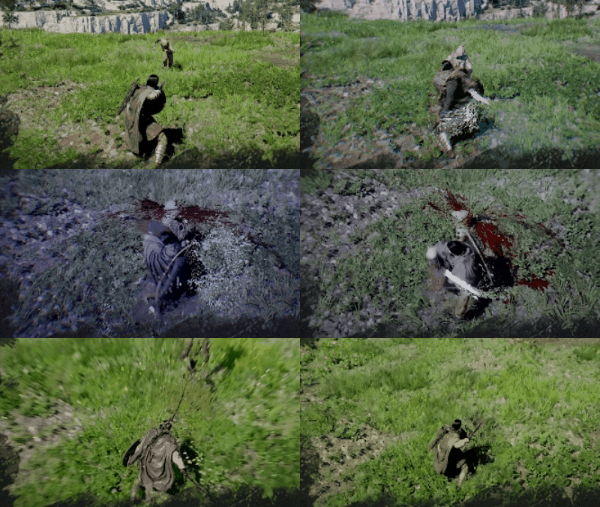
The Blinding Flash Finisher costs 5 Spirit per use. If you decide to respec this skill later, it will cost 1 Faded Abyss Artifact.
Blinding Flash is one of the first skills you unlock (during the Prologue for Kliff), and investing in the Finisher upgrade early gives you a powerful crowd-clearing option for the rest of the game.
Spirit regenerates while in Focus mode, so pair Blinding Flash Finisher with Focus for sustained use in drawn-out fights.
The base Blinding Flash has no Spirit cost, so use it liberally whenever you are surrounded. Even without the Finisher, the brief stun buys time to heal or reposition.
When exploring a new area, head to the highest point you can find and activate Blinding Flash to reveal nearby points of interest, fast travel locations, and collectible spots.
During light-reflection puzzles, do not panic if nothing happens for the first few seconds. Keep your aim steady on the glowing crystal, and the activation will follow after a short delay.
On PC, consider rebinding Blinding Flash to Mouse 4 or Mouse 5 if pressing Ctrl + Left Click feels awkward during combat.
