
The developer has published a set of the control and quality-of-life features in Dust Front RTS, describing them as partly ordinary for the genre and partly specific to this game. What follows is only what has actually been shown or written about. As of October 2026, no full keybinding list has been published and key rebinding is still listed as in development, so this page does not attempt a keybind table. For what those controls are used on, see the Gameplay Overview.
Tactical Pause
The game includes a tactical pause. The developer added it for players who do not want the pace of the battle to dictate how fast they have to decide: you can stop the action and issue the orders you need. Construction visualisation zones and unit behaviour both continue to work correctly under pause after fixes made during the demo.
Selection and Control Groups
Double-clicking an object selects every object of that type on the screen, which is standard. Dust Front adds a toggle that removes the screen limit, so the same double-click selects matching objects across the entire map. The developer notes this is most useful for finding buildings when you have not set up a control group and do not want to hunt across the map for them. With the toggle off, buildings that are off screen are included in the selection.
Control groups can be created by holding the T key together with a number, not only with the usual modifier key.
Movement and Formations
Holding the right mouse button and dragging in a direction moves units while setting their facing, and produces a formation in which they distribute themselves automatically into rows and a line. Arranging units into multiple rows requires a large enough force. A demo fix later made the drag formation effect apply per position rather than to the group as a whole.
Units also carry preferred target types. If a tank sees a priority target within its line of sight, it switches to that target on its own, so attack priorities do not have to be micromanaged every time.
Since the October 2026 demo update, a selected unit always shows its order lines, so the movement and fire orders you have given it stay visible.
Placement and Abilities
Two features stand out as specific to this game, and the second was reworked in the October 2026 demo update.

Feature | What it does |
|---|---|
Repositioning the placement phantom | After marking where a heavy vehicle should deploy, you can select the placement projection itself and move it rather than cancelling and starting over |
Bomber strikes | Choosing a tactical ability from the left panel calls in a bomber. In the June demo you set the bombing direction and could still adjust the flight path once the aircraft was on its way. Since the October 2026 update you no longer choose the flight direction, which now follows map control, but you can bomb into the fog of war without a scout |
The tactical abilities on the left panel are also how aircraft support is called into a battle, which matters for dealing with entrenched artillery as described under Units and Armies.
The same update added construction plans, covered under Base Building and Resources. Clicking a placed plan lets you move it, holding the left Control key lets you delete plans quickly, and holding Shift keeps the selected building phantom ready for repeated placement.
The Camera
The camera does not look straight down. It sits at an angle, looking slightly into the depth of the front line, which the developer treats as part of the game's feel rather than a setting to be tuned away.
He has addressed the requests around it directly. The camera angle will most likely not change. In June he said the zoom level was undecided and that he was looking for a solution rather than the partial measures usually suggested; the October 2026 update then nearly doubled the maximum zoom-out, as described below. He has also pointed out that the camera already sits higher than in many classic strategy games and many recent ones, and that adjusting to it is mostly a matter of habit. Camera controls using the standard movement keys are not in the game, but he has said he does not object to adding them for players who prefer that scheme, noting that hotkeys would have to move to make room, and that key rebinding is already listed as in development.
The October 2026 Zoom Change
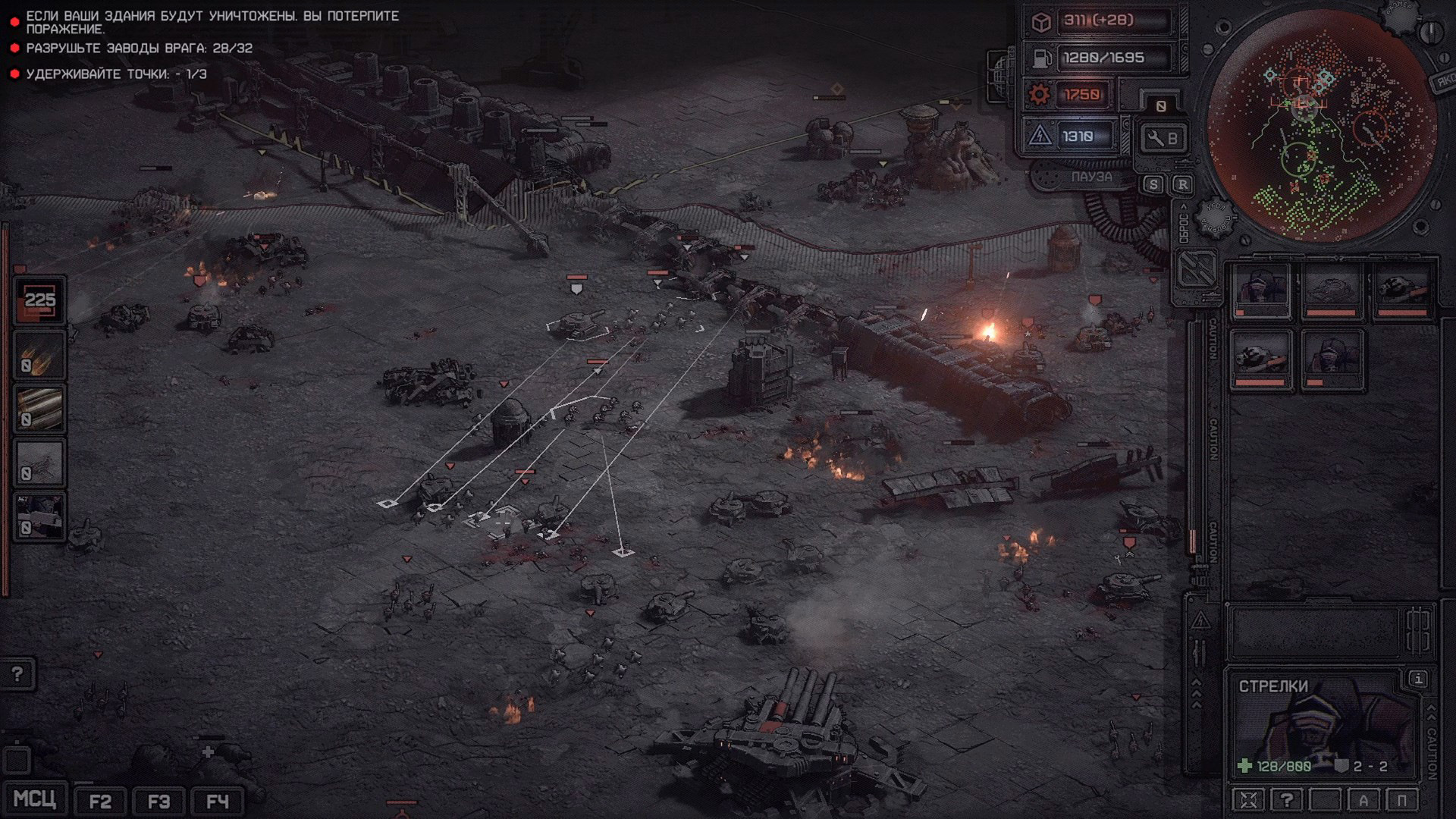
The October 2026 demo update nearly doubled the maximum camera zoom-out. The developer rewrote parts of the post-processing so that small geometry still reads at the new distance, and he enlarged super-heavy vehicles such as the MCV and the Artillery Dreadnought so they keep their sense of scale. Zooming out no longer requires holding the left Alt key, and at the widest view the front line is drawn across the battlefield.
Unit and Building Icons
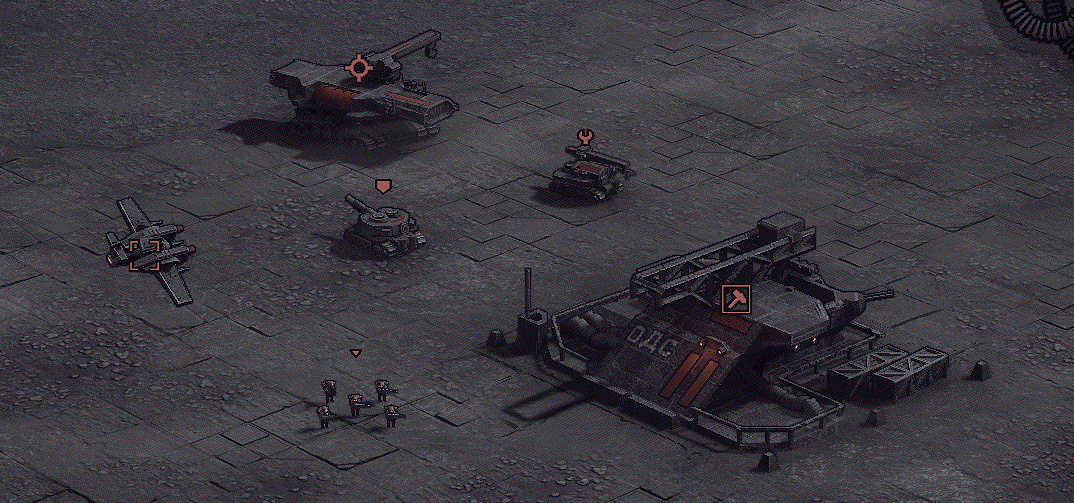
To keep the battlefield readable at the wider zoom, the same update added small icons over some units and buildings. The developer wanted them to help when needed without being as intrusive as in some older strategy games, and most buildings carry none, since buildings were enlarged as well. Icons turn white when the unit is selected.
Icon | Meaning |
|---|---|
Circle with short lines | An infantry replenishment point |
Square corners | Highlights a flying unit |
Shield | A medium combat vehicle |
Repair sign | The BREM repair vehicle, so its plain model can be picked out among others |
Small triangle | An infantry squad |
Sledgehammer in a square | Shown on the Supply Depot, marking it as a supply builder |
He has said he may later look for a minimal way to tell different kinds of medium vehicles apart, such as anti-air, artillery and light vehicles.
Visual Options
A dithering effect is applied by default and can be turned off, which the developer confirmed when asked about the grain visible in early trailer footage.
Asked in October 2026 why an ultrawide aspect ratio that worked in an early demo build no longer did, the developer pointed to an overrideRes parameter in the settings configuration file in the game folder, which takes a resolution value in pixels.
Learning the Game
A basic tutorial is included, which you can run through and return to in order to check the fundamentals. The developer has deliberately kept written explanations short beyond that, saying he does not want to take away the feeling of discovering things for yourself. Reporting forms for bugs are likely to appear in the future; for now feedback is handled through the community channels.
Announced but Not Yet In
Several control and convenience features have been named as planned or in development rather than shipped. Treat everything in this list as unconfirmed until it appears in a build.
A full auto-cast system and mass selection for repair abilities, planned before the demo; the October 2026 update added only a temporary measure in which the BREM looks for the nearest unit to repair on its own
Key rebinding, listed as in development
Camera control on the standard movement keys, described as something the developer does not mind adding