
Loading...
Loading...
Assist Mode
September 27, 2026 at 05:39 AM
Re-dated storefront accessibility tags after launch; added a note on the launch balance patch; reframed unpublished preset values and keybinds; linked the achievement list
Assist Mode is the difficulty layer of Control Resonant. Instead of a fixed list of difficulty levels, the game exposes eleven individual gameplay variables that can be raised or lowered at any point during play, plus four presets that bundle them. Sergey Mohov, Lead Gameplay Designer at Remedy Entertainment, set the system out in a September 2026 write-up, first published on September 10 and then on the game's official site and on Steam on September 15 with seven screenshots of the options menus. This page covers the presets, the settings, the wider accessibility options and what remains unconfirmed. For a first-run primer see Getting Started, and for the platform picture see Platforms and Release.
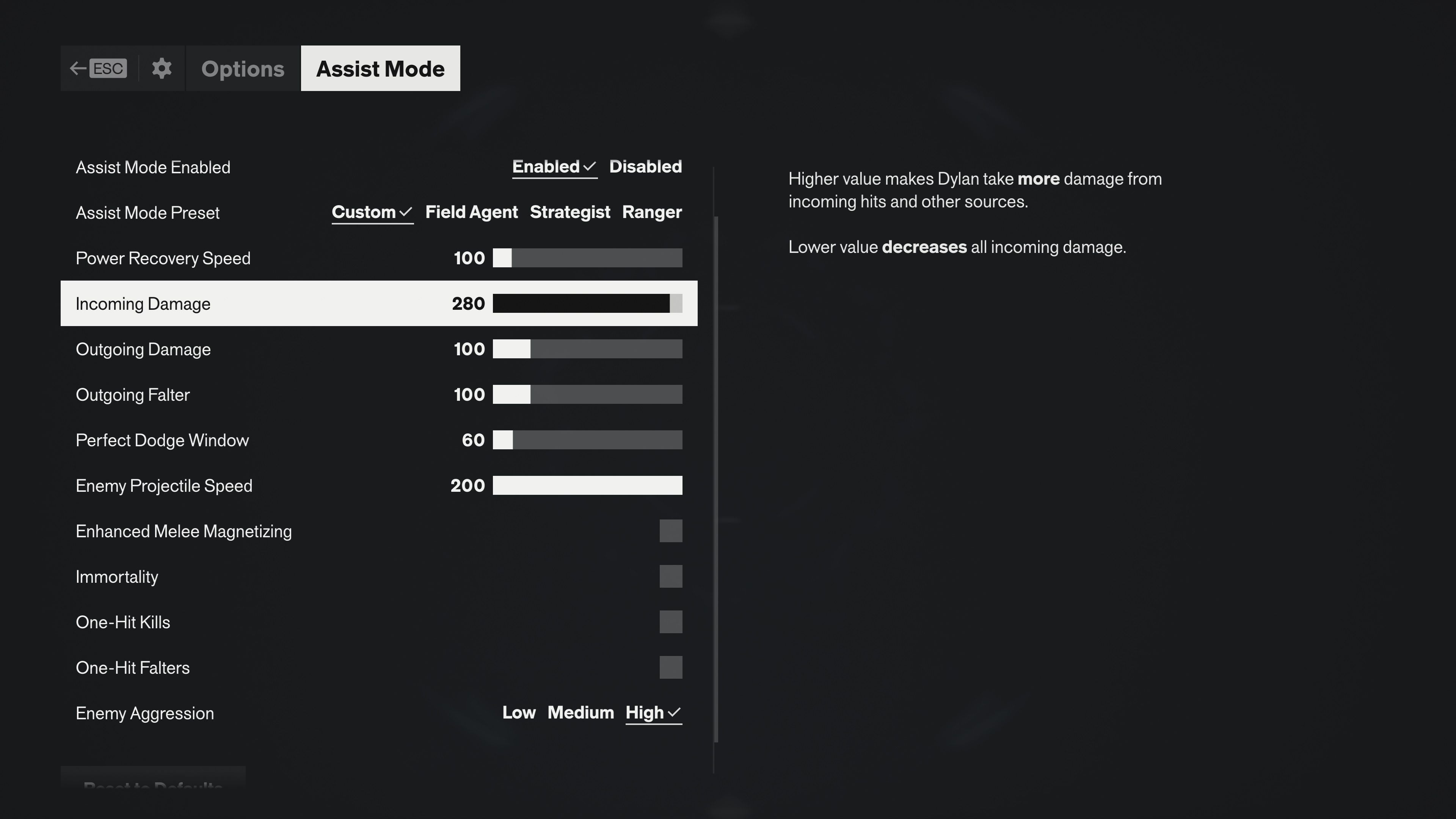
Remedy's stated reason for the design is that global difficulty modifiers, the usual Easy, Normal and Hard, tend to tweak enemy health and damage under the hood and can undermine the tuning of a combat system built around reading enemy animations, managing staggers and status effects, and timing dodges. Assist Mode instead hands the player a control panel, so the one mechanic causing trouble can be adjusted without changing everything else. Three rules follow from that.
The dials turn both ways. In the original Control the sliders could only lower the challenge; in Resonant they can also make the game harder, by raising enemy aggression, shrinking the perfect dodge window to a few frames or increasing incoming damage.
It can be switched on, off or changed at any time during play. Remedy deliberately does not present the settings before a first playthrough begins, so that players try the intended tuning first and adjust later.
Nothing is gated. Trophies and achievements are awarded regardless of any Assist Mode setting.
Two details visible in the official options screenshots add to that. Assist Mode is opened from the in-game menu rather than the main menu, because it applies to the current save slot, and each save slot can carry its own configuration. And there is no separate difficulty selector anywhere: the Gameplay options tab lists Enable Tutorials, Enable Backwards Dodge and Disable Timescale Curves, then the Assist Mode submenu.
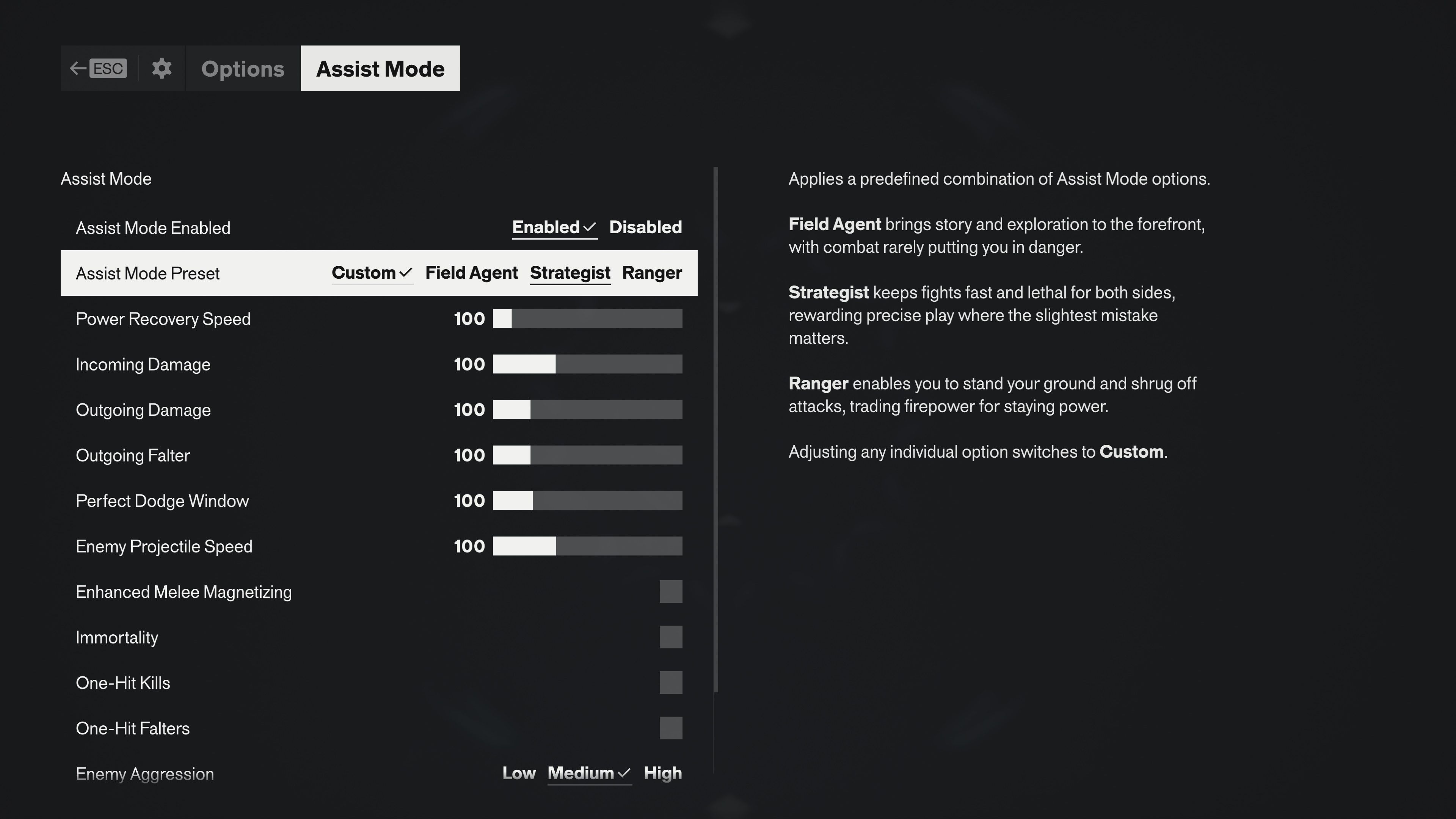
Remedy authored a small set of preset baselines built on how different groups inside the studio like to play, so that the eleven settings do not have to be tuned from scratch. The write-up introducing the system does not name them; the names and their one-line descriptions appear in the official options screenshots. Adjusting any individual setting after choosing a preset switches the preset to Custom.
Preset | Official Description |
|---|---|
Custom | Any manual mix of settings. It is the preset shown as selected in the screenshot of the untouched menu, with every slider at 100 and Enemy Aggression on Medium, and it is selected automatically as soon as an individual option is changed. |
Field Agent | Brings story and exploration to the forefront, with combat rarely putting the player in danger. |
Strategist | Keeps fights fast and lethal for both sides, rewarding precise play where the slightest mistake matters. |
Ranger | Lets the player stand their ground and shrug off attacks, trading firepower for staying power. |
Remedy has not published the slider values each preset applies; this page will add them from the released game. The official screenshots show only the untouched configuration and one deliberately harder custom setup.
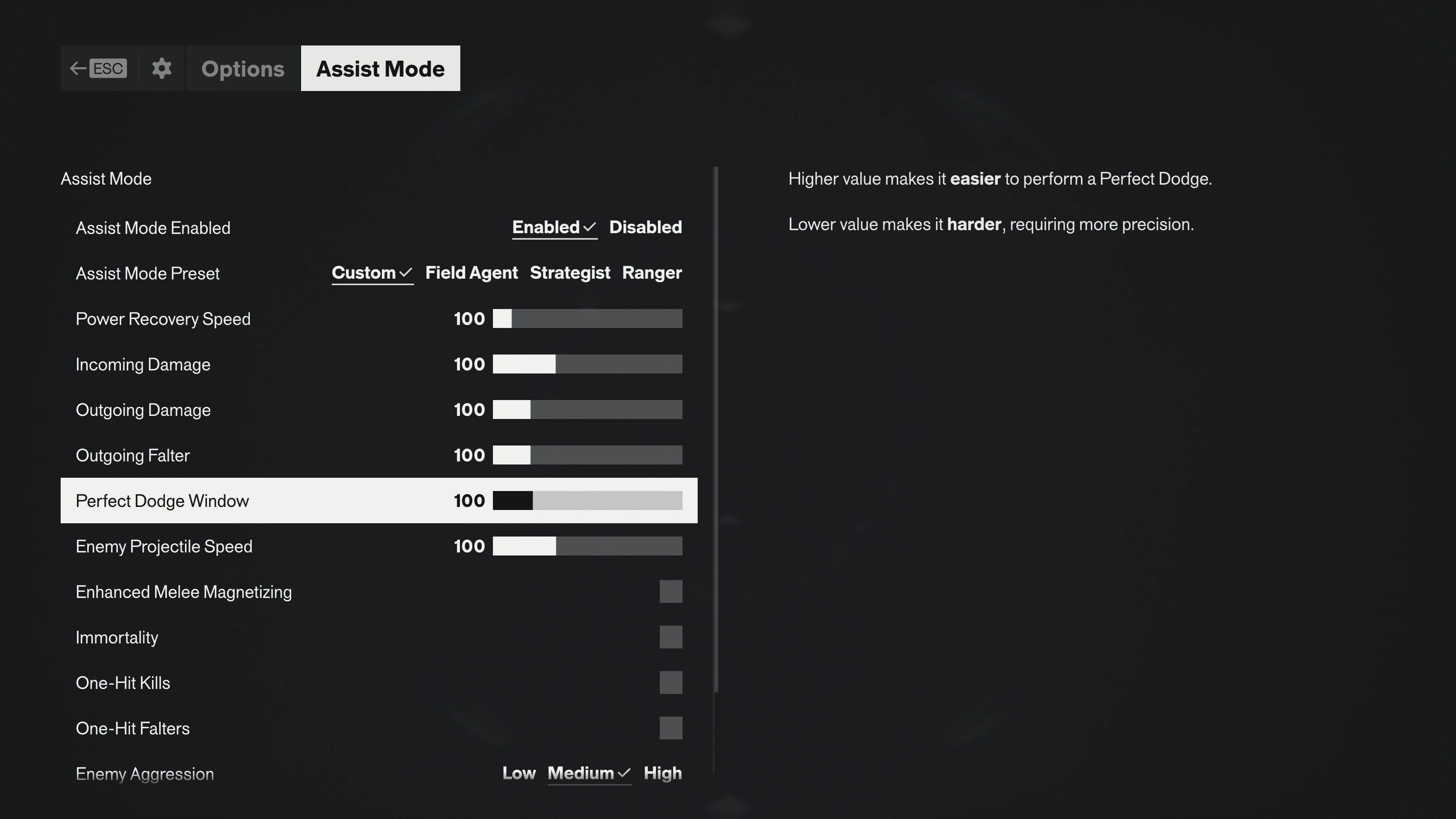
The settings fall into sliders, which use 100 as their baseline value, a three-step aggression selector, and on or off toggles. The values in the last column are the ones visible in the official screenshots, not published limits.
Setting | Type | What It Does | Values Seen |
|---|---|---|---|
Enemy Aggression | Selector | How hard enemies press the player, including swarming from off-screen. | Low, Medium (untouched setting), High |
Enemy Projectile Speed | Slider | Speed of enemy ranged attacks. | 100 untouched; 200 in the harder setup |
Perfect Dodge Window | Slider | Higher values make a Perfect Dodge easier to land; lower values require more precision. | 100 untouched; 60 in the harder setup |
Incoming Damage | Slider | Higher values make Dylan take more damage from hits and other sources; lower values reduce all incoming damage. | 100 untouched; 280 in the harder setup |
Outgoing Damage | Slider | Damage Dylan deals. | 100 untouched |
Outgoing Falter | Slider | How fast Dylan breaks an enemy's posture, the Falter build-up that sets up executions. | 100 untouched |
Power Recovery Speed | Slider | How quickly Power, the resource that combat Abilities consume, comes back. | 100 untouched |
Enhanced Melee Magnetizing | Toggle | Pulls melee attacks toward targets so that positioning matters less. | Off untouched |
Immortality | Toggle | Grouped by Remedy with One-Hit Kills and One-Hit Falters as the options for playing through the story without combat stress; a returning option from the first game. | Off untouched |
One-Hit Kills | Toggle | A returning option from the first game, in the same group. | Off untouched |
One-Hit Falters | Toggle | Described by Remedy as the newest addition to that group. | Off untouched |
Assist Mode sits on top of the game's own balance, which Remedy adjusted in hotfix 1.3.3 on launch day, September 24, 2026. That patch lowered the base health and the required Falter level of most enemies and of the Dancer and the Deserter bosses, and raised maximum Aberrant Strength and maximum Ability Strength on a curve that grows toward the end of the game. It is a balance change that applies to every player rather than an Assist Mode setting. In the same patch notes Remedy pointed players who want to tune individual parts of the experience, such as enemy aggression, incoming damage or how quickly Dylan recovers his abilities, to the Assist Mode sliders in the Gameplay menu of the options.
Assist Mode is one part of the options set. The same write-up confirms the following, and the options screenshots show further rows on the same screens.
Area | Confirmed in the Write-Up | Further Rows Visible in the Screenshots |
|---|---|---|
Gameplay | Actions can be changed from hold to toggle; full remapping for controller and for mouse and keyboard; horizontal and vertical axis inversion set independently for mouse and controller. | Separate hold or toggle rows for the Barrage, Push, Shield and Spore Burst abilities, plus Melee charge, Gap Transition, Conversation, Quick Camera Lock-On and Automatic Rush, each listed for mouse and keyboard and again for controller; a Haptics Volume slider; mouse and controller sensitivity. |
Graphics | Motion blur, depth of field, lens distortion, film grain and vignetting can each be disabled. | Post Processing Resolution (render or display resolution), Indirect Lighting and Transparency quality steps, a Debris toggle and a DLSS Ray Reconstruction toggle. |
Audio | Separate volume sliders; a Hyperacusis Filter for players sensitive to certain sounds. | No audio screen is among the published screenshots. |
Interface | Subtitle size and backgrounds; speaker names; a localized overlay; a colour-blind mode for the interface; individual HUD elements can be hidden. | Colour palette adjustment with separate strength values for the user interface and the game world; Hide HUD, Hide Tracked Quest and Hide Quest Tracking Reminder toggles. |
Movement comfort | Shift Tunneling reduces the effects of rapid movement when using Shift. | A Shift-Tunnelling toggle with Intensity and Grid Intensity sliders, both at 50 in the screenshot; the tooltip describes a vignette added to the screen while shifting. |
Separately from Remedy's own write-up, the storefronts declare accessibility tags from their own fixed vocabularies. As of September 27, 2026, after launch, the PlayStation Store lists nine tags and Steam lists nine categories from its accessibility set, the same sets recorded before release.
Storefront | Declared Tags |
|---|---|
PlayStation Store | Volume Controls, Mono Audio, Subtitles (Basic), Large Subtitles, Controller Remapping (Advanced), Adjustable Stick Sensitivity (Basic), Adjustable Stick Inversion (Basic), Adjustable Difficulty (Advanced), Game Pausing. |
Steam | Camera Comfort, Color Alternatives, Contrast Controls, Custom Volume Controls, Adjustable Difficulty, Keyboard Only Option, Playable without Timed Input, Save Anytime, Subtitle Options. |
Two of those tags carry definitions worth reading. Subtitles (Basic) means, in the PlayStation Store's own definition, that subtitles cover the main story and main characters only. Game Pausing is defined there as pausing at any time during gameplay or cinematics, in offline play only. Adjustable Difficulty (Advanced) on PlayStation and Adjustable Difficulty on Steam are the storefront labels for Assist Mode itself.
The following were not covered by first-party material before release and have not yet been checked against the released game:
The slider values each preset applies. Remedy has not published them; the official screenshots show only the untouched configuration and one harder custom setup.
The true minimum and maximum of each slider. The screenshots show values from 60 to 280, but no limits.
Default keybinds. As of September 27, 2026 Remedy had not published them; the options screenshots show the hold or toggle rows but not the bindings.
Whether the Mac version, due later in 2026, carries the same options.
Already settled and not open: whether presets change trophy or achievement behaviour. They do not; Remedy has stated that nothing is gated behind any Assist Mode setting. The achievement list itself is on Trophies and Achievements.
This page will be updated as the shipped build is documented.
