

Overview
The housing system in Neverness to Everness allows players to buy apartments and houses throughout Hethereau. Housing is a core component of the City Tycoon life simulation system, giving players a personal space to decorate, furnish, and share with their favorite characters. Properties can be fully customized with purchased furniture, and bonded companions can be invited to move in, adding social interactions and gameplay bonuses.
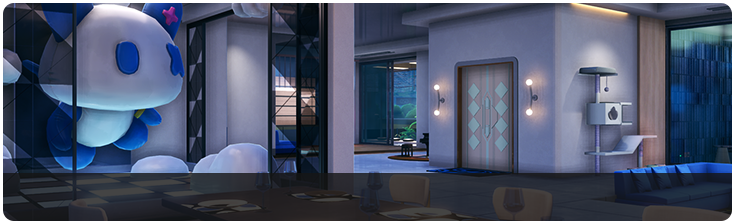
In a genre where most gacha RPGs treat housing as a side feature or ignore it entirely, NTE puts real effort into making your home feel like a meaningful part of the experience. The system connects to multiple other gameplay loops: earning Fons through city activities, building character bonds, and progressing through the City Tycoon ranks.
Purchasing Property
Players purchase properties using Fons, the city's primary in-game currency. The real estate market in Hethereau offers a range of options at different price points. Smaller apartments in less central districts are affordable even for early-game players, while premium properties in desirable locations cost significantly more.
Property availability may expand as the player's City Tycoon level increases. Higher levels could unlock access to exclusive listings, larger homes, or properties in new areas of the city. This progression system ensures that housing remains a long-term goal rather than something fully completed in the first few hours.
Property Type | Price Range | Notes |
|---|---|---|
Small Apartment | Low | Compact living space. Good starter home with room for basic furniture. |
Standard Apartment | Medium | More rooms and wall space for decoration. Allows companion invitations. |
Large Home | High | Multiple rooms, premium locations. May require high City Tycoon level to access. |
Furnishing and Decoration
Once a property is owned, the real fun begins. Players can decorate their home with furniture, decorations, and appliances purchased from in-game shops. The furniture catalog includes seating, tables, beds, lighting, kitchen items, wall art, rugs, plants, and more. Each piece can be freely placed and rotated within the property.
The decoration system uses a placement interface where players drag and position items in their space. The controls are designed to work on both controller and touch screen (for mobile players), with grid snapping to help with alignment. Some furniture items may have functional effects beyond aesthetics, such as a bed that provides a resting bonus or a kitchen setup tied to cooking activities.
Furniture styles are not uniform across the city. Different districts in Hethereau offer exclusive furniture collections that reflect the character of each neighborhood. Northern areas of the city tend to carry fancier, more upscale furniture options, while other districts lean toward more casual or utilitarian styles. This geographic variety encourages players to explore multiple districts when shopping for decor, and it adds a layer of identity to each property based on where the player sources their furnishings.
Companion Invitations
One of the most distinctive aspects of NTE's housing system is the ability to invite bonded characters to live with you. This is not just a cosmetic feature: companions in your home provide gameplay bonuses, trigger unique dialogue, and offer interactions not available elsewhere.
To invite a character, you must first build sufficient trust through the game's relationship mechanics. This involves spending time with the character, completing their personal quests, giving gifts, and participating in shared activities. Once the bond threshold is reached, the option to invite them home becomes available.
Having a companion living in your home changes the feel of the space. They move around the rooms, comment on the furniture choices, and interact with items you have placed. If multiple companions are living with you (if the system supports it), they may also interact with each other. The exact number of companions allowed per property may vary based on property size and City Tycoon level.
Connection to City Tycoon
Housing is deeply integrated into the City Tycoon progression system. The City Tycoon level governs access to higher-tier properties, premium furniture collections, and advanced companion features. The Fons currency used for housing is the same currency earned through all City Tycoon activities: running businesses, completing part-time jobs, winning races, and finishing city quests.
This integration means that housing is not an isolated system. Progress in one area of city life feeds into progress in another. A player who focuses on running a successful business earns more Fons for a nicer home, while a player who decorates their home well may attract companion bonuses that help in other activities.
Peak and Fenglin Villa
Two named properties stand out in the housing market: Peak Villa and Fenglin Villa. These premium residences became available during the Containment Test and represent the high end of NTE's real estate offerings. Both villas offer substantially more floor space than standard apartments, with multiple rooms, outdoor areas, and dedicated spaces for displaying collectibles.
Owning a named villa unlocks additional features that standard apartments lack. These include the Quick Teleport system, which lets players fast-travel directly to their property from anywhere in Hethereau, and the Anomaly Furniture system (see below). The combination of extra space, exclusive unlocks, and prestige makes named villas a major goal for players who invest heavily in the City Tycoon progression track.
Anomaly Furniture
Anomaly Furniture is a special category of furniture exclusive to owned properties. Unlike standard decorative items, Anomaly Furniture pieces are functional objects tied to the game's commission system. Placing an Anomaly Furniture item in your home grants access to special Anomaly Commissions that can be accepted and tracked from inside your property, rather than requiring a trip to the Bureau of Anomaly Control.
This system gives property owners a practical incentive beyond decoration. Players who furnish their home with Anomaly Furniture can pick up commissions from the comfort of their living room, saving travel time and making the daily routine more efficient. The specific commissions available through Anomaly Furniture may rotate or expand as you progress through the City Tycoon levels.
Furniture Types and Categories
The furniture catalog in NTE spans a wide range of categories. In-game shops across Hethereau's districts stock different selections, and inventory can rotate over time. The major furniture categories are listed below.
Category | Examples | Notes |
|---|---|---|
Seating | Sofas, chairs, armchairs, bar stools, bean bags | Characters placed in the home will sit on available seating. |
Tables and Desks | Dining tables, coffee tables, work desks, nightstands | Some tables serve as interaction points for companions. |
Beds | Single beds, double beds, bunk beds, futons | May provide a minor resting bonus when used. |
Kitchen and Appliances | Stoves, refrigerators, counters, sinks, microwaves | Tied to the cooking system for recipe preparation at home. |
Lighting | Floor lamps, ceiling lights, wall sconces, string lights | Affects the atmosphere and ambiance of each room. |
Wall Art and Decor | Paintings, posters, shelves, mirrors, clocks | Purely decorative. District-specific styles available. |
Rugs and Flooring | Area rugs, mats, carpets | Can be layered and positioned freely within rooms. |
Plants and Nature | Potted plants, flowers, terrariums, aquariums | Adds color and life to the space. |
Storage | Bookshelves, cabinets, wardrobes, dressers | Functional or decorative depending on the piece. |
Outdoor | Patio furniture, grills, swimming pools, garden items | Available for villas with outdoor space. Includes swimming pools. |
Trophies, figurines, display cases, memorabilia | show items earned from anomaly dungeons and events. | |
Anomaly Furniture | Special commission boards, anomaly detectors | Unlocks home-based Anomaly Commissions. Property-exclusive. |
Furniture is purchased using Fons, the city currency earned through City Tycoon activities. Higher-end furniture pieces cost significantly more, and some exclusive collections may only appear in shops at certain City Tycoon levels. Players should explore multiple districts when shopping, as different neighborhoods stock different aesthetics and items.
Interior Design System
The interior design interface gives players full control over item placement. After entering decoration mode from inside your property, you can move, rotate, and position furniture freely within the available floor space. The system supports both grid-snapped placement for clean alignment and free-form placement for more creative arrangements.
Key features of the design system include:
Free Rotation: Furniture can be rotated to any angle, not just 90-degree increments.
Wall Mounting: Certain items like shelves, sconces, and art can be placed on walls.
Stacking: Smaller items can be placed on top of tables and shelves.
Preview Mode: See how a piece looks before confirming placement.
Cross-Platform Controls: The interface works with mouse and keyboard on PC, controller on PS5, and touch controls on mobile.
The decoration system is designed to be approachable regardless of platform. Mobile players can drag and drop items with touch gestures, while PC and console players use cursor-based or controller-based placement. Grid snapping can be toggled on or off depending on whether you prefer precision or flexibility.
Bond Level Requirements
Inviting a character to live in your home requires reaching a specific affinity threshold with that character. The bond level must reach level 4 or higher before the invitation option appears. Building affinity involves spending time with the character, completing their personal Bond Quests, giving gifts, and participating in shared activities around Hethereau.
Once invited, characters placed in your property will behave differently depending on their bond level. At higher bond levels, companions respond more readily to player requests inside the apartment. You can ask them to sit in specific spots, hold your hand as you walk through the apartment and the surrounding neighborhood, or participate in other interactions. The higher the bond level, the more varied and personal these interactions become.
Bond Level | Housing Feature Unlocked |
|---|---|
Level 4 | Character can be invited to move into your property. |
Level 5+ | Additional dialogue options and companion interactions at home. |
Higher Levels | Characters respond to more requests and offer unique animations. |
City Stamina and the Fons Economy
Almost all city activities reward Fons, the currency used to buy furniture, properties, cars, ingredients, and more. However, the Stamina System places a weekly cap on how much you can earn. City Stamina is a resource that resets once per week, and once it runs out, many activities stop awarding Fons. This means players need to plan their spending carefully, balancing furniture purchases against other uses of Fons like vehicle customization and business management investments.
The most reliable sources of Fons for housing-focused players include Part-Time Jobs, City Commissions, business management profits, and side activities and mini-games. Running a successful business is particularly effective because it generates passive Fons income alongside the active earnings from commissions and jobs.
Multiplayer Housing Plans
The developers at Hotta Studio have confirmed that online multiplayer support for housing is part of the game's post-launch roadmap. Once implemented, players will be able to visit each other's homes, see how friends have decorated their spaces, and interact with shared furniture and companion NPCs. The co-op infrastructure already supports cross-platform play, so multiplayer housing is expected to work across PC, PS5, and mobile.
While no specific release date has been announced for this feature, players who invest in decorating their properties early will be well positioned to show off their designs when multiplayer housing goes live. The social dimension of home visits is expected to become a significant part of the endgame experience for players who enjoy the life simulation side of NTE.
Tips
Buy a small apartment early to have a personal space. You can always upgrade later as you earn more Fons.
Check furniture shops regularly. The inventory may rotate or expand as you increase your City Tycoon level.
Prioritize building bonds with characters you want as companions. The trust requirements take time to meet.
Functional furniture items (beds, cooking stations) may provide minor gameplay bonuses beyond decoration.
Housing decoration is a relaxing counterpoint to combat. Take your time with it between anomaly hunts and city quests.
The side activities and mini-games throughout Hethereau are good sources of Fons to fund your property purchases.
Character-Specific Home Interactions
At launch the Bond system unlocks the ability to invite specific characters into the player's home for personal interactions. Four characters are confirmed as invite-eligible in the launch build, and the developers have indicated that the roster of invite-eligible characters will expand with post-launch content. Each character has at least one unique home interaction on top of a shared pool of generic interactions (hugs, drinks, photographs), so bringing different characters home produces meaningfully different scenes rather than the same recycled animation set.
Character | Unique Home Interaction |
|---|---|
Walks on the ceiling. Carries the same anti-gravity ability she uses in open-world traversal into the living-room space, so she can stroll inverted across the player's ceiling. | |
Performs a fake fall so the player character catches her. The catch is player-controlled, meaning the interaction requires the player to be in position rather than auto-triggering as a cutscene. | |
Jumps into the player's arms outright, skipping the slower greet-and-chat framing that some of the other characters use. | |
Flips the power dynamic of the interaction, with Jiuyuan initiating rather than the player. |
Shared interactions that any invite-eligible character can perform include hugs (character-specific animation variants), hand-holding walks through the home and adjacent city blocks, and scripted bond-event scenes triggered by affection tier. Raising affection through gifts, encounters, and bond quests unlocks progressively more of these scenes per character.
Comfort Value and Tycoon Rank Requirements
Every piece of purchasable furniture carries a Comfort Value number. The sum of placed furniture comfort values determines the home's overall comfort rating, and reaching a threshold rating is one of the gating requirements for advancing City Tycoon rank past certain milestones. This means interior decoration is not purely cosmetic; a player who ignores furniture placement will eventually run into a tycoon-level wall until they either buy more furnishings or place what they have.
Practical implication. Fill out the rooms before running out of room. The comfort requirement scales with tycoon level, and mid-to-late tycoon progression expects a fully furnished home rather than a single show couch. Players with limited Fons should prioritize inexpensive high-comfort pieces first (bulk seating, shelving, decorative plants) and save visual centerpiece purchases for when the core comfort threshold is already cleared.
Anomaly Furniture Effects
A subset of home decor consists of Anomaly Furniture, fixed pieces that cannot be relocated once placed but which grant persistent gameplay buffs rather than just comfort points. Anomaly furniture is unlocked by defeating specific anomalies in the open world rather than by purchase. Some pieces can be upgraded with materials (frequently found at the weekly city auction) to amplify their effects.
Effect Category | What It Does |
|---|---|
Climbing Stamina | Reduces the stamina cost of scaling walls, cliffs, and tall structures. Significant over a long exploration session on characters without a dedicated traversal ability. |
Character ATK | Permanent additive buff to equipped character's base attack stat. Stacks across multiple placed pieces. |
Daily Stamina Cap | Raises the ceiling on the combat stamina pool that feeds anomaly commissions and dungeon runs. Stacks with City Tycoon progression effects. |
Other passive buffs | Include move-speed nudges, drop-rate tweaks for specific loot tables, and smaller situational bonuses surfaced in the furniture item description. |
Because anomaly furniture is fixed after placement, it rewards early planning about which rooms will become the "buff room" versus purely aesthetic spaces. Pieces granting stamina-cap buffs are usually the first priority since the uplift to daily combat capacity compounds across every day of the patch cycle.
Accessing the Property Menu
Real-estate purchases run through the City Tycoon menu. Open the menu and select the Property sub-tab to list every apartment and villa the player is currently cleared to buy. Houses and apartments are purchased through a real-estate agent office in the city; standalone businesses that come with their own location, such as cafes, are purchased at the venue itself rather than from the agent.
The Property menu also is the quick-access hub for any home the player already owns. From this panel the player can warp back to a purchased residence, check the occupancy list of roommates assigned to each property, and review the comfort rating each building currently holds.
Observed Property Price Tiers
During the closed beta the agent listings spanned three rough price tiers in Fons. Entry-tier apartments opened the market around 1.4 million, mid-tier apartments with roommate support sat near 2 million, and premium villas with luxury amenities ran up to 8 million. Pricing on the live service can shift with patches, but the spread below reflects the closed-beta baseline for budgeting purposes.
Property Tier | Example Price (Fons) | Notable Features |
|---|---|---|
Entry Tier | 1.4 million | Starter apartment. Compact footprint, basic furniture slots, limited or no roommate slots. |
Mid Tier | 2 million | Multi-room apartment with roommate slots (two in the beta example). Comes with a butler greeter NPC. Includes dedicated gaming room, bedroom, bathroom, and office space. No swimming pool. |
Premium Villa | 8 million | Top-end residence. Adds outdoor patio areas and a swimming pool on top of the mid-tier amenities. Access is typically gated behind higher City Tycoon progression and a larger Fons reserve. |
Availability of each listing updates as the player's City Tycoon rank rises, so early-game players typically see only the entry-tier apartments in the agent office until enough bank activities and passive income clear the prerequisites for larger homes.
Example Property: Sky View Halls
The Sky View Halls apartment is a representative mid-tier listing that surfaced during the closed beta. The unit sits on the 21st floor of a downtown high-rise and was priced inside the 2 million Fons bracket. Opening the door to the apartment triggers a short arrival cutscene, with the building's resident butler NPC greeting the owner by name before stepping aside.
The unit ships pre-furnished with four themed zones that are worth calling out because they influence which roommates and activities feel natural inside the home:
Gaming Room. A dedicated lounge with a large display, seating for two, and enough open floor to place anomaly-furniture consoles without clipping into other zones.
Bedroom. Bed and side-table layout sized for the catch and hug interactions that trigger when a roommate is invited.
Bathroom. Decorative fixture space. Used for background animations when the roommate system puts a housemate into a wandering loop.
Office. Desk, chair, and shelving. Natural spot to place figurine furniture that boosts the home's comfort value.
Sky View Halls does not include a swimming pool. Swimming pools are limited to the higher-priced villa tier on the agent's listing. Players who want pool geometry in their home must either upgrade to the premium tier or place a compatible outdoor kit if their property supports it.
Butler NPC
Mid-tier apartments such as Sky View Halls come with a butler NPC assigned to the building's front door. The butler greets the owner on every arrival, calling the player by name as a small flavor beat that ties the property into the roleplay side of the City Tycoon loop. The butler is not tradeable or dismissable; their role is purely ambient, but their presence is one of the clearest visual cues that a property sits at the mid tier or above.
Anomaly Furniture Upgrade Materials
Every Anomaly Furniture piece can be upgraded to raise the size of the buff it provides. Upgrades consume materials that drop exclusively from specific overworld enemies rather than from shops or commission rewards, so progression is tied to targeted enemy hunting rather than raw Fons spending.
To make the hunt practical, the enemy list screen in the combat HUD lets the player track any enemy species tied to an anomaly-furniture material. Selecting an enemy on the list highlights its known spawn points on the world map, so players can plan farming routes rather than wandering into random encounters and hoping the correct mob appears.
As a concrete example, the Bop enemy drops the upgrade material required by the Old Skateboard anomaly furniture piece. The same pattern applies to other anomaly furniture items: each tracked enemy species corresponds to a single upgrade material, and farming that species is the only reliable way to refine the matching furniture piece.
Observed account-wide buff categories from the closed beta include additional attack, additional defense, additional stamina pool, and extra Beetle Coins earned per activity. These bonuses persist across every character on the account rather than staying tied to whichever character was equipped when the furniture was placed, so investing in anomaly furniture is one of the highest-value long-term moves for any account.
Decor and Placement Controls
Beyond major furniture pieces, the home supports three categories of small placeable decor that play a role in the home's overall comfort and in character expression.
Decor Type | Placement Surface | Source and Notes |
|---|---|---|
Posters | Walls | Bought from city shops or unlocked as rewards. Mounted flush against any empty wall surface. |
Figurines | Shelves and flat surfaces | Bought from shops and obtained from in-game gacha machines inside city stores (distinct from the character and weapon banners). Certain figurines carry a comfort-rating bonus, which helps push the home past City Tycoon rank gates. |
Plushes | Shelves, beds, or floor | Bought from shops or won from in-city claw machines. Purely decorative, but they contribute smaller comfort values and fill empty surfaces cheaply. |
Placement itself runs through a dedicated decoration mode. The control scheme has two distinct feels depending on input device:
Keyboard and mouse. Preferred for precision work. Holding Alt surfaces a placement reticle on the cursor, making it much easier to pin decor onto the exact shelf slot or wall coordinate the player wants.
Controller. Currently has no equivalent reticle indicator in the closed-beta build, which makes pixel-precise decor placement more awkward on gamepad. Broad furniture placement still works; stacking small figurines on shelves is easier with keyboard and mouse.
Roommates
Invited playable characters move into the property as roommates. Each property carries a fixed number of roommate slots tied to the building. The mid-tier Sky View Halls apartment from the example above offered two roommate slots in the closed beta, and entry-tier apartments offered fewer or none. Slot counts scale with property tier rather than with City Tycoon rank.
During the closed beta the roommate-eligible pool was limited to four characters, and the specific roster below was confirmed in that build. Additional characters may become invite-eligible in later content updates, so the table reflects the closed-beta state rather than a permanent lock.
Roommate | Closed-Beta Status | Note |
|---|---|---|
Natalie | Eligible | Closed-beta roommate slot. Carries over the anti-gravity traversal animations into her home idle loops. |
Eligible | Closed-beta roommate slot. Owns the rock paper scissors interaction, which is not shared by other roommates. | |
Eligible | Closed-beta roommate slot. Performs the fake-fall catch interaction when the bond tier is high enough to unlock physical scenes. | |
Xi | Eligible | Closed-beta roommate slot. Fills the fourth invite-eligible slot in the test build. |
Roommates wear a dedicated housewear outfit while at home, distinct from their combat or street outfits. They free-roam the apartment and play character-specific idle animations: sitting on furniture, eating at a table, and, for at least one character, climbing across the ceiling as a deliberate signature flair rather than a bug.
Roommate Interactions
What the player can actively trigger with a roommate is gated by the character's Affinity System tier. Basic interactions are available from the earliest affinity tier; more physical or narrative-heavy interactions unlock at higher tiers. Observed gates from the closed beta are listed below.
Interaction | Affinity Gate | Notes |
|---|---|---|
Hold Hands | Basic | Shared interaction. Pair walks through the apartment in sync. |
Sit on Chair | Basic | Roommate takes a seat at a specific piece of furniture the player points at. |
Hug | Affinity 6 | Gated interaction. Appears on the interaction menu only after the roommate's Affinity tier reaches 6. |
Stroll | Affinity 6 | Pair walks outside the apartment through the surrounding city blocks. Shares the Affinity 6 gate with Hug. |
Organize Ammo | Character-specific (Jun) | Unique Jun interaction. Not available with any other roommate. |
Rock Paper Scissors | Character-specific (Mint) | Unique Mint interaction. Mint plays the hand game with the player; other roommates do not have this option. |
Passive roommate animations that the player does not trigger (sitting, eating, ceiling climbs, and other character-flavor loops) run regardless of Affinity tier. The Affinity gate only applies to interactions the player actively selects from the roommate menu.
Weekly Mammoon Boss
Every player's first owned apartment is home to Mammoon, a weekly tally boss that takes the shape of a cat and lives inside the property. Mammoon is not an anomaly commission and cannot be skipped by switching properties; the boss stays tied to the first apartment on the account even after the player buys additional homes.
The fight resets every Monday. A reset restores Mammoon's full health pool and re-opens the fight for the week. Damage dealt during the active week is tracked and converted into a Fons payout at week end, so the fight functions as a passive weekly income source on top of the City Tycoon active earners. Higher total damage dealt across the week translates into a larger payout.
Mammoon's health and defense scale with the account's World Level, so the fight becomes more demanding as the rest of the endgame scales up. Players typically bring their most damage-optimized squad and Arcs into the fight once per week to maximize the payout. The damage window stays open until the Monday reset, meaning a player can chip at the boss across multiple short sessions rather than committing to a single long fight.