

This article is incomplete
Some sections are missing or need additional details. Help improve it by contributing.
Ship design is one of the core strategic pillars of Gameplay. Players construct and customize vessels by selecting from a range of weapons, utility modules, and other components. Each ship can be tailored to fill a specific role in a fleet or supply chain.
Combat Ship Classes
Falling Frontier features four main combat ship classes. The game contains over 20 distinct ship types spread across these classes, alongside an array of civilian vessels.
Class | Role |
|---|---|
Frigate | Smallest combat vessels; suited to fast strikes and patrol duties |
Destroyer | Mid-weight combatants balancing firepower and mobility |
Cruiser | Heavy combat vessels with greater armament and durability |
Battlecruiser | The largest combat class; heavily armed capital ships |
The development team noted that battleships and carriers are not present in the Frontier sector, as such vessels are considered too expensive to build during the early colonization of a new system.
Named Ship Classes
Several specific hulls have been shown in official materials. Names and class are confirmed; as of 27 August 2026 per-ship statistics have not been published, and they will be documented as they are revealed.
Ship | Class | Notes |
|---|---|---|
Berwick | Frigate | Shown painting targets at close range to guide friendly fire. |
Coventry | Frigate | Shown conducting electronic warfare to disrupt nearby missiles. |
Sheffield | Destroyer | Shown firing missile salvos from cover behind an asteroid. |
Sukula | Mining barge | A mining barge, and the first ship designed from the ground up specifically for this game. |
Hano | Destroyer | Formally the Hano-Class Destroyer, redesigned during development. The vessels TFV Caligula and TFV Richmond were both shown as Hano destroyers. |
TDF Pinnacle | Not stated | A named vessel shown jumping into an area of operations to support local forces. Its class has not been stated. |
Named Vessels
Individual ships are named as well as classed, which fits the game's presentation of fleets as small groups of distinct vessels. Titan's warships carry a TDF prefix. The following named vessels have appeared in official material.
Vessel | Class | Notes |
|---|---|---|
TDF York | Coventry frigate | Shown selected in the tactical view with its command crew and subsystem status panel open. |
TDF Fitzroy | Hano destroyer | Shown conducting an orbital bombardment of a world. |
TDF Jamestown | Coventry frigate | Shown docked at a colony. |
TDF Boston | Berwick frigate | Shown docked at a colony. |
TDF Vermont | Not stated | Reported in an operations feed as completed at a shipyard. |
TDF Pinnacle | Not stated | Shown jumping into an area of operations to support local forces. |
Roster Growth
The ship roster has expanded in stages rather than arriving complete. The Sukula mining barge was the first vessel designed from the ground up for this game specifically, and arrived after a full-time artist joined the project. A later reveal added four more ship types alongside a revised ship designer and updated visuals. The developer has described the art direction as giving each faction its own cultural and design philosophy while keeping every hull recognisably built by the same species, with shared component shapes repeated across hulls so that a ship stays readable at a glance.
Civilian Ships
Civilian ships form the backbone of the logistics network. Supply ships transport food, munitions, and supplies to fleets operating away from allied stations. Cargo ships jump between stations carrying raw resources, requiring fuel for FTL travel. Destroying enemy civilian vessels is a key form of economic warfare.
Customization
Ships are assembled from modular components. Players select weapons, utility modules, and other fittings to shape each vessel's role. The development team noted that a shared color language exists across ship designs so players can identify a ship's function at a glance while still reflecting faction aesthetics in the visual design. In this scheme, white generally marks sensors, while orange marks maintenance or access points such as hatches, bays, or missile tubes. Each faction also has its own palette: Titan ships, for example, share a single orange-stripe scheme. These schemes are applied through tint maps layered over the base texture, which lets faction colours and camouflage patterns be applied across ships without building a new material for each one. Campaign ships use predefined faction schemes, while the scenario editor is planned to let players reconfigure them.
The Ship Designer
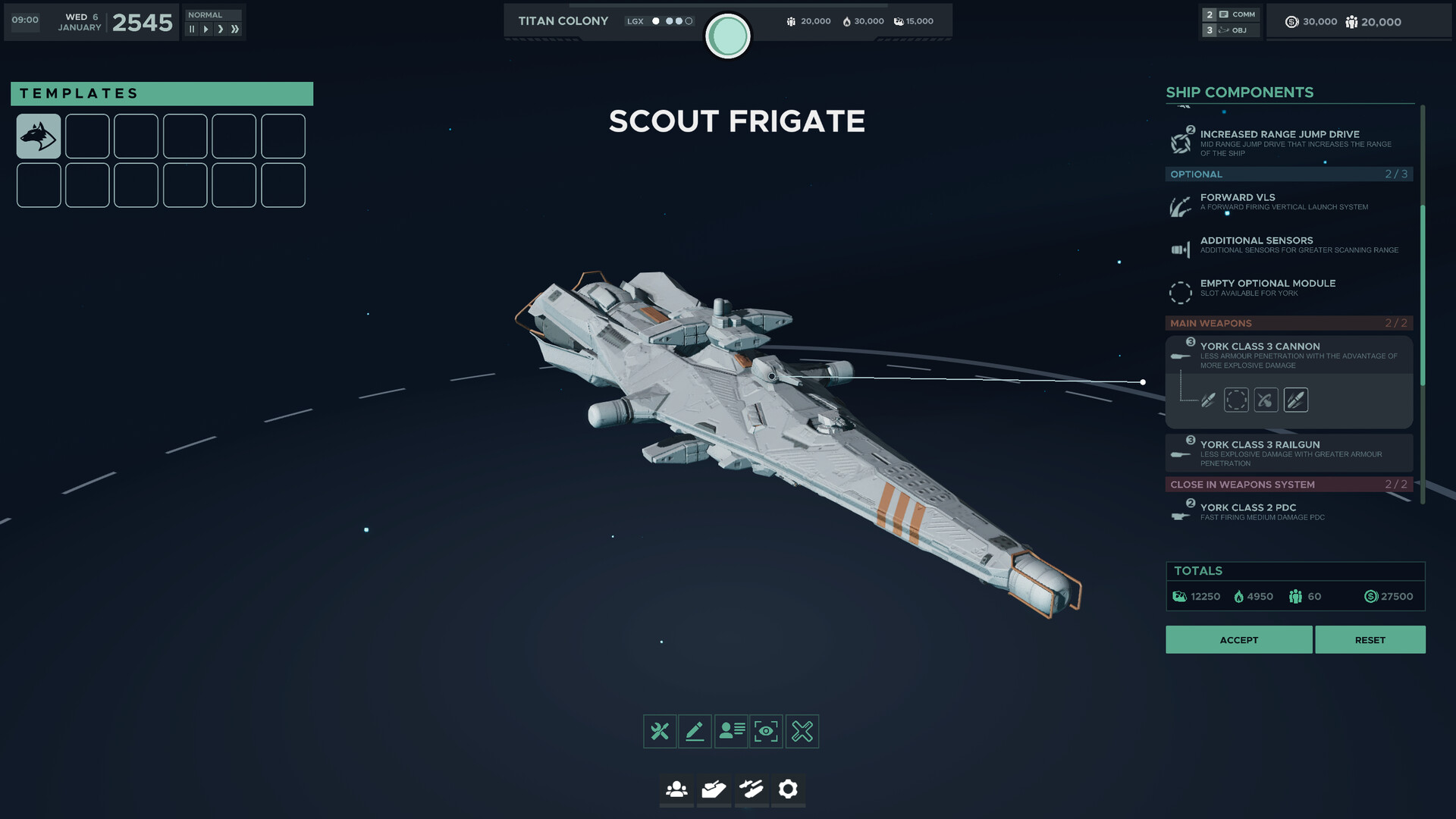
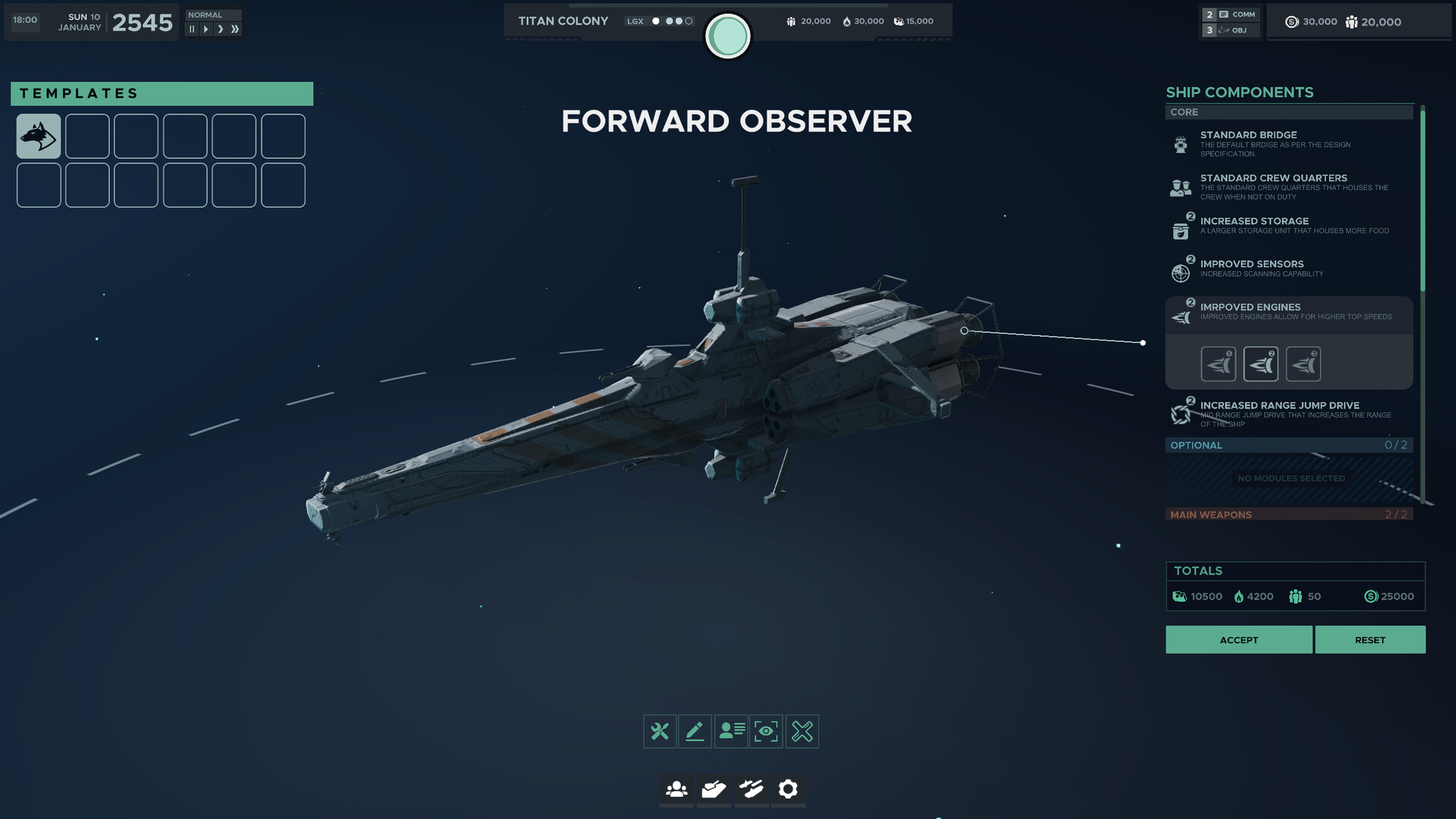
Designs are assembled on a dedicated ship designer screen and saved into template slots, so a worked-out loadout can be reused rather than rebuilt each time. The designer shows the hull in full while components are fitted, and reports a running total for the design's build cost and crew requirement as fittings are added. A design is committed with an accept action, or rolled back to the starting configuration with a reset.
Fittings are grouped into separate slot categories rather than a single pool. A core group holds the modules every ship needs, an optional group holds a limited number of extra modules, and a main weapons group is capped by the hull. The counts on the optional and weapon groups are shown as a used-of-available figure, so the hull itself decides how much freedom a design has.
Core Components
The core group covers the systems a vessel cannot fly without, and several have upgraded versions that occupy the same slot. Upgraded modules are shown with tier markers, so a design can trade an improved engine against another priority rather than taking everything at once.
Component | Effect |
|---|---|
Standard Bridge | The default bridge fitted as per the design specification. |
Standard Crew Quarters | Houses the crew when they are not on duty. |
Increased Storage | A larger storage unit that holds more food. |
Improved Sensors | Increases the ship's scanning capability. |
Improved Engines | Allows a higher top speed. |
Increased Range Jump Drive | A jump drive that extends the ship's range, tied to the FTL system described on the Setting and Lore page. |
Optional Modules
The optional group holds a limited number of extra modules, and the count is shown as a used-of-available figure so the hull decides how much room a design has to specialise. Modules confirmed in official material include a forward firing vertical launch system and an additional sensor package that increases scanning range. An unfilled slot is shown explicitly as an empty optional module rather than hidden.
Weapons and Close-In Defence
Weapons are fitted in two separate groups: a main weapons group capped by the hull, and a distinct close-in weapons system group for point defence. Main weapon fittings carry class tiers, and the choice between them is an explicit tradeoff rather than a straight upgrade.
Fitting | Group | Tradeoff |
|---|---|---|
Class 3 Cannon | Main weapons | Less armour penetration in exchange for more explosive damage. |
Class 3 Railgun | Main weapons | Less explosive damage in exchange for greater armour penetration. |
Class 2 Point Defence Cannon | Close-in weapons system | Fast firing for medium damage, intended to blunt incoming missiles. |
Because the missile phase of an engagement is fought by trying to overwhelm close-in weapons systems, how much of a hull is given over to point defence is a decision made at the design stage rather than during the battle.
Costs and Templates
As fittings are added, the designer reports a running total for the design covering its material and fuel requirements, the crew it needs, and its build cost, so the price of a specialised loadout is visible before it is committed. Finished designs are saved into a bank of template slots and can be recalled rather than rebuilt, and official material shows saved templates named for their intended role, such as a scout frigate and a forward observer.
Firing Arcs and Hardpoints
Individual hardpoints can be controlled directly rather than left to fire on their own, which lets a commander manage ammunition use and concentrate damage. Firing arcs matter as much as raw armament. Larger ships have to keep track of where their guns can actually point, and they are vulnerable at close range where they may not rotate quickly enough to track a smaller, more agile opponent. That limitation is a large part of why a nimble craft can defeat a far bigger vessel through positioning rather than firepower.
Combat Damage Model
Each ship has individual subsystems that can be damaged or destroyed by weapons fire. Hits to munitions storage can cause a chain reaction that destroys the ship instantly. When ships are destroyed, the internal decks become visible inside the wreckage. Fully physicalized ballistics mean that rounds follow realistic trajectories, can miss and strike other ships, and can ricochet off hulls.
Destruction is driven by physics rather than a fixed animation. Debris is pushed outward from the point of the killing blow, so the same hull comes apart differently depending on where it was hit. Mid-sized stations can be ripped open by an internal blast, scattering wreckage in the direction of the impact.