

Controls
The developers published a complete default gamepad layout for Blight: Survival in September 2025, showing an Xbox pad and a PlayStation pad side by side. It is the only full controls reference the studio has released, and several systems appear in it that are documented nowhere else, including three separate attack directions, a proximity chat toggle and an emote wheel.
On This Page
Overview
The developers published a full default control scheme for Blight: Survival in a September 2025 development update, showing an Xbox pad and a PlayStation pad side by side with every binding labelled. The screenshot carries a July 2025 capture stamp and the studio's standing "in development, content subject to change" watermark, so the layout describes the build at that point rather than a shipping control scheme. It is still the only complete controls reference the studio has released, and several systems appear in it that are described nowhere else, including a proximity chat toggle and an emote wheel.
Nothing on this page is a keyboard-and-mouse mapping. The developers have confirmed full controller support and say the game is designed to be played with either a gamepad or keyboard and mouse, but no keyboard layout has been published.
Default Gamepad Layout
Every binding below is taken from the studio's published diagram. Where a control has two behaviours, the second is on a hold or a double tap rather than a separate button.
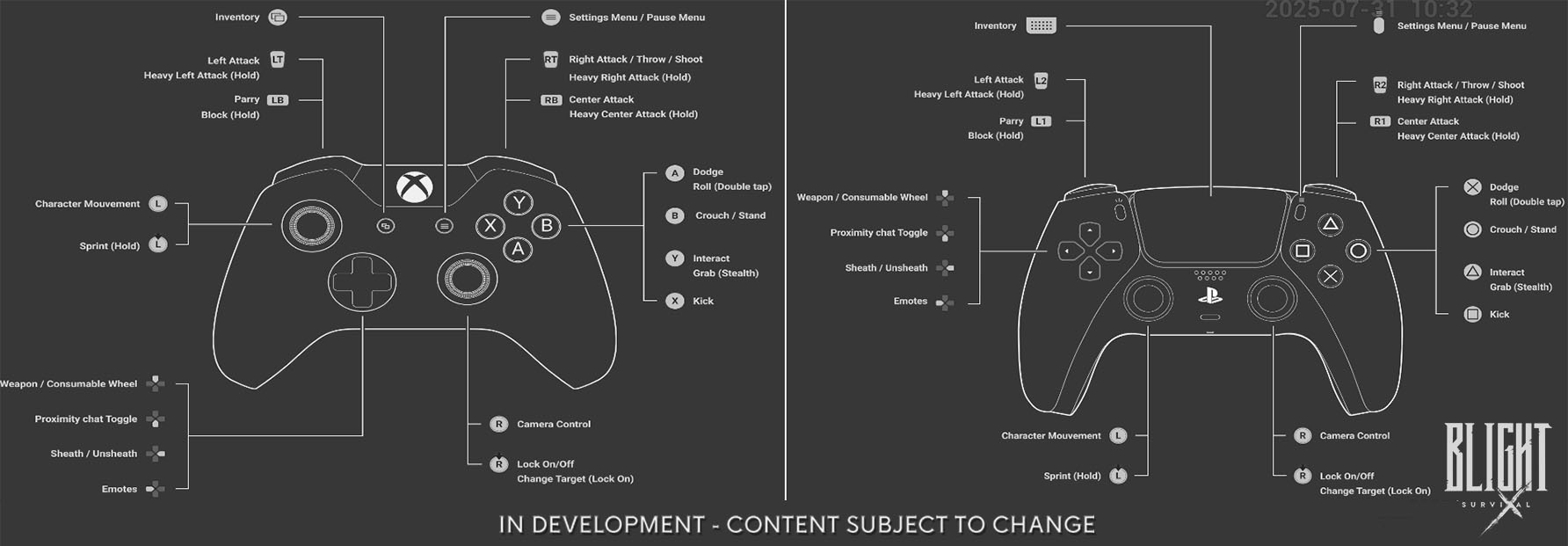
Xbox | PlayStation | Action |
|---|---|---|
LT | L2 | Left attack. Heavy left attack on hold |
RT | R2 | Right attack, throw and shoot. Heavy right attack on hold |
RB | R1 | Centre attack. Heavy centre attack on hold |
LB | L1 | Parry. Block on hold |
A | Cross | Dodge. Roll on double tap |
B | Circle | Crouch and stand |
Y | Triangle | Interact. Grab while in stealth |
X | Square | Kick |
Left stick | Left stick | Character movement. Sprint on hold |
Right stick | Right stick | Camera control. Lock on and off, and change target while locked on |
Directional pad | Directional pad | Weapon and consumable wheel, proximity chat toggle, sheath and unsheath, emotes |
View | Create/Share | Inventory |
Menu | Options | Settings and pause menu |
Attack Inputs
There are three attack directions, not a free-aim swing arc: a left attack, a right attack and a centre attack, each on its own trigger or bumper. Holding the same input produces the heavy version. That gives six melee attacks before weapon choice, stance or posture are taken into account, and it is the mechanical basis for the developers' description of the combat as "a hybrid between Dark Souls and Mount and Blade."
The right attack input doubles as throw and shoot, which is how ranged options are expected to sit alongside melee rather than occupying a separate weapon slot. The developers have said ranged weapons are an area they are expanding. See Weapons and Equipment for what has actually been shown.
Defence and Movement
Parry and block share a single input, with a tap parrying and a hold blocking. That is a deliberate design decision rather than a convenience: it means committing to a block costs the same finger as attempting a parry, and the two cannot be layered. Dodge and roll share the same relationship, with a double tap converting a dodge into a roll.
Sprint sits on the left stick click, and crouch and stand share a single button. Lock on is a right stick click, with the same stick used to change target while a lock is held.
Interaction, Stealth and Utility
Interact and grab share a button, with grab being the stealth behaviour of the same input. Kick has its own dedicated button rather than sharing one with an attack, which puts shoving out of an attack chain on the same footing as swinging. See Finisher System for how those executions are triggered.
The directional pad carries four functions rather than four directional inputs: a weapon and consumable wheel, a proximity chat toggle, sheath and unsheath, and emotes. The weapon and consumable wheel is how remedies and secondary weapons are expected to be reached mid-run without opening the inventory.
Proximity Chat and Emotes
Both appear on the directional pad in the published layout and neither has been described in a written update. Proximity chat is the more consequential of the two: in June 2025 the developers called it something they were experimenting with, and said that if it shipped, non-player characters would react to sounds picked up through it. Its presence as a bound toggle six weeks later puts it in the build. See Co-Op for how that interacts with the noise rules that govern detection.
Helmet Collision Avoidance
A 2023 studio video demonstrated what the developers called an automated helmet collision avoidance system, an animation layer that keeps a helmeted character from clipping through the world during traversal. It is not a player-facing control and has no binding, but it is the only movement-system detail the studio has shown in isolation, and it explains why traversal animation reads as heavier than a standard third-person template.
What Has Not Been Published
The studio has released no keyboard and mouse mapping, no remapping or accessibility options, no deadzone or sensitivity settings, and no separate console layouts beyond the two shown. Nothing has been said about whether the layout differs between solo and co-op play, or whether the directional pad functions can be reassigned. The diagram itself is marked as subject to change, and the developers have not restated it since. See Platforms and Technical Details for confirmed controller support and platform information.