
The Adventures of Elliot: The Millennium Tales includes a range of accessibility features and player-friendly options, many of which were introduced or expanded in response to feedback on the 2025 Debut Demo. These settings apply across all four platforms (PC, PlayStation 5, Xbox Series X|S, Nintendo Switch 2).
Difficulty Settings
Four difficulty levels are available: Easy, Normal, Hard, and Very Hard. Difficulty can be changed at any adventuring guidepost during play, without penalty, so players are never locked into an initial choice.
Difficulty | Notes |
|---|---|
Easy | Reduced enemy damage and durability; a low revival cost that does not increase after deaths |
Normal | Standard experience; revival costs reset at each guidepost |
Hard | Increased enemy damage and durability; revival costs reset at each guidepost |
Very Hard | Maximum enemy threat; revival costs do NOT reset at guideposts, accumulating throughout the run |
Faie's revival cost is fixed and low on Easy. On Normal and Hard, successive deaths raise the cost, and reaching a guidepost resets it. Very Hard starts at the normal base cost, increases after every death and does not reset at guideposts.
What Each Difficulty Changes
Each difficulty adjusts several values at once, using Normal as the baseline. The table below shows exactly what changes across the four settings. Difficulty can be changed at any adventuring guidepost, so players are free to experiment.
Setting | Easy | Normal | Hard | Very Hard |
|---|---|---|---|---|
Player Defense | Very High | High | Low | Very Low |
Enemy HP | Low | Normal | High | Very High |
Enemy Amount | Low | Normal | High | Very High |
Contact Damage | None | None | Normal | High |
Shop Prices | Low | Normal | Normal | Normal |
Revival Cost | Low | Normal | High | Normal |
Revival Cost Scaling | None | Resets at save points | Resets at save points | No reset |
Save Point Healing | All | All | Limited | Limited |
On Easy, shop prices are halved and contact damage is removed entirely, making it a gentle introduction. On Very Hard, contact damage is high, fewer save points heal, and the revival cost never resets, so death becomes steadily more punishing across a run.
Combat Accessibility
Playable without Timed Input: An explicit accessibility option that accommodates players who find precise action-timing mechanics difficult.
Single-button shortcut menu: Once the weapon shortcut menu is open, the equipped weapons can be changed with a single button press (added based on demo feedback). This sets which two weapons occupy the slots; in combat both stay live on their own button, so there is no switching step.
"Leave it to Faie" auto-equip: Automatically equips Magicite, allowing players to let the game choose pieces for their weapons.
Simplified Faie magic selection: The interface for manually choosing Faie's active magic was streamlined from the 2025 Debut Demo.
Navigation and Interface
Single-button map access: The map is accessible with a single button press (simplified from the earlier demo build).
Faster movement speed: Elliot's base movement speed was increased from the Debut Demo version based on player feedback.
Reviewable control reminders: Control layouts and tutorials can be reviewed at any time during play.
Reviewable tutorial reminders: Tutorial information is accessible on demand rather than displayed only once.
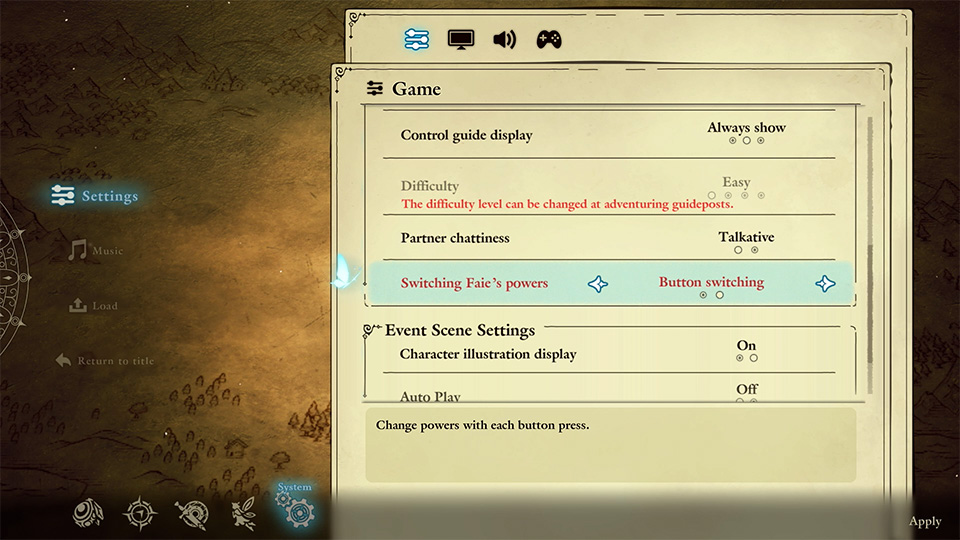
Adjustable Faie dialogue frequency: A menu option lets players lower how often Faie speaks, added in response to demo feedback that she talked too much.
Support character voice toggle: A version 1.1.0 update added a menu option to turn off Faie's voice entirely, separate from the setting that only lowers how often she speaks. See Patch Notes.
Audio Options
Custom Volume Controls: Individual audio channels can be muted or adjusted independently.
Mono Audio: Available as an option.
3D Audio: Supported (PS5 confirmed; other platforms not detailed).
Controller and Platform Options
Full controller support is available on all platforms. On PC, the game is playable with a keyboard or a connected gamepad.
On PlayStation 5 the game carries 21 tagged accessibility features, grouped into five categories. The full set is listed below.
Category | Features |
|---|---|
Visuals | Clear Text, Large Text, Visual Comfort (Basic) |
Audio | Volume Controls, Mono Audio, 3D Audio |
Subtitles and Captions | Playable without Subtitles, Subtitles (Basic), Clear Subtitles, Captions (Basic), Clear Captions |
Controls | Controller Remapping (Basic), Playable without Rapid Button Presses, Playable without Simultaneous Presses, Playable without Motion Controls, Playable without Touch Controls, Playable without Controller Vibration, Playable without Adaptive Trigger Effect |
Gameplay | Adjustable Difficulty (Basic), Control Reminders, Tutorial Reminders |
The Controls group is the largest of the five: no part of the game requires rapid button mashing, simultaneous button holds, motion controls, touch input, vibration, or adaptive trigger resistance, and an alternate control layout is available. Subtitles cover the main story and main characters, and captions cover important gameplay sounds. Separately from the 21 tagged features, the PS5 version supports DualSense vibration and Remote Play.
The option to lower how often Faie speaks is the game's direct answer to the frequently cited complaint about companion chatter, and handheld performance reports since launch have been mixed.
To reduce incidental companion chatter, open System > Settings > Game > Partner Chattiness and change Talkative to Reticent. Important location, health and boss warnings remain. This frequency setting is separate from the Faie voice toggle.
Useful menu options
Use these settings to adjust input feedback, dialogue and presentation.
Options | What to adjust |
|---|---|
Voices and sound | Choose English or Japanese voices. Overall, BGM, SFX, voice and environment volumes can be adjusted separately. |
Text and interface | Text Speed, Auto Play, Character Illustration Display, Destination Guide and Control Guide are available. |
Special attacks | Special Attack Effect controls camera effects. Standard Special Attack Direction allows changing direction during a special attack. |
Graphics | Graphics options include brightness, depth of field, vignette and shadows. |
Rumble | Toggle controller vibration. |
Controller preset | Choose Custom to edit bindings. See Controls and Key Bindings for defaults and the commands fixed on consoles. |
Getting Started
New players can find general orientation in the Getting Started guide, which covers difficulty selection in the context of early gameplay decisions.