Loading...
Loading...
Turning Slash
March 24, 2026 at 05:23 AM
Expanded skill stub with detailed controls, combo potential, unlock guide, tips, and skill progression
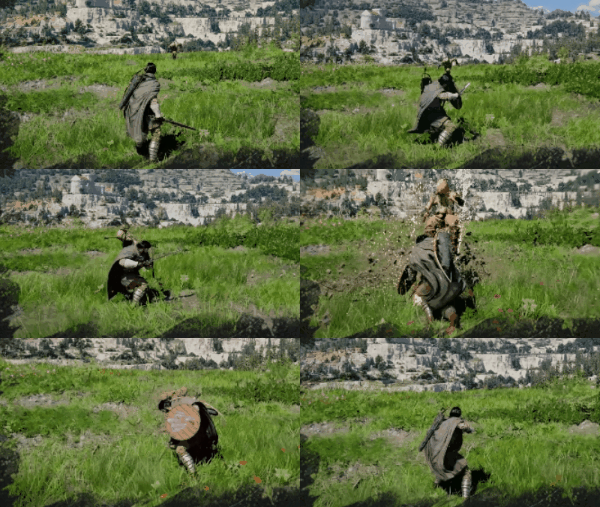
Turning Slash is a melee combat skill in Crimson Desert, available to Kliff. It belongs to the Stamina (Blue) branch of the skill tree. Kliff charges up his strength, spins his body, and delivers a powerful overhead strike that sends enemies flying. The move functions as both a crowd-control tool and a heavy damage dealer, making it one of Kliff's most iconic combat abilities.

Turning Slash is a starting skill that requires no Abyss Artifacts to unlock. It uses a special input that combines both the light and heavy attack buttons simultaneously, distinguishing it from standard combo attacks. As a Stamina-consuming skill, it fits into melee-focused builds that prioritize physical damage and crowd control over elemental or Spirit-based abilities.
Detail | Info |
|---|---|
Character | |
Skill Tree | Stamina (Blue) |
Category | Armed Combat |
Cost | Stamina |
Max Level | 3 (1 Abyss Artifact per level) |
How to Unlock | Unlocked by default (starting skill) |
Platform | Input | Action |
|---|---|---|
PlayStation 5 | R1 + R2 | Perform Turning Slash |
Xbox | RB + RT | Perform Turning Slash |
PC (Keyboard/Mouse) | RMB + Shift | Perform Turning Slash |
Note that Turning Slash requires pressing both buttons simultaneously. The game will not register the input if the buttons are pressed sequentially. This makes it a deliberate commitment move rather than something that can be accidentally triggered during normal attack strings.
Turning Slash has three upgrades that branch from it as you invest more Abyss Artifacts. These upgrades transform Turning Slash from a standalone heavy attack into a versatile combo tool.
Skill | Effect | How to Unlock | Controls |
|---|---|---|---|
Turning Slash Proficiency | While using another skill, quickly chain into Turning Slash. This allows Turning Slash to be used as a combo finisher from any other melee skill, rather than only from neutral. | Raise Turning Slash to Lv. 2 | R1 + R2 during another skill (PS5) / RB + RT during another skill (Xbox) |
Turning Slash Expertise | Follow up Turning Slash with a powerful downward slam attack. The slam deals additional damage and extends the knockdown duration on hit enemies. | Raise Turning Slash to Lv. 3, or observe the skill in action | Hold R1 + R2 after Turning Slash (PS5) / Hold RB + RT after Turning Slash (Xbox) |
Turning Slash Rend Armor | Turning Slash now ignores enemy Super Armor and sends enemies flying on hit. This passive upgrade makes it effective against guarding enemies and armored foes. | Raise Turning Slash to Lv. 3 | Passive (always active) |
Turning Slash is one of the most flexible combo pieces in Kliff's kit once Proficiency is unlocked at Level 2. With Proficiency, you can chain Turning Slash directly out of Forward Slash, Stab, Spinning Slash, or any other active skill. This effectively turns it into a universal combo finisher that launches enemies into the air.
A strong mid-game combo is: Forward Slash (light attacks) into Turning Slash (R1 + R2) into Turning Slash Expertise (hold after the spin). This three-part sequence deals heavy damage and keeps enemies airborne or knocked down for the entire duration. Against groups, the launch effect scatters enemies, giving you breathing room to recover Stamina or reposition.
At Level 3, Turning Slash also pairs well with the Imbue Element system. The Elemental Turning Slash variant (unlocked at Imbue Element Lv. 1) adds elemental damage to the spin, making it deal both physical and elemental damage in a single attack.
Invest in Turning Slash early. It is one of the most recommended early-game skills across multiple community guides due to its damage output and crowd-control utility.
The Proficiency upgrade at Lv. 2 is a major quality-of-life improvement. Without it, Turning Slash can only be used from neutral stance. With it, you can weave Turning Slash into any combo string.
Rend Armor at Lv. 3 is a game-changer against shielded enemies and bosses with Super Armor. It eliminates the need to break their guard before landing heavy damage.
Watch your Stamina. Turning Slash is a Stamina-intensive move, and chaining it with Expertise consumes even more. Keep enough Stamina in reserve for a dodge or block afterward.
Turning Slash Expertise can be learned for free through the Watch and Learn mechanic if you observe it being performed during gameplay, saving an Abyss Artifact.
If you respec, reclaiming Turning Slash levels costs 1 Faded Abyss Artifact per level.