

This article is incomplete
Some sections are missing or need additional details. Help improve it by contributing.
Wild Wild Eden gives the player a level, stat points and a panel of survival and combat stats. Everything on this page comes from store screenshots of a pre-release development build, so names and values may change.
Level and Experience
The inventory screen's Character Info section shows the character's name and level, and the HUD has an EXP bar along the bottom-left edge. The player also receives stat points: notifications in the screenshots read "You have 4 stat points" and "You have 1 stat points", and the inventory screen has a Stat Points counter. How points are spent has not been explained as of October 2026.
A hands-on report from the 2026 event demos says experience comes from gathering and defeating enemies, and that level-ups also give craft points used to unlock recipes. See Crafting.
Stats Panel
The Stats section of the inventory screen lists eleven stats:
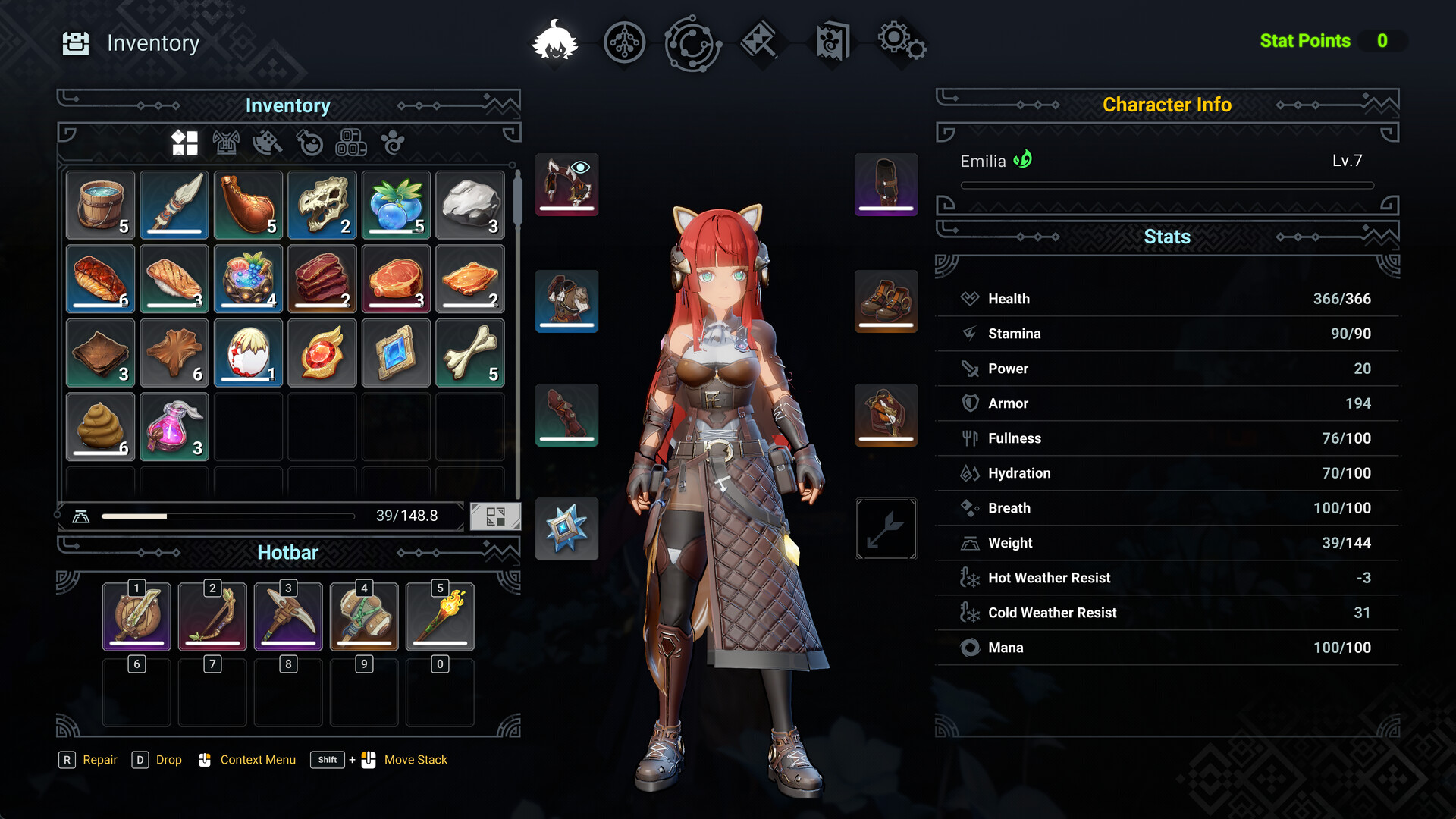
Stat | Shown as |
|---|---|
Health | Current and maximum value |
Stamina | Current and maximum value |
Power | Single value |
Armor | Single value |
Fullness | Current value out of 100 |
Hydration | Current value out of 100 |
Breath | Current value out of 100 |
Weight | Current load and capacity |
Hot Weather Resist | Single value |
Cold Weather Resist | Single value |
Mana | Current and maximum value |
The example values in the screenshot belong to one development-build character and are not base values.
Survival Needs
Fullness, Hydration and Breath are shown out of 100, and the HUD shows small unlabelled icons next to the health bar. As of October 2026, the developers have not explained how these needs drain or what happens when they run out. The effects of Hot Weather Resist and Cold Weather Resist have not been explained either; see World.
Inventory and Weight
The inventory screen has a grid with filter icons, a weight bar, equipment slots around the character, and a 10-slot hotbar numbered 1 to 0. The inventory controls shown are R for Repair, D for Drop, a mouse button for the context menu, and Shift with a mouse button to move a stack. See Controls and Interface.
Anima Nodes
The HUD legend lists an Anima Nodes menu on the K key. Its function has not been explained as of October 2026.