

This article is incomplete
Some sections are missing or need additional details. Help improve it by contributing.
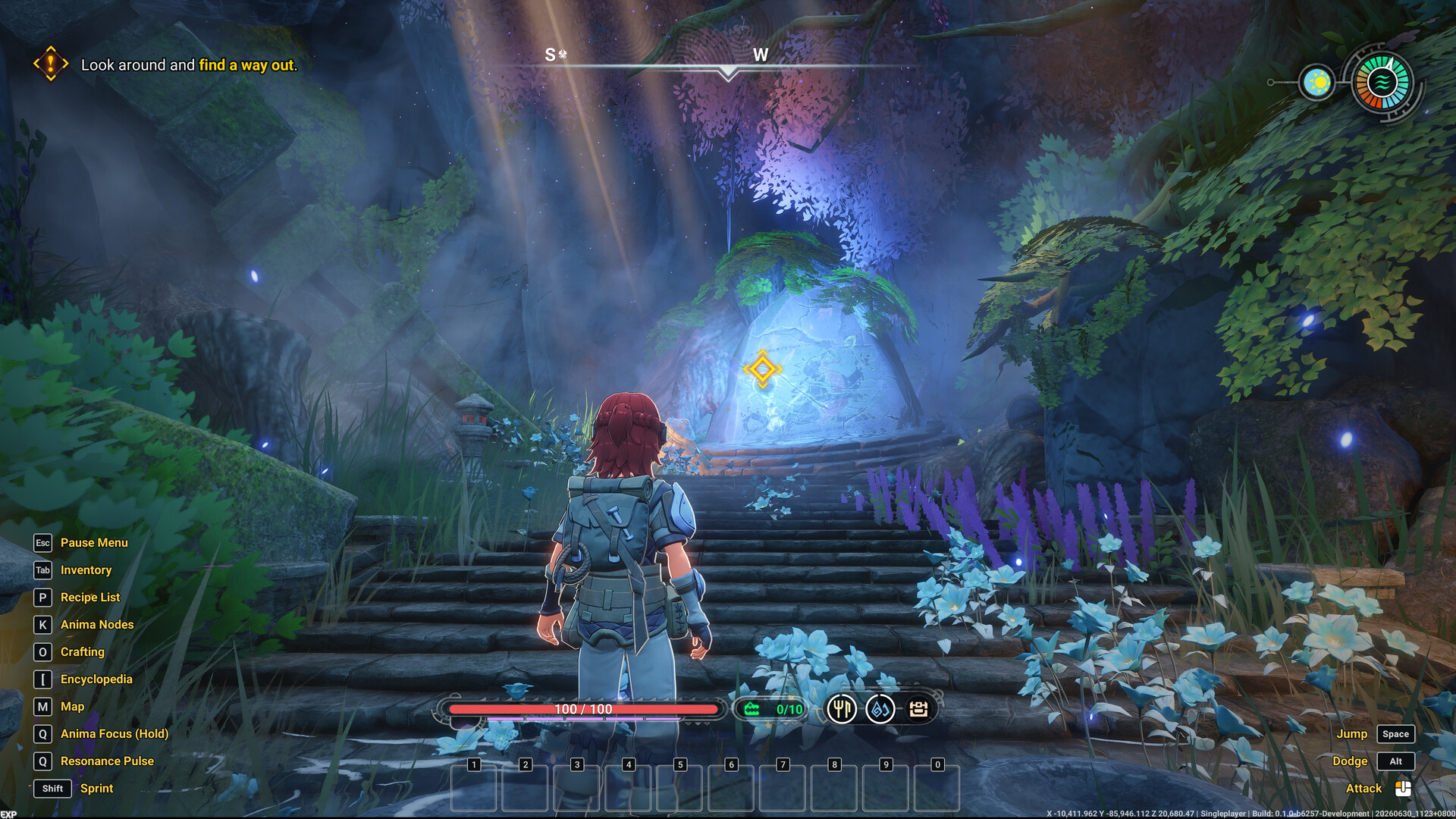
Wild Wild Eden is being built for mouse and keyboard first. The controls and menus below come from the key legend and prompts in store screenshots of a pre-release development build, so they may change before Early Access.
Key Legend
Every store screenshot that shows the HUD has the same legend on the left side of the screen:
Key | Action |
|---|---|
Esc | Pause Menu |
Tab | Inventory |
P | Recipe List |
K | Anima Nodes |
O | |
[ (left square bracket) | Encyclopedia |
M | Map |
Q (hold) | Anima Focus |
Q | Resonance Pulse |
Shift | Sprint |
Anima Nodes, Anima Focus, Resonance Pulse and the Encyclopedia appear only as menu entries. Their functions have not been explained as of October 2026.
Context Prompts
Action | Input | When it appears |
|---|---|---|
Jump | Space | On foot and mounted |
Dodge | Alt | On foot and mounted |
Attack | Mouse button | On foot and mounted |
Aim and Shoot | Mouse buttons | With a bow equipped |
Harvest | E | Next to a bush, from a gathering quest |
Put Down | E | While carrying a creature |
Fertilize | E | Next to a Farm Plot with Monster Poop(S) equipped |
Dismount | E | Mounted |
Open Monster Info | F | Mounted |
See Mounts and Riding for more on mounted play.
Build Mode
Prompt | Key shown |
|---|---|
Place Building | Not stated |
Toggle Build Mode | Not stated |
Toggle Building Menu | Not stated |
Rotate | Not stated |
Destroy Building | Not stated |
Toggle Repair Mode | R |
Free Placement | Shift |
See Building for how construction works.
Inventory Controls
Action | Input |
|---|---|
Repair | R |
Drop | D |
Context Menu | Mouse button |
Move Stack | Shift and mouse button |
HUD
A compass strip along the top of the screen
A health bar at the bottom centre showing current and maximum health
An unlabelled counter out of 10 with a building-like icon
Three small unlabelled round icons next to the health bar
A 10-slot hotbar numbered 1 to 0
An EXP bar at the bottom-left edge
A quest tracker with objectives and rewards
Labels over creatures showing name, level and a gender symbol
A sun icon and a circular gauge at the top right, both unlabelled
See Player Stats for the stats panel and inventory screen.
Controller Support
As of October 2026, controller support is not confirmed. In September 2026 the developers said on the Steam discussion boards that they were focused on the mouse and keyboard experience and hoped to look at other input options later.